











A slow computer makes it hard to focus. Programs take too long to open. Free space keeps shrinking until the disk is almost full. This happens to most PC owners at some point. Even new machines can slow down after a while. That is the exact problem cleanup tools are built to solve. They comb […]
Fortect Driver Updater Review: Features, Steps, Pros, and Cons.
A new PC usually feels quick and responsive. Applications open instantly, games run smoothly, and everything works as expected. As time passes, however, you may notice slower performance, system crashes, hardware glitches, or devices that stop working properly. While many people assume malware or low storage space is to blame, outdated drivers are often the real cause.
Drivers act as the link between Windows and your computer’s hardware. Components such as graphics cards, sound devices, printers, network adapters, and peripherals rely on them to communicate correctly with the operating system. When drivers become old, damaged, or incompatible, issues can start appearing. You may experience poor graphics performance, audio problems, unstable internet connections, or unexpected system errors.
Fortect Driver Updater is designed to make driver maintenance simple. It scans your computer, identifies outdated or problematic drivers, and installs the latest compatible versions automatically. There is no need to search manufacturer websites or worry about downloading the wrong files. In this guide, you will learn how Fortect Driver Updater works, its main features, and the steps required to keep your drivers up to date.
The Easiest Way to Update Drivers Automatically: Download Fortect Driver Updater using the Button below to Automatically update drivers on Windows 10–

Fortect Driver Updater vs Manual Driver Updates: Which Is Better?
Many users wonder if they even need a tool like Fortect. After all, you can update drivers manually through Windows Device Manager or by visiting manufacturer websites directly. So how does Fortect compare to doing it yourself?
Manual driver updates work, but they come with challenges. You need to identify every outdated driver on your own, visit each manufacturer’s website separately, download the correct version for your specific hardware model, and install everything one by one. One wrong driver can cause system instability or hardware conflicts. It is time-consuming and easy to get wrong, especially for users who are not tech-savvy.
Fortect simplifies the entire process. It scans your system automatically, identifies every driver that needs attention, and installs the correct verified version with minimal effort from your side. What could take hours manually takes just a few minutes with Fortect. For everyday users who want a fast, safe, and reliable solution, Fortect is the smarter choice over manual updates.
__________________________________________________________________________________
Key Features of Fortect Driver Updater That You Should Know
Fortect is not just a driver updater. It is a complete PC health tool with a wide range of features built to keep your system running at its best. Here is a closer look at what it offers.
Driver Updater:
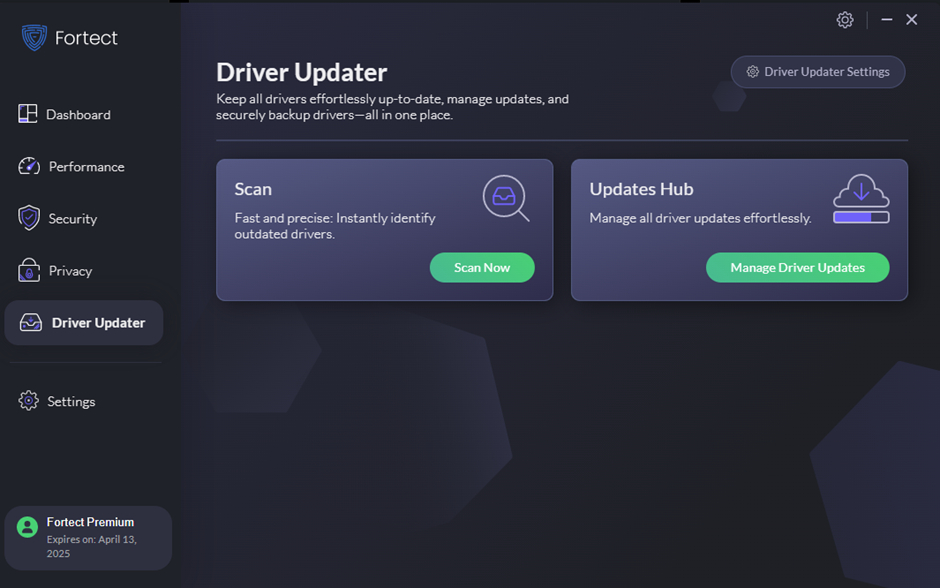
Fortect scans your entire system and automatically identifies every driver that is outdated, missing, or incompatible. You do not need to know your hardware model numbers or check anything manually. It does the detection work for you in minutes.
Manufacturer-Verified Driver Database:
Fortect sources all its drivers directly from official manufacturers. Every driver in its database is tested and verified before it is made available. This means you are never installing unofficial, modified, or potentially harmful driver files.
One-Click Driver Updates:
Once Fortect identifies outdated drivers, you can update all of them with a single click. There is no need to download and install each driver separately. The entire update process is handled automatically from start to finish.
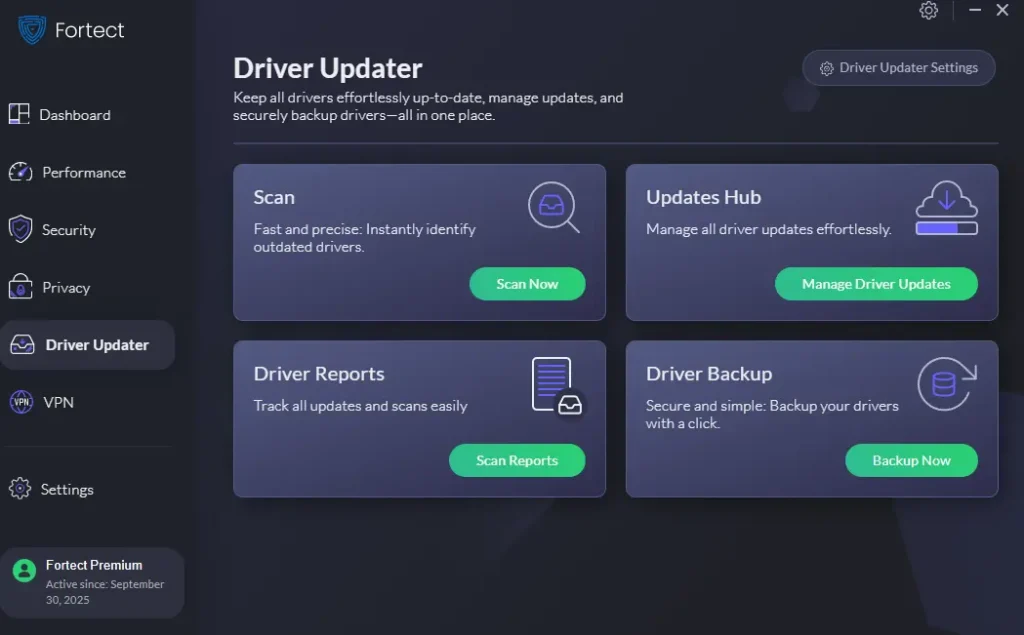
Driver Backup and Restore:
Before installing any new driver, Fortect creates a backup of your existing one. If a newly installed driver causes issues or conflicts, you can roll back to the previous version instantly. This safety feature protects your system from update-related problems.
Comprehensive Hardware Coverage:
Fortect covers drivers for a wide range of hardware, including graphics cards, audio devices, network adapters, USB controllers, printers, Bluetooth devices, and chipsets. Whether your hardware is common or less mainstream, Fortect’s database is likely to have it covered.
Silent Background Updates:
Fortect can run driver updates quietly in the background without interrupting your workflow. You can continue working while it handles the updates. Once done, it notifies you of the changes made without requiring any input from you.
Update History Log:
Fortect keeps a detailed log of every driver update it has performed on your system. You can review what was updated, when it was updated, and which version was installed. This gives you full visibility and control over your driver update history.
How to Update Drivers With Fortect: Step by Step
Using Fortect to update your drivers is a straightforward process. You do not need to be a tech expert to get it done. The interface is clean and guides you through each step clearly. Follow the steps below to get your drivers updated quickly and safely.
Before you start, make sure you have a stable internet connection. Fortect needs to connect to its database to identify the correct drivers for your system. Also, close any open applications before running a scan to get the most accurate results and avoid any interruptions during the update process.
Step 1: Install Fortect
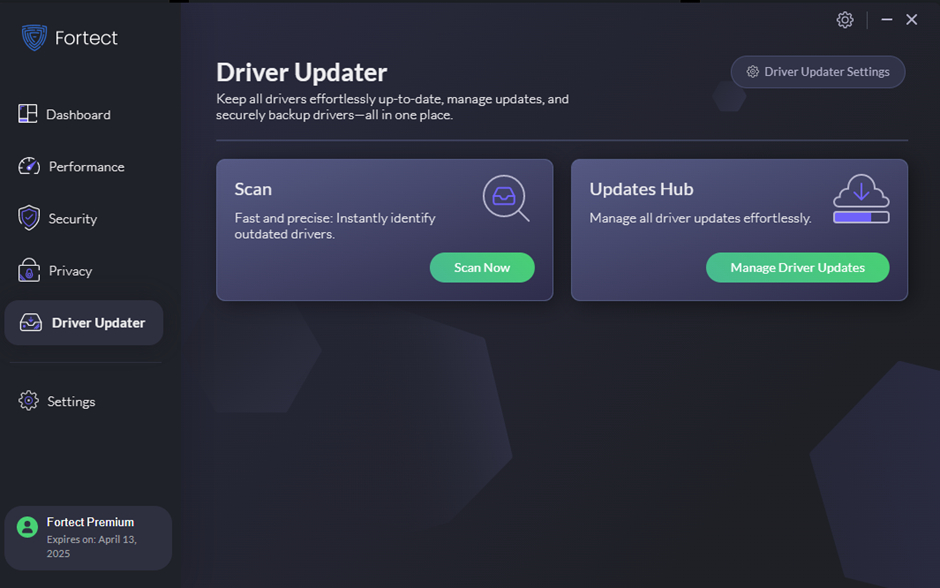
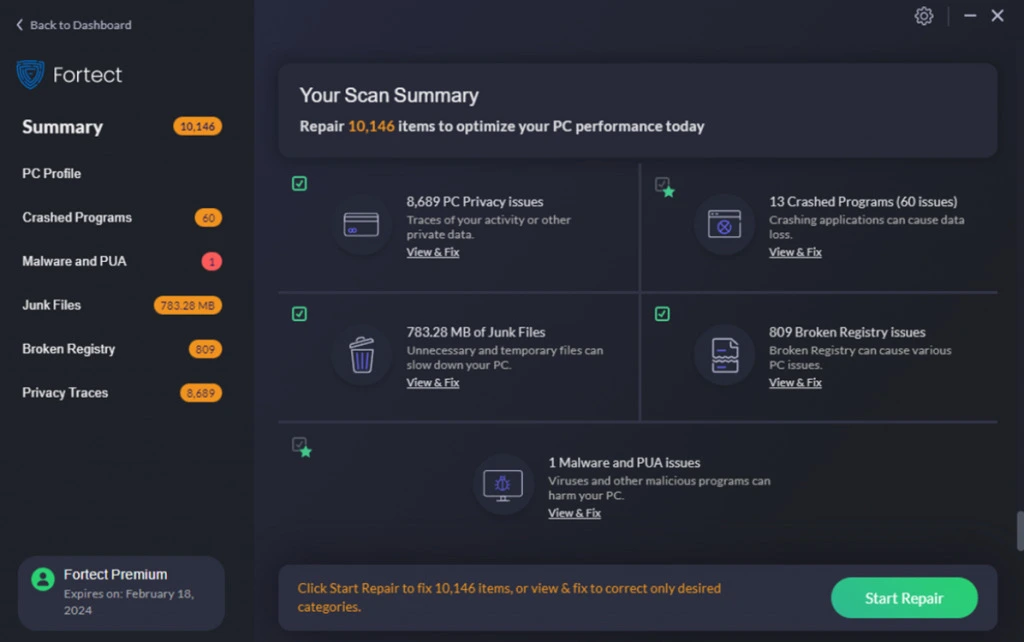
Download Fortect from its official website, run the installer, and follow the setup instructions. Launch the program once installation is complete. Click Scan Now on the dashboard. Fortect will check your system, drivers, registry, and hardware for issues.
Step 2: Update Drivers
After the scan, review the driver results. Click Start Repair or the update option to automatically download and install the latest driver versions.
Pros, Cons and Pricing
Pros: Why Fortect Driver Updater Is Worth Considering
Fortect brings a lot to the table when it comes to driver management and overall PC health. It is not just about updating drivers. It tackles multiple PC issues under one roof. Here is a detailed look at what it does well.
For users who want a simple, reliable way to keep their drivers updated without spending hours on it manually, Fortect is a strong contender. Its combination of driver updating with broader system repair features makes it more versatile than many standalone driver updaters. Let us break down its top advantages.
- Large Driver Database: Fortect has access to a massive database of manufacturer-verified drivers. It covers a wide range of hardware, including graphics cards, audio devices, network adapters, printers, and more. This means it can find the right driver for almost any hardware component on your PC.
- Automated Updates: Once Fortect identifies outdated drivers, it handles the entire update process automatically. You do not need to visit manufacturer websites or manually install files. This saves time and reduces the chance of installing an incorrect or incompatible driver.
- All-in-One PC Tool: Unlike standalone driver updaters, Fortect also handles system repair, malware removal, registry cleaning, and privacy protection. You get a full PC maintenance suite in a single application. This makes it a cost-effective choice for users who want more than just driver updates.
- Safe and Verified Drivers: Fortect only installs drivers that are verified and sourced from official manufacturers. This ensures compatibility and reduces the risk of driver-related crashes or hardware conflicts. You can update with confidence knowing the drivers are legitimate.
- User-Friendly Interface: Fortect’s dashboard is clean and easy to navigate. The scan and repair process is clearly laid out and does not require any technical knowledge. Even beginners can use it comfortably without feeling overwhelmed.
- Backup Before Update: Fortect creates a backup of your existing drivers before installing new ones. If a new driver causes issues, you can roll back to the previous version easily. This safety net gives users peace of mind during the update process.
- Real-Time Monitoring: Fortect keeps an eye on your system even after the initial scan. It can alert you when new driver updates become available or when it detects new issues. This proactive approach helps you stay ahead of potential problems.
- Supports Windows 10 and 11: Fortect is fully compatible with both Windows 10 and Windows 11. It keeps up with Microsoft’s updates and ensures its driver database stays current. Whether you are on an older or newer version of Windows, Fortect works reliably.
Cons: Limitations of Fortect Driver Updater
Like any software, Fortect has its share of drawbacks. Knowing these before you invest in a subscription helps you set realistic expectations. Here is an honest look at where it falls short.
Some users find certain aspects of Fortect frustrating, particularly around pricing and the free version’s limitations. Others have raised questions about its scan results and how they are presented. Here is what you should keep in mind before committing.
- Free Version Is Very Limited: The free version of Fortect lets you scan your system but does not allow you to fix most issues. To actually update drivers and repair problems, you need to purchase a paid plan. This can feel misleading for users who expect more from the free tier.
- Aggressive Scan Results: Some users have reported that Fortect’s scan results appear exaggerated. It sometimes flags issues as critical when they may not be serious. This can create unnecessary alarm and pressure users into buying the paid version.
- Subscription-Based Pricing: Fortect operates on a subscription model, which means you pay annually rather than once. For users who prefer a one-time purchase, this recurring cost can be a drawback. The cost adds up over multiple years compared to a lifetime license tool.
- Internet Required for Driver Downloads: Fortect requires an active internet connection to download driver updates. If your internet connection is slow or unstable, the update process can be disrupted. This is not ideal for users in areas with poor connectivity.
- No Mobile or Mac Support: Fortect is designed exclusively for Windows PCs. There is no Mac or mobile version available. If you use multiple platforms, you will need separate tools for non-Windows devices.
- Customer Support Response Times: Some users have reported slow response times from Fortect’s customer support team. While the support is available, it may not always be prompt. This can be frustrating when you are dealing with an urgent PC issue.
- System Resource Usage During Scans: Fortect can be resource-intensive while running a full system scan. On older or lower-spec PCs, this can cause noticeable slowdowns. It is best to run scans when you are not actively using your PC for other tasks.
- No Standalone Driver Updater Plan: Fortect bundles the driver updater with its full suite of tools. There is no option to purchase just the driver updater on its own. Users who only need driver updates may feel they are paying for features they do not need.
Fortect Pricing Plans
Fortect offers a tiered pricing structure to accommodate different user needs. All paid plans unlock the full repair and driver update features. Here is a summary of what is available.
- Free Version: $0 — Allows system scanning only. Issues are identified but not fixed without upgrading to a paid plan.
- Fortect Basic: Around $29.95 per year for 1 PC — Includes full system repair, driver updates, registry cleaning, and privacy protection.
- Fortect Pro: Around $39.95 per year for 1 PC — Adds real-time monitoring, priority support, and advanced malware removal on top of Basic features.
- Fortect Premium: Around $49.95 per year — Covers up to 3 PCs and includes all Pro features plus enhanced hardware monitoring and faster support response.
- Multi-Device Plans: Custom pricing is available for businesses or users who need coverage for more than 3 devices.
Note: Prices may vary based on region and active promotions. Visit the official Fortect website for the most accurate and current pricing information.
Conclusion
Fortect Driver Updater is a reliable and easy-to-use tool for keeping your PC drivers current. It saves time, reduces errors, and handles the entire update process automatically. For non-technical users, especially, it is a stress-free way to fix common hardware-related issues.
The free version is limited, and the subscription cost may not suit everyone. But if you want an all-in-one PC maintenance tool that goes beyond just driver updates, Fortect delivers good value. Keep your drivers updated, and your PC will run better for it.
Frequently Asked Questions
Is Fortect Driver Updater safe to use?
Yes, Fortect is a legitimate and safe tool when downloaded from its official website. It uses manufacturer-verified drivers, so you do not have to worry about installing incorrect or harmful files. The software also creates backups before making changes, which adds an extra layer of safety. However, always make sure you are downloading from fortect.com and not a third-party site. Unofficial sources may distribute modified versions that could pose a security risk.
Can Fortect fix all driver-related problems?
Fortect handles most common driver issues, including outdated, missing, and incompatible drivers. It covers a wide range of hardware categories and has a large driver database. However, it may not always have the very latest drivers for brand-new hardware that was just released. In rare cases, you may still need to visit a manufacturer’s website for the most cutting-edge driver version. For the vast majority of users, though, Fortect’s database is more than sufficient.
Do I need to pay to update drivers with Fortect?
The free version of Fortect allows you to scan your PC and see which drivers are outdated. However, to actually download and install the driver updates, you need a paid subscription. This is a common limitation among driver updater tools. If you only have one or two drivers to update, you could identify them using Fortect’s free scan and then update them manually. But for a fully automated experience, the paid plan is necessary.
Author Bio:
Dinesh Lakhwani 

Dinesh Lakhwani, the entrepreneurial brain behind “TechCommuters,” achieved big things in the tech world. He started the company to make smart and user-friendly tech solutions. Thanks to his sharp thinking, focus on quality and the motto of never giving up, TechCommuters became a top player in the industry. His commitment to excellence has propelled the company to a leading position in the industry.
Popular Post
Recent Post

Fortect Software Review: The Ultimate PC & Mobile Cleaning, Optimization & Security Tool
Slow computers are a common problem for almost every Windows user. Well, yes! Over time, your PC picks up junk files. These files sit quietly in the background. They take up space and slow things down. Programs open slower. Windows takes longer to boot. Even simple tasks like opening a folder can feel sluggish. There […]
CCleaner PC Optimizer Review: A Complete Guide for Windows Users
If your computer has started to feel slow, you are not alone. Most Windows PCs slow down over time. Junk files pile up. The registry gets messy. Too many apps open when you start your PC. All this adds up and makes even a good machine feel tired. This is where a PC cleaner tool […]
Auslogics Duplicate File Finder: Full Review and User Guide
A computer quietly gathers clutter over time. This includes duplicate photos, repeated downloads, and forgotten backups hiding in random folders. This buildup slowly eats away at storage and can make even a fast PC feel sluggish. Manually finding and deleting duplicates is tedious. It means checking every folder, comparing file names, and guessing which copies […]
CCleaner Duplicate File Finder: Key Features, Pricing, Step-by-Step Guide and More
Every computer collects junk over time. Right? Well, yes! Photos often get copied twice. Documents get saved in two folders by mistake. Old downloads pile up and never get deleted. This slowly eats up your storage space, and most people do not even notice until their drive is almost full. That is where a duplicate […]
Duplicate File Finder Pro: A Complete Review, Everything You Should Know
Computers collect thousands of files over time. Well, yes! Many of them end up being duplicates created by backups, downloads, or accidental copies. These extra files take up valuable storage space and make it harder to keep everything organized. Finding and removing them manually can take hours. Right? Duplicate File Finder Pro is a tool […]
Top 3 Duplicate File Finder for Windows 11 & Windows 10
If your PC storage keeps filling up even after you delete big files, duplicate files could be the real reason. Most of us save the same photo twice, download a document more than once, or copy a whole folder by mistake. Over months and years, these duplicate files pile up quietly. You do not even […]
Monitor Screen Calibration Guide: Everything You Should Know
Your monitor shows colors every single day. But are those colors actually correct? Most people never stop to check this. They just use the screen as it comes out of the box. This habit can lead to wrong colors in photos, videos, and work files. Colors may look too warm or too cold without you […]
How To Check Installed RAM and RAM Slots [Complete Guide]
RAM plays an important role in how smoothly a computer runs. Short for Random Access Memory, it stores the data and instructions that Windows and active applications need at any given moment. From opening multiple browser tabs to running games and productivity software, RAM helps keep everything responsive. A system with limited memory may experience […]
What is Microsoft Autopilot Everything You Need To Know
Technology has changed the way companies manage computers. Well, yes! Employees now work from offices, homes, and remote locations. Setting up devices manually for every worker takes time and effort. It can also create mistakes that slow down productivity. This is where Microsoft Autopilot becomes useful. It helps businesses prepare and deploy Windows devices with […]

