











Imagine this. You spend hours perfecting a video project. You hit save. Then your laptop freezes, reboots, and when the screen comes back. The file is gone. Your stomach sinks. It’s not just you. Lost files happen all the time. A dropped hard drive, a bad update, an accidental delete, or a corrupted partition can […]
How to secure Android phone from hackers?
Android has been enjoying the status as one of the most advanced mobile operating systems. Through Android, it has been possible for millions of people to enjoy sophisticated and unique features. But, unfortunately, when it comes to security, Android is not the best out there.
So, you personally need to precautionary steps to ensure the safety of your device and the data in it. One of the most talked aspects about Android is how to secure Android phone from hackers. Today, we’re going to answer that question by providing a list of top 10 ways you could secure your device.
10 Best methods to secure Android phone
For those of you wondering how to secure Android phone from hackers, continue reading to learn about some of the most effective techniques you can implement in order to protect your phone:
Never Install Unofficial Apps:
Regardless of whether it’s Android, iOS, or any other platform you’re using, it’s not advisable to install unofficial apps. But, Android users tend to do it, at alarming rates. Well, if you don’t know what an unofficial app is, basically, every app download from any source other than Play Store, is an unofficial application.
Usually, such apps carry harmful elements with them, such as, malware, ransomware, and many others, which are then used by hackers to exploit your device.
Clear Junk Files Regularly:
For every app usage session, the application stores several logs and related files on your device. In general terms, they are referred to as junk files. Temporarily, they’re completely alright. But, the problem arises when they’re being stored for longer periods of time.
These files also cause problems to your privacy as well. Hackers can easily use them against you, as these files contain important information about your device and the apps in it. Use a good cleaner app to get rid of these junk files.
Update Your Phone Regularly:
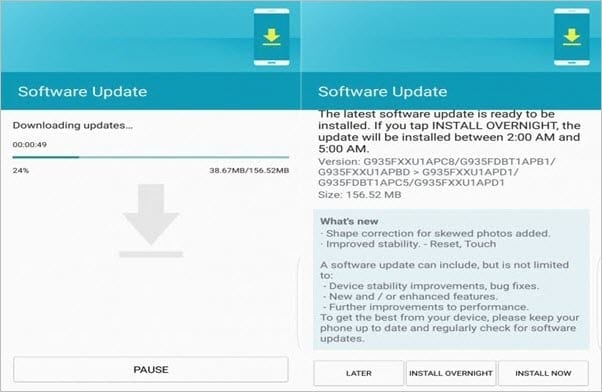
Pretty much everyone knows that it’s important to update their device consistently, but not many people put it into practice. Most people neglect the aspect of updating their device, but it’s highly suggested that you shouldn’t among such people. Usually, updates carry important features, bug fixes, and security patches.
The security patches contain essential security features that combat any type of cyber threats. So, updating your Android will definitely enhance the security system.
quoracdn.net
Review App Permissions:
Not many people are aware of the significance of Android app permissions. Generally, majority of the people grant access to whatever permissions, an app asks before the installation procedure. Every android app requires certain types of permissions, for the basic functionality. But, some apps require you to grant app permissions, which are not really mandatory for the app to run.
So, by granting such unnecessary permissions, you’re jeopardizing your security and privacy. To protect phone from hackers and any other cyber threats, try to review app permissions carefully, and only grant access to whichever is necessary.
Install a Security App:
Why worry all by yourself, when you can let a tool do the work for you?! There are numerous security mobile apps that offer a wide variety of features, which protect your device and data from hackers. Simply put, download an anti-virus app that not only secures your device from virus attacks, but also from different other cyber threats.
Usually, hackers hijack your phone by first deploying a malicious file. A good anti-virus app would be able to detect such files and instantly block them from doing any further damage.
Try Safe Browsing:
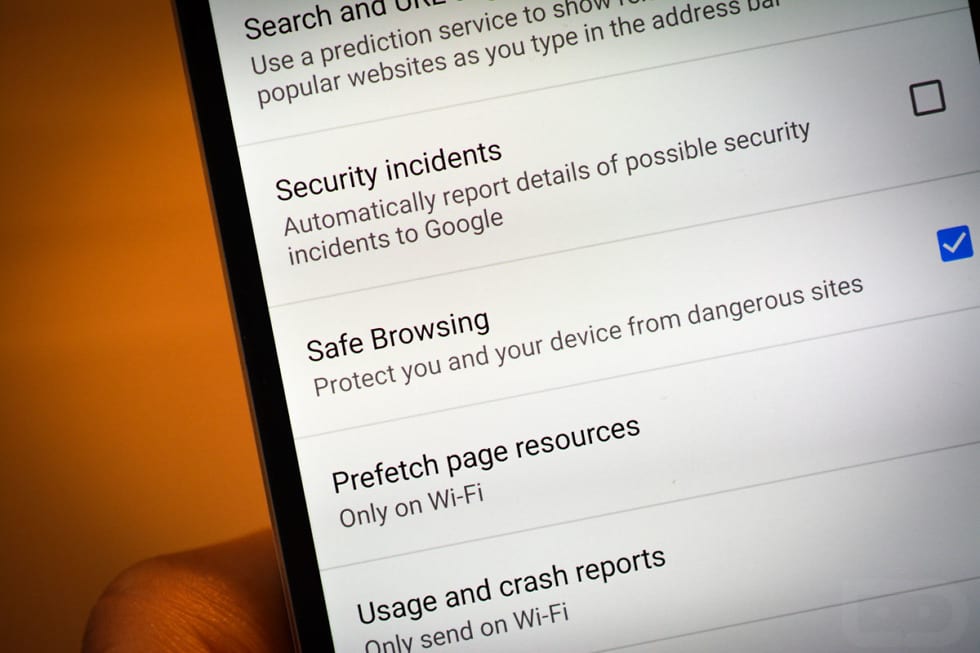
Majority of the Android users choose Google Chrome to surf the internet. This browser comes equipped with an in-built security feature named Safe Browsing. This feature enables you safeguard your device from different types of malicious websites.
Usually, such dangerous websites download virus files onto your phone in the background, without your permission. Hackers use those files as a gateway to exploit your Android. So, try using the Safe Browsing feature whenever you’re surfing the internet.
Enable Biometrics:
Thanks to the latest innovations in the industry, we now have biometrics in smartphones. You can easily lock and unlock your device via different biometric systems such as fingerprint sensors, eye scanners, face unlock, and many more.
Instead of using a generic password or a pattern, using biometric options could really elevate the security level of your Android device. This way, you will also be enhancing the privacy of your data as well.
Two-factor Authentication:
If you’re still thinking “how to protect my phone from hackers”, try implementing two-factor authentication, which is also shortly known as 2FA. This feature is extremely helpful, even if a hacker gets hold of your password. 2FA provides two security layers for any access.
So, when a login attempt is made, you’ll then get another security code to your mobile number, which you have to enter, to gain entry to your account. Sounds secure, right?! Yes, it is!
Avoid Public Wi-Fi:
Whenever you visit a local coffee shop, restaurant, or a mall, you might be tempted to use the free wifi available there. But, don’t! Because, public wifi connections are less secure, which leads to more cyber threats.
Hackers could easily penetrate these unsecured connections and target anyone they would like to. If you’re not vigilant enough, you could very well be their next victim. So, try not to use open wifi connections.
Use a Password Manager:
We use different apps and accounts on our mobile phones. But, do you know, if a hacker gets access to one account, they can simply hijack your device and all the data in it?! To secure Android phone, you must secure everything related to it, be it your Gmail account, Facebook account, or anything.
Since a password is the gateway to any account or app, using a secure password could do the job here. Rather than using basic passwords, you can create and set highly secure passwords by taking help of a password manager application.
Clear Junk Files Regularly:
For every app usage session, the application stores several logs and related files on your device. In general terms, they are referred to as junk files. Temporarily, they’re completely alright. But, the problem arises when they’re being stored for longer periods of time.
These files also cause problems to your privacy as well. Hackers can easily use them against you, as these files contain important information about your device and the apps in it. Use a good cleaner app to get rid of these junk files.
Conclusion
You now know how to secure android phone from hackers. It’s high time that you take action by implementing best security for android phone tips and safeguard your privacy and security. If you suspect that your phone has already been hacked, immediately change all your account passwords and perform a hard reset of your device.
Author Bio:
Dinesh Lakhwani 

Dinesh Lakhwani, the entrepreneurial brain behind “TechCommuters,” achieved big things in the tech world. He started the company to make smart and user-friendly tech solutions. Thanks to his sharp thinking, focus on quality and the motto of never giving up, TechCommuters became a top player in the industry. His commitment to excellence has propelled the company to a leading position in the industry.
Popular Post
Recent Post

5 Best Data Recovery Software For Windows 11 and Windows 10
A crashed drive can ruin a whole day. One minute your photos, work files, and tax records sit safe on your PC. The next minute they are gone. A power cut, a bad update, or one wrong click can wipe out years of memories and months of work in seconds. That sinking feeling is why […]

How To Update NVIDIA Drivers On Windows 11/10 PC
Learn how to update NVIDIA drivers on Windows 11/10 with simple methods, safety tips, and easy steps for smoother gaming and better PC performance.

Top AI Features Hidden Inside Windows 11
Explore the top AI features in Windows 11, from Copilot to Recall, plus safety tips and simple steps to use each tool the right way.

Customize Your Screen Saver Settings in Windows [Easy Steps]
Learn how to customize screen saver settings in Windows 11 with easy steps, safety tips, and simple tricks to personalize your PC screen.

Driver Easy Windows Driver Updater Tool Review: Tried & Tested
In-depth information about Driver Easy’s functions and features can be found in our review. Learn how to update drivers more easily with this tool for a more seamless computer experience.

Is Avast Driver Updater Worth It? A Hands-On Analysis
A full review of Avast Driver Updater covering features, setup steps, pricing, pros and cons, and real PC results, to help you decide if it is worth buying.

IObit Driver Booster 13 (PRO) Review: [Tried & Tested]
IObit Driver Booster 13 is built for one purpose: keeping your PC drivers up to date. Well, yes! Outdated drivers can cause crashes, slowdowns, and hardware issues. This tool scans fast and updates with one click. The interface is simple. Even beginners can use it without confusion. Updates are pulled from a huge database, covering […]

Auslogics Driver Updater: A Detailed Walkthrough [2026]
This comprehensive review covers the key features, pros, and cons, pricing, and a final verdict on Auslogics’ driver update utility. Learn how it stacks up against manual driver maintenance.

5 Best Driver Updater Tools for Windows to Use (Free and Paid)
Introduction: Most people blame their PC for problems that a driver caused. A driver works like a bridge between your hardware and your operating system. When this bridge cracks, strange things start to happen. Screens flicker without reason. Printers go silent mid-task. Games freeze or crash out of nowhere. Manually finding the right driver is […]

