












So, search for a pair of shoes once online. Close the tab. By evening, those same shoes are sitting on your news site, your video app, and even your recipe blog. Nobody placed them there by chance. A cookie did. Well, yes! Cookies are small files that websites place on your device while you browse. […]
Stellar Repair for MS SQL: A Thorough Review
Introduction:
Corruption of critical databases can have devastating consequences for any organization relying on Microsoft SQL Server. When database files (MDF and NDF) become damaged or corrupted, it impacts the ability to access and manage data, resulting in costly downtime and business disruption. Stellar Repair for MS SQL is a powerful software solution that repairs corrupt SQL Server database files and restores database items, ensuring business continuity.
This review will explore how this tool tackles complex database problems, bringing databases back to life.
Overview of SQL Server Database Corruption
The complex architecture of SQL server database systems makes them susceptible to corruption issues. Some common causes include:
- Software Failures or Bugs: Bugs in SQL Server can lead to pages getting marked incorrectly, index corruption, and other inconsistencies.
- Hardware Malfunctions: Faulty memory, bad sectors on data disks, and storage subsystem faults can cause data loss or corruption.
- Unexpected Shutdowns: Power loss, reboot issues, and improperly closed connections can result in incomplete transactions and data inconsistencies.
- Administrator Errors: Accidentally dropping database objects, incorrect configurations, and faulty SQL statements can all impact database integrity.
- Virus or Malware Attacks: Malicious software is a prime cause of deliberately corrupted databases and destroyed data integrity.
- System Resource Constraints: Lack of disk space, insufficient memory, and server capacity issues can trigger low-level corruption.
Corruption often manifests as read errors when attempting to open database files, inconsistencies in queried data, and various exception messages. Without the ability to repair and recover corrupted databases, businesses risk permanent data loss and extended downtime.
About Stellar Repair for MS SQL and Key Features

Stellar Repair for MS SQL utilizes a robust algorithm to mend corrupt databases effortlessly. It restores nearly all data without altering or deleting the original information, ensuring optimal repair even for severely damaged databases.
Stellar Repair for MS SQL offers a user-friendly interface, making the complex task of database restoration accessible to users of varying technical expertise. Its intuitive design guides users through the recovery process step-by-step, ensuring a seamless experience.
Moreover, the software provides detailed logs and reports post-repair, offering transparency and insights into the recovery process, and empowering users with valuable diagnostic information.
Key Features:
Here are some of the key features of Stellar Repair for MS SQL tool:
- Repairs corrupt or damaged SQL database files (.mdf, .ndf files).
- Fixes errors like “database cannot be opened”, “invalid file header”, etc.
- Faster recovery with data processing.
- Supports repair of SQL databases created in all SQL Server versions – 2005, 2008, 2008 R2, 2012, 2014, 2016, 2017, 2019.
- Scans and extracts maximum data from corrupted SQL database files.
- Compatible with Ubuntu 16.04 (64-bit), 18.04 (64-bit), 19.10 (64-bit), CentOS 7 (64-bit), and Red Hat Enterprise Linux 7 (64-bit).
- Saves repaired database in a new .mdf file to avoid overwriting original data.
- Provides preview of recovered objects like tables, views, stored procedures, triggers, etc. before saving.
- Easy to use interface with simple steps to repair SQL database.
Compatibility: Supports all MSSQL versions from SQL server 2022 to lower version.
Stellar Repair for MS SQL: Detailed Review
Some of the key features that enable Stellar Repair to efficiently fix even highly corrupted SQL Server database files include:
Multi-Object Repair
The tool performs comprehensive repairs across all database objects like tables, triggers, views, stored procedures, functions, indexes, constraints, keys, data types, and more. This object-level repair is far more advanced than page or file-level repairs.
Deleted Record Recovery
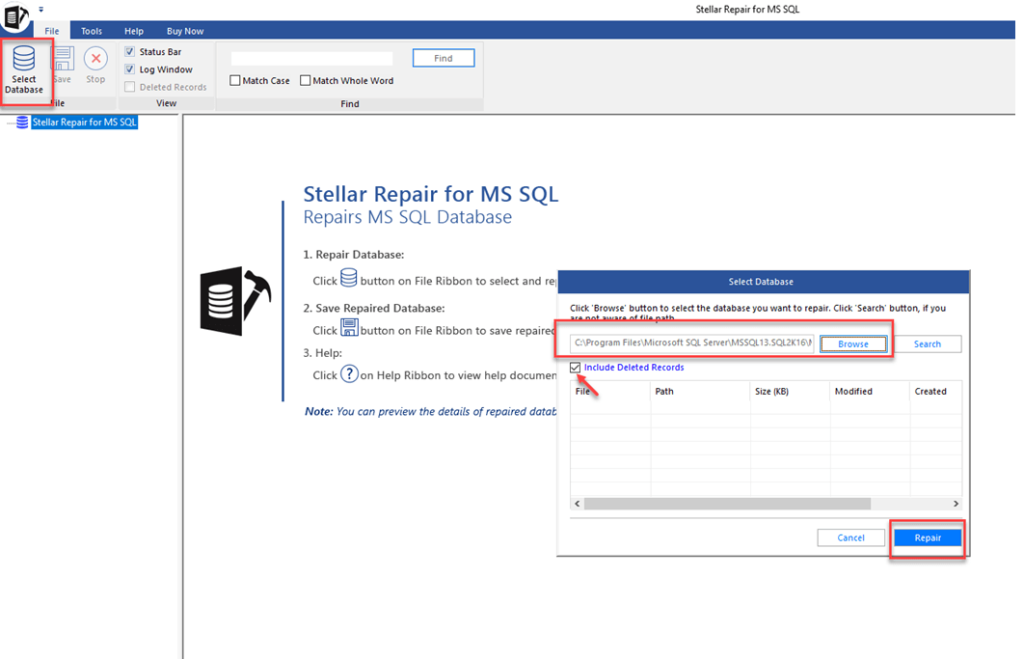
Lost records that may have been deleted or purged before corruption can be recovered by scanning rollback segments. This allows recovering historical data for a more complete restoration. The software retrieves erased table records from a damaged SQL database without altering the existing data or structure.
It saves the recovered data in a new table created under the original one. This way, it distinguishes between the restored deleted records in the new table and the original data.
Recovers Data From Ransomware-Affected SQL Servers
This tool facilitates the recovery of SQL Server databases impacted by ransomware, enabling the restoration of vital business data. Its robust restoration algorithms guarantee accuracy when repairing compromised SQL database files, aiding in regaining control over your valuable information.
Diverse Scanning Options
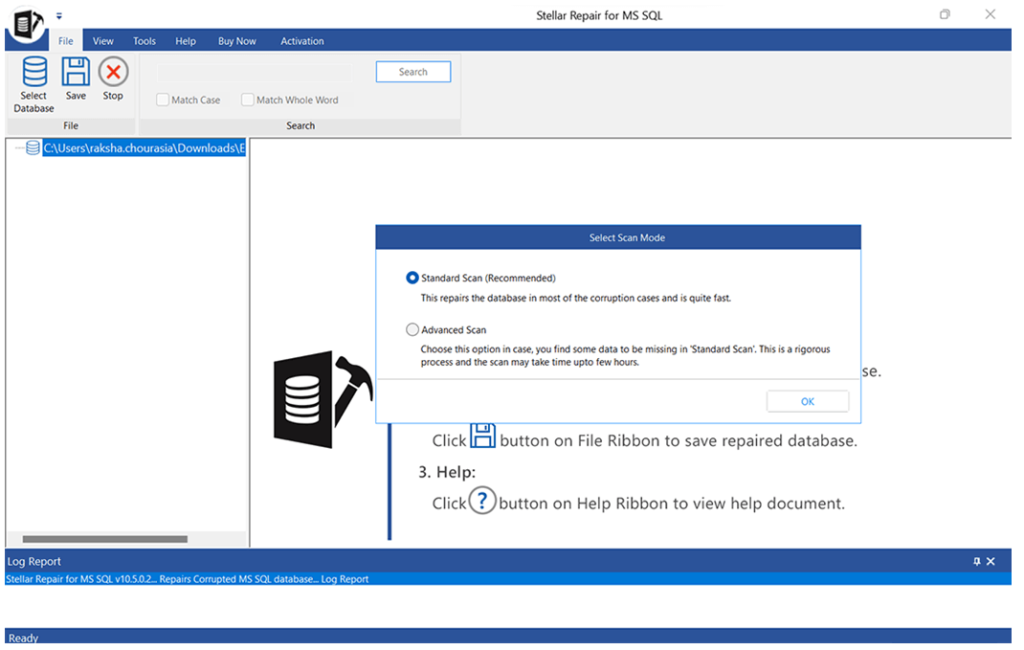
The software offers two scanning choices – Standard Scan and Advanced Scan – for easy database recovery. The Standard Scan suggested for the swift recovery of the database (.mdf) file, is the quicker option. On the other hand, the Advanced Scan method thoroughly examines
Broad Data Type Support
The tool supports both native and specialized SQL Server data types during repair:
- Native types: numeric, character, binary, date/time, etc.
- XML, spatial, and hierarchy data.
- Filestream for unstructured data.
- Sparse columns, masked columns.
- Table columns with encryption or compression.
- Custom user-defined data types.
- Sequence Object Repair.
SQL Sequence objects often get corrupted but are critical for auto-incrementing values like keys or version numbers. Stellar Repair can rebuild damaged sequence objects.
Multiple Saving Options
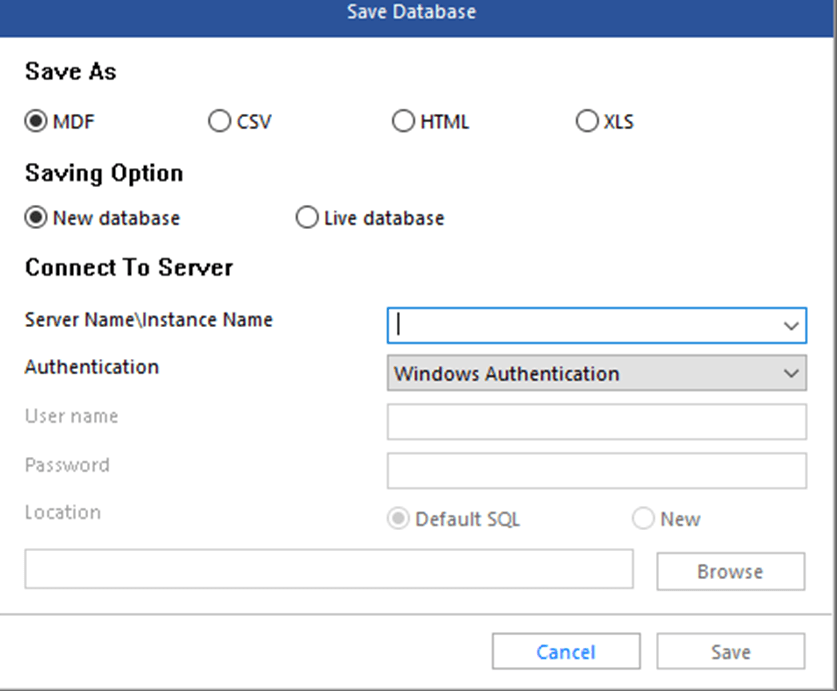
The SQL database recovery software offers options to store the restored data in a New Database, Live Database, or different File Formats like MDF, CSV, HTML, and XLS. Saving in alternative formats proves beneficial as it enables accessing the recovered file on systems without SQL installation.
Intuitive Interface
With the visual workflow and on-screen tips, even non-technical users can follow the guided repair process with minimal training or expertise.
Technical Support
Knowledgeable 24/7 technical support is provided to help with installation, configuration, and repair scenarios.
The combination of features like broad object/data support, optimized algorithms, and robust custom modes enables Stellar Repair for MS SQL to fix even extreme SQL Server corruptions.
How to Use Stellar Repair for MS SQL
Using Stellar Repair for MS SQL involves a quick and easy workflow:
Step 1: Visit the Stellar Repair for MS SQL’s official website, and hit the “Free Download” button. Run the setup file and follow the on-screen instructions to complete the installation. Launch the Stellar Repair tool on your PC.
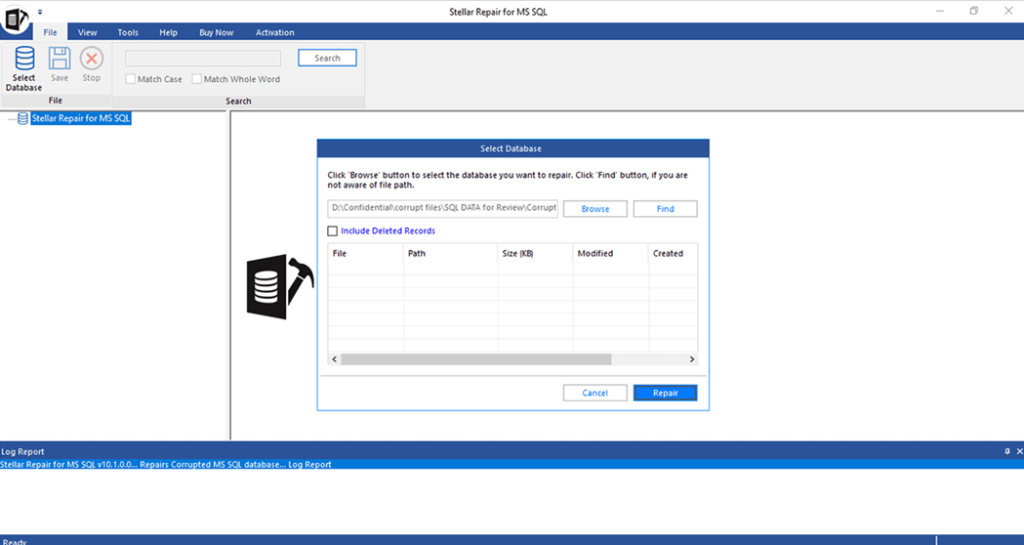
Step 2: From the home screen, select the corrupted SQL Server database (.MDF file) for repair after launching the tool. Multiple databases can be queued for sequential recovery.
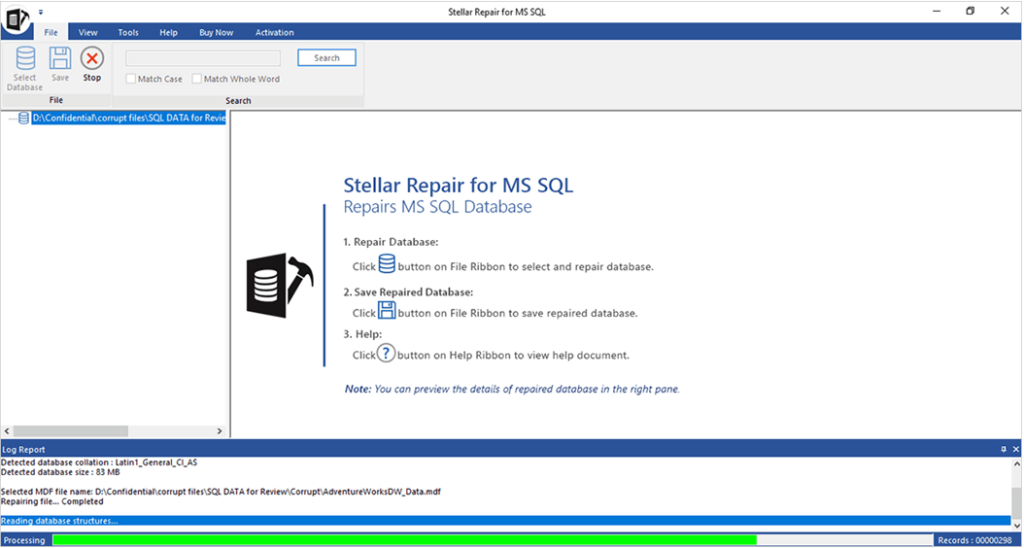
Step 3: The database analysis and repair process runs, with a progress bar and log alerts displayed. Depending on the corruption severity, it may take several hours.
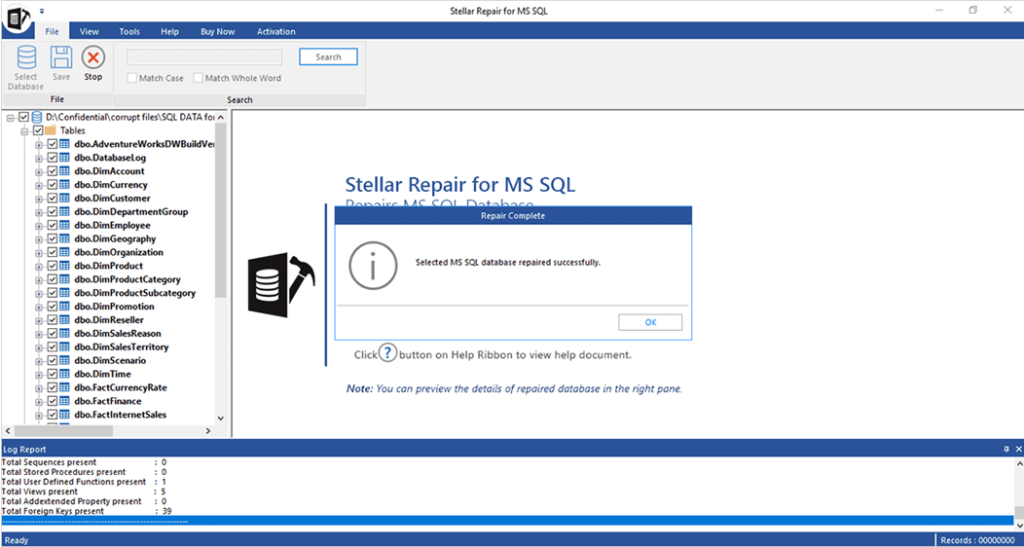
Step 4: After completion, the tool reports success and repaired databases can be opened directly in SQL Server. Validating full functionality is recommended.
Step 5: Stellar Repair offers you two different saving modes: Fast Saving and Standard Saving. Pick your option and then hit the “Save” button.
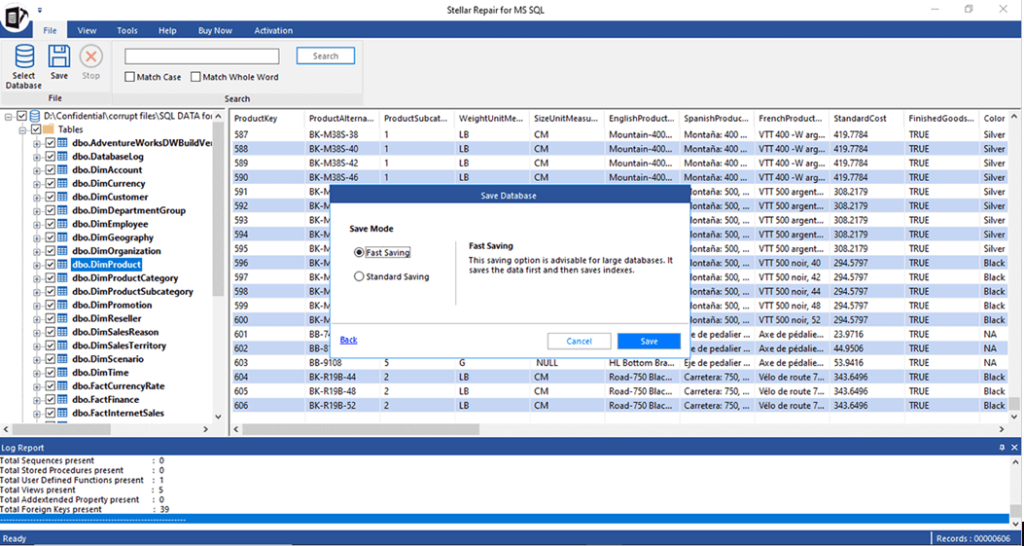
The user interface is clean and intuitive, with clear guidance provided throughout the repair workflow. Key information like current process status, expected time to completion, and corruption warnings or errors are conveniently displayed in the main window.
Databases repaired by Stellar can be seamlessly used to restore business operations, avoiding a full restore from a backup that is time-consuming. The tool gives SQL admins or technicians a faster, more automated recovery option over manual repair methods.
Here is the Video of “How to Use Stellar Repair for MS SQL” for better understanding:
Pricing and Subscription Plans
Stellar Repair for MS SQL is affordable priced for businesses and database administrators managing SQL Server environments. Current pricing options:
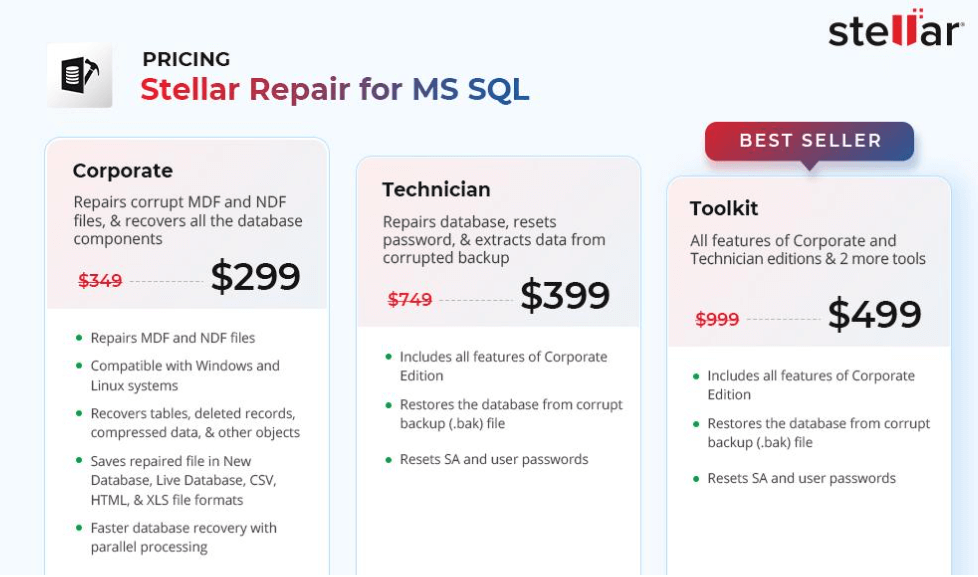
Pros and Cons of Stellar Repair for MS SQL
Some of the key advantages and limitations users should consider when evaluating Stellar Repair for MS SQL:
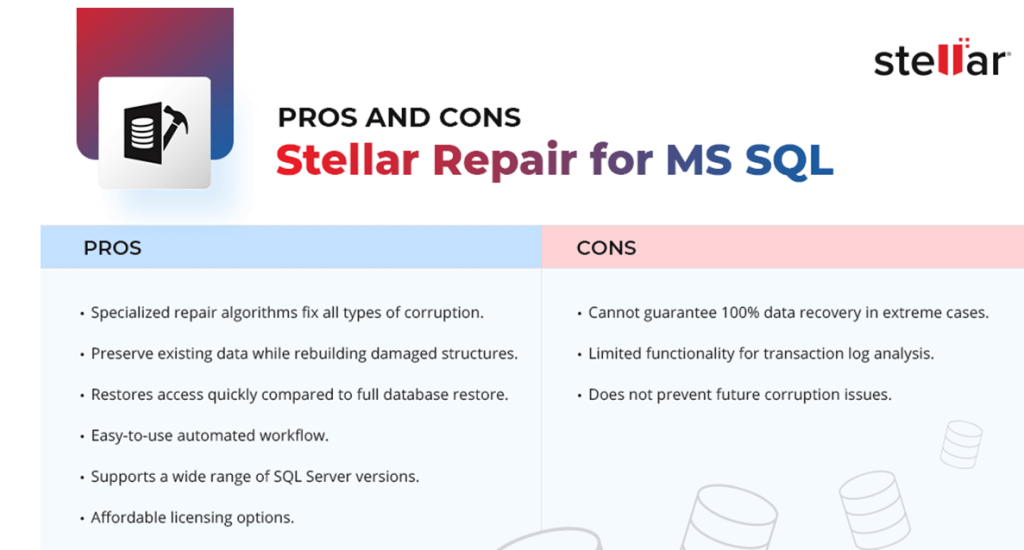
For the majority of database corruption incidents, Stellar Repair provides an efficient, cost-effective, and reliable path to restoration and availability of business data.
Conclusion
Stellar Repair for MS SQL is purpose-built software that empowers SQL Server administrators and technicians to independently fix database corruption issues. With its automated repair algorithms, broad object and version support, and different saving modes, the tool enables rapid restoration of damaged SQL databases.
By handling routine corruption scenarios in a streamlined way, Stellar Repair reduces reliance on cumbersome manual techniques and costly professional services. For any organization using SQL Server as the backbone of operations, Stellar Repair for MS SQL is an essential insurance policy against corruption-related downtime and data loss.
Author Bio:
Dinesh Lakhwani 

Dinesh Lakhwani, the entrepreneurial brain behind “TechCommuters,” achieved big things in the tech world. He started the company to make smart and user-friendly tech solutions. Thanks to his sharp thinking, focus on quality and the motto of never giving up, TechCommuters became a top player in the industry. His commitment to excellence has propelled the company to a leading position in the industry.
Popular Post
Recent Post

How To Disable Background Apps In Windows: 4 Quick Methods
A slow PC rarely gives a warning. One day, it simply takes longer to start. Apps open late. The fan runs loud, even when the screen is almost empty. Most people blame old hardware. Often, that is not the real reason. The real reason is hiding in plain sight. Windows keeps many apps active in […]

How to Activate Windows with a Product Key for Windows 11 & Windows 10
It always shows up at the worst time. You are halfway through a report, or about to join a video call. Then you spot it in the bottom right corner of the screen. Activate Windows. Go to Settings to activate Windows. Initially, an unactivated copy of Windows may seem like a minor inconvenience. Over time, […]

Is Easy Duplicate Finder Worth It? Honest Review
The photos folder looked normal at first glance. Then the storage warning popped up. One trip photo appeared four times. A tax PDF sat in three different folders. Two old setup files were still in Downloads, and each one was over 500 MB. Nobody plans this mess. Copies pile up slowly. A download runs twice. […]

Wise Duplicate Finder Review: Real Results from Wise Duplicate Finder
Read my honest Wise Duplicate Finder review. See features, pricing, pros and cons, and real PC test results. Find out if this free duplicate cleaner can free up your Windows storage.

How to Recover Deleted Files from Pen drive, USB Drive, SD Card
Introduction: On tech forums, you’ll often see posts like this: “I connected my pen drive to my laptop this morning, but the folder was empty. All my college project files had vanished. I don’t have a backup. Can someone help me?” Stories like this are very common. Pen drives, USB drives and SD cards are […]

How To Recover Files Deleted from the Recycle Bin [Windows 11]
Losing a file can happen in seconds. You clear your desktop, hit Delete, and empty the Recycle Bin. Then, just when you need that file again, it seems to have vanished. This guide will walk you through ways to restore files removed from the Recycle Bin. We will begin with simple fixes, then look at […]

Disk Drill Data Recovery Tool Explained: Full Review and Guide
It happens in a split second. You delete a folder by mistake. Your drive stops showing up. A photo album from your last trip just vanishes. And your stomach drops. Lost files feel personal. They are not just data. They are memories, work hours, and sometimes years of effort packed into a few gigabytes. When […]

Recover Deleted Files In Windows 11 With Software & Without
Introduction What is the first thing that goes through your mind the second an important file vanishes from a Windows 11 PC? For most people, it is a mix of panic and disbelief, followed by a frantic click through every folder that file could possibly be hiding in. It happens in a split second: one […]

EaseUS Data Recovery Wizard: Everything To Know
Data loss does not always come from a big disaster either. Most cases start small and boring. A drive gets formatted by mistake. A laptop freezes mid-save and restarts on its own. A memory card stops showing up after being pulled out too fast. None of these feel like emergencies at first, until you realize […]

