











Imagine this. You spend hours perfecting a video project. You hit save. Then your laptop freezes, reboots, and when the screen comes back. The file is gone. Your stomach sinks. It’s not just you. Lost files happen all the time. A dropped hard drive, a bad update, an accidental delete, or a corrupted partition can […]
Photography Culling- 5 Best Software Choices to Consider
During social events, most photographers, whether for personal or professional reasons, click various pictures for clients. Similarly, professional photographers in their respective career paths click many images of their subjects, like animal photography. However, while this allows for more options, many of these pictures are substandard or unnecessary.
Instead of individually searching and deleting each photograph, you should use the best photography culling software to delete bad pictures. These AI-powered software tools easily delete images that are duplicated, out of focus, or have bad framing and lighting automatically.
If you are on the lookout for one such software, you will find the best option for you through this list. Go ahead and give the post a read.
Top 5 Picks for Streamlining Your Photo Workflow
In photography, culling software helps you quickly sort through large batches of images to find the best ones. Whether you’re working on weddings, nature shoots, or magazine projects, the right tool can save time and make your workflow smoother.
Here’s a quick look at five top software choices, each offering useful features like fast performance, smart organization, and AI support.
Comparison Table: Best Photography Culling Software
| Software | Key Features | Compatibility | Pricing | Best For |
| Adobe Photoshop Lightroom | Rating-based culling, flags, plug-in support, batch editing | Windows, Mac | Starts at $9.99/month | All-in-one editing and organizing |
| Systweak Photo Organizer | Duplicate detection, system-wide scan, auto-folder sorting | Windows | Free & Paid options | Quick cleanup and organization |
| Photo Mechanic Plus | Fast rendering, metadata tagging, GPS geotags, batch processing | Windows, Mac | Starts at $139 (one-time) | High-volume manual culling |
| Nektony Duplicate File Finder | AI-powered duplicate detection, customizable filters, and preview before delete | Mac | Free & Paid tiers | Removing duplicates and freeing up space |
| FilterPixel | AI auto-select, face view, smart filters, Lightroom sync | Windows, Mac | Starts at $9.99/month | AI-assisted culling with manual control |
Multiple brands offer services, tools, apps, or software suitable for specific device types, to cull multiple images in one sequence. We tested the software versions that proclaim the best photography culling software to see their functions and usability. Here, we present the top ones among them to make your installation choice easier.
1. Adobe Photoshop Lightroom
Adobe Photoshop Lightroom is one of the best online photo editing and organization software types. It is easy to make photo edits with premium-quality specifications with a few clicks. In terms of photo culling, photographers would get a user-friendly organizer here.
This software allows grouping quickly and saving the photos into the library with syncing functions switched on. The saving functions are complete automatically and are stored in 1 TB of cloud storage available.
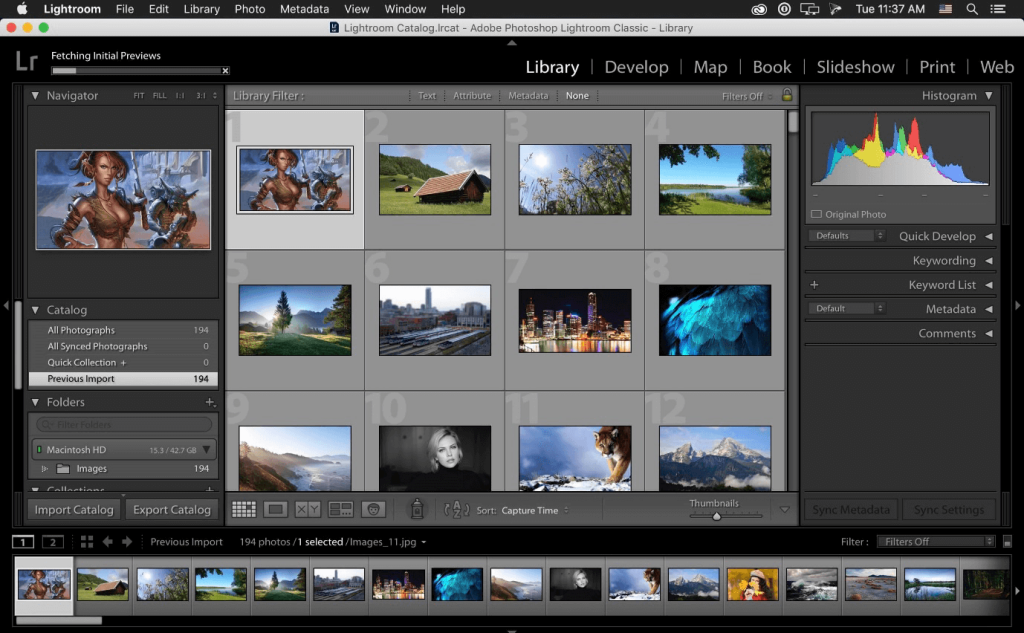
Compatibility: Windows, Mac
Price: Starts at USD 9.99 per month.
Features:
- Remix the photos with filters and effects before quick sharing.
- Edit and store multiple photos automatically into specific folders.
- Automatically remove red-eye signs from images.
- Premium-quality pre-sets are available for quick editing.
Pros:
- Users get Lightroom Classic, Lightroom, and Photoshop software add-ons.
- 20 GB- 1 TB cloud storage access available.
- Files are synced to the library for quick saving.
Cons:
- If the software is installed on more than one device, you can use it on one device only per round.
- Video editing/storage functions are not available yet.
Best for: Photographers in need of an all-in-one photo editing and management software can use Adobe Photoshop Lightroom.
2. Systweak Photo Organizer
Systweak Photo Organizer is an all-in-one management software for efficiently scanning and moving images into specific photo collections. You can easily scan the full system for broken, low-quality, or duplicate images and get quick results. Afterward, you can delete the duplicate images in one go and restore the ones you delete by mistake.
Edit the images in batches and create sub-folders like “camera mode” and other customizations for easier management. Instead of manually renaming each file, rename multiple images altogether with batch-based renaming functions.
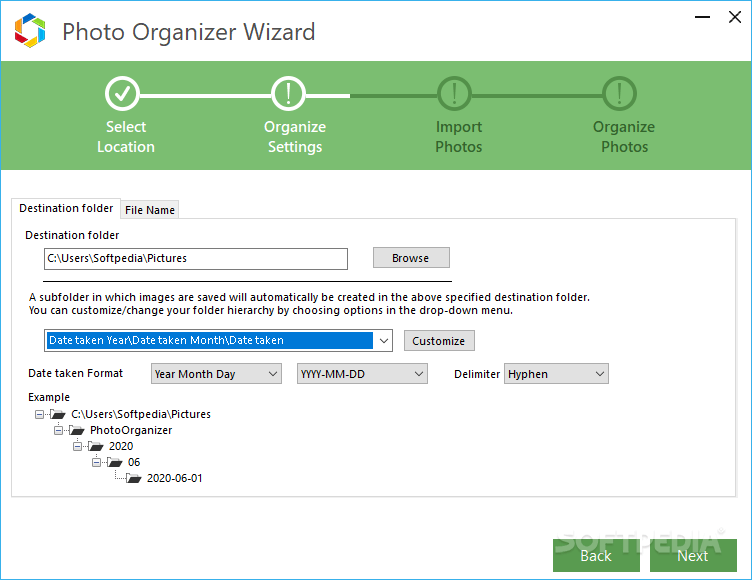
Compatibility: Windows
Price: Free
Features:
- Scan the whole folder and system for proper photo organization into systematic folders.
- Delete images that are repeated in different folders or drives.
- Neatly organize albums of images for quick access.
- Redo any changes you make easily.
Pros:
- You can choose which folders to scan or not.
- Choose the destination folder for scanned images to store safely.
- Move or copy the photos safely to another folder without affecting the original images.
Cons:
- Only available to Windows users, thus decreasing its target userbase.
- The minimum scan size for files is 20 KB by default.
Best for: Professional photographers and home-based users who want a strong photo organization tool with batch editing functions, AI-based scanning, and manual control.
3. Photo Mechanic Plus
Photo Mechanic is another of the best photography culling software available with strong organization and storage functions. You can quickly cull different, similar-looking photos or images with low-quality specifications. Moreover, you can add copyright, keywords, and captions to these pictures before sharing them with the clients.
Expect a faster and more efficient photo organization function here, with various export file types supported.

Compatibility: Windows, Mac
Price: The Free version has standard functions like quick culling and embedded metadata addition like captions/keywords. Pro: Version 6 to Plus upgrade- USD 90.00, Version 5 to Plus upgrade- USD 179.00, New License- USD 229.00
Features:
- Combine pictures into drives and folders relevant to each other.
- Strong search bar to find complex and simple keywords for faster browsing.
- Customized specific search types with a similar structure or grouping for faster recovery.
- Smoothly browse multiple images without the UI navigation glitching, etc.
Pros:
- Search and use photos in catalogs.
- Browse easily through filters like colors, ratings, camera, date, and lens data.
- Take a few steps to browse through multiple catalogs fast.
Cons:
- Site updates are automatically active after posting, and users get no prior recommendation for that.
- Not a huge variety in terms of the difference between the Pro and Free versions.
Best for: Beginner-level users who want simplified filter-based search functions along with AI support, can benefit from this software.
4. Nektony Duplicate File Finder
You can use the Duplicate File Finder from Nektony to find and curate all duplicate images in your device storage. Then, the software deletes them to declutter the system. You can use this to scare the different folders on your PC, Mac’s hard drive, Photo Libraries, and even external disks.
Here, you can mention the type and size of the extensions of files that you want to examine. Then, browse easily and preview the files individually or group-wise. Ultimately, you can analyze all the photos and then merge specific folders together.
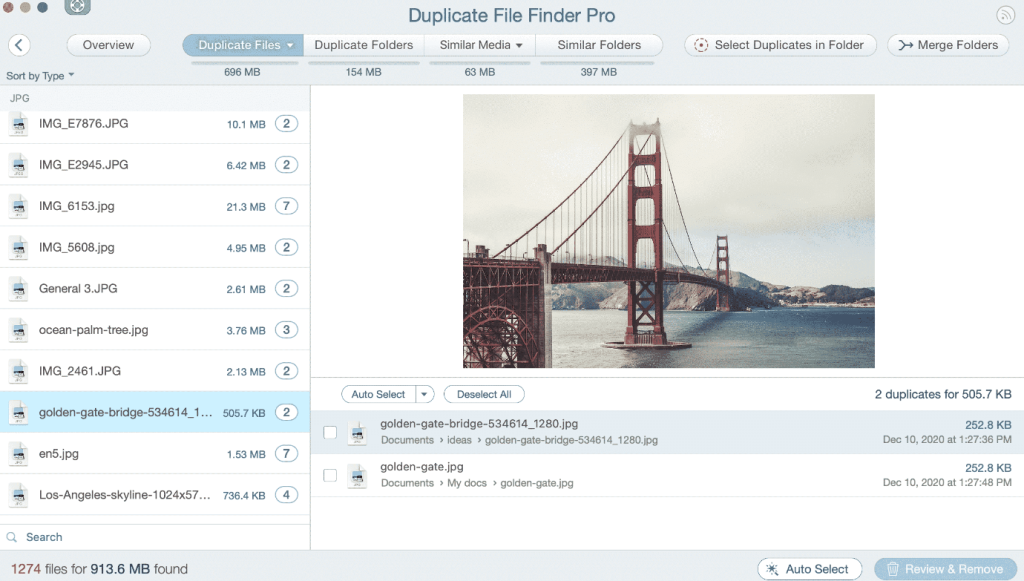
Compatibility: Mac, iOS
Price: Free, Pro- USD 19.99 for features like restoring removed files.
Features:
- Directly finds duplicates from PC home folders, Google Drive, Dropbox, iCloud, Photos, iTunes, or external disks.
- View and open the files directory for the duplicate images via the Finder.
- Preview the double files with Quick Look mode.
- Auto-select multiple files in a specific folder for quicker processing.
Pros:
- Delete duplicate files with single-click optimization.
- Sorting files on a byte-by-byte basis to study image quality.
- Fast processing of duplicate browsing, with customized speed adjustment.
Cons:
- Users can get premium-quality technical support for their software if they pay for the subscription plan.
- You cannot decide on specific duplicates to remove or keep if you use the Free plan.
Best for: Photographers who want an all-in-one file management and culling software for photos and other varieties like documents and music.
5. FilterPixel
You can use FilterPixel as the best photography culling software fora wide range of photography projects like weddings and family portraits. Instead of the users having to browse through multiple options and manage all pictures, you can automatically get them in an arrangement with the auto-select feature.
The AI of this software carefully sorts images into separate folders after analyzing their quality, like rejected, accepted, and untagged. The face view mode, in particular, allows users to zoom in/out easily while editing different images.
multiple clicks
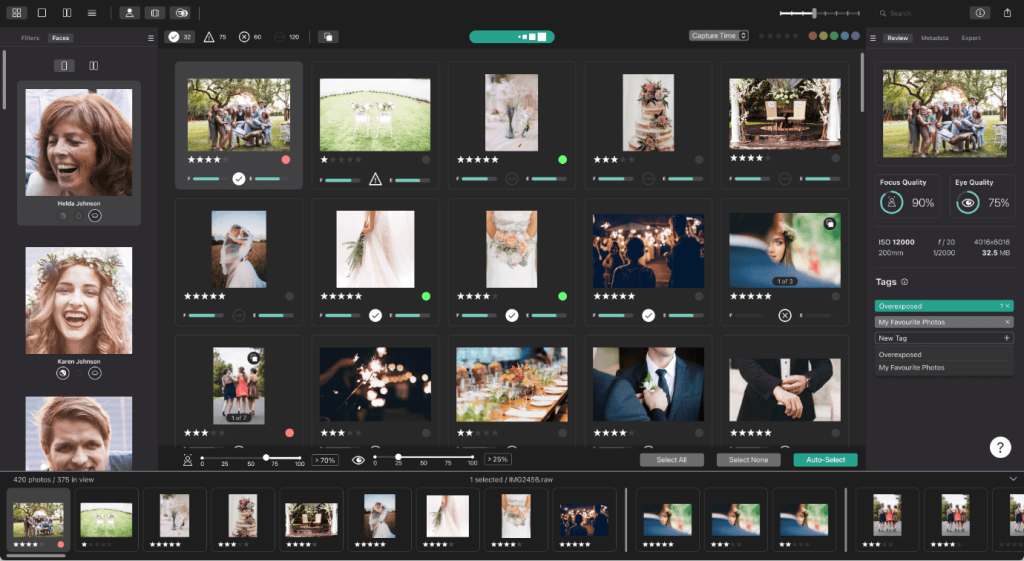
Compatibility: Windows, Mac
Price: Free, Standard- USD 9.99, Pro- USD 14.99. (All prices are monthly-based).
Features:
- It supports many photo formats like NEF, JPG, JPEG, CR3, RAW, DCR, CR3, ORF, etc.
- Users get the initial 10,000 photo-culling actions for free.
- Use the Survey Mode to check and group similar images.
- Auto-select pictures for culling and organization.
Pros:
- The AI software can detect and save blurry images with aesthetic appeal instead of deleting all blurry pictures.
- Free trials are available for each plan type.
- The software assures guaranteed content safety to users with CCPA and GDPR compliance records.
Cons:
- Only Pro users get the Smart Filtering feature with their plan.
- High-quality functions like AI sliders and auto culling are not available for free.
Best for: Photography professionals who want an AI/Manual-controlled software for image culling for weddings, portraits, family portraits, and other such programs.
Conclusion
All of these software options are great choices for photo culling excessive images in quick steps. Out of the ones mentioned here, Systweak Photo Organizer wins in terms of variety for photo storage and organization, while Adobe Photoshop Lightroom specializes in image editing additionally.
The AI-based storage is high-quality in FilterPixel as well. Thus, users who want automated photo sculling features can use this software. Overall, understand all of their diverse uses before finalizing one to use permanently.
Frequently Asked Questions:
1. What is photo culling?
Photo culling means picking the best photos from a large batch. You remove blurry, duplicate, or unwanted shots. It helps save time and keeps your work clean and professional.
2. Can AI choose photos for me?
AI can help spot bad focus, closed eyes, or poor lighting. But it can’t judge emotion or creativity. You still make the final call.
3. Which software is good for beginners?
Lightroom is easy to use and has built-in help. FilterPixel is also simple and uses smart tools. Both are great for learning and growing.
Author Bio:
Dinesh Lakhwani 

Dinesh Lakhwani, the entrepreneurial brain behind “TechCommuters,” achieved big things in the tech world. He started the company to make smart and user-friendly tech solutions. Thanks to his sharp thinking, focus on quality and the motto of never giving up, TechCommuters became a top player in the industry. His commitment to excellence has propelled the company to a leading position in the industry.
Popular Post
Recent Post

5 Best Data Recovery Software For Windows 11 and Windows 10
A crashed drive can ruin a whole day. One minute your photos, work files, and tax records sit safe on your PC. The next minute they are gone. A power cut, a bad update, or one wrong click can wipe out years of memories and months of work in seconds. That sinking feeling is why […]

How To Update NVIDIA Drivers On Windows 11/10 PC
Learn how to update NVIDIA drivers on Windows 11/10 with simple methods, safety tips, and easy steps for smoother gaming and better PC performance.

Top AI Features Hidden Inside Windows 11
Explore the top AI features in Windows 11, from Copilot to Recall, plus safety tips and simple steps to use each tool the right way.

Customize Your Screen Saver Settings in Windows [Easy Steps]
Learn how to customize screen saver settings in Windows 11 with easy steps, safety tips, and simple tricks to personalize your PC screen.

Driver Easy Windows Driver Updater Tool Review: Tried & Tested
In-depth information about Driver Easy’s functions and features can be found in our review. Learn how to update drivers more easily with this tool for a more seamless computer experience.

Is Avast Driver Updater Worth It? A Hands-On Analysis
A full review of Avast Driver Updater covering features, setup steps, pricing, pros and cons, and real PC results, to help you decide if it is worth buying.

IObit Driver Booster 13 (PRO) Review: [Tried & Tested]
IObit Driver Booster 13 is built for one purpose: keeping your PC drivers up to date. Well, yes! Outdated drivers can cause crashes, slowdowns, and hardware issues. This tool scans fast and updates with one click. The interface is simple. Even beginners can use it without confusion. Updates are pulled from a huge database, covering […]

Auslogics Driver Updater: A Detailed Walkthrough [2026]
This comprehensive review covers the key features, pros, and cons, pricing, and a final verdict on Auslogics’ driver update utility. Learn how it stacks up against manual driver maintenance.

5 Best Driver Updater Tools for Windows to Use (Free and Paid)
Introduction: Most people blame their PC for problems that a driver caused. A driver works like a bridge between your hardware and your operating system. When this bridge cracks, strange things start to happen. Screens flicker without reason. Printers go silent mid-task. Games freeze or crash out of nowhere. Manually finding the right driver is […]

