











Imagine this. You spend hours perfecting a video project. You hit save. Then your laptop freezes, reboots, and when the screen comes back. The file is gone. Your stomach sinks. It’s not just you. Lost files happen all the time. A dropped hard drive, a bad update, an accidental delete, or a corrupted partition can […]
Top 10 Free Antivirus for Windows PC/Laptop for Virus Protection
Agree or not, your Windows PC or laptop needs strong virus protection. The best free antivirus for Windows PC can keep your data safe without costing you money. Computer virus protection is not just an option – it’s a must for everyone who uses a computer.
Many people think they need to pay for good antivirus protection apps. That’s not true! There are excellent free antivirus programs that provide complete virus protection for your laptop. These free options can detect and remove malware just like paid versions.
Choosing the right free antivirus for your Windows PC can be hard. There are many options available. This guide will help you find the best antivirus for laptop security. We’ll compare the top free computer virus protection tools.
Let’s help you make a smart choice for your antivirus program needs!
Part 1: How To Choose The Best Free Antivirus Software
Finding the best free antivirus for Windows PC requires knowing what to look for. Not all antivirus protection apps are equal. Here’s what matters most when choosing computer virus protection software:
- Detection Rates: Choose an antivirus program with high malware detection scores
- System Impact: The best antivirus for laptop use won’t slow down your computer
- Extra Features: Look for useful tools like password managers or VPNs
- User Interface: A simple, easy-to-use design makes protection easier
- Update Frequency: Regular updates mean better virus protection
- Compatibility: Make sure it works with your Windows version (10 or 11)
Part 2: Precautions Before Choosing a Computer Virus Protection Software
Before installing any free antivirus for Windows PC, take these important steps for complete virus protection:
- Research Reputation: Check reviews from trusted tech sites about the antivirus program
- Download Source: Always get antivirus protection apps from official websites only
- System Requirements: Make sure your laptop fulfills the minimum requirements.
- Backup Data: Save important files before installing new computer virus protection
- Uninstall Old Antivirus: Remove any existing antivirus program completely
- Check For Bundled Software: Watch out for unwanted programs during installation
Part 3: Free V/S Paid Antivirus Programs: Which One to Choose and When
| Feature | Free Antivirus | Paid Antivirus |
| Basic Virus Protection | ✓ | ✓ |
| Real-time Scanning | Limited | Complete |
| Email Protection | Basic | Advanced |
| Customer Support | Limited/None | 24/7 Support |
| Extra Features | Few | Many |
| Ads | Often Present | None |
| Updates | Regular | Immediate |
| Multiple Device Protection | Usually No | Yes |
| Advanced Ransomware Protection | Limited | Complete |
| Price | $0 | $20-60/year |
Choose free antivirus when: You have basic needs, a tight budget, or a secondary computer.
Choose paid antivirus when: You need complete virus protection, store sensitive data, or use online banking frequently.
Part 4: Quick Comparison: Top 5 Free Antivirus For Windows
Protecting your Windows PC or laptop is vital. This guide lists the top 5 free antivirus options. The comparison table highlights their key features, system impact and more.
| Antivirus Program | Malware Detection | System Impact | Extra Features | Best For |
| Avast Free | 99.6% | Medium | Password manager, Wi-Fi scanner | All-around protection |
| AVG Free | 99.5% | Medium | File shredder, Performance tools | Basic security |
| Microsoft Defender | 98.8% | Low | Built-in to Windows, Parental controls | Windows users |
| Bitdefender Free | 99.7% | Low | Anti-phishing, Anti-fraud | Light resources |
| Kaspersky Free | 99.5% | Medium | Safe browsing, Anti-phishing | Online safety |
Part 5: Top 10 Picks: Free Antivirus Software for Windows 11 and Windows 10
1: Avast Free Antivirus
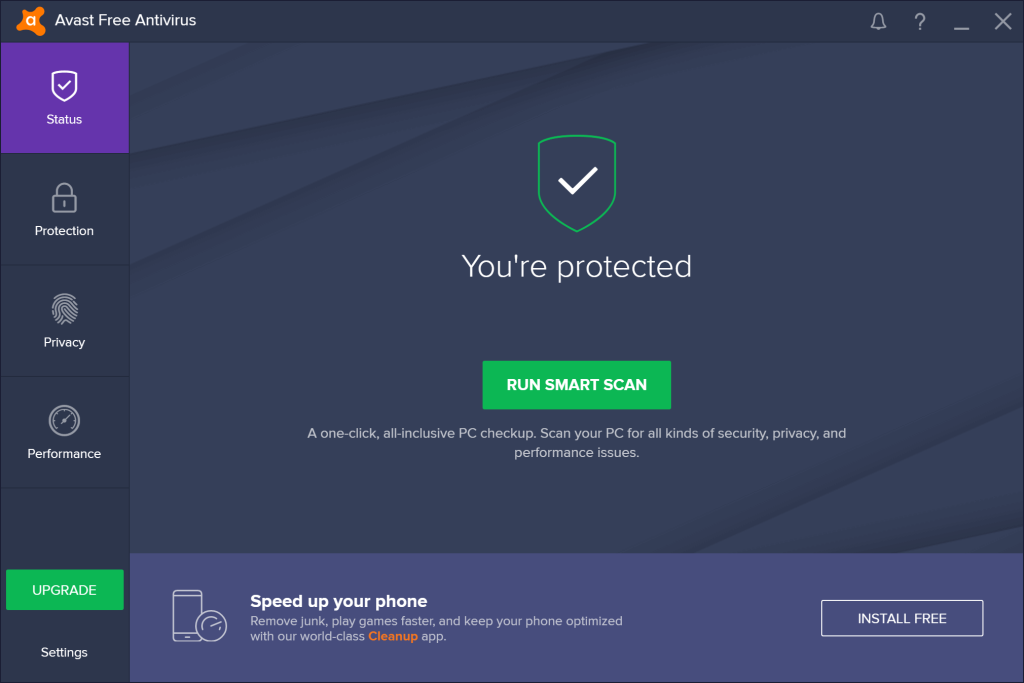
Best For: Everyday users wanting complete virus protection
Price: Free (Premium version available)
Description: Avast Free Antivirus is one of the best free antivirus for Windows PC with high detection rates. It protects against viruses, malware, and spyware without slowing your laptop.
Features:
- Real-time Protection: Stops threats before they can harm your PC
- Smart Scan: Finds security, performance, and privacy issues in one scan
- Wi-Fi Inspector: Checks your network for vulnerabilities
- Password Manager: Stores and encrypts your passwords securely
Advantages:
- Top-rated malware detection
- User-friendly interface
- Good selection of extra tools
- Regular updates
Disadvantages:
- Some pop-ups promoting premium version
- Collects some user data
- Installation tries to add extra components
Author’s View: Avast remains the best free antivirus for laptop users who want strong protection without technical complexity. The computer virus protection it offers is impressive for a free product.
2: Microsoft Defender

Best For: Windows users wanting built-in protection
Price: Free (Included with Windows)
Description: Microsoft Defender, previously known as Windows Defender, is included with Windows 10 and 11. It has seen significant improvements and now provides strong protection against computer viruses.
Features:
- Cloud-delivered Protection: Uses Microsoft’s threat intelligence network
- Periodic Scanning: Can work alongside another antivirus as a backup
- Ransomware Protection: Shields important folders from ransomware
- Parental Controls: Helps keep children safe online
Advantages:
- No installation needed
- Zero impact on system resources
- No ads or upsells
- Seamless Windows integration
Disadvantages:
- Fewer advanced features
- No password manager
- Limited customization options
Author’s View: Microsoft Defender has become a solid antivirus protection app that’s perfect for users who want simplicity. It’s the best antivirus for laptop users who don’t want to install additional software.
3: AVG Free Antivirus

Best For: Complete protection with performance features
Price: Free (Premium version available)
Description: AVG Free provides strong computer virus protection with added performance tools. This antivirus program catches malware while helping your Windows PC run better.
Features:
- File Shield: Checks files before you open them
- Web Shield: Blocks dangerous downloads and links
- Email Shield: Protects against email threats
- Performance Scanner: Speed up your PC
Advantages:
- High detection rates
- Performance optimization tools
- Easy installation process
- Regular database updates
Disadvantages:
- Frequent upgrade prompts
- Moderate system impact during scans
- Bundles optional software during installation
Author’s View: AVG remains one of the best free antivirus for Windows PC users who also want performance tools. Its complete virus protection approach covers all the basics well.
4: Bitdefender Free Antivirus

Best For: Lightweight protection with minimal interaction
Price: Free (Premium versions available)
Description: Bitdefender Free offers powerful antivirus protection with almost no system impact. This lightweight antivirus program runs quietly in the background.
Features:
- Advanced Threat Defense: Uses machine learning to detect new threats
- Anti-Phishing: Blocks dangerous websites
- Anti-Fraud: Warns about scam websites
- Automatic Updates: Keeps protection current without user action
- Autopilot: Makes security decisions automatically
Advantages:
- Very high detection rates
- Extremely light on system resources
- Simple, clean interface
- No registration required
Disadvantages:
- Limited features compared to paid version
- Few customization options
- No password manager or VPN
Author’s View: Bitdefender Free is the best antivirus for laptop users with limited resources. Its “set and forget” approach to computer virus protection is perfect for non-technical users.
5: Kaspersky Free

Best For: Online protection and safe browsing
Price: Free (Premium version available)
Description: Kaspersky Free provides core antivirus protection with a focus on web safety. This antivirus protection app has excellent detection rates without complicated features.
Features:
- Real-time Protection: Guards against malware continuously
- Web Anti-Virus: Blocks malicious websites
- Network Attack Blocker: Prevents network-based attacks
- Anti-Phishing: Identifies and blocks phishing attempts
- On-Screen Keyboard: Protects against keyloggers
Advantages:
- Outstanding malware detection
- Clean, simple interface
- Effective web protection
- Minimal false positives
Disadvantages:
- Basic feature set in free version
- Occasional slowdowns during full scans
- Geopolitical concerns for some users
Author’s View: Kaspersky Free delivers excellent computer virus protection with a focus on web safety. It’s among the best free antivirus for Windows PC users who primarily need protection while browsing.
6: Malwarebytes Free

Best For: Removing existing infections
Price: Free (Premium version available)
Description: Malwarebytes Free works well as a second-line antivirus program. It’s excellent at cleaning already infected Windows PCs and laptops.
Features:
- Threat Scan: Quickly finds active malware
- Rootkit Detection: Finds deeply hidden malware
- Malware Removal: Effectively removes discovered threats
- Database Updates: Regular definition updates
- Quarantine: Safely isolates suspicious files
Advantages:
- Excellent cleanup capabilities
- Fast scanning speed
- Works alongside other antivirus software
- Simple interface
Disadvantages:
- No real-time protection in free version
- Limited prevention capabilities
- Manual scanning only
Author’s View: While not a complete virus protection solution alone, Malwarebytes Free is an essential second scanner. Pair it with another free antivirus for Windows PC for better overall protection.
7: Avira Free Antivirus

Best For: Feature-rich protection and privacy tools
Price: Free (Premium version available)
Description: Avira Free offers comprehensive computer virus protection plus useful privacy features. This antivirus program balances performance and protection well.
Features:
- Real-time Protection: Blocks threats as they appear
- PUA Shield: Blocks potentially unwanted applications
- Safe Shopping: Secures your online purchases
- Password Manager: Stores credentials securely
- Basic VPN: Includes limited free VPN service (500MB/month)
Advantages:
- High detection rates
- Good selection of extra tools
- Low false positive rate
- Privacy-focused approach
Disadvantages:
- Can impact system performance
- Frequent upgrade notifications
- Installation tries to change browser settings
Author’s View: Avira Free provides one of the most feature-rich free antivirus protection experiences. It’s among the best antivirus for laptop users who also value privacy tools.
8: Sophos Home Free

Best For: Family protection across multiple devices
Price: Free (Premium version available)
Description: Sophos Home Free allows protection of up to three devices from one account. This computer virus protection software has robust parental controls.
Features:
- Real-time Protection: Guards against all types of malware
- Web Filtering: Blocks dangerous and inappropriate websites
- Remote Management: Control protection for all devices online
- Parental Controls: Monitor and restrict children’s activities
- Exploit Protection: Guards against vulnerabilities
Advantages:
- Multi-device protection
- Strong parental controls
- Clean interface
- Remote management
Disadvantages:
- Some advanced features require premium
- Occasional connectivity issues with management portal
- Limited to three devices
Author’s View: Sophos Home Free is the best free antivirus for Windows PC users with multiple family devices. Its remote management makes it unique among free options.
9: Adaware Antivirus Free

Best For: Basic protection with minimal resource usage
Price: Free (Premium version available)
Description: Adaware Antivirus Free focuses on core protection without extras. This lightweight antivirus program is good for older computers.
Features:
- Real-time Protection: Blocks incoming threats
- Download Protection: Scans files as they download
- Email Protection: Checks messages for threats
- Fast Scanning: Quick system checks
- Gaming Mode: Reduces interruptions while gaming
Advantages:
- Very light system impact
- Simple, straightforward interface
- Good core protection
- Quick installation
Disadvantages:
- Limited additional features
- Less frequent updates than competitors
- Basic interface may lack advanced options
Author’s View: Adaware is a solid choice for basic computer virus protection. It’s not the most feature-rich, but it delivers core antivirus program functionality effectively.
10: Panda Free Antivirus

Best For: Cloud-based protection with minimal local impact
Price: Free (Premium version available)
Description: Panda Free Antivirus uses cloud processing to reduce system impact. This antivirus protection app has a distinctive look and strong core features.
Features:
- Cloud Scanning: Offloads processing to the cloud
- Process Monitor: Shows which programs are trustworthy
- USB Protection: Scans external drives automatically
- Rescue Kit: Creates a recovery drive for emergency situations
- Virtual Keyboard: Prevents keyloggers from stealing passwords
Advantages:
- Low system impact
- Good detection rates
- Attractive interface
- USB drive protection
Disadvantages:
- Requires internet connection for best protection
- Some useful features are premium-only
- Settings can be confusing for beginners
Author’s View: Panda offers unique cloud-based protection that’s light on resources. It’s among the best antivirus for laptop users with limited system resources but good internet connectivity.
Conclusion
After reviewing the top free antivirus programs for Windows PC and laptop security, it’s clear that good computer virus protection doesn’t need to cost money. The best free antivirus for Windows PC can provide excellent security for most users. Programs like Avast Free, Microsoft Defender, and Bitdefender Free consistently perform well in testing.
Your choice of antivirus protection app should match your specific needs. If you want an all-around solution, Avast or AVG might be best. For built-in simplicity, Microsoft Defender works great. If system performance is your concern, Bitdefender or Panda offer lightweight protection.
Remember that even the best antivirus for laptop security can’t replace safe computing habits. Be careful what you download, avoid suspicious websites, and keep your Windows PC updated. Free antivirus programs provide good protection, but always back up important files and consider upgrading to a paid version if you need advanced features like password managers or VPNs.
FAQs
Is free antivirus good enough for my Windows PC?
Yes, free antivirus can provide good protection for most users. The best free antivirus for Windows PC, like Microsoft Defender or Avast Free, offer strong core protection against viruses, malware, and other threats. However, paid versions typically include more features like advanced ransomware protection, priority updates, and better customer support. For basic computer virus protection needs, free options work well.
Can I use multiple antivirus programs on my laptop?
Generally, you should avoid running multiple real-time antivirus protection apps simultaneously. They can conflict with each other, causing system slowdowns or errors. However, you can use Microsoft Defender in passive mode alongside another antivirus program. You can also use on-demand scanners like Malwarebytes Free alongside your main antivirus for occasional additional checks. This combination gives better complete virus protection.
How often should I scan my computer with antivirus software?
With a good antivirus program that offers real-time protection, you should run a full system scan at least once a month. Set up quick scans to run weekly. The best antivirus for laptop maintenance will allow scheduling these scans automatically. Also, always scan new files from external sources before opening them. Regular scanning helps ensure your computer virus protection remains effective against both old and new threats.
Dinesh Lakhwani
Author Bio:
Dinesh Lakhwani 

Dinesh Lakhwani, the entrepreneurial brain behind “TechCommuters,” achieved big things in the tech world. He started the company to make smart and user-friendly tech solutions. Thanks to his sharp thinking, focus on quality and the motto of never giving up, TechCommuters became a top player in the industry. His commitment to excellence has propelled the company to a leading position in the industry.
Popular Post
Recent Post

5 Best Data Recovery Software For Windows 11 and Windows 10
A crashed drive can ruin a whole day. One minute your photos, work files, and tax records sit safe on your PC. The next minute they are gone. A power cut, a bad update, or one wrong click can wipe out years of memories and months of work in seconds. That sinking feeling is why […]
How To Update NVIDIA Drivers On Windows 11/10 PC
Learn how to update NVIDIA drivers on Windows 11/10 with simple methods, safety tips, and easy steps for smoother gaming and better PC performance.

Top AI Features Hidden Inside Windows 11
Explore the top AI features in Windows 11, from Copilot to Recall, plus safety tips and simple steps to use each tool the right way.

Customize Your Screen Saver Settings in Windows [Easy Steps]
Learn how to customize screen saver settings in Windows 11 with easy steps, safety tips, and simple tricks to personalize your PC screen.

Driver Easy Windows Driver Updater Tool Review: Tried & Tested
In-depth information about Driver Easy’s functions and features can be found in our review. Learn how to update drivers more easily with this tool for a more seamless computer experience.

Is Avast Driver Updater Worth It? A Hands-On Analysis
A full review of Avast Driver Updater covering features, setup steps, pricing, pros and cons, and real PC results, to help you decide if it is worth buying.

IObit Driver Booster 13 (PRO) Review: [Tried & Tested]
IObit Driver Booster 13 is built for one purpose: keeping your PC drivers up to date. Well, yes! Outdated drivers can cause crashes, slowdowns, and hardware issues. This tool scans fast and updates with one click. The interface is simple. Even beginners can use it without confusion. Updates are pulled from a huge database, covering […]

Auslogics Driver Updater: A Detailed Walkthrough [2026]
This comprehensive review covers the key features, pros, and cons, pricing, and a final verdict on Auslogics’ driver update utility. Learn how it stacks up against manual driver maintenance.

5 Best Driver Updater Tools for Windows to Use (Free and Paid)
Introduction: Most people blame their PC for problems that a driver caused. A driver works like a bridge between your hardware and your operating system. When this bridge cracks, strange things start to happen. Screens flicker without reason. Printers go silent mid-task. Games freeze or crash out of nowhere. Manually finding the right driver is […]

