9 Best Video Enhancer Tools For Windows
In the growing digital world, people are more creative and selective with content creation and editing. You can find thousands of software and applications that can help you enhance your video quality. People have different experiences with the tools, but you must find out the best editing tool.
So don’t get fussy with different opinions; we have a list of top video quality enhancer tools. Select the best suitable option that fulfills your requirements and start enhancing your video quality with the best tools in the world. Get on social media with professional-quality video content.
Top 5 Video Enhancer Tools for Windows
Video enhancers are now essential for creators who need clear, sharp footage without guesswork. In 2026, AI and smart acceleration make this task faster and more reliable on Windows. Below is a quick look at five top tools and how they perform on key points.
| Tool Name | AI Upscaling | Format Support | Export Speed | Ease of Use | Price Tier |
| Adobe Premiere Pro | Good | Very wide | Fast | Moderate | High |
| AVCLabs Video Enhancer AI | Excellent | Wide | Moderate | Easy | Mid |
| Topaz Video Enhance AI | Excellent | Good | Slow | Easy | Mid |
| HitPaw Video Enhancer | Good | Good | Fast | Very easy | Low-Mid |
| PowerDirector | Good | Very wide | Fast | Moderate | Mid |
First, Know The Answers To These Questions:
Will video enhancement damage the original look of my footage?
This is a common fear, and it is valid. Some enhancement tools push sharpening too hard. This can create halos and fake textures. AI tools try to guess missing details, not truly restore them. When presets are overused, faces may look plastic and edges may look harsh. Tools like Topaz and AVCLabs reduce this risk if settings are adjusted carefully. Editors like Premiere Pro give more manual control, which helps protect the original style. The safest approach is to preview often and export short test clips. Enhancement should improve clarity, not rewrite the image.
Do these tools really work on very old or low-resolution videos?
They help, but expectations must stay realistic. AI can clean noise and improve edges, but it cannot recreate lost information perfectly. Old videos with heavy blur or compression artifacts will still show limits. Results vary based on the source quality and lighting. AVCLabs and Topaz perform best on such footage, especially for upscaling. HitPaw and PowerDirector offer lighter improvements that look natural but less dramatic. Even a good enhancer cannot fix everything. It can make footage usable, not flawless.
Is a powerful computer required to use video enhancer tools smoothly?
System power matters more than many users expect. AI-based tools rely heavily on GPU and RAM. On weak systems, processing can feel slow, and exports take hours. Premiere Pro and PowerDirector handle mid-range systems better due to optimization. Topaz and AVCLabs demand stronger hardware for the best results. Without it, fans run loud and progress crawls. If your system is older, shorter clips and lower upscale targets work better. Hardware does not decide quality alone, but it strongly affects comfort and speed.
List of some Best Video Quality Enhancer Tools for Windows PC
Want to get fame on social media? Look no more! Check out some best video quality enhancer software that can create professional-style videos. Also, focus on their performance and how these tools provide good quality videos.
1. Adobe Premiere Pro
One of the powerful tools from Adobe Systems is to create realistic editing and enhance video quality. It is the most popular tool professionals use to enhance video quality. You can find multiple features and AI tools to help you advance video development.
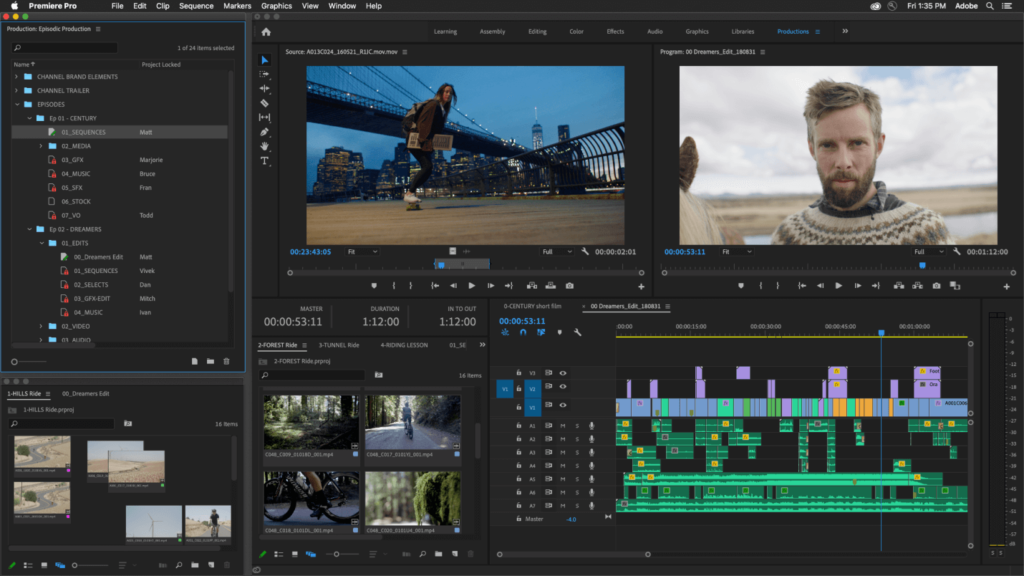
You can create a full video with short clips from this software and add a smooth transition that no one can identify. This app helps you in editing and improving video quality. You also get multiple options to add text, pictures, and amazing GIFs to the video. You can also add subtitles and captions directly from Adobe Premiere Pro to the video.
Features:
- Millions of Templates.
- Power of exporting low-quality video in high quality.
- Allow the user to add audio and captions to the video.
Pros:
- Produce a high-quality video.
- Process 360-degree video.
- Quick rendering capabilities.
Cons:
- Works only on Powerful PCs.
- Valid substitution is required to access the facilities.
2. AVCLabs Video Enhancer AI
AVCLabs is AI-based multimedia software that can help you enrich your video quality. Explore the powerful tools of AVCLabs and make your video more creative. It has multiple features to convert video into audio and read the Blu-ray disc and old DVDs. Its ripper tool lets you convert DVD and BluRay videos into any format.
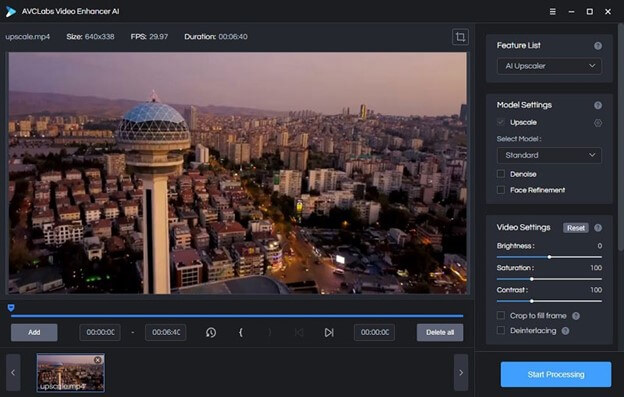
AVCLabs software is easy to use and provides multiple features required to create professional videos. You can enjoy the coolest features and powerful AI with AVCLabs in your Windows.
Features:
- Advanced AI technology
- Fast video processing.
- Convert video into different formats.
Pros:
- Allows the user to convert multiple videos at the same time.
- Color Enhancing tools.
- User-friendly interface.
Cons:
- Slightly fewer features for editing.
- Subscription active service.
3. Topaz Video Enhance AI
Topaz Video Enhance AI is a powerful software to upscale video quality. The leading developer of photos and videos, TopazLab, creates the software. The software uses high-scale algorithm learning AI that automatically enhances the video quality with suitable color changes. You can also customize your color grading with Topaz Video Enhance AI.
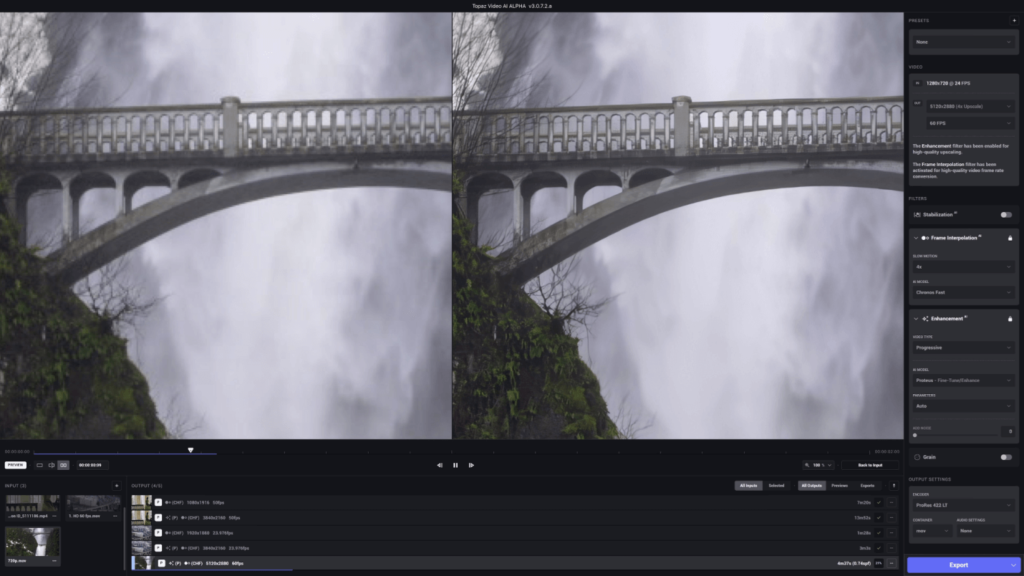
The software can enter video up to 4K with 60FPS. Now if you are sad about getting low-quality video on your phone, you can develop it professionally with topaz labs. Moreover, you can also work offline with this software and render videos.
Features:
- Power of article intelligence develops high-quality videos.
- Optimization of videos.
- Works with GPU acceleration.
Pros:
- Produce high-quality video from low quality.
- Enhance very fine details in the video.
- AI automatically reduces the grain and blurs shots.
Cons:
- Does not support every video format.
- Quite unaffordable.
4. HitPaw Video Enhancer
Not able to afford a High-resolution camera? Don’t worry! You can upscale low-quality videos with the powerful Windows software HitPaw Video Enhancer. The tool optimizes your video quality and enhances the overall pixels and graphics of the video. The tool automatically detects the part that needs to get high or low.
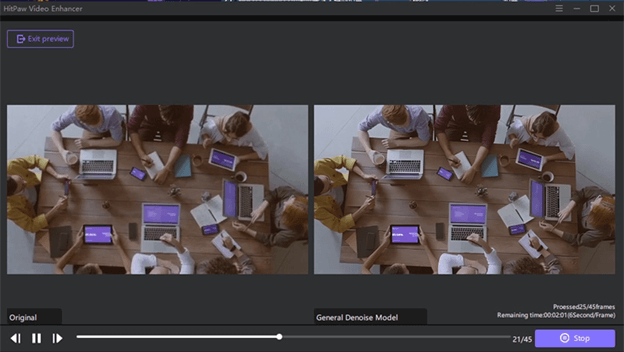
With HitPaw, you can produce professional-level videos with a low-end camera. You can directly drag the video; its AI will give you a quick enhancement you can reduce or increase later. Moreover, it can produce up to 4K videos in the final render.
Features:
- Users can access multiple video formats in this software.
- Produce video up to 4K.
- Speed rendering process.
Pros:
- Smooth video production.
- Multiple view processing at the same time.
- Autofix the video quality.
Cons:
- It cannot process 360-degree videos.
- A powerful system is essential.
5. PowerDirector
It is one of the most usable software on mobile and PC. PowerDirector has a smart AI that allows you to choose multiple video templates and filters. The software can optimize every kind of video and generate higher-resolution products.
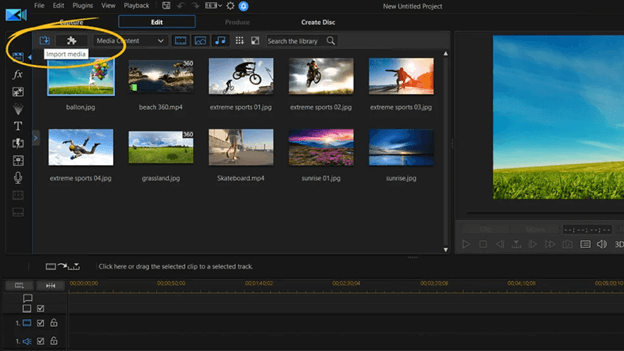
PowerDirector has all the features and tools required to edit and enhance video quality. There are millions of videos and sorts for YouTube that PowerDirector creates. If you were unaware of PowerDirector and its benefits, it could be the best tool for video optimization and quality enhancement.
Features:
- Works on Powerful AI tools.
- Capable of developing 360-degree videos.
- MultiCam edition is available.
Pros:
- Powerful rendering speed
- You can mix audio in the video.
- User-friendly interface.
Cons:
- Slightly expensive.
- The AI audio system is not available.
6. Ashampoo Video Optimizer
Video and developing with good quality software may be difficult for you. Try out Ashampoo Video Optimizer to develop videos seamlessly. It is a powerful movie video editor with color enhancement technology that can increase video contrast. You can create multiple effects in video with the powerful optimizing effect of Ashampoo Video Optimizer.
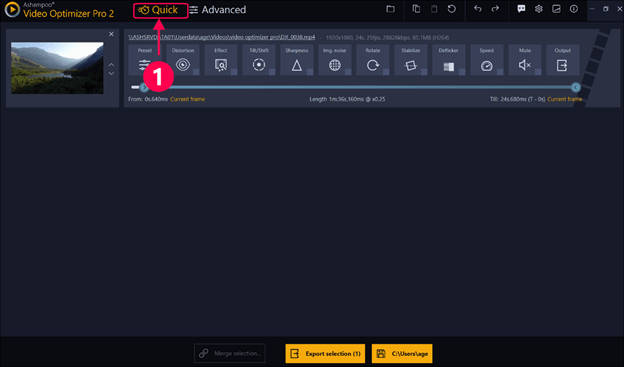
Moreover, you can edit long videos and add multiple transitions with suitable effects. The software will produce very smooth and high-resolution videos that you won’t be able to detect any transition. With Ashampoo, optimizing videos and generating them in high quality is easy.
Features:
- Quick optimization of the video.
- Powerful noise reduction and quality increment.
- AI automatically fixes the color contrast.
Pros:
- Produce Sharp, detailed video.
- Smooth Slow-Mo and transitions.
- Produce videos up to 4K quality.
Cons:
- Limited exporting options.
- Does not support 360-degree videos.
7. Pinnacle Studio
Pinnacle Studio is the smartest and simplest Windows software that helps edit and enhance video quality. It has multiple features that help you upgrade the video quality. Moreover, you can choose multiple effects and transition styles to help you create a long video.
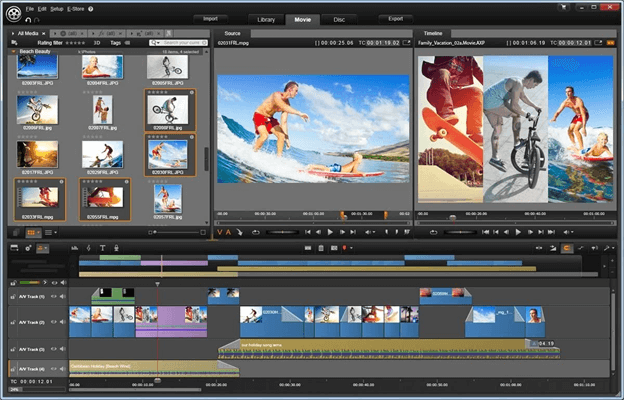
Pinnacle Studio converts different file formats, making its rendering process very smooth. If you are a blogger and want to edit 360 videos, it can be a crucial app and give a fine touch to your video. Try out Pinnacle Studio and make your videos professional style with its enhancing tools.
Features:
- The multi-camera editing feature is available.
- Powerful Color grading system.
- It can track superior Quality of motions.
Pros:
- Screen recording feature available.
- Process 360-degree videos
- Smooth transitions
Cons:
- Software may make you feel laggy while editing.
- It does not have a Built-in stock Media library.
8. Vegas Pro
Vegas Pro is the most popular video editing software used by professionals. Vegas Pro’s powerful AI technology guides you with Editing videos and upgrading quality. With the help of the advanced technology of Vegas Pro, you can create professional-style videos in your Windows system.
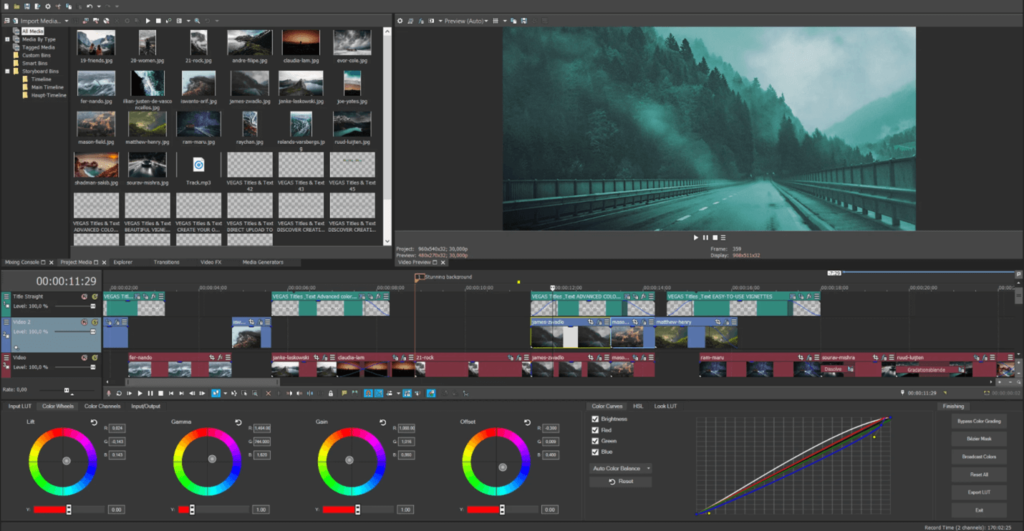
Vegas Pro gives you multiple features to upgrade your video and create realistic effects with AI. Now you can easily create professional quality videos for your YouTube channel or edit short movies with the help of Vegas Pro.
Features:
- Audio missing feature available.
- Dynamic interface for video editing.
- Fastest rendering software.
Pros:
- Stabilize your video.
- Support high frame rate videos.
- Support plugins.
Cons:
- Stock middle library not available
- Quite expensive to access the full version.
9. Pikavue
Do you want to learn how to start video editing? Pikavue is the best software for beginners who want to learn to edit and create videos. You find many professional features missing in this software, but the AI of the Pikavue does not require these features. The software automatically detects the requirements in the video and fixes them with automatic color tools.
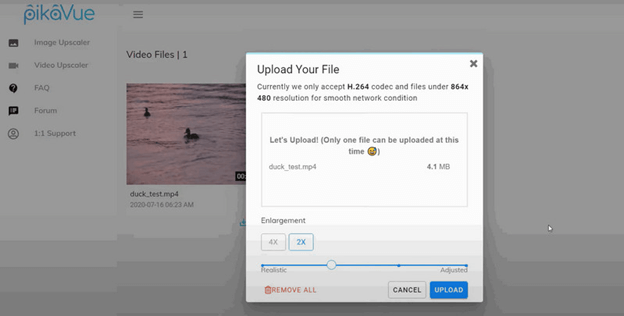
The software does the basic adjustment for the user, so it becomes easy for you to make essential changes. It produces very fast results with high quality. Therefore if you are looking for a tool to enhance the video quality for social media, Pikavue AI assists you with your video enhancement.
Features:
- Quick optimization
- Multiple transition effects and filters.
- Video stabilization feature.
Pros:
- Quick Social media share faculties.
- Affordable full version.
- Automatically color correction tools.
Cons:
- Does not support 360-degree videos.
- Fewer features are available compared to Professional software.
Conclusion
If you were uploading low-quality video on social media, now you can enhance the video quality with the help of professional tools. We shared a list of software for Windows that can perfectly enhance your video quality.
Therefore, don’t depend on professional cameras to capture high-quality videos. You can take the help of software to generate high-quality videos captured by low-end devices. Check out the features and functionality of every software and find a suitable application to enhance video quality.
FAQs
Q1 Can we produce mobile videos in 4K videos?
Yes, these powerful software automatically detect the color correction and enhance the overall quality. This software reduces the grain and adjusts the light for professional cinematic shots. With video-enhancing software, you don’t have to buy professional cameras.
Q2 Which is the most powerful and simplest tool for editing?
There are thousands of software programs with powerful editing tools, but among the list, you should consider PowerDirector. It is a free video editing and development software. It has professional features to enhance the video quality and add multiple filters and templates. It also allows you to render 4K videos at a super-fast speed.
Q3 Which is the best AI video editing software?
Talking of AI, Filmora is one of the most common and user-friendly software programs that possesses powerful AI. The AI of Filmora reduces your creative effort and gives multiple facilities. The Filmora AI text-to-speech feature allows you to create voice notes in the software and produce automatically generated texts.
Author Bio:
Dinesh Lakhwani 

Dinesh Lakhwani, the entrepreneurial brain behind “TechCommuters,” achieved big things in the tech world. He started the company to make smart and user-friendly tech solutions. Thanks to his sharp thinking, focus on quality and the motto of never giving up, TechCommuters became a top player in the industry. His commitment to excellence has propelled the company to a leading position in the industry.
Popular Post











Recent Post
How to Update Wireless Network Driver in Windows 11 and 10
Your Wi-Fi keeps dropping. Pages load slowly. The connection feels unstable? Well, you are not alone. Most of the time, the problem is not with your internet plan. It is with your wireless network driver. A driver is a small piece of software that helps your computer talk to its hardware. When it gets outdated, […]
Common Windows 11 Problems and Solutions (2026 Version)
Windows 11 has become more polished over the years, but it is still not completely free from problems. Even after regular updates from Microsoft, many users continue to face issues like lagging performance, failed updates, audio troubles, random crashes, and network errors. Some problems appear after installing new features, while others develop gradually as the […]
Fortect Driver Updater Review: Features, Steps, Pros, and Cons.
A new PC usually feels quick and responsive. Applications open instantly, games run smoothly, and everything works as expected. As time passes, however, you may notice slower performance, system crashes, hardware glitches, or devices that stop working properly. While many people assume malware or low storage space is to blame, outdated drivers are often the […]
New Features Coming in Windows 11 This Year [2026]
Microsoft is always working to make Windows better. This year is no exception. The company has announced and rolled out several exciting updates for its users. These updates touch almost every part of the operating system. From the Start menu to system settings, changes are arriving fast. If you use Windows daily, you will want […]

Top 14 Duplicate Photo Finder and Remover For Windows [2026]
Introduction: Photos pile up fast. Well, yes! You take ten shots of the same moment. You download the same image twice. You back up your folder and forget you already did it. Before you know it, your storage is packed with copies. A good duplicate photo finder helps you take back that space without losing […]
Advanced System Settings on Windows 11: Complete Guide
Windows 11 is a powerful operating system. It comes with many features that most users never explore. One of the most useful areas is the System Properties panel. This is where you can control how your computer performs, starts up, and handles memory. Many users only change basic settings like wallpaper or display options. But […]

21 Advanced Windows Security Settings: Latest Updates
Introduction: Your computer holds a lot of important data. From personal photos to work files, everything sits on your Windows system. That is why protecting it properly matters more than ever. Windows security settings have come a long way. Microsoft keeps adding stronger layers of protection with every update. Most users never go beyond the […]
Security Upgrades of Microsoft Windows in This Decade [Complete Guide]
Introduction Microsoft has been working hard to make Windows safer every year. Cyberattacks are growing fast. Hackers are smarter now. They target millions of Windows users every single day. That is why Microsoft has added many powerful new security upgrades of Microsoft Windows since 2020. These upgrades protect your data, your identity, and your device […]
How To Link a Microsoft Account to a Digital License on Windows [2026]
Most people never think about Windows activation until it suddenly stops working. Something as simple as replacing hardware or reinstalling Windows can cause the system to lose its activated status. Linking your Microsoft account to your digital license beforehand helps prevent unnecessary trouble and makes activation recovery much easier later on. Many people using Windows […]
Monthly Round Up: All Big Incidents Happened for Windows Users in The Month of April 2026
Windows users had a turbulent April 2026. On April 14, Microsoft rolled out its scheduled Patch Tuesday security updates, a routine release meant to close vulnerabilities and resolve known issues. What followed was anything but routine. Rather than strengthening systems, the updates triggered a cascade of fresh problems across Windows 10, Windows 11, and Windows […]

