











Imagine this. You spend hours perfecting a video project. You hit save. Then your laptop freezes, reboots, and when the screen comes back. The file is gone. Your stomach sinks. It’s not just you. Lost files happen all the time. A dropped hard drive, a bad update, an accidental delete, or a corrupted partition can […]
How to Fix Wi-Fi Keeps Disconnecting on Windows 10?
Most modern operating systems, like Windows 10, work smoothly on different devices. However, some errors may enter the device, which may cause it to malfunction or start creating issues with its features. For example, while every Windows 10 device offers seamless internet connectivity through Wi-Fi, users may have to face the issue of Wi-Fi keeps disconnecting on Windows 10.
Let us understand all about this Wi-Fi disconnection error on Windows 10 devices. Starting with the quick reasons for Wi-Fi disconnection followed by the detailed fixes to use Wi-Fi easily on your Windows 10 devices. We’ll also cover the prerequisites for troubleshooting the Wi-Fi that keeps disconnecting on Windows 10 errors to eliminate any sudden data loss or file getting corrupted.
Why Wi-Fi Keeps Disconnecting on Windows 10?
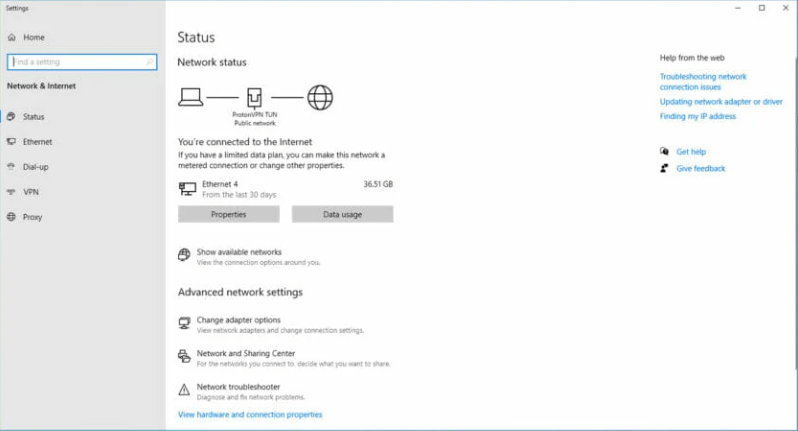
It becomes easy to apply the different fixes when users know the reasons behind the Wi-Fi issue. For example, some of the reasons that Wi-Fi keeps disconnecting on Windows 10 include:
- Damages router: Many times, it is observed that the Wi-Fi disconnection may be due to improper router placement. To start with, bringing the Wi-Fi router closer to the Windows 10 system is easy.
- Improper configuration of wireless adapter: The changes in the wireless adapter settings may cause Wi-Fi to work improperly. These can be channel frequency range detection, etc.
- Damaged drivers: The different drivers harness hardware and software power for multiple functionalities. Further, if the drivers are outdated, these may cause multiple Wi-Fi issues.
- Power management: Windows 10 is a leading operating system that aims to reduce power usage to improve battery life. These measures include automatically disabling different hardware, turning the Wi-Fi adapter off, etc.
- Wi-Fi sense: It is the in-built Windows 10 feature which aims to connect seamlessly with different Wi-Fi networks. However, it is observed that Wi-Fi sense may try to connect with different networks, which keeps disconnecting the existing connection.
Before starting the fixes:
It is crucial to take care of the few points before jumping to the solutions for Wi-Fi keeps disconnecting on Windows 10. These are:
- Accessing administrator account: It is essential to get administrator account access before performing different fixes related to Wi-Fi errors.
- Creating data backup: It is recommended to save all crucial data on an external drive before fixing the Wi-Fi disconnection error. Users can find the data backup in the “C:\Users” folder.
Quick fix for Wi-Fi Keeps Disconnecting on Windows 10
After the preparation, it is essential to know that all Wi-Fi disconnection errors need detailed solutions. Hence, the quick steps to solve the Wi-Fi keeps disconnecting on Windows 10 issue are:
- Restart the Wi-Fi router.
- Update the Wi-Fi adapter settings by downloading firmware drivers from the manufacturer’s website.
- Reach the internet service provider (ISP) to locate the connection area within the location.
Top Six Fixes for Wi-Fi Keeps Disconnecting on Windows 10
The top fixes for solving the Wi-Fi keeps disconnecting on Windows 10 problem are:
- Updating wireless drivers
The quick steps for updating the outdated drivers on Windows 10 system are:
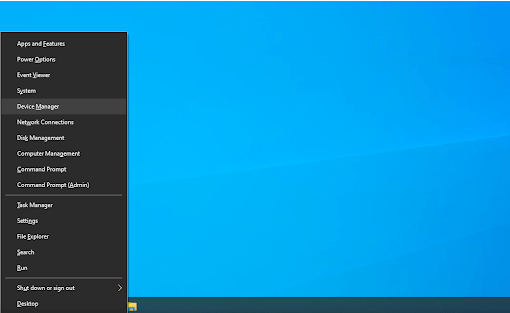
- Go to “Windows + X” and go to the “Device Manager” option.
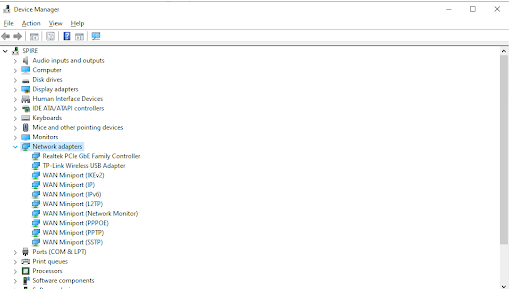
- Click on the “Network adapters” option.
- Go to the “Driver’ option.
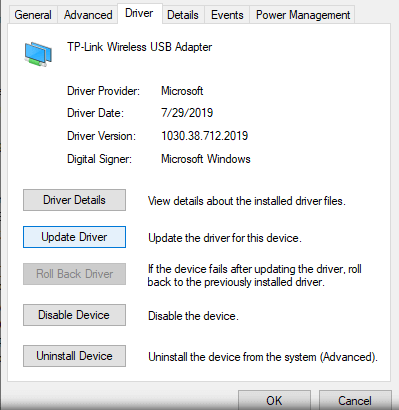
- Enable Windows 10 to search for the newest driver online or local computer.
- It is easy to restart the computer to install updated driver settings.
- Resetting the Wi-Fi AutoConfig service
The Wi-Fi disconnecting issue can be due to the unexpected behavior of the Wi-Fi AutoConfig service. The quick steps for resetting this service are:
- Go to “Windows + R” and type “services.msc” in the run menu. Press “OK.”
- Go to the WLAN AutoConfig and then go to the “Properties” menu.
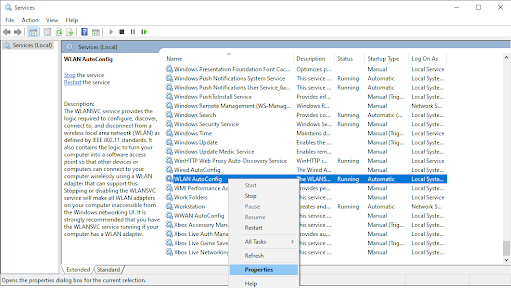
- Change the “Startup type” to “Automatic” and press “OK.”
- You can restart the system and check the changes.
- Running the network troubleshooter
It is easy to go through different Windows 10 troubleshooters to eliminate possible issues and bugs in the system. So, the quick steps to running the network troubleshooter are:
- Go to “Windows + R” and type “control” in the run menu. Press “OK.”
- Go to the “Troubleshooting” option in the control panel.
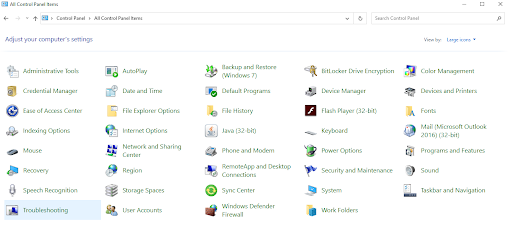
- Go to the “Network and Internet.”
- Go to “Network Adapter” and follow the on-screen instructions to repair detected errors.
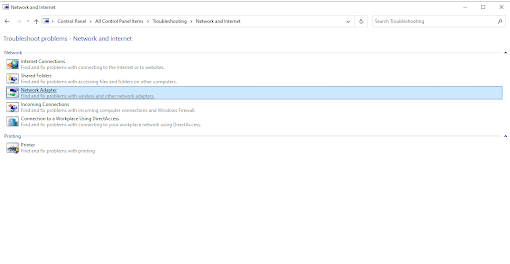
- Fixing power management settings
The power management settings may cause Wi-Fi disconnection on Windows 10 system. The quick steps to fix power management issues are:
- Go to “Windows + X” and open “Device Manager.”
- Expand the “Network Adapters” menu.
- Go to the “power management” menu and uncheck “allow the computer to turn off this device to save power.”
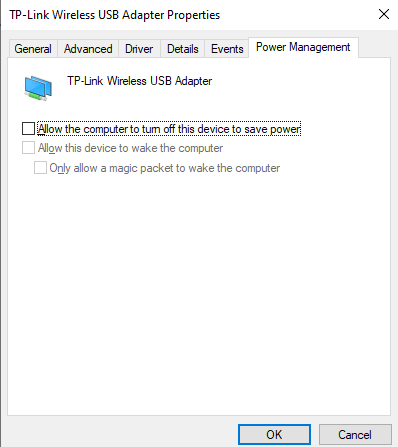
- Restart the Windows 10 device to check for modifications.
- Disabling Wi-Fi sense
Wi-Fi sense is one of the main issues when it comes to the Wi-Fi disconnecting error on Windows 10. The quick steps to manage Wi-Fi sense are:
- Go to “Windows + I” to open settings.
- Go to “Network and Internet” tile.
- Go to “Manage Wi-Fi settings” to find the current connection details.
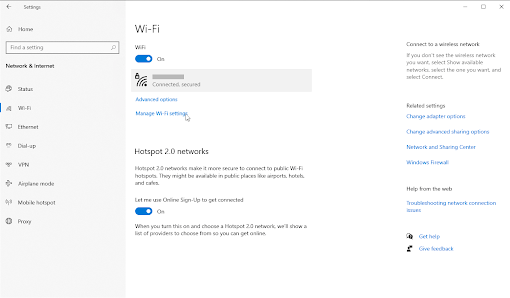
- Turn the “Wi-Fi Sense” off.
- Restart the computer to check the settings.
- Setting home network to private
The home network set to the public may cause a Wi-Fi disconnection error. The quick steps to set the home network to private are:
- Go to the “Network and Internet” icon.
- Select the Wi-Fi network connected to the system, followed by clicking on the “Properties” link.
- Go to the “Network profile” and make the connection to “Private” from “Public.”
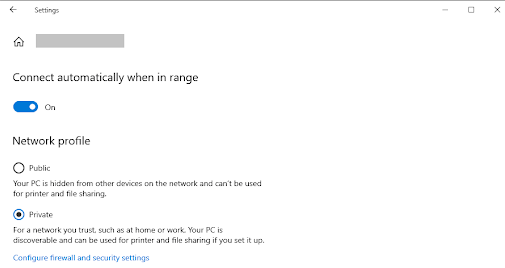
- Restart the system to check if the issue persists.
Wrapping Up:
Hence, no more confusion in solving the Wi-Fi that keeps disconnecting on Windows 10. It is easy to go through the key reasons, including router damages, bad Wireless adapter configuration, outdated drivers, weak power management, or Wi-Fi sense. It becomes smooth to apply the different fixes once the root cause is clear.
Users can start with a quick fix to solve Wi-Fi keeps disconnecting on Windows 10 and can go for detailed results if the issue persists. The common solutions are adjusting network and internet settings, disabling Wi-Fi sense, fixing power management errors, or running a network troubleshooter. Further, users can reset the Wi-FiConfig service or update wireless drivers. First, however, users must pay attention to creating data backup and accessing administrator accounts.
Dinesh Lakhwani
Author Bio:
Dinesh Lakhwani 

Dinesh Lakhwani, the entrepreneurial brain behind “TechCommuters,” achieved big things in the tech world. He started the company to make smart and user-friendly tech solutions. Thanks to his sharp thinking, focus on quality and the motto of never giving up, TechCommuters became a top player in the industry. His commitment to excellence has propelled the company to a leading position in the industry.
Popular Post
Recent Post

5 Best Data Recovery Software For Windows 11 and Windows 10
A crashed drive can ruin a whole day. One minute your photos, work files, and tax records sit safe on your PC. The next minute they are gone. A power cut, a bad update, or one wrong click can wipe out years of memories and months of work in seconds. That sinking feeling is why […]

How To Update NVIDIA Drivers On Windows 11/10 PC
Learn how to update NVIDIA drivers on Windows 11/10 with simple methods, safety tips, and easy steps for smoother gaming and better PC performance.

Top AI Features Hidden Inside Windows 11
Explore the top AI features in Windows 11, from Copilot to Recall, plus safety tips and simple steps to use each tool the right way.

Customize Your Screen Saver Settings in Windows [Easy Steps]
Learn how to customize screen saver settings in Windows 11 with easy steps, safety tips, and simple tricks to personalize your PC screen.

Driver Easy Windows Driver Updater Tool Review: Tried & Tested
In-depth information about Driver Easy’s functions and features can be found in our review. Learn how to update drivers more easily with this tool for a more seamless computer experience.

Is Avast Driver Updater Worth It? A Hands-On Analysis
A full review of Avast Driver Updater covering features, setup steps, pricing, pros and cons, and real PC results, to help you decide if it is worth buying.
IObit Driver Booster 13 (PRO) Review: [Tried & Tested]
IObit Driver Booster 13 is built for one purpose: keeping your PC drivers up to date. Well, yes! Outdated drivers can cause crashes, slowdowns, and hardware issues. This tool scans fast and updates with one click. The interface is simple. Even beginners can use it without confusion. Updates are pulled from a huge database, covering […]

Auslogics Driver Updater: A Detailed Walkthrough [2026]
This comprehensive review covers the key features, pros, and cons, pricing, and a final verdict on Auslogics’ driver update utility. Learn how it stacks up against manual driver maintenance.

5 Best Driver Updater Tools for Windows to Use (Free and Paid)
Introduction: Most people blame their PC for problems that a driver caused. A driver works like a bridge between your hardware and your operating system. When this bridge cracks, strange things start to happen. Screens flicker without reason. Printers go silent mid-task. Games freeze or crash out of nowhere. Manually finding the right driver is […]

