











Imagine this. You spend hours perfecting a video project. You hit save. Then your laptop freezes, reboots, and when the screen comes back. The file is gone. Your stomach sinks. It’s not just you. Lost files happen all the time. A dropped hard drive, a bad update, an accidental delete, or a corrupted partition can […]
Files Go by Google – Review
Google has been rolling out amazing applications since more than a decade. Apart from its search engine, it has been successful at developing and releasing numerous software programs and mobile applications that are effective and efficient. One of the latest additions to that list is none other than the Files Go.
Currently available for the Android platform, it’s a multi-purpose app that offers different types of file management features. Actually, it takes all the important aspects of file management under one platform and merges them to create a powerful app. To find out more about this android app, continue reading.
Features of Files Go
In this competitive tech world, an app must possess excellent set of features along with functionality and user-friendliness. So, here’s a look at the key features offered by this app.
App Cache Cleaner:
The basic yet primary functionality of this app is assisting you in cleaning temporary junk files. App cache is a major antagonist in slowing down your android device. You must get rid of such junk files regularly in order to keep up the performance of your device.
Although there are a lot of app cache cleaning apps for Android out there, this app from Google still stands out in performance. Unlike many other alternatives, this app lets you clean cache of all the apps in one instance. Just select the apps you want to clean cache and hit the button.
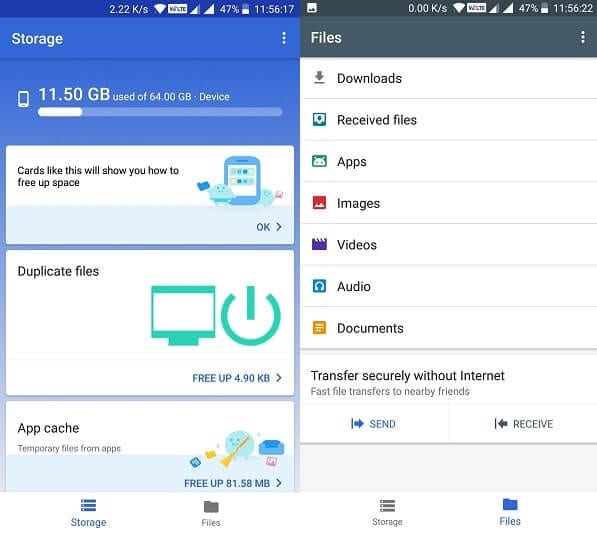
Duplicate File Remover:
Everyone knows that duplicate files are really troublesome for your smartphone. Sometimes they may end up in your android’s storage through accidental file copies, repeated downloads, and several other ways. Regardless of reason, duplicate files are very irritating, as they’re hard to find manually.
Furthermore, they eat up a lot of storage, slowing down your android’s performance as well. The duplicate file remover of Files Go is a great tool that lets you detect all the duplicate files and eventually deleting them. This feature also shows you the number of file versions of the same file on your android.

Huge File Remover:
There may be a few instances, where you may copy or download a large file onto your android and then forget about it. Such phenomena would simply create a storage problem, which eventually leads to poor performance of your android.
It’s better to delete any large files that you don’t really use regularly. This app regularly scans through your android and detects large files. It then intimates you about the scan results, so that you can take a decision of either deleting them or keeping them, if they’re important.
File Explorer:
It’s really frustrating if you don’t have a file explorer app in your smartphone. It could get quite difficult finding a file without a dedicated app for that. Usually, many android phones don’t come equipped with a file explorer app.
You need to download an effective app from the Play Store. But, you can get the file explorer feature from this app. Isn’t it great to have a file explorer app that also does several other things?! You can search through your files by different categories and filters.
File Sharer:
One more great feature offered by this app is, offline file sharer. You don’t need an internet connection to transfer files through this app. You can transfer files to nearby devices through WPA2 encrypted system, which is a very secure way. The file sharing feature of this app is superfast and secure. The speed of file transfers can go as high as 490 MBPS.

File Backups:
Finally, you can also backup your local files to cloud systems. You can either backup important files to your Google Drive or any other cloud storage account. This feature can help you keep your files safe and secure permanently on a cloud account.

Pros & Cons
Here’s a look at some of the pros and cons of this app from Google:
Pros:
- This app is very lightweight with just 9MB of file size.
- Very easy to use, one of the most user-friendly file management apps.
- Encrypted file sharing feature.
- A great file organizer for android, helping you maintain your device.
- Helps you boost up the performance of your android device.
Cons:
- The file manager feature of this app doesn’t allow you to copy or delete files.
Final Verdict
Files Go from Android is overall a great file management app, especially for the less tech savvy users. It is targeted mainly towards common users, empowering them with several file management options. It doesn’t really occupy a lot of space in your device, making it a small yet powerful app. Download this app from here and clean off the junk files off your android.
Dinesh Lakhwani
Author Bio:
Dinesh Lakhwani 

Dinesh Lakhwani, the entrepreneurial brain behind “TechCommuters,” achieved big things in the tech world. He started the company to make smart and user-friendly tech solutions. Thanks to his sharp thinking, focus on quality and the motto of never giving up, TechCommuters became a top player in the industry. His commitment to excellence has propelled the company to a leading position in the industry.
Popular Post
Recent Post

5 Best Data Recovery Software For Windows 11 and Windows 10
A crashed drive can ruin a whole day. One minute your photos, work files, and tax records sit safe on your PC. The next minute they are gone. A power cut, a bad update, or one wrong click can wipe out years of memories and months of work in seconds. That sinking feeling is why […]

How To Update NVIDIA Drivers On Windows 11/10 PC
Learn how to update NVIDIA drivers on Windows 11/10 with simple methods, safety tips, and easy steps for smoother gaming and better PC performance.

Top AI Features Hidden Inside Windows 11
Explore the top AI features in Windows 11, from Copilot to Recall, plus safety tips and simple steps to use each tool the right way.

Customize Your Screen Saver Settings in Windows [Easy Steps]
Learn how to customize screen saver settings in Windows 11 with easy steps, safety tips, and simple tricks to personalize your PC screen.
Driver Easy Windows Driver Updater Tool Review: Tried & Tested
In-depth information about Driver Easy’s functions and features can be found in our review. Learn how to update drivers more easily with this tool for a more seamless computer experience.
Is Avast Driver Updater Worth It? A Hands-On Analysis
A full review of Avast Driver Updater covering features, setup steps, pricing, pros and cons, and real PC results, to help you decide if it is worth buying.
IObit Driver Booster 13 (PRO) Review: [Tried & Tested]
IObit Driver Booster 13 is built for one purpose: keeping your PC drivers up to date. Well, yes! Outdated drivers can cause crashes, slowdowns, and hardware issues. This tool scans fast and updates with one click. The interface is simple. Even beginners can use it without confusion. Updates are pulled from a huge database, covering […]

Auslogics Driver Updater: A Detailed Walkthrough [2026]
This comprehensive review covers the key features, pros, and cons, pricing, and a final verdict on Auslogics’ driver update utility. Learn how it stacks up against manual driver maintenance.

5 Best Driver Updater Tools for Windows to Use (Free and Paid)
Introduction: Most people blame their PC for problems that a driver caused. A driver works like a bridge between your hardware and your operating system. When this bridge cracks, strange things start to happen. Screens flicker without reason. Printers go silent mid-task. Games freeze or crash out of nowhere. Manually finding the right driver is […]

