10 Best Screen Mirror Apps Android to TV & PC in 2026

Last updated on December 28th, 2025 at 9:54 am
Android is the most prevalent operating system for mobile phones, TVs, and other devices. The functionality and compatibility provided by the Android platform have encouraged app developers to create kinetic and proactive apps for far and widespread Android users.
If you want to share the screen of your Android phone on your TV or PC, you have to get an app to mirror screen from the Google Play Store. To cast an Android screen, a plethora of screen mirroring apps are available to cast phone to PC or cast mobile to TV. If you are looking for the best screen mirror apps for Android, you can try downloading any of the following top 10 apps.
Advanced Tips: Make the Most of Screen Mirror Apps
Screen mirroring isn’t just about duplicating your phone screen. When used strategically, these apps can enhance productivity, improve presentations, and even elevate your entertainment experience. To get the most out of them, users should explore advanced settings and features that go beyond basic casting.
- Use a high-speed 5GHz Wi-Fi network to reduce lag and improve video quality.
- Enable low-latency or game mode for smoother gameplay and real-time responsiveness.
- Try multi-device mirroring if your app supports it, especially for collaborative work.
- Record your screen to create tutorials, demos, or save gameplay sessions.
- Secure your connection with PIN codes or encrypted links to prevent unauthorized access.
- Sync audio properly using Bluetooth or app settings to avoid delays.
- Explore integrations with apps like Zoom, PowerPoint, or Google Meet for professional use.
- Use annotation tools to highlight or draw during presentations or teaching sessions.
Comparison Table: Top 5 Screen Mirror Apps for Android to TV & PC
Selecting the ideal screen mirroring app hinges on how you plan to use it—be it for relaxed media viewing, delivering polished presentations, or enhancing classroom engagement. Below is a comparison of five top-rated apps to help you find the one that aligns with your needs.
| App | Platforms Supported | Key Features | Pros | Cons |
| ApowerMirror | Android, iOS, Windows, Mac | Screen recording, multi-device mirroring | High-quality resolution, keyboard sync | High battery usage, installs Bonjour |
| Miracast | Android, Windows | Wireless display, easy setup | Free, simple interface | Limited device compatibility |
| Mirroring360 Sender Basic | Android, PC, Mac, Fire TV | App/game casting, presentation support | Easy to use, screen recording | Paid after trial, Android 5.0+ only |
| Screen Mirroring for Roku | Android, Roku devices | Cast to Roku TV, no config needed | Great compatibility, easy setup | No sound support, Android 5.0+ only |
| EZMira | Android, MiraScreen, AnyCast | Simplified casting, high compatibility | Free, intuitive interface | Limited advanced features |
Top 10 Screen Mirror Apps for Android to TV and PC in 2026
Whether you want to watch a movie on the big screen or present an annual budget report in front of the board members, you can download screen mirror apps for numerous purposes. Android users can cast an Android screen with the help of the following apps –
1. ApowerMirror

ApowerMirror is a powerful app for screen mirroring on Android, iOS, and Windows platforms. This is quite a popular screen mirroring tool with some new and advanced features. From pin code cast from phone to TV and PC to enhanced user experience, it is a very useful and free screen mirroring tool.
Features
- The advanced PC screen sharing feature can sync the screen of PC and TV via PIN code connection so that PPT, Word, and other files can be effortlessly viewed on the big screen.
- Multiple devices can be mirrored together through ApowerMirror.
- It can be a phone screen recorder that can seamlessly record all your phone activities.
- While screen mirroring, you can reply to your Facebook, Twitter, and other social media messages through keyboard syncing.
- It shows your Android phone notifications on your PC or TV.
Pros
- It comes with screen recording, controlling, and screenshot-taking features.
- PC screen mirroring is a high resolution that can be further modified.
- One-click screen mirroring activation.
Cons
- Too much battery
consumption. - It installs
third-party software named Bonjour, which constantly runs in the background.
2. Miracast

It is a wireless display screen mirror app for Android, iOS, and Windows platforms. Miracast casts an Android screen to smart TVs and wireless adapters for a better view. It is a free cast phone to TV app available on the Google Play Store for download.
Features
- Cast the Android screen on the smart TV screen – if your TV supports the app.
- Find devices support show screencast in the current wifi network.
- It is very easy to set up the app and sync it with your TV.
Pros
- It can be easily
downloaded using the WPS. - It is a
cost-effective solution. - It is very easy
to use.
Cons
- You need a Wifi
network to use the app. - It doesn’t
connect with all the devices.
3. Mirroring360 Sender Basic

Mirroring360 casts your Android screen over Amazon Fire TV, Fire TV Stick, Windows PC, Mac, and all other Android devices. One of the promising features of the app is that it can screen apps and games exactly the way you are viewing on your phone screen. It is compatible with PC to PC, Mac, and Android. Initially, the app is free, but later on, you have to pay $9.99.
Features
- You can show your business presentations on the big screen.
- For teaching purposes, it is a perfect app.
- Apps and games can be shared and recorded through the app.
- You can easily share photos, videos, or other formats of multimedia files instantly.
Pros
- It is easy to operate
the app. - It can connect
with multiple devices. - It can record
phone screens.
Cons
- Android 5.0 or above support is required.
- It is free for a limited period only.
4. Screen Mirroring for Roku

Screen Mirroring is a dynamic screen mirror app for Android and Roku users. As compared to the in-built Roku screen mirror software Miracast, it is an easier and smoother solution. You can easily cast mobile to TV with this app. It is compatible with Roku Stick, Roku Box, Roku TV, and all other Roku devices. You can effortlessly share websites, presentations, photos, and other files with the app.
Features
- Without changing
Wifi or mobile settings, you can configure this app. - When your Android
phones and Roku devices are connected to the same Wifi network, the app
performs better. - It is compatible
with all the Android and Roku devices.
Pros
- Super easy to set
up without any configuration. - Compatibility is
very good.
Cons
- The sound is not
yet supported. - Works with
Android 5.0 or above only.
5. EZMira

EZMira is an advanced cast Android screen software available under the flagship of MiraScreen and AnyCast. This app has simplified the process of mirroring the Android screen on the big screen for better and improved vision. It is a free and highly compatible app with plenty of features.
Features
- One-click screen sharing with Miracast or Smart View.
- Quick syncing by scanning a QR code or Bluetooth connectivity.
- It can easily cast content from popular websites like YouTube, Facebook, Netflix, Dailymotion, and others.
- It supports DLNA for better viewing and multitasking on the phone while screen mirroring.
Pros
- Easy to set up.
- Quick to connect.
- Let you
multitask.
Cons
- You have to share
the screen via Miracast for better results. - It is a Wifi
display app.
6. AnyCast

It is a screen mirror app android to TV which can transfer your phone to your TV. This is a free and popular Android screen mirroring app with multiple features. The app mainly supports 3GP and MP4 format videos.
Features
- You can directly cast your favorite movies, photos, and social media videos on your big TV.
- Facebook posts can be viewed on your TV.
- You can easily share, organize, and view your photo and video gallery.
- You can add videos and music tracks to the queue.
Pros
- It is a free
screen mirroring solution. - Very powerful to
watch videos, images, and music on the big screen.
Cons
- Limited features.
- Come with ads.
7. TeamViewer QuickSupport
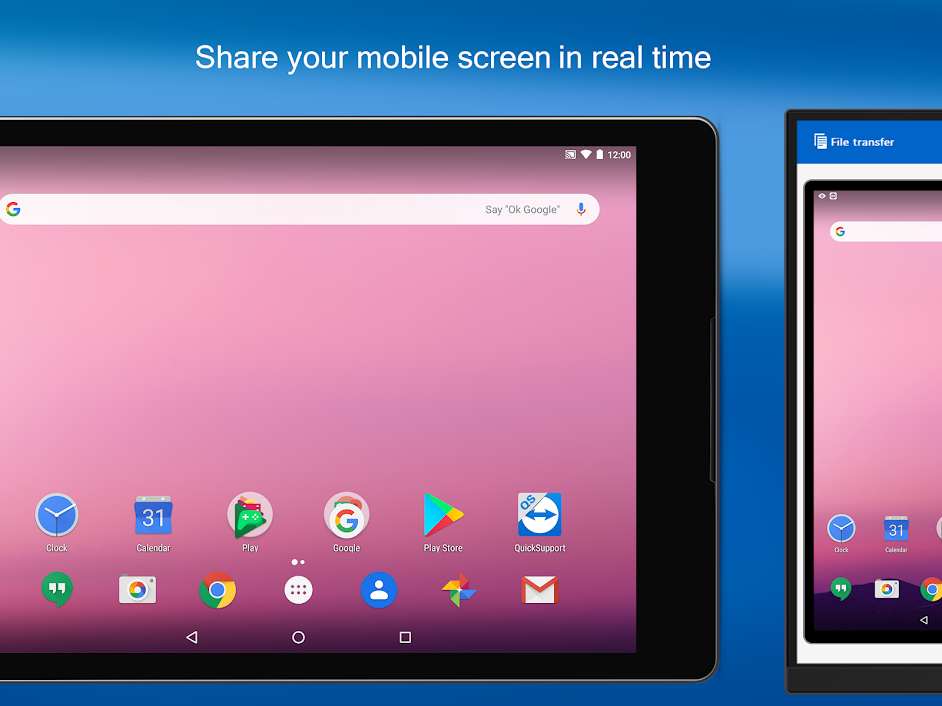
TeamViewer is an incredible cast from mobile to TV with advanced remote technology. You can remotely control your gadgets with the app. It is a fast, secure, and easy way to establish remote access among Windows, Mac OS, and Linux devices.
Features
- It is a complete remote-sharing solution.
- Comes with initiative, touch, and gestures.
- Files can be transferred both ways.
- It is stacked with the latest security technologies such as 256 Bit AES Session Encoding, and 2048 Bit RSA Key Exchange.
- You can chat through this app.
Pros
- Easy to install
with TeamViewer QuickSupport ID. - It is a highly
secure app.
Cons
- You have to sit
in front of the gadgets to establish a remote connection.
8. Vysor

Vysor is a cast phone to PC app; you can export your Android phone screen to your desktop and easily use apps, play games, and perform other activities with the help of a mouse and keyboard. You can use Vysor Share to set up device farms and remotely debug and test your applications across a wide range of devices. This free and compatible app is loaded with numerous features.
Features
- You can easily debug your Android devices by casting on the desktop.
- Vysor can be utilized without any emulator.
- For wireless connectivity, it is a good app.
Pros
- Easily debug your Android devices.
- Application testing is simplified.
Cons
- ADB driver is
required for the Windows platform. - Comes with ads.
9. AirDroid

This app helps in sharing your Android phone screen over Windows, iOS, MAC, or Linux devices for free. With AirDroid, you can cast the Android screen to your big TV and enjoy all the calls, messages, and other app notifications directly on it.
Features
- You can transfer all kinds of audio and video files with this app.
- Complete remote access control can be established across multiple platforms.
- Notifications can be mirrored from numerous apps.
- Web users have the facility to locate their lost phones.
Pros
- Works well with
all the leading platforms. - Notification
mirroring and remote control are amazing.
Cons
- One-way audio is only available.
10. Screen Stream Mirroring – No Longer on the Google Play Store

Screen Stream Mirroring is a complete screen mirror app for Android to TV or PC. You can share your Android screen in real-time through a media player, web browser, Chromecast, and UPnP / DLNA devices. The basic version of the app is free, but for the pro version, you have to pay $9.
Features
- Screen mirroring with multiple media tools is possible.
- You can broadcast on Twitch, YouTube games, and Facebook live.
- Chromecast features are built-in.
- Compatible with Network Tethering.
Pros
- Highly
functional. - Easy to use.
Cons
- The free version
has limited features.
Conclusion
Screen mirroring apps are more than just tools—they’re gateways to seamless connectivity. Whether you’re casting for fun or work, the right app makes all the difference.
Each app has its strengths. Some excel in simplicity, others in advanced features. Choose based on your device, purpose, and comfort level.
As we move into 2026, expect smarter mirroring, better integration, and smoother performance across platforms.
FAQs
1. Can I mirror my Android screen without Wi-Fi?
Yes, apps like Miracast use Wi-Fi Direct, allowing you to mirror without a shared network. However, for the best results, a stable Wi-Fi connection is recommended.
2. Why is there a delay when I mirror my screen?
Lag usually comes from weak Wi-Fi, older devices, or app limitations. Switching to a 5GHz network and using low-latency settings can help reduce delay significantly.
3. Is screen mirroring safe for sensitive content?
Generally, yes. Most apps offer encrypted connections or PIN-based access. Avoid public networks and always review app permissions to ensure your data stays secure.
Author Bio:
Dinesh Lakhwani 

Dinesh Lakhwani, the entrepreneurial brain behind “TechCommuters,” achieved big things in the tech world. He started the company to make smart and user-friendly tech solutions. Thanks to his sharp thinking, focus on quality and the motto of never giving up, TechCommuters became a top player in the industry. His commitment to excellence has propelled the company to a leading position in the industry.
Popular Post


Recent Post

How to Fix Widgets not Working on Windows 11 (8 Solutions)
Windows 11 has brought many new and graphic-intense features for Microsoft users. Widgets is one of the best and most talked about Windows 11 features for both good and bad purposes. Windows 11 Widgets are extremely useful to access different information like weather, sports, photos, and news. In fact, Windows 11 has divided the Widgets […]

Gmail Not Syncing With Outlook (How To Fix)
When your company can utilize Microsoft products such as Outlook but also choose to use Gmail, there is no better option than to sync both. Are you facing difficulties in conducting Gmail and Outlook synchronization? Or, do you face the “Outlook 365 not syncing with Gmail” issue? You may experience difficulties synchronizing some or all […]

10 Best Wi-Fi Analyzer Apps for Mac
Comparison table of top five Wi-Fi analyzer apps for Mac Sr. No. Name of product Compatibility Pricing 1 Wi-Fi Scanner MacOS 10.7 and later 19.99USD 2 KisMac MacOS 10.6 and later Free 3 Mac Wireless Diagnostics Tool MacOS 10.14 and later Free 4 Wi-Fi Explorer Pro 3 MacOS 10.13 and later 19.99USD 5 Homedale MacOS […]

How to Remove Watermark from Photo
A watermark is a symbol or signature that is imprinted on an image. These are often translucent and do not hinder the viewers from enjoying the photo. Watermarking photographs can help safeguard the owner’s copyright by preventing others from using the image without consent. If you are looking for the appropriate approach for how to […]

10 Best Free VR Games 2026 for Windows 10/11
Virtual reality gaming has reached new heights in 2026. More people can now enjoy amazing VR experiences without spending money on games. Free VR games offer the same thrills as paid ones. They let you explore new worlds and have fun adventures. 2026 is one of the best times to be a VR gamer, and […]
Reasons To Choose Azure In 2026: Everything You Need To Know
Throughout the digital transformation, businesses have been encompassing the most revolutionary paces. Every sector and industry has tapped into the power of cloud and remote storage options for their business resources. In other words, businesses have chosen centralized and more holistic business solutions that cover up their entire data resources no matter the number of […]

Top 10 Software to Scan Documents In 2026 [Complete Guide]
Scanning documents is now part of daily life. People use it to save papers, share files, and stay organized. Whether you work in an office, run a business, or study at school, scanning helps you keep things neat and easy to find. In 2026 , scanning software have become smarter. It can read text from […]

10 Best Free & Paid YouTube Intro Maker
Social networks and video streaming services enhance the video content on the internet. With customers spending their maximum hours viewing YouTube videos every day, the marketplace is becoming more competitive. Therefore, YouTube producers require all the assistance to stand forth in the market. This is where a highly produced video introduction can make a huge […]

10 Best Download Manager for Windows 11
Downloading files on your Windows 11 system is one of the common functions for different users. Hence, many people look for dedicated download manager software for Windows 11 that facilitates error-free and quick downloads. While all Windows 11 browsers come with an in-built download manager, not all are as effective as they are marketed to […]

How To Check Screen Time On android?
Digital Well-being is an essential health aspect that you need to take care of. It is very important to understand that mobile phones should not be used so much that it becomes a threat to your social life. Additionally, with several applications that are interesting, you could get addicted to using your mobile. However, to […]

