











Imagine this. You spend hours perfecting a video project. You hit save. Then your laptop freezes, reboots, and when the screen comes back. The file is gone. Your stomach sinks. It’s not just you. Lost files happen all the time. A dropped hard drive, a bad update, an accidental delete, or a corrupted partition can […]
Top 10 Security Camera Apps for iPhone: With Comparison
iPhone apps for security cameras could be a useful addition to your device if you want to keep an eye on your loved ones. These smart apps help you monitor, record videos, watch live streaming, share videos, and more. Here, we have listed the best home security camera apps for iPhones.
How To Choose a Security Camera App for iPhone: Key Points To Remember:
Well, take into account the following important factors when choosing an iPhone app for security camera:
- Interface for Users: Seek out an app with an intuitive and user-friendly UI.
- Features: Consider features like two-way audio, online storage, motion detection, and live streaming.
- Motion Detection: Seek out applications that offer sophisticated motion detection capabilities, like notifications and alarms.
- Two-Way Audio: To communicate with guests or intruders, take into account applications that provide two-way audio communication.
- Cloud Storage: To record and store video footage, and see if the software has cloud storage choices.
- Compatibility: Verify that the software works with the security cameras you currently have or that it can convert your old iPhone into a camera.
- Pricing: Check for the app’s trial duration and free version, as well as the monthly fees for its premium features.
- Security: To safeguard your data, look for encryption and privacy rules.
Comparison Table: Top 5 Apps
| App Name | Compatibility | Video Quality | Motion Detection | Two-Way Audio | Cloud Storage |
|---|---|---|---|---|---|
| Alfred Home Security Camera | iOS 8+ | 1080p | Yes. | Yes | Yes |
| Alarm.com | iOS 12+ | 1080p | Yes | Yes | Yes |
| Cloud Baby Monitor | iOS 9+ | 720p | Yes | Yes | No |
| Presence Video Security Camera | iOS 8+ | 720p | Yes | No | Yes |
| Pet Monitor VIGI | iOS 9+ | 1080p | Yes | Yes | Yes |
10 Best iPhone Apps For Security Cameras
1. At-home Camera Pro: Monitor
Device Compatibility: Requires iOS 9.0 or later.
Ratings: 3.0
Price: Free, In-app purchases start from $1.99

With the help of the creative app AtHome Camera, users can transform their extra cell phones into top-notch security cameras. It provides a full range of functions to meet the security requirements of both homes and businesses. With its versatility and user-friendliness, the AtHome Camera is a great option for consumers wishing to turn outdated electronics into useful security gadgets.
Features of AtHome Camera:
- It offers two-way audio communication that lets users listen & talk through the camera.
- Improved vision in low light levels makes round-the-clock monitoring possible.
- The camera security app sends instant alerts if motion is detected, ensuring users can take timely action.
- It provides remote access capabilities, that let you use your tablet or smartphone to keep an eye on your property from anywhere.
PROS:
- Adaptable as a general security camera, pet cam, or baby monitor.
- An easy-to-use interface simplifies setup and operation.
- Allows for complete coverage by supporting a variety of devices.
CONS:
- To fully utilize certain services, a membership may be necessary.
- Depending on the device being used, performance can change.
2. Manything
Device Compatibility: Requires iOS 8.0 or later.
Ratings: 3.1
Price: Free, In-app purchases start from $3.99

Manything is a robust program that offers cloud recording capabilities and lets users stream live video from outdated cell phones. This application is especially well-liked by people who wish to make efficient use of their underused devices. For tech-savvy customers who want to use their current devices to create a personalized surveillance system, Manything is perfect.
ManyThing is a great choice for anyone searching for an affordable and dependable home security system because of its strong features and easy-to-use interface.
Features of Manything:
- Users get the ability to broadcast live video directly from their respective devices.
- When motion is detected, the app instantly notifies users, guaranteeing prompt reactions to any possible incursions.
- Users may easily view and back up recorded video by storing it on the cloud.
- It supports multiple monitor locations simultaneously by connecting several devices.
- Supports effortless navigation experience, so that every kind of user can access the application at their convenience.
PROS:
- Easy setup procedure.
- Great for do-it-yourself home security systems with outdated smartphones.
- Offers dependable performance and video quality.
- Dependable system for motion sensing and warning.
CONS:
- Advanced functionalities require premium upgrades.
- Occasionally, some customers complain about connectivity problems.
ALT NAME: Best_Security_Camera_App_JPEG.2
ALT TEXT:
3. WardenCam
Device Compatibility: Requires iOS 8.0 or later.
Ratings: 4.0
Price: Free

A feature-rich and reasonably priced program called WardenCam was created to turn your outdated iPhones into fully functional security cameras. The software is a great option for home and small office security because it includes cutting-edge features like motion detection, two-way audio, and cloud storage.
For people looking for an easy and reasonably priced approach to keep an eye on their surroundings, WardenCam is a good option. Despite certain drawbacks when compared to specialized security systems, many users find it to be an appealing alternative due to its simplicity of use and free basic functionality.
Features of WardenCam:
- Detects movements using sophisticated algorithms and instantly notifies your smartphone.
- Ensures clear visibility in low-light or nighttime conditions.
- Enables smooth communication through your security camera by supporting two-way audio.
- Allows for the monitoring of numerous places from a single account on multiple devices.
- Offers continuous video recording and 24-hour surveillance.
PROS:
- Easy-to-use & budget-friendly app.
- Supports cloud storage integration.
- Works seamlessly across iPhone & other smart devices.
CONS:
- The free version includes ads.
- Required stable Wi-Fi connection for smooth performance.
ALT NAME: Best_Security_Camera_App_JPEG.3
ALT TEXT:
4. Camy – Live Video Monitoring
Device Compatibility: Requires iOS 13.0 or later.
Ratings: 4.6
Price: Free, In-app purchases start from $2.49

Camy is another popular live video monitoring available for homes, workplaces, or any other location you want to secure with the help of the robust and intuitive UI. The app, which was created with contemporary surveillance requirements in mind, enables users to turn their iPhones or other smart devices into top-notch security cameras.
Camy is excellent at providing safe cloud storage for recorded video, motion detection alerts, and real-time monitoring. Both novices and experts looking for strong security solutions will benefit from its feature-rich interface and easy-to-use design.
Features of Camy – Live Video Monitoring:
- Enables interaction via the device in real-time.
- Watch your cameras’ live feeds in high definition.
- Instant notifications are triggered by motion detection enabled by advanced AI.
- Allows users to connect and keep an eye on several devices using a single account.
- Even in low light, clear video surveillance is possible thanks to built-in night vision capabilities.
PROS:
- Cost-effective and user-friendly interface.
- Provides comprehensive monitoring solution.
- Enhanced privacy and security to prevent unauthorized access.
CONS:
- Limited free functionalities.
- Relies heavily on Internet connection.
ALT NAME: Best_Security_Camera_App_JPEG.4
ALT TEXT:
5. YI Home
Device Compatibility: Requires iOS 12.0 or later.
Ratings: 4.5
Price: Free, In-app purchases start from $4.99

The YI Home Camera security app is a nifty, stealthy indoor security camera with night vision, motion detection, and live streaming features. It is renowned for its user-friendly mobile app and simplicity of setup. For the majority of customers, it successfully serves as a basic home security camera, although possibly lacking some of the more sophisticated functions available in more costly models. For consumers on a tight budget who require rudimentary home security capabilities, the YI Home Camera is a good option.
Features of YI Home:
- It holds the capability to record 1080p video that is crisp and detailed.
- Thanks to its solid capabilities of night vision it’s possible to see clearly in dim light.
- Sends constant notifications and alerts your phone when it detects motion.
- Enables you to talk to individuals in your house with two-way audio communication.
- Keeps your recordings in cloud storage (membership required).
- MicroSD cards are supported for local storage.
PROS:
- Supports high-quality video feeds suitable for detailed surveillance.
- It provides a user-friendly setup process with quick installation.
- Can easily adapt to various monitoring needs.
CONS:
- Cloud storage may be limited.
ALT NAME: Best_Security_Camera_App_JPEG.5
ALT TEXT:
6. Alfred Home Security Camera
Device Compatibility: Requires iOS 8.0 or later
Ratings: 4.7
Price: Free, Offers in-app purchases
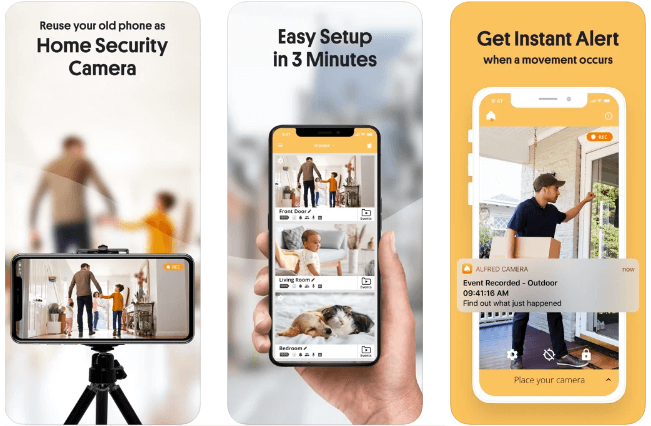
Alfred Home iOS apps for security camera works seamlessly on iPhone, iPad, and iPod touch devices. This highly-rated app on the App Store is available for free. You can check in-app purchases to explore more features of the app. This powerful security camera app is trusted by millions of users around the world. If you are thinking of home security, then you should try this app. It works as a portable video monitor that works anytime anywhere. This app is super easy to set up and use.
Features of Alfred Home Security Camera
- It offers high-quality 24/7 video streaming anytime anywhere.
- It is supported by a smart intruder alert to keep you up to date about all activities.
- You can playback, download, and share your video footage anytime with unlimited cloud storage.
- It offers a low-light filter for night vigilance.
- It supports the Walkie-Talkie option.
Pros
- Feature-loaded app for complete home security
- Supports even the old iOS versions
Cons
- Expensive in-app purchases
7. Alarm.com
Device Compatibility: Requires iOS 12.0 or later
Ratings: 4.7
Price: Free
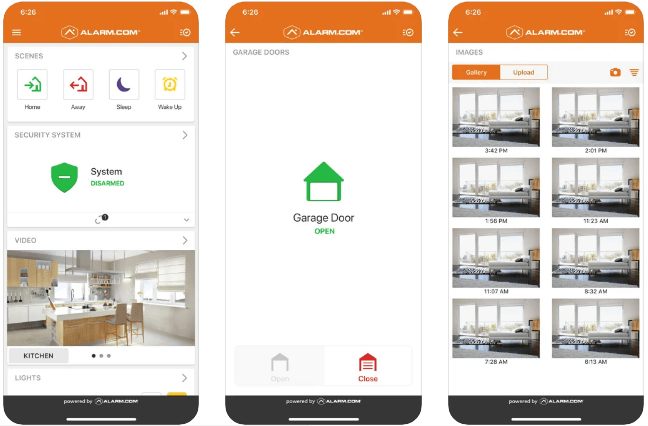
It works well on iPhone, iPad, Apple TV, and Apple Watch and supports multiple language options. It helps you keep your home or business connected 24/7 for better vigilance & security. The smart technology of the app helps you connect your locks, security, video cameras, lights, and more into a single system. It is an essential app you should download on your iOS device to stay protected from crime, fire, carbon monoxide, and even water damage. You can try Alarm.com to control your entire property remotely from a single screen.
Features of Alarm.com
- Arm or disarm your security panel across multiple locations.
- It sends you quick alerts for all unexpected activities under the surveillance area.
- You can talk to visitors through the doorbell camera and unlock the door if needed.
- You can customize your video alerts to see specific activity only.
- Use scene commands to activate multiple devices with one touch.
Pros
- It is supported by intelligent
alerts and live video feeds to offer complete security.
Cons
- Some users have noticed it
works only when connected to home Wi-Fi.
8. Cloud Baby Monitor
Device Compatibility: Requires iOS 9.0 or later
Ratings: 4.8
Price: $4.99
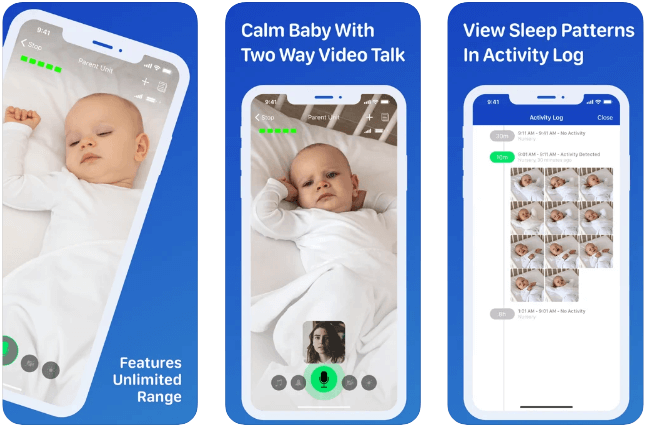
If you want to keep an eye on your little one, then download this smart security camera app for iOS. It is one of the best apps available on the market and is a highly satisfied user base around the world with 4.8 ratings on the App Store. With unlimited range (Wi-Fi, 3G, LTE, and Bluetooth), it offers high-quality video and audio feeds. It is featured by all leading publications around the world and listed as the best baby security app. It works well on all iOS and devices and a Mac version is also available.
Features of Cloud Baby Monitor
- It supports super-sensitive audio for better audio feeds.
- It supports noise and motion alerts.
- You can talk to a baby with live video and audio chat.
- It offers multi-parent and multi-child features.
- Battery status monitoring and alert.
Pros
- Super sensitive audio, noise & motion alerts are some of the best features that make it the best app to download.
Cons
- Minor bugs & fixes
9. Presence Video Security Camera
Device Compatibility: Requires iOS 8.0 or later
Ratings: 4.6
Price: Free, Offers in-app purchases
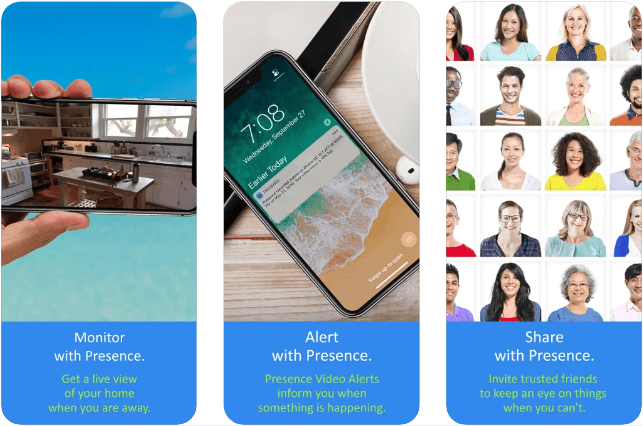
Monitor, alert, share, and protect with this advanced security camera app for iOS. You can try this powerful app to monitor activities on your iPad and iPhone devices. It allows you to have two-way communication with your pets and loved ones. You can remotely switch between front and back cameras easily on this app. For better security, it offers encrypted cloud storage. You can access these videos easily anytime anywhere.
Features of Presence Video Security Camera
- You can turn on the camera flash remotely for improved visibility.
- It offers encrypted cloud storage to store all your video recordings.
- It supports on-demand video recording.
- You are alerted by email, and in-app PR through push notifications for unexpected activities.
- It supports multiple viewers connecting to a single camera simultaneously.
Pros
- It offers tons of features to
provide complete vigilance.
Cons
- Expensive Pro plans
10. Pet Monitor VIGI
Device Compatibility: Requires iOS 9.0 or later
Ratings: 4.8
Price: $4.99
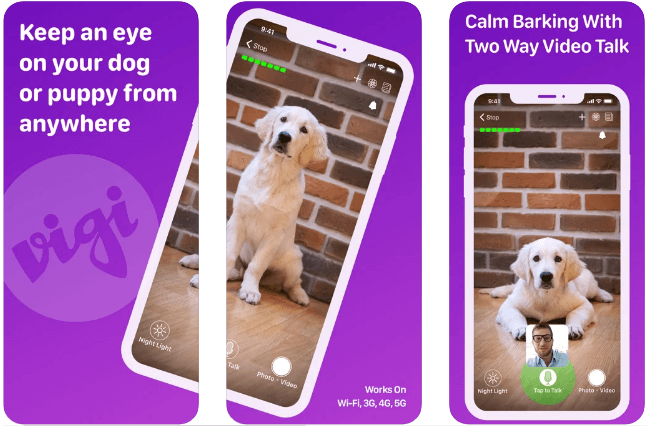
This smart security app for iPhone is designed to keep an eye on your pet. It works as an active dog camera and activity monitor for your device. It supports noise and motion notifications to let you know when your dog is barking, howling, or suffering from separation anxiety. You can talk to your dog remotely to say hello or continue training. You can watch live streaming or recorded videos of your pet’s activities.
Features of Pet Monitor VIGI
- Two-way audio & video chat
- Motion and sound alerts with automated photo snapshots
- Zoom in on live video
- Remotely controllable night light
- Support for Apple Watch notifications
Pros
- It has all the necessary features including noise and motion alerts for better security when watching your pet.
Cons
- It is limited to pet activity
watching.
Conclusion
Selecting the appropriate security camera app is essential to guarantee the safety of your house or place of business. By repurposing current gadgets, these apps offer convenience and peace of mind, saving you money on specialised security systems.
Alfred Home Security Camera is the best solution overall, according to a thorough analysis of the available options. For the majority of customers, it is a dependable and adaptable option because of its extensive capabilities, which include live video streaming, motion detection, and two-way audio, as well as its user-friendly interface and reasonable price.
From the standpoint of a writer, the decision ultimately comes down to your particular needs.
TechCommuter’s Recommendation:
For General Use: Alfred Home Security Camera
For Pet Monitoring: Pet Monitor VIGI
For Baby Monitoring: Cloud Baby Monitor
PEOPLE ALSO ASK:
Q1. Are iPhone security camera apps free?
A1. Basic versions of the majority of security camera applications are available for free, however, subscriptions are typically needed for more advanced capabilities.
Q2. Is it possible to turn my old iPhone into a security camera?
A2. Yes, you can turn outdated iPhones into security cameras with applications like Alfred and Presence.
Q3. What is the best pet tracking app?
A3. With features like motion alerts and two-way audio, Pet Monitor VIGI is a great option.
Q4. Are these apps safe to use?
A4. Although the majority of trustworthy applications have strong privacy policies and encryption, you should constantly evaluate each app’s privacy settings and reviews.
Q5. Are these apps subscription-based?
A5. While some programs may need a subscription to work fully, others offer free versions with restricted features.
Author Bio:
Dinesh Lakhwani 

Dinesh Lakhwani, the entrepreneurial brain behind “TechCommuters,” achieved big things in the tech world. He started the company to make smart and user-friendly tech solutions. Thanks to his sharp thinking, focus on quality and the motto of never giving up, TechCommuters became a top player in the industry. His commitment to excellence has propelled the company to a leading position in the industry.
Popular Post
Recent Post

5 Best Data Recovery Software For Windows 11 and Windows 10
A crashed drive can ruin a whole day. One minute your photos, work files, and tax records sit safe on your PC. The next minute they are gone. A power cut, a bad update, or one wrong click can wipe out years of memories and months of work in seconds. That sinking feeling is why […]

How To Update NVIDIA Drivers On Windows 11/10 PC
Learn how to update NVIDIA drivers on Windows 11/10 with simple methods, safety tips, and easy steps for smoother gaming and better PC performance.

Top AI Features Hidden Inside Windows 11
Explore the top AI features in Windows 11, from Copilot to Recall, plus safety tips and simple steps to use each tool the right way.

Customize Your Screen Saver Settings in Windows [Easy Steps]
Learn how to customize screen saver settings in Windows 11 with easy steps, safety tips, and simple tricks to personalize your PC screen.
Driver Easy Windows Driver Updater Tool Review: Tried & Tested
In-depth information about Driver Easy’s functions and features can be found in our review. Learn how to update drivers more easily with this tool for a more seamless computer experience.
Is Avast Driver Updater Worth It? A Hands-On Analysis
A full review of Avast Driver Updater covering features, setup steps, pricing, pros and cons, and real PC results, to help you decide if it is worth buying.
IObit Driver Booster 13 (PRO) Review: [Tried & Tested]
IObit Driver Booster 13 is built for one purpose: keeping your PC drivers up to date. Well, yes! Outdated drivers can cause crashes, slowdowns, and hardware issues. This tool scans fast and updates with one click. The interface is simple. Even beginners can use it without confusion. Updates are pulled from a huge database, covering […]

Auslogics Driver Updater: A Detailed Walkthrough [2026]
This comprehensive review covers the key features, pros, and cons, pricing, and a final verdict on Auslogics’ driver update utility. Learn how it stacks up against manual driver maintenance.

5 Best Driver Updater Tools for Windows to Use (Free and Paid)
Introduction: Most people blame their PC for problems that a driver caused. A driver works like a bridge between your hardware and your operating system. When this bridge cracks, strange things start to happen. Screens flicker without reason. Printers go silent mid-task. Games freeze or crash out of nowhere. Manually finding the right driver is […]

