












Read my honest Wise Duplicate Finder review. See features, pricing, pros and cons, and real PC test results. Find out if this free duplicate cleaner can free up your Windows storage.
Top 10 Bass Booster & Equalizer for Android
Smartphones are the hub of our audio life. Whether you stream podcasts, play games, or listen to music, the right sound quality changes the experience. For Android users, bass boosters and equalizers fine-tune how audio is delivered, helping genres like hip-hop, EDM, and rock feel more alive.
This guide covers the best bass booster and equalizer apps for Android. You’ll see what makes each app stand out, how they compare, and what to look for before choosing one. By the end you’ll have a clear idea of which fits your listening style.
Top 5 Comparison Table
Before we dive into full reviews, here’s a snapshot of the top Android bass booster and equalizer apps this year.
| App Name | Key Strength | Custom Presets | Bass Control | Volume Boost | User Friendliness |
| Music Volume EQ | Simple but powerful | Yes | Good | Moderate | Easy |
| Equalizer & Bass Booster | Balanced features | Yes | Strong | Strong | Smooth |
| Bass Booster & Equalizer | Heavy bass focus | Limited | Very Strong | High | Clean |
| Music Equalizer – Bass Booster & Volume Booster | All-in-one | Yes | Good | Very High | Intuitive |
| Flat Equalizer | Minimalist | No | Basic | Low | Straightforward |
Each app in this table brings something slightly different. Some focus on raw power, others on simplicity and ease of use. The full list below will help you match features to your needs.
How to Choose the Best Bass Booster & Equalizer
Picking the right app comes down to how you listen to audio and what controls you value most. These pointers help you judge options beyond just name and popularity.
What to Consider
- Bass Control Quality: Great bass isn’t just louder. It’s tight, clean, and enhances without distortion. Look for sliders or dedicated bass bands.
- Equalizer Bands: More bands let you shape sound finely across highs, mids, and lows. Five or ten bands give control suited to different genres.
- Presets: Built-in presets save time. Good apps offer modes like “Rock,” “Bass Boost,” and “Classical” that adjust many bands at once.
- Volume Boost Range: Some apps push overall volume beyond system limits. That can help with quiet tracks, but be cautious of distortion or speaker strain.
- User Interface: A clean, responsive UI makes adjustments easier. Cluttered controls or poor feedback can make tuning frustrating.
- Compatibility with Music Players: Some equalizers work system-wide. Others only affect their own player. System-wide support gives consistent results.
- Battery Impact: Audio processing uses CPU. Choose apps that are efficient and respectful of battery life.
- Ads and In-App Purchases: Free versions often have ads or locked features. Check what’s included without payment and what costs extra.
Before you start, First Know the Answers to These Questions.
What’s the difference between a bass booster and an equalizer?
A bass booster zeroes in on low frequencies to make them louder or deeper. An equalizer splits sound into bands (lows, mids, highs) so you can shape each independently. Many modern apps combine both so you can boost bass while adjusting other parts of the sound spectrum for balance.
Do these apps work with all music players on Android?
That depends on the app. Some act as system-wide audio processors, meaning they affect audio from any player. Others only work inside their own built-in music player. Always check the app description or settings to confirm how broadly it applies changes.
Can boosting bass damage my phone speakers or headphones?
If you push settings too far, especially on low-quality hardware, distortion or strain can occur. Headphones handle boosted bass better than small phone speakers. Use moderate boosts and test gradually to avoid potential damage or poor sound quality.
Best Equalizer & Bass Booster Apps for Android
1. Music Volume EQ
Compatible OS: 4.1 and up
Ratings: 4.5
Downloads: 50 Million +
Price: Free (Offers in-app purchases)
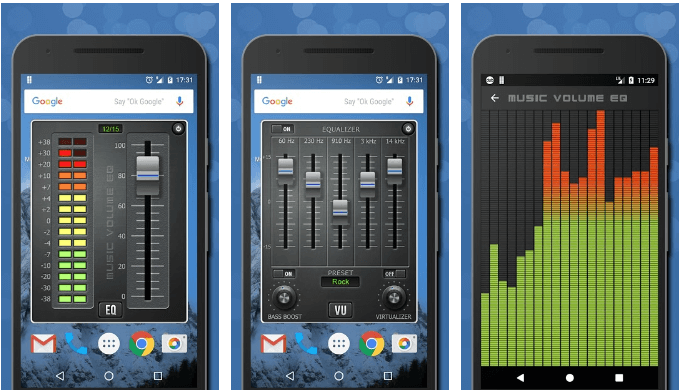
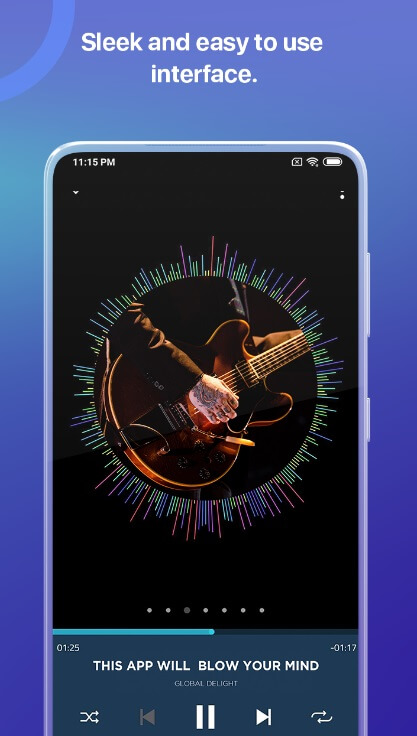
Music Volume EQ is one of the finest bass boosters and music volume equalizers for Android. It helps you control music volume, amplify audio, and boost your music. You can listen to your favorite music withthe best audio controls and high bass. It offers tons of useful features including a band equalizer, live music stereo-led VU meter, bass boost, amp, slider volume & audio controls, 3D virtualizer, and more. You can try Music Volume EQ with quality headphones to enjoy great sound output.
Features of Music Volume EQ
- You can select from classic or material themes.
- You can switch to full-screen visualization and enjoy in a stereo sound booster.
- You can save presets or delete them when needed. Here, you will find 9 equalizer presets with a custom preset option.
- In other features, it offers lock media volume, audible sound spectrum, live wallpaper, the option to use a system equalizer, home screen widget, and more.
2. Equalizer & Bass Booster
Compatible OS: 4.2 and up
Ratings: 4.5
Downloads: 10 Million+
Price: Free (Contains Ads)
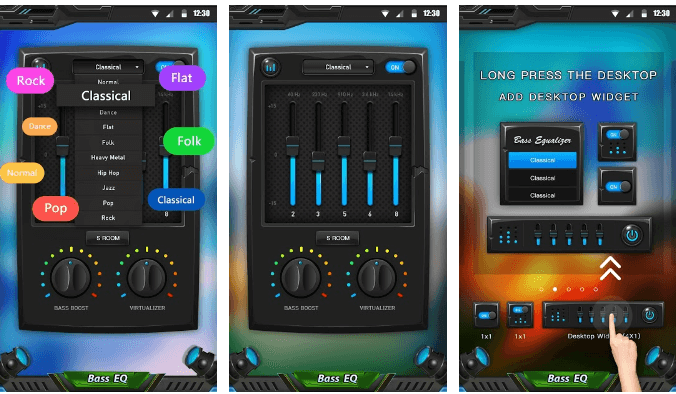
This powerful Android equalizer helps you improve the sound quality of your device. To enjoy better music quality, you can adjust sound effects levels and use better-quality headphones. It offers 22 equalizer presets and even allows you to apply custom presets for better results. You can check and turn on or off notifications from the notification bar. It offers a powerful bass boost effect, equalizer effect, media volume controls, virtualizer effects, and more.
Features:
- It offers quick buttons to adjust sound level and frequency.
- It comes loaded with a band equalizer and live music stereo-led VU meter.
- With powerful media controls, you can play/stop, or the next/previous song easily.
- With 22 equalizer presets you get better control over music & sound quality.
3. Bass Booster & Equalizer
Compatible OS: 4.3 and up
Ratings: 4.6
Downloads: 10 Million+
Price: Free (Contains Ads)
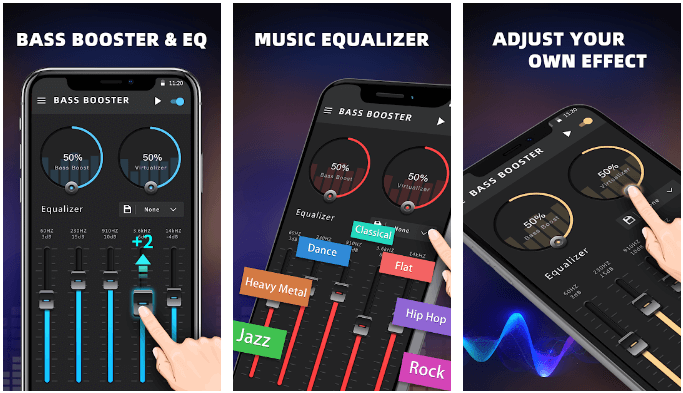
Try this one of the best equalizers for Android to make your music and video sound like never before. To get the best out of your music, audio file, or videos, it helps you adjust sound effect levels with a single click. It offers multiple effects for music, audio, and video files. Here, you will also find 3 different widgets for quick app access.
Features:
- It offers custom notification controls.
- You will find customizable presets for effective results.
- It offers 16 colorful themes.
- Additionally, it offers cool spectrum, five bands equalizer, and stereo surround sound effect.
4. Music Equalizer – Bass Booster & Volume Boster
Compatible OS: 4.3 and up
Ratings: 4.5
Downloads: 10 Million+
Price: Free (contains ads)
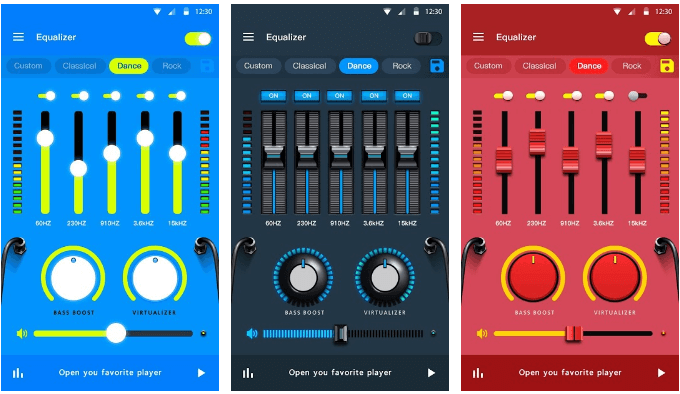
Try this Android equalizer app to control music the way you want. It comes with a number of useful features to help you control and manage music on your Android device. It works on interactive interface and offers bass boost effect, volume booster, and 3D virtualizer. You can use this music equalizer app for Android to improve the sound quality significantly.
Features of Music Equalizer
- It offers 10 preset equalizations including normal, classic, dance, folk, heavy metal, and more.
- It offers edge lighting and
visualizer. - With Music Equalizer, you will find music playing process controls like play/stop, and next/previous song play.
- It offers 18 colorful themes.
5. Flat Equalizer
Compatible OS: 4.1 and up
Ratings: 4.6
Downloads: 5 Million +
Price: Free (Offers in-app purchases)
It is a comprehensive equalizer app for Android that allows you to fine-tune their listening experience. With its intuitive interface and powerful equalizer, users can effortlessly boost bass levels, adjust treble, and create custom sound profiles to suit their preferences. The app offers a range of presets, including genre-specific settings, making it easy to optimize audio output for different types of music.
Features of Flat Equalizer App:
- Robust 10-band graphic equalizer.
- Bass boost and volume enhancement tools.
- Compatible with various audio sources, including music players, streaming services, and multimedia apps.
- Customizable sound profiles and presets.
- Real-time audio visualization.
6. Poweramp Equalizer
Compatible OS: 4.1 and up
Ratings: 4.0
Downloads: 1 Million +
Price: Free (Offers in-app purchases)
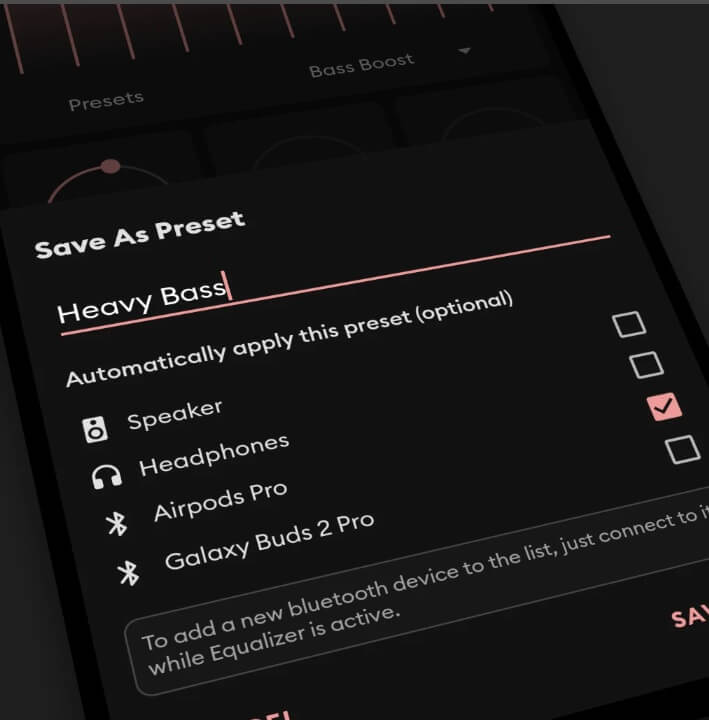
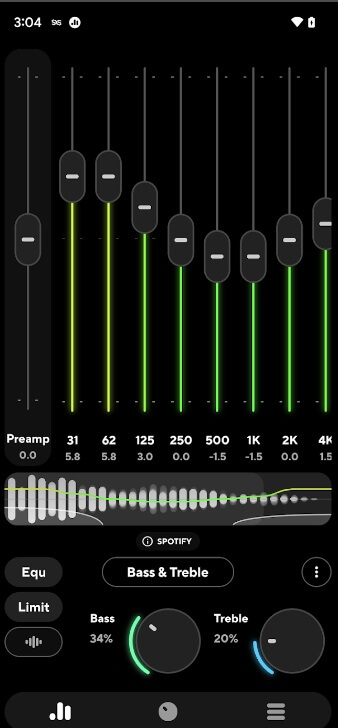
Poweramp Equalizer is a feature-rich Android bass booster app designed to work seamlessly with the Poweramp music player. This powerful tool allows users to fine-tune their audio output with a comprehensive 10-band graphic equalizer, enabling them to boost bass, adjust treble, and create personalized sound profiles. The app also offers advanced features such as room effects and a built-in headphone tuner, making it a versatile choice for audiophiles.
Features of Poweramp:
- 10-band graphic equalizer with built-in presets.
- Provides a real-time audio visualizer that displays the frequency spectrum, allowing users to see the impact of their equalizer adjustments.
- Room effects and headphone tuner.
- Offers volume normalization features to ensure consistent volume levels.
- Integration with the Poweramp music player.
- Customizable user interface.
7. Volume Booster GOODEV
Compatible OS: 4.1 and up
Ratings: 4.2
Downloads: 50 Million +
Price: Free (Offers in-app purchases)
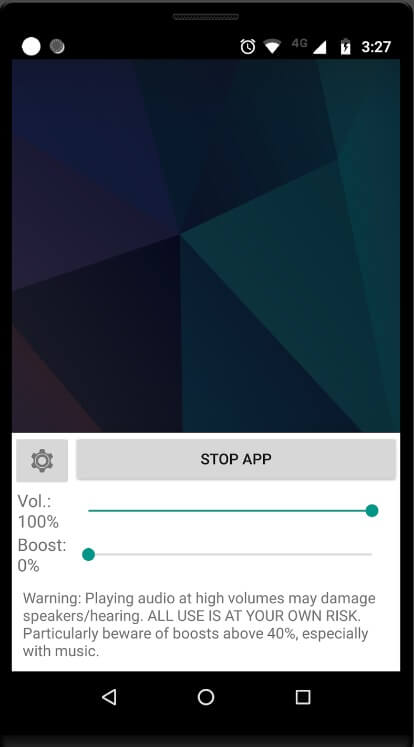
Volume Booster GOODEV is a specialized bass booster and equalizer for Android app that focuses on enhancing the volume and bass output of Android devices. With its simple yet effective interface, users can easily boost the volume and bass levels, ensuring a more immersive audio experience. The app also offers a range of preset sound profiles, allowing users to quickly optimize their audio settings for different music genres or listening environments.
Features of Volume Booster GOODEV:
- Dedicated volume and bass boost tools.
- Preset sound profiles for various genres.
- Enhances the volume output for all audio playback on your device, including music, videos, calls, and notifications.
- Compatibility with popular music players.
- Includes safety measures to prevent audio distortion or damage to the device’s speakers.
- Easy-to-use, minimalist interface.
8. °SOUND° Beautifier – Equalizer
Compatible OS: 4.1 and up
Ratings: 4.7
Downloads: 1 Million +
Price: Free (Offers in-app purchases)
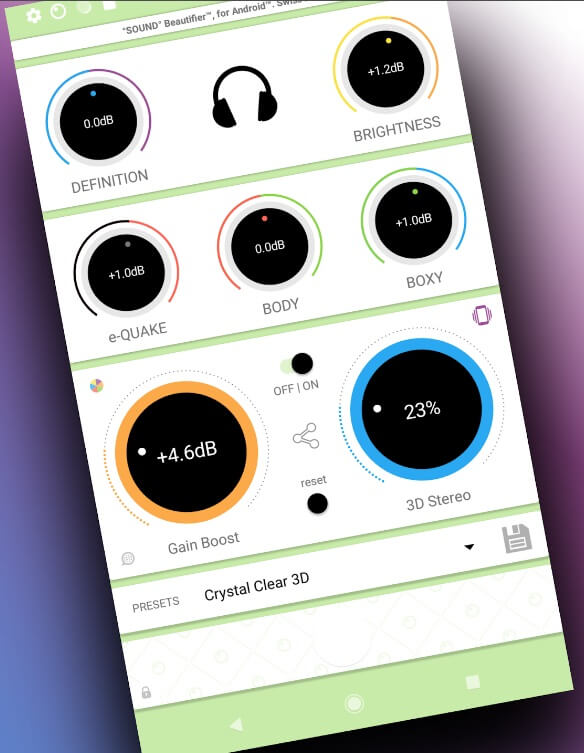
°SOUND° Beautifier – Equalizer is a versatile Android equalizer app that combines a powerful equalizer with a range of advanced features. Users can fine-tune their audio output with a 7-band graphic equalizer, boost bass levels, and create custom sound profiles. The app also offers additional tools, such as a volume booster and a built-in music player, making it a comprehensive solution for audiophiles.
Features of Sound Beautifier:
- Provides a range of customizable equalizer settings, including sliders or presets for adjusting frequencies such as bass, midrange, and treble.
- Custom sound profile creation.
- Built-in music player.
- Includes pre-configured presets optimized for different music genres or audio environments.
- Sleek and intuitive user interface.
9. Boom: Bass Booster & Equalizer
Compatible OS: 4.1 and up
Ratings: 4.0
Downloads: 5 Million +
Price: Free (Offers in-app purchases)
It is a feature-rich audio enhancement app that specializes in boosting bass and delivering a more immersive listening experience. With its intuitive interface and a suite of advanced tools, users can easily adjust bass levels, tweak the equalizer, and create custom sound profiles. The app also offers integration with popular music players, making it a versatile choice for music enthusiasts.
Features:
- Boosts the bass frequencies of audio playback, providing a richer and more impactful low-end response.
- 10-band graphic equalizer with presets.
- Amplifies the overall volume output of the device beyond its default limits,
- Includes additional audio effects or enhancements such as 3D surround sound, reverb, and spatial effects.
10. SpotiQ Ten – Equalizer Booster
Compatible OS: 4.1 and up
Ratings: 4.6
Downloads: 100K +
Price: Free (Offers in-app purchases)
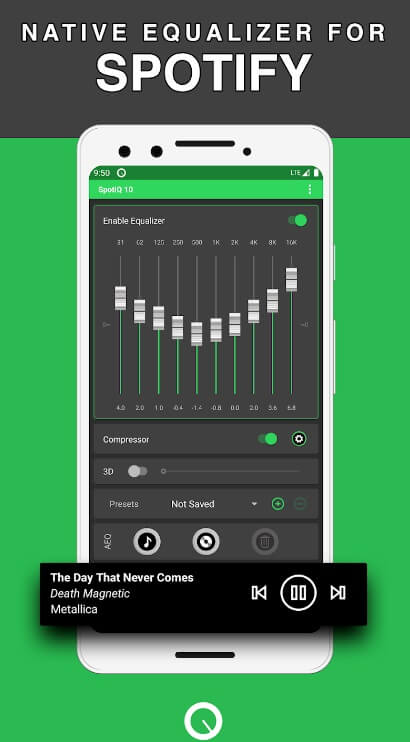
SpotiQ Ten – Equalizer Booster is a comprehensive audio enhancement app designed to work seamlessly with the Spotify music streaming service. This app offers a 10-band graphic equalizer, allowing users to fine-tune their audio output and boost bass levels. Additionally, this Android bass booster app provides a range of presets and the ability to create custom sound profiles, making it a valuable tool for Spotify users who want to optimize their listening experience.
Features of SpotiQ Ten Equalizer Booster:
- 10-band graphic equalizer with presets.
- Seamlessly integrates with the Spotify app, enabling users to apply the equalizer settings directly to their Spotify music playback.
- Custom sound profile creation.
- Compatible with various devices and versions of the Spotify app, ensuring accessibility for a wide range of users.
Author’s Tip
When you first install a bass booster or equalizer, start with gentle adjustments. Drastic boosts may feel fun at first, but often muddy the sound or introduce distortion. A small increase in bass combined with light boosts in mids or highs usually delivers richer sound without stress on the audio chain.
Also, listen to different content. What sounds good with bass-heavy tracks might undercut clarity in acoustic or vocal-driven music. Use presets as a starting point, then tweak bands to suit the genre you’re playing.
Conclusion
Android audio enhancement tools have advanced a lot. The best ones combine powerful processing with simple controls. Whether you want deep, room-shaking lows or balanced, clear sound across genres, there’s an option that fits. Your ideal choice depends on how much control you want and how you listen.
Take time to explore a few apps from this list, keeping in mind the key features and your listening style. With the right setup, your Android device can deliver sound that feels lively, detailed, and enjoyable across all your favorite media.
FAQs:
What are the key benefits of using a bass booster and equalizer app on an Android device?
These apps can enhance audio quality, boost bass levels, and customize the sound output to personal preferences. These apps allow users to fine-tune the audio settings, creating a more immersive and enjoyable listening experience, especially for music enthusiasts.
How do these apps differ from the built-in audio settings on Android devices?
While Android devices often come with basic audio settings, the specialized bass booster and equalizer apps offer a more comprehensive suite of tools and a higher degree of customization. These apps typically provide a more detailed equalizer, advanced bass-boosting capabilities, and the option to create and save custom sound profiles, which can significantly improve the overall audio output.
What factors should users consider when choosing the best bass booster and equalizer app for their Android device?
When selecting the right, users should consider factors such as the app’s range of features (e.g., number of equalizer bands, bass boost capabilities, preset profiles), compatibility with their music player or streaming service, user-friendliness of the interface, and reviews from other users. Additionally, it’s important to ensure the app is compatible with the user’s Android device and operating system version.
Author Bio:
Dinesh Lakhwani 

Dinesh Lakhwani, the entrepreneurial brain behind “TechCommuters,” achieved big things in the tech world. He started the company to make smart and user-friendly tech solutions. Thanks to his sharp thinking, focus on quality and the motto of never giving up, TechCommuters became a top player in the industry. His commitment to excellence has propelled the company to a leading position in the industry.
Popular Post
Recent Post

How to Recover Deleted Files from Pen drive, USB Drive, SD Card
Introduction: On tech forums, you’ll often see posts like this: “I connected my pen drive to my laptop this morning, but the folder was empty. All my college project files had vanished. I don’t have a backup. Can someone help me?” Stories like this are very common. Pen drives, USB drives and SD cards are […]

How To Recover Files Deleted from the Recycle Bin [Windows 11]
Losing a file can happen in seconds. You clear your desktop, hit Delete, and empty the Recycle Bin. Then, just when you need that file again, it seems to have vanished. This guide will walk you through ways to restore files removed from the Recycle Bin. We will begin with simple fixes, then look at […]

Disk Drill Data Recovery Tool Explained: Full Review and Guide
It happens in a split second. You delete a folder by mistake. Your drive stops showing up. A photo album from your last trip just vanishes. And your stomach drops. Lost files feel personal. They are not just data. They are memories, work hours, and sometimes years of effort packed into a few gigabytes. When […]

Recover Deleted Files In Windows 11 With Software & Without
Introduction What is the first thing that goes through your mind the second an important file vanishes from a Windows 11 PC? For most people, it is a mix of panic and disbelief, followed by a frantic click through every folder that file could possibly be hiding in. It happens in a split second: one […]

EaseUS Data Recovery Wizard: Everything To Know
Data loss does not always come from a big disaster either. Most cases start small and boring. A drive gets formatted by mistake. A laptop freezes mid-save and restarts on its own. A memory card stops showing up after being pulled out too fast. None of these feel like emergencies at first, until you realize […]

Recuva Data Recovery Tool: Is it Actually Worth it?
When I first tried Recuva Data Recovery, I wanted to see if it could really bring back lost files. The tool is free, small in size, and promises quick recovery, which made me curious enough to test it on my own PC. The setup was fast, and the wizard guided me step by step. I […]

GetData Recover My Files Data Recovery Tool: Honest Review
A hard drive error brings a special kind of silence. Well, yes! The screen freezes, then a message appears saying the drive can’t be found or must be formatted. In that moment, years of photos and work files feel at risk. It never happens at a good time. Coffee spills near a laptop, a memory […]

Windows File Recovery: A Complete Review [Tried & Tested]
Imagine this. You spend hours perfecting a video project. You hit save. Then your laptop freezes, reboots, and when the screen comes back. The file is gone. Your stomach sinks. It’s not just you. Lost files happen all the time. A dropped hard drive, a bad update, an accidental delete, or a corrupted partition can […]

5 Best Data Recovery Software For Windows 11 and Windows 10
Introduction: A crashed drive can ruin a whole day. One minute your photos, work files, and tax records sit safe on your PC. The next minute they are gone. A power cut, a bad update, or one wrong click can wipe out years of memories and months of work in seconds. That sinking feeling is […]

