











Imagine this. You spend hours perfecting a video project. You hit save. Then your laptop freezes, reboots, and when the screen comes back. The file is gone. Your stomach sinks. It’s not just you. Lost files happen all the time. A dropped hard drive, a bad update, an accidental delete, or a corrupted partition can […]
10 Best Android Storage Managers: With Comparison Table
Overview
If you find cleaning up Android and managing storage a complicated task, then you should consider using the best Android storage manager apps. These powerful phone manager tools help you clean, optimize, and manage storage space. It also helps you boost overall device performance working on smart algorithms.
What Is The Need Of A Storage Manager App On Android?
As our smartphones become central to our digital lives, storage management has become increasingly crucial. Modern Android devices store countless photos, videos, apps, and documents, often leading to cluttered storage and degraded performance. A good storage manager app helps identify space-hogging files, remove unnecessary data, and optimize your device’s performance without requiring technical expertise.
- Prevent performance slowdowns caused by nearly full storage
- Remove temporary files and cached data that build up over time to free up space and optimize performance.
- Manage and organize media files efficiently
- Transfer files between devices easily
- Back up important data to prevent loss
- Uninstall unused apps that take up space
- Monitor storage usage patterns to maintain optimal performance
How To Choose The Best App To Manage Storage On Android?
Selecting the right storage manager depends on your specific needs and technical comfort level. The best apps offer intuitive interfaces combined with powerful features that help you maintain your device without overwhelming you with complex options.
- User interface simplicity – Choose apps with clean, straightforward designs
- Scanning speed – Look for efficient apps that quickly analyze your storage
- Cleaning effectiveness – Prioritize apps that can identify and remove genuinely unnecessary files
- Additional features – Consider tools offering file transfer, backup options, or app management
- Privacy policy – Verify the app respects your data and doesn’t share information unnecessarily
- Update frequency – Select regularly updated apps that remain compatible with the latest Android versions
- Customer support – Choose apps backed by responsive support teams
- Cost structure – Determine if free versions meet your needs or if premium features justify subscription costs
Top 5 Android Storage Manager Comparison
When your Android device starts running out of space, finding the right storage manager can make all the difference. With so many options available, it’s crucial to compare their features, ease of use, and efficiency in freeing up storage. In this comparison, we’ll look at the top five Android storage managers, examining their strengths and weaknesses to help you pick the best one for your needs.
Whether you’re looking for automated cleanup, file organization, or deep storage analysis, we’ve got you covered!
| Feature | ApowerManager | Dr.Fone – Phone Manager | TunesGo | Syncios | Vibosoft Android Mobile Manager |
| Price | $39.95/year | $59.95/year | $39.95/year | Free version available, $29.95 premium | $69.95 one-time |
| Storage Analysis Speed | Very Fast (< 30 sec) | Fast (< 45 sec) | Fast (< 45 sec) | Moderate (60+ sec) | Fast (< 45 sec) |
| Junk Cleaning Efficiency | 95%+ | 90%+ | 85%+ | 90%+ | 85%+ |
| File Transfer Options | PC/Mac/iOS/Cloud | PC/Mac/iOS/Cloud | PC/Mac/iOS | PC/Mac/iOS | Windows only |
| Backup Frequency | Scheduled/Manual | Scheduled/Manual | Manual only | Manual only | Scheduled/Manual |
| Number of Manageable Apps | Unlimited | Unlimited | 100+ | 50+ | 100+ |
| Media Organization Tools | Advanced filters, auto-categorization | Smart albums, duplicate finder | Basic categorization | Manual organization | Folder management, tagging |
| User Interface | Clean, modern | Feature-rich | Simple, intuitive | Very simple | Technical |
| Customer Support | 24/7 chat, email | Email, phone | Email only | Email, community forum | Email only |
——————————————————————————————
10 Best Android Phone Manager Apps
Here, we have tested & reviewed some of the best Android storage manager apps.
1. ApowerManager
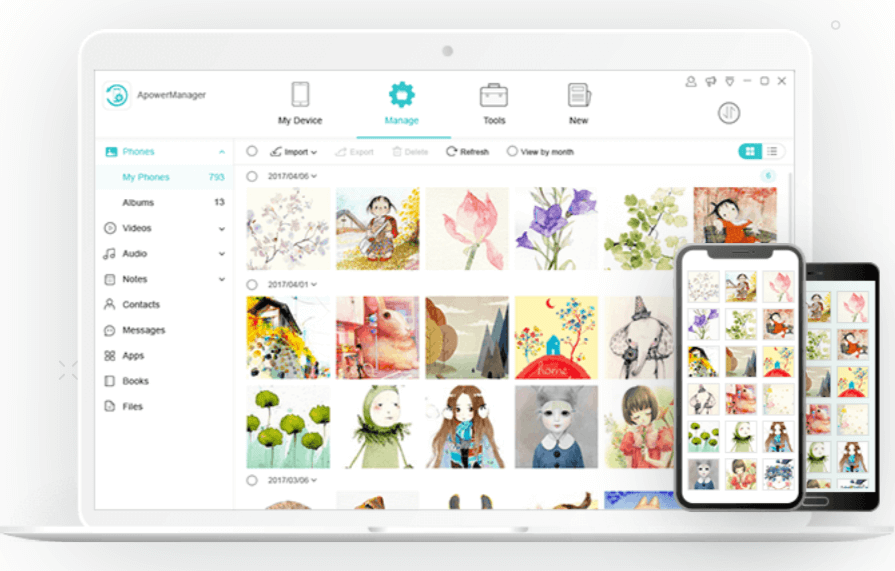
ApowerManager is a professional Android phone manager that offers one-stop data management for all your mobile devices. It works seamlessly on all your devices and helps you transfer data between Android, iOS, Windows, and Mac. You can use ApowerManager to transfer photos, videos, call logs, messages, contacts, apps, and more.
Features of ApowerManager
- It helps you import, export, or delete media files on your mobile device.
- You can preview files before moving them. It offers a built-in media player to do that.
- You can use this tool to backup, organize, transfer, and print contacts and messages.
- You can view and manage all apps, documents, and files on Android using this app.
Price: Starts from $39.95/year
Device Support: Android, iOS, Windows, Mac
2. Dr.Fone – Phone Manager
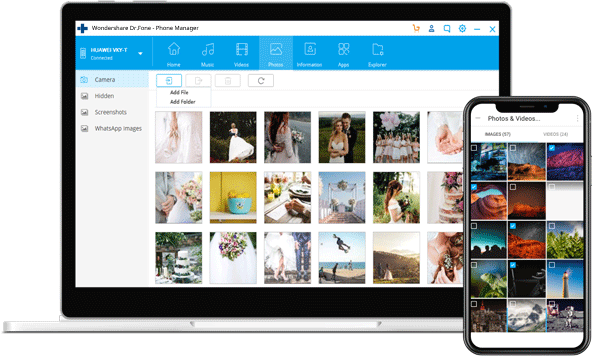
Dr.Fone is a smart Android transfer and managing solution. It helps you transfer all your data from Android to computer and vice versa. You can also use this app to transfer data from iTunes to Android and back. You can connect your Android device to your computer and manage data on mobile easily.
Features of Dr-Fone – Phone Manager
- It is fully compatible with
Android 10.0. - You can use it to transfer data
between Android and other platforms including Windows, Mac, and iTunes. - It allows you to transfer,
manage, delete, and convert data between devices. - It offers easy Android app
management features.
Price: Starts from $29.95/year
Device Support: Android, iOS, Windows, Mac
3. TunesGo
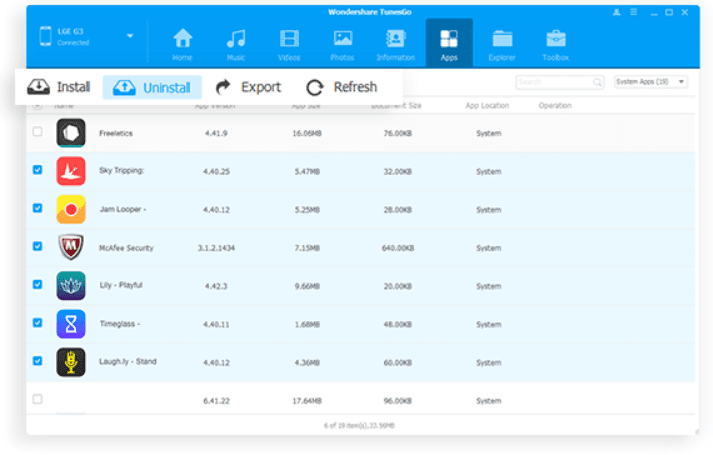
TunesGo is must-have phone manager for Android devices. You can use this powerful Android phone manager to transfer and back up contacts, messages, photos, music files, and more on your Android and iOS devices. The best part is you don’t need access to iTunes for all iOS-related features. It is fully compatible with Android 10, iOS 13, and macOS 10.15.
Features of TunesGo
- It supports the transfer of data from all your devices including Android, iOS, Windows, and Mac.
- It offers multiple language interfaces.
- You can transfer, import, export, manage, and backup data easily.
- You can root your device to explore more features.
Price: Starts from $29.95
Device Support: Android 10, iOS 13, macOS 10.15, Windows
4. Syncios
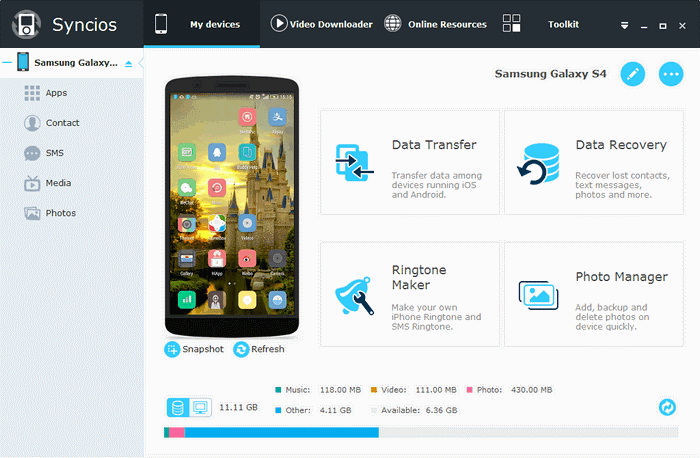
Syncios is one of the best free Android file managers and transfer tools that helps you transfer music files, photos, videos, contacts, messages, apps, and more. You can use Syncios to download millions of wallpapers, ringtones, etc. for free. You can even get personalized ringtones and text tones with a text tone maker. It works well on both Wi-Fi and USB connections.
Features of Syncios
- It offers data backup and retrieval options in lossless quality.
- You can find a handy audio and video converter.
- The tool is available for free use.
- It allows you to make personalized ringtones and text tones from your favorite music.
Price: Free
Device Support: Android, iTunes, Windows, Mac
5. Vibosoft Android Mobile Manager for Windows
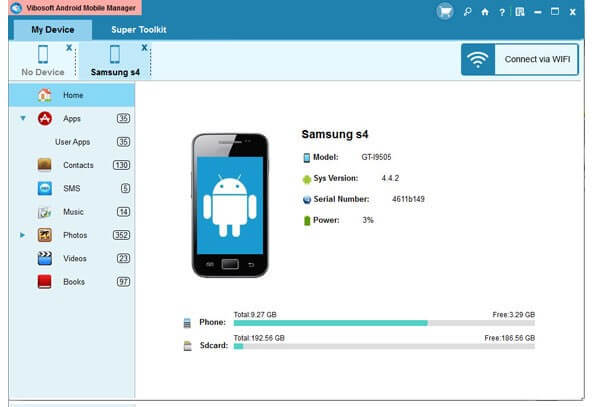
To keep your Android device data safe, Vibosoft Android Mobile Manager helps you make a copy of it. It gives you the ability to back up everything from your Android mobile to your PC without any loss. You can use this best Android storage manager to download, install, organize, uninstall, and export apps easily. You can even edit contacts and messages using this app.
Features of Vibosoft Android Mobile Manager
- You can set up new catalogs on PC when exporting files from mobile.
- You can easily add and sync media files and check them on a PC.
- You can save exported messages in different file formats.
- Additionally, you can easily manage files on the SD card and phone’s memory.
Price: Starts from $35.95
Device Support: Android, Windows, Mac
6. Storage Analyzer
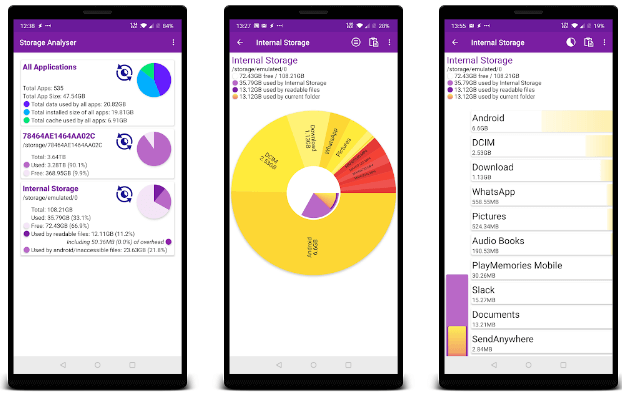
Try this best Android storage manager to visualize and organize the data on your Android, phone, tablet, or Chromebook. It works on a simple & intuitive interface and delivers a seamless user experience. It scans your device storage and lists storage areas available on your phone or tablet including internal storage, SD card, and attached devices such as hard drives.
Features of Storage Analyzer
- You can preview files before you edit, delete, or move them.
- It helps you check obsolete apps and remove them to recover storage space.
- It is available for free and offers in-app purchases.
- It offers an interactive graphical interface to manage data easily.
Price: Free offers in-app purchases
Device Support: Android
7. Disk & Storage Analyzer Pro
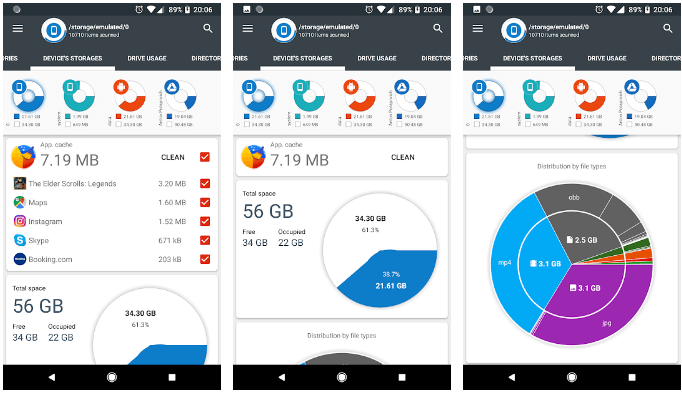
It scans all your device storage and displays information from the SD card and internal storage. USB devices, and external storage in interactive graphical form. It doesn’t annoy you with ads and it is free from virus threats. It helps you free up valuable storage space and manage it efficiently. It displays files and folders in a Sunburst chart and allows you to sort them by their size.
Features of Disk & Storage Analyzer Pro
- It displays data in intuitive charts for easy file management.
- All contents of the device are indexed at run for easy management.
- You can search & remove obsolete large files with the top ten largest files mode.
- It displays files in different categories and displays drive usage in the Sunburst chart.
Price: Free
Device Support: Android
8. Files by Google
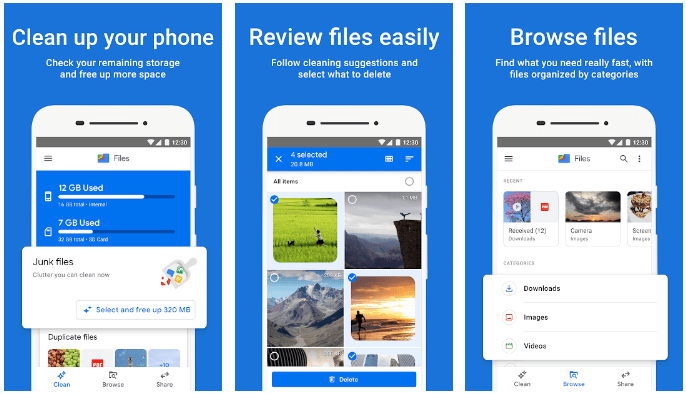
Free up space, find files faster, and share files offline with this advanced Android storage manager. It helps you free up GBs of storage space in a just few clicks. It helps you find & remove duplicate files, memes, chats, old videos, and more easily. It offers great control over your data and allows you to select what content you want to delete or retain.
Features of Files by Google
- It helps you clean junk files, manage storage space, and boost overall device performance.
- You can use Files by Google to backup files to the cloud or SD card.
- It helps you share files in an encrypted manner across platforms easily.
- It displays files in categories and sorts them size-wise for easy file management.
Price: Free
Device Support: Android
9. Systweak Cleaner for Android
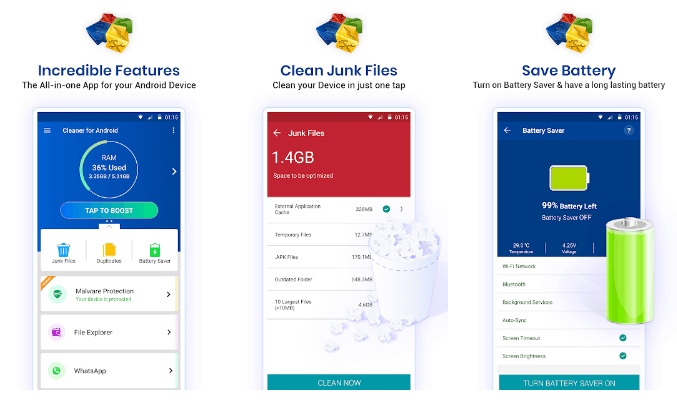
Cleaner for Android is a powerful phone manager and cleaner app. This all-in-one app cleans your storage space to boost and optimize device performance. With its one-tap booster, you can find and clean all junk instantly. It not only helps you save device resources, but it also boosts battery life significantly. Additionally, it offers antimalware modules to protect your data against virus and malware threats.
Features of Cleaner for Android
- With the Game Speedup feature, it helps you free up RAM storage to offer a seamless gaming experience.
- You can uninstall, manage, or disable apps on your device using its App Manager feature.
- It helps you manage all files with its File Explorer feature.
- It also works as a duplicate files remover tool.
Price: Free, offers in-app purchases
Device Support: Android
10. Storage Space
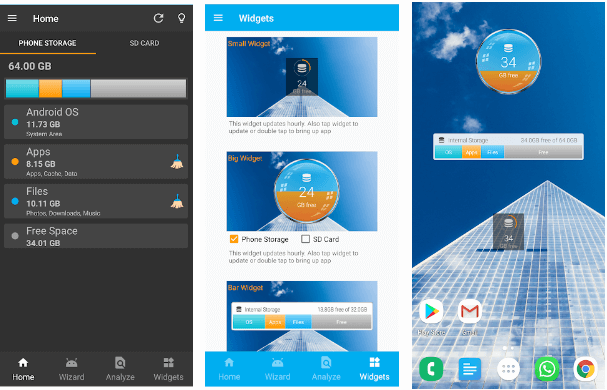
If you want to clean, optimize, and speed up your device performance, then you should use this Android phone manager. You can use this powerful app to free up GBs of storage space in a few clicks process. It works on a simple & intuitive interface to offer a seamless user experience. This app is available for free to use and doesn’t bother you with annoying ads.
Features of Storage Space
- It offers an app manager to help you manage, install, and uninstall apps.
- You can easily manage all files with its file manager feature.
- It offers an easy wizard for carrying out common file-cleaning tasks.
- It offers premium widgets.
Price: Free
Device Support: Android
Conclusion
Managing storage on Android devices is essential for maintaining optimal performance and ensuring you always have space for what matters. The right storage management app can transform the way you interact with your device, eliminating the frustration of “Storage Full” notifications and sluggish performance.
While all the apps covered in this article offer valuable features, your choice should ultimately depend on your specific needs, technical comfort level, and budget. Whether you need simple junk cleaning or comprehensive device management, there’s an option available that will help keep your Android device running smoothly throughout.
FAQs
How often should I clean my Android storage?
Keeping your Android storage organized is essential for smooth performance and optimal efficiency. A regular cleanup helps remove unnecessary files, cached data, and app clutter that can slow down your device. While a monthly cleanup is generally sufficient, those who frequently download apps or take numerous photos may find a bi-weekly routine more effective in preventing storage congestion.
Can storage manager apps access my personal files?
Storage manager apps need permission to scan your files, but reputable apps only analyze file sizes and types without reading content. Before installing any app, make sure to review its privacy policy and opt for downloads only from reputable developers with strong positive feedback.
Will cleaning my storage delete important files?
Quality storage managers identify junk files like cached data and temporary files while keeping your important data safe. They typically recommend what to delete but let you make the final decision before removing anything permanent.
Dinesh Lakhwani
Author Bio:
Dinesh Lakhwani 

Dinesh Lakhwani, the entrepreneurial brain behind “TechCommuters,” achieved big things in the tech world. He started the company to make smart and user-friendly tech solutions. Thanks to his sharp thinking, focus on quality and the motto of never giving up, TechCommuters became a top player in the industry. His commitment to excellence has propelled the company to a leading position in the industry.
Popular Post
Recent Post

5 Best Data Recovery Software For Windows 11 and Windows 10
A crashed drive can ruin a whole day. One minute your photos, work files, and tax records sit safe on your PC. The next minute they are gone. A power cut, a bad update, or one wrong click can wipe out years of memories and months of work in seconds. That sinking feeling is why […]

How To Update NVIDIA Drivers On Windows 11/10 PC
Learn how to update NVIDIA drivers on Windows 11/10 with simple methods, safety tips, and easy steps for smoother gaming and better PC performance.

Top AI Features Hidden Inside Windows 11
Explore the top AI features in Windows 11, from Copilot to Recall, plus safety tips and simple steps to use each tool the right way.

Customize Your Screen Saver Settings in Windows [Easy Steps]
Learn how to customize screen saver settings in Windows 11 with easy steps, safety tips, and simple tricks to personalize your PC screen.
Driver Easy Windows Driver Updater Tool Review: Tried & Tested
In-depth information about Driver Easy’s functions and features can be found in our review. Learn how to update drivers more easily with this tool for a more seamless computer experience.

Is Avast Driver Updater Worth It? A Hands-On Analysis
A full review of Avast Driver Updater covering features, setup steps, pricing, pros and cons, and real PC results, to help you decide if it is worth buying.
IObit Driver Booster 13 (PRO) Review: [Tried & Tested]
IObit Driver Booster 13 is built for one purpose: keeping your PC drivers up to date. Well, yes! Outdated drivers can cause crashes, slowdowns, and hardware issues. This tool scans fast and updates with one click. The interface is simple. Even beginners can use it without confusion. Updates are pulled from a huge database, covering […]

Auslogics Driver Updater: A Detailed Walkthrough [2026]
This comprehensive review covers the key features, pros, and cons, pricing, and a final verdict on Auslogics’ driver update utility. Learn how it stacks up against manual driver maintenance.

5 Best Driver Updater Tools for Windows to Use (Free and Paid)
Introduction: Most people blame their PC for problems that a driver caused. A driver works like a bridge between your hardware and your operating system. When this bridge cracks, strange things start to happen. Screens flicker without reason. Printers go silent mid-task. Games freeze or crash out of nowhere. Manually finding the right driver is […]

