












Read my honest Wise Duplicate Finder review. See features, pricing, pros and cons, and real PC test results. Find out if this free duplicate cleaner can free up your Windows storage.
10 Best Sound Equalizers for Windows 11 & 10 PC- EQ Apps
Looking for the best audio Equalizer for Windows 11 to elevate your music experience? Well, the right sound equalizer can make all the difference. From fine-tuning music to enhancing the nuances in your favorite movies or games, the best sound equalizers for Windows 11 can transform your PC’s audio output.
Whether you’re a music enthusiast, a gamer seeking immersive soundscapes, or simply aiming for clearer, crisper audio, exploring these top-notch best sound equalizers for Windows equalizers can take your listening experience to the next level.
What is a Sound/Audio Equalizer?
A sound equalizer is a tool or software that enables users to adjust various frequency components within an audio signal. It functions by modifying the amplitude of specific frequency bands, allowing users to boost or reduce certain frequencies (like bass, midrange, or treble) to achieve desired audio output. This manipulation helps in tailoring sound to personal preferences or optimizing it for different types of audio content, resulting in a more balanced, richer, or customized listening experience.
Equalizers are commonly used in music production, sound mixing, and even in consumer applications to fine-tune audio playback on devices like computers, smartphones, and home theater systems.
How to Choose Sound EQ Software for Windows
Picking the right sound equalizer matters because each app shapes audio differently. Some focus on deep control, others on presets and ease. Your choice depends on how you listen, what gear you use, and whether you want simple tweaks or detailed tuning. Use these points to guide your pick.
- Audio control depth: Some equalizers offer basic sliders. Others give multiband control and advanced filters. More bands mean finer shaping ability.
- Ease of use: Beginners benefit from simple layouts and presets. Power users may prefer complex interfaces. Choose what you can navigate without frustration.
- Preset library: A strong preset collection helps if you do not want manual adjustment. Look for genre-based presets and custom slots.
- System integration: Check if the EQ works system-wide or only in specific apps. System-wide EQ applies changes to all sounds on your PC.
- Performance impact: Lightweight tools keep CPU use low. Heavy apps with real-time processing may tax older systems. Balance features with performance.
- Compatibility with audio devices: Some EQs adapt to headphones, speakers, or DACs. Device-specific tuning often improves sound quality noticeably.
- Support and updates: Tools that receive regular updates stay compatible with Windows changes. Good support means bug fixes and feature growth.
- Price and trial options: Free tools may offer solid basics. Paid software often adds polish and support. Always test a trial before buying.
Top 5 Sound Equalizers for Windows
Here are five standout EQ tools for Windows. They differ in power, style, and focus. This table highlights their key strengths so you can decide fast.
| Software | System-wide EQ | Bands/Filters | Presets | UI Ease | Price Tier |
| Equalizer APO | Yes | Unlimited (via plugins) | Few | Basic | Free |
| Boom 3D | Yes | Multiband | Large library | Very easy | Mid |
| FXSound | Yes | 10+ bands | Many | Easy | Mid |
| Viper4 Windows | Yes | Multiband/Effects | Moderate | Moderate | Free |
| Breakaway Audio Enhancer | Yes | Intelligent EQ | Genre focus | Easy | Mid-High |
Will using an EQ damage my original audio files?
No. EQ software changes playback, not the source file. Your original audio stays unchanged. The equalizer only affects what you hear.
Do I need special hardware for EQ to work well?
Not really. EQ works with regular sound cards or audio drivers. Some tools offer better results with quality DACs or good headphones. But basic use does not need extra gear.
Can an EQ fix poor-quality music?
An EQ can balance tones and improve clarity. It cannot make low-quality recordings sound like high-resolution files. EQ shapes sound; it does not recreate missing detail.
Best Sound Equalizer for Windows 11 To Use
Here are the 10 best audio Equalizer for Windows 11 that you can use to fine-tune your musical journey.
1. Equalizer APO
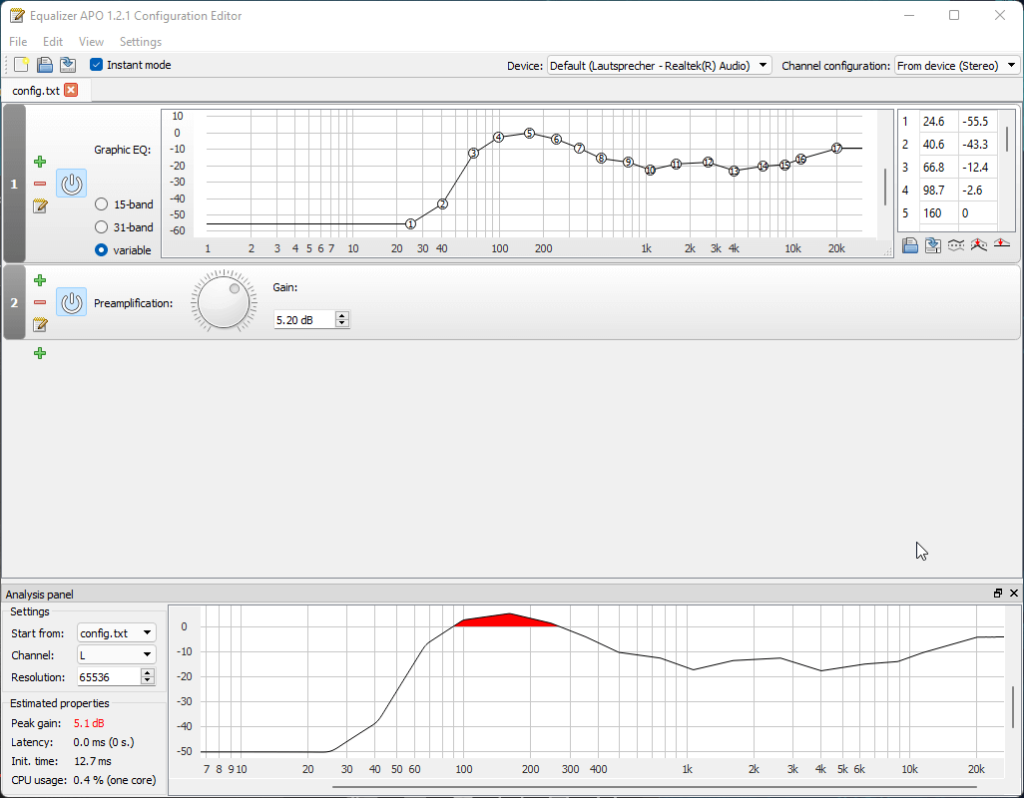
Equalizer APO remains a top choice for Windows 11 users seeking powerful audio customization. Its open-source nature and versatility make it a standout option. This parametric equalizer allows precise adjustments across various frequency bands, catering to both novices and audio enthusiasts.
Moreover, its compatibility with numerous audio devices and comprehensive interface makes it one of the best audio Equalizer for Windows 11. With support for advanced features and a range of plugins, Equalizer APO continues to stand tall as one of the best sound equalizers for Windows 11, providing extensive control and exceptional audio enhancement capabilities.
Key Features:
- Allows precise adjustment of individual frequency bands for detailed audio customization.
- Supports multiple filters and effects for comprehensive audio tweaking.
- Offers minimal impact on system performance and audio delay.
- Allows users to create and save multiple presets for different audio scenarios.
- Enables a wide range of audio enhancements, from basic adjustments to complex configurations.
Pros:
- Works with a variety of audio devices and software applications.
- Minimal impact on system resources and performance.
- Suitable for both casual users and audio enthusiasts due to its customizable features.
- Supports both 32 and 64-bit versions.
Cons:
- Interface design might seem basic or less intuitive compared to some commercial alternatives.
- Limited visual cues or real-time graphs for audio adjustments may pose challenges for some users.
Compatibility: Windows 11, Windows 10, Windows 8.1, Windows 8, Windows 7, Windows Vista.
2. Boom 3D
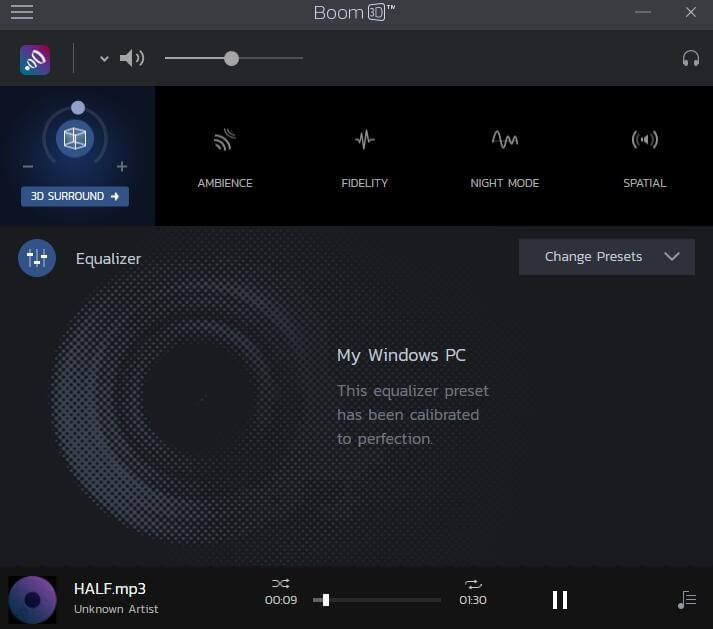
Boom 3D is a comprehensive audio enhancement software designed to elevate the audio experience on Windows 11 systems. It offers an intuitive interface coupled with a range of features to enhance audio playback, providing users with a more immersive and customizable sound environment.
With its emphasis on spatial audio and personalized audio profiles, Boom 3D aims to deliver a heightened audio experience across various media platforms.
Key Features:
- Creates an immersive audio experience, simulating a spatial 3D environment for enhanced depth and realism.
- Offers a range of presets tailored for different audio scenarios (music, movies, gaming, etc.), simplifying customization.
- Allows fine-tuning for specific audio output devices, ensuring optimal performance on various hardware.
- User-friendly interface with easy-to-navigate controls for quick adjustments.
Pros:
- Tailors audio settings to different hardware, optimizing the output for specific devices.
- Boosts audio volume without sacrificing clarity or introducing distortion.
- Enables users to save and switch between customized audio profiles.
Cons:
- The free version might have restricted access to some premium features.
- The effectiveness of 3D surround sound and device customization may vary based on the audio hardware used.
Compatibility: Windows 11 and Windows 10.
3. FXSound
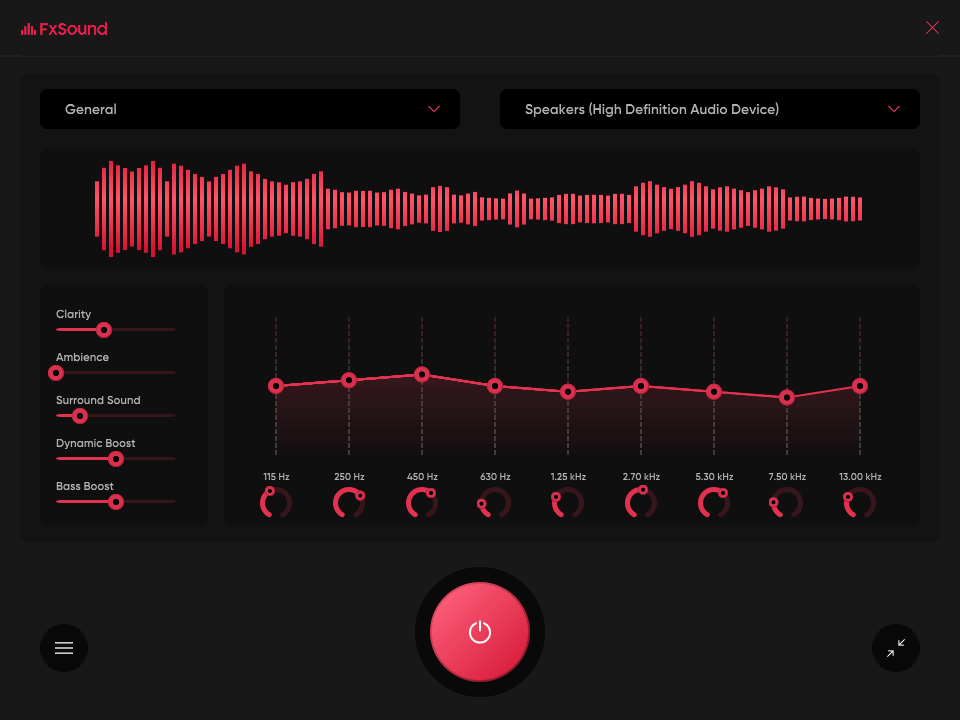
FXSound, formerly known as DFX Audio Enhancer, is a Windows 11-compatible audio enhancement software designed to elevate the audio quality of music, videos, games, and other media. Wondering what makes FXSound one of the best sound equalizers for Windows? Well, it aims to improve the overall sound experience by providing various audio processing tools, including an advanced equalizer, 3D surround sound simulation, and audio presets, enhancing the richness and clarity of audio output.
Key Features:
- Utilizes advanced audio processing algorithms to improve audio quality and clarity.
- Offers a 10-band equalizer for precise tuning of different frequency ranges.
- Simulates a virtual surround sound experience, creating a more immersive audio environment.
- Accessible Studio-Quality Listening Experience
- Increases volume levels without distortion, ensuring a louder yet clearer sound output.
- Allows users to save and apply custom presets for personalized audio profiles.
Pros:
- Provides pre-defined audio presets suitable for different media types and preferences.
- Increases volume levels without sacrificing audio quality.
Cons:
- Might consume considerable system resources, impacting overall performance on lower-end devices.
- Audio enhancement might be limited by the quality of the media being played.
Compatibility: Windows 11/10/8/7.
4. Viper4 Windows
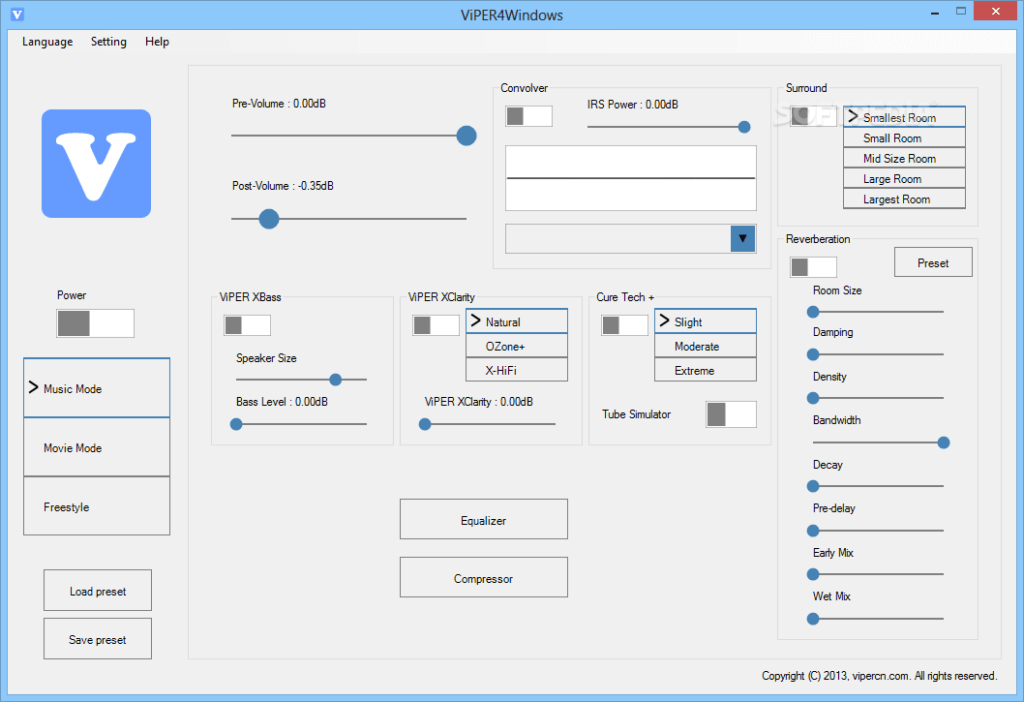
ViPER4Windows is an advanced audio processing tool for Windows 11, specializing in offering a wide array of audio enhancement features. It provides users with an extensive suite of tools to customize and improve the audio output across various applications, including music, movies, and gaming.
ViPER4Windows is one of the best EQ apps for Windows 11 PC that stands out for its flexibility in manipulating sound elements to suit individual preferences, offering a comprehensive platform for audio enthusiasts and casual users alike.
Key Features:
- Utilizes impulse response filters for room simulation, allowing users to create virtual acoustic environments.
- Enables control over audio channel panning for adjusting stereo or surround sound positioning.
- Provides a highly customizable equalizer with multiple bands for precise frequency adjustments.
- Provides immediate audio output adjustments without latency for a seamless listening experience.
Pros:
- Enables simulation of different acoustic environments for immersive audio experiences.
- Adjustments take effect immediately, ensuring a seamless and responsive user experience.
Cons:
- Its extensive feature set may be overwhelming for beginners or casual users unfamiliar with audio processing.
- Some users might experience compatibility challenges with specific hardware or software configurations.
Compatibility: Windows 11, Windows 10, 7, (32/64-bit PC).
5. Breakaway Audio Enhancer
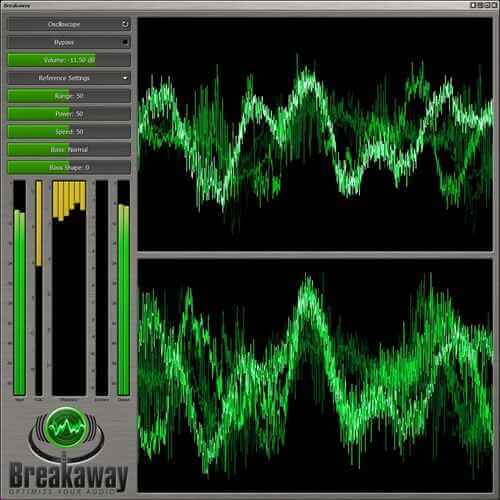
Here comes the next pick on our list of best sound equalizers for Windows. Breakaway Audio Enhancer is an audio processing software tailored for Windows 11, designed to significantly improve the quality of audio output across various applications and media types. It aims to enhance audio clarity, dynamics, and richness by employing advanced algorithms that dynamically adjust audio signals in real time. This software is focused on delivering a more immersive and optimized listening experience for music enthusiasts, gamers, and multimedia consumers.
Key Features:
- Utilizes sophisticated algorithms to enhance audio quality without distortion or artifacts.
- Dynamically adjusts volume levels to maintain consistent audio output without sudden peaks or drops.
- Controls the balance between different frequency bands for a more balanced and refined audio output.
- Provides visual representations of audio adjustments for intuitive control and monitoring.
Pros:
- Maintains consistent volume levels, preventing sudden loudness changes for a smoother listening experience.
- Works seamlessly with popular media players and applications on Windows 11 systems.
Cons:
- Access to certain advanced features might be restricted in the free version, requiring a purchase for full functionality.
- Users new to audio processing might find the range of controls and settings initially overwhelming.
Compatibility: Windows 11, Windows 10, and Windows 8. (Both 64-bit and 32-bit processors)
Other Popular Audio EQ apps for Windows 11 and Windows 10
6. HD Audio Manager by Realtek
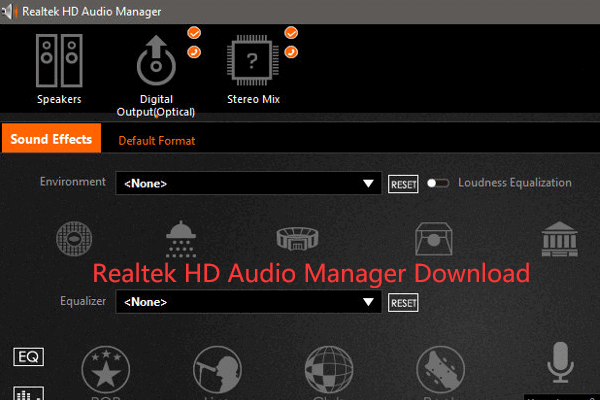
The Realtek HD Audio Manager is a software utility that comes bundled with Realtek audio drivers on many Windows systems, providing users with control over various audio settings and features. It serves as an interface for managing audio input/output configurations, speaker configurations, audio effects, and equalization options for Realtek audio hardware.
While it offers a range of controls and customization options, its compatibility limitations and interface design might influence its usability for users seeking more advanced or universal audio enhancement features.
Key Features:
- Allows users to configure playback devices, adjust volume levels, and select audio input sources.
- Enables users to set up and calibrate speaker systems for optimal audio output.
- Provides controls for microphone input levels, noise suppression, and echo cancellation.
- Offers a range of sound effects and enhancements, including environment simulations and equalizer settings.
Pros:
- Allows users to personalize sound effects and equalization to suit their preferences.
- Enables optimization of speaker systems for better audio output.
- Allows users to repurpose audio jacks based on their preferences or needs.
Cons:
- Specific to Realtek audio hardware, limiting its use to systems equipped with Realtek audio drivers.
- Some users may find the interface less intuitive or outdated compared to standalone audio enhancement software.
Compatibility: Windows 11, Windows 10.
7. Equalizer Pro
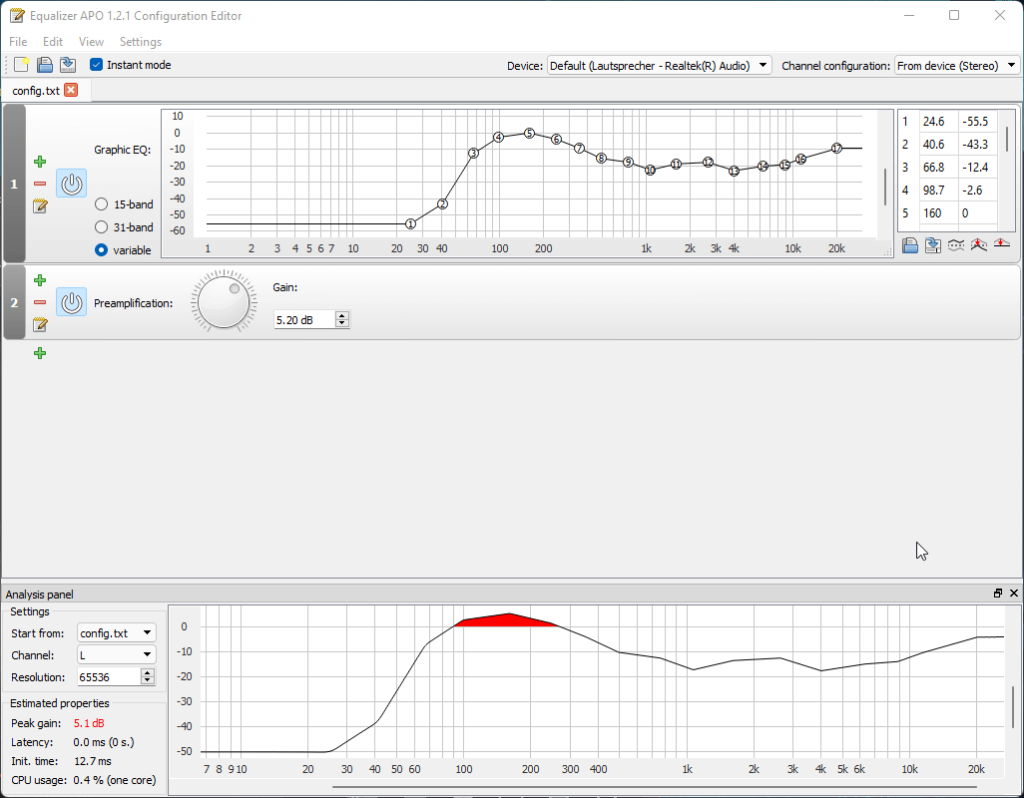
Equalizer Pro is an intuitive one of the best sound equalizer for Windows offering a user-friendly interface and a range of audio enhancement features. It provides precise control over sound frequencies, allowing users to adjust and fine-tune audio output according to individual preferences. Equalizer Pro aims to deliver an optimized and personalized audio experience across various media platforms, including music, movies, games, and more.
Key Features:
- Offers a 10-band equalizer with individual frequency controls for precise audio adjustments.
- Provides a variety of pre-configured presets tailored for different music genres and media types.
- Works seamlessly with various media players and applications on Windows systems.
- Enables users to save and switch between custom audio profiles for different media scenarios or personal preferences.
Pros:
- User-friendly design with simple controls for easy and quick audio adjustments.
- Visual representations aid in understanding and adjusting audio settings effectively.
Cons:
- May utilize moderate system resources, potentially impacting performance on lower-end devices.
Compatibility: Windows 11, Windows 10 / 8.1 / 8 / 7.
8. Peace Equalizer

Peace Equalizer is a comprehensive interface equalizer specifically designed for Windows systems. It serves as a graphical user interface for Equalizer APO, providing users with a more accessible platform for precise audio adjustments. This software offers an intuitive interface coupled with extensive customization options, allowing users to fine-tune audio output according to their preferences across various media applications.
Key Features:
- Presents a visually intuitive interface for Equalizer APO, simplifying audio adjustments.
- Facilitates the management of multiple audio profiles, allowing users to organize and easily switch between various saved configurations.
- Offers support for multiple languages within the interface, enhancing accessibility for users across diverse linguistic backgrounds.
- Provides options for interface customization, allowing users to adjust visual elements to suit their preferences or improve usability.
- Encourages community involvement and contributions.
Pros:
- Allows for intricate adjustments with precise control over individual frequency bands, catering to audio enthusiasts and professionals.
- One central interface to control all audio settings instead of adjusting multiple windows.
- Can boost quiet audio tracks to make them more audible.
- Visual equalizer shows adjustments in real-time so changes are clear.
Cons:
- Presets may not suit every user’s personal preferences.
- May not offer huge audible benefits for users without discerning “audiophile” ears.
- Visual equalizer takes up screen space and draws system resources.
Compatibility: Windows 11/10/8.1/8/7.
9. Bongiovi DPS

Bongiovi DPS is an advanced audio enhancement tool designed to deliver immersive and high-quality audio experiences on Windows systems. It utilizes Digital Power Station technology to dynamically optimize audio in real-time, aiming to enhance the clarity, depth, and richness of sound across various media applications.
It stands as a feature-rich audio enhancement tool aimed at providing an immersive and optimized audio experience across various media on Windows systems.
Key Features:
- Utilizes algorithms to restore lost audio details and improve the overall fidelity of sound output.
- Balances audio levels across different tracks or media files, preventing sudden volume fluctuations.
- Presents a streamlined interface with intuitive controls for ease of use and quick adjustments.
Pros:
- Uses patented digital signal processing to improve audio quality and volume.
- Can make low-quality audio from laptops, TVs or smartphones sound richer.
- Adds bass, widens the stereo field, and boosts clarity even on basic speakers.
- Includes preset audio profiles optimized for different listening situations.
- One-click activation is easy for non-technical users
Cons:
- Too much audio boost can add distortion at loud volumes.
- Software must remain running to keep enhancements activated.
- Could conflict with other audio editing/enhancing software.
Compatibility: Windows 11 and Windows 10.
10. Sonic Studio 3
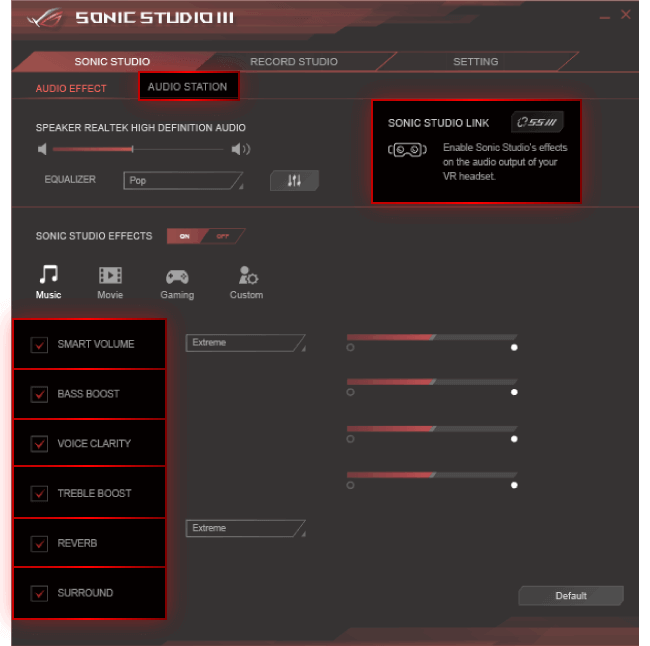
Sonic Studio III is an audio enhancement software developed by ASUS, primarily integrated into their motherboard utilities, offering users an extensive suite of audio customization tools. Tailored for ASUS motherboards, this software aims to deliver an immersive and personalized audio experience by providing detailed control over audio settings and effects.
It presents an array of features tailored for ASUS motherboard users, offering extensive audio customization tools and gaming-specific enhancements. However, its dependency on ASUS hardware might limit its accessibility to users with non-ASUS systems.
Key Features:
- Provides a comprehensive suite of tools for fine-tuning audio settings, including equalization, effects, and spatial audio adjustments.
- Dynamically adjusts volume levels to maintain consistent audio output, preventing abrupt loudness variations.
- Provides gaming-specific audio optimizations, such as audio profiles tailored for gaming scenarios.
- Features enhancements for voice communication, ensuring clearer and more intelligible speech during online communication or gaming.
Pros:
- Provides a range of audio controls for fine-tuning sound output.
- Comes with preset modes optimized for music, movies, gaming, and voice.
- Includes intelligent loudness equalization for consistent volume across content.
- Offers virtual surround effects to widen the stereo field spaciality.
- Compatible with a range of Asus motherboards and devices.
Cons:
- Only designed to work with Asus hardware components.
- Requires Asus motherboard with specialized SupremeFX audio.
- Too many effects and enhancements could reduce audio quality.
Conclusion
This wraps up our list of best sound equalizers for Windows. In a world of diverse audio needs, these tools offer tailored solutions for Windows users. From precise equalization control with Peace Equalizer to ASUS’s gaming-centric Sonic Studio III, each tool brings unique features, enhancing audio immersion and clarity.
Whether seeking real-time adjustments or immersive surround sound, these best audio Equalizer for Windows 11 options cater to diverse preferences, delivering enriched audio experiences.
FAQs:
Q1: Are these audio enhancement tools compatible with all versions of Windows?
Most of the mentioned tools are compatible with Windows 7, 8, 8.1, and 10. However, compatibility might vary for Windows versions, so checking specific software requirements is advisable.
Q2: Can these tools enhance audio quality on any computer hardware?
While these tools aim to optimize audio, their effectiveness may vary based on the quality and capabilities of the hardware. High-quality audio hardware tends to yield better results.
Q3: Do these tools work universally with all media players and applications?
These tools are designed to work across various media players and applications on Windows. However, compatibility with specific software might differ, necessitating adjustments or configurations for optimal performance.
Author Bio:
Dinesh Lakhwani 

Dinesh Lakhwani, the entrepreneurial brain behind “TechCommuters,” achieved big things in the tech world. He started the company to make smart and user-friendly tech solutions. Thanks to his sharp thinking, focus on quality and the motto of never giving up, TechCommuters became a top player in the industry. His commitment to excellence has propelled the company to a leading position in the industry.
Popular Post
Recent Post

How to Recover Deleted Files from Pen drive, USB Drive, SD Card
Introduction: On tech forums, you’ll often see posts like this: “I connected my pen drive to my laptop this morning, but the folder was empty. All my college project files had vanished. I don’t have a backup. Can someone help me?” Stories like this are very common. Pen drives, USB drives and SD cards are […]

How To Recover Files Deleted from the Recycle Bin [Windows 11]
Losing a file can happen in seconds. You clear your desktop, hit Delete, and empty the Recycle Bin. Then, just when you need that file again, it seems to have vanished. This guide will walk you through ways to restore files removed from the Recycle Bin. We will begin with simple fixes, then look at […]

Disk Drill Data Recovery Tool Explained: Full Review and Guide
It happens in a split second. You delete a folder by mistake. Your drive stops showing up. A photo album from your last trip just vanishes. And your stomach drops. Lost files feel personal. They are not just data. They are memories, work hours, and sometimes years of effort packed into a few gigabytes. When […]

Recover Deleted Files In Windows 11 With Software & Without
Introduction What is the first thing that goes through your mind the second an important file vanishes from a Windows 11 PC? For most people, it is a mix of panic and disbelief, followed by a frantic click through every folder that file could possibly be hiding in. It happens in a split second: one […]

EaseUS Data Recovery Wizard: Everything To Know
Data loss does not always come from a big disaster either. Most cases start small and boring. A drive gets formatted by mistake. A laptop freezes mid-save and restarts on its own. A memory card stops showing up after being pulled out too fast. None of these feel like emergencies at first, until you realize […]

Recuva Data Recovery Tool: Is it Actually Worth it?
When I first tried Recuva Data Recovery, I wanted to see if it could really bring back lost files. The tool is free, small in size, and promises quick recovery, which made me curious enough to test it on my own PC. The setup was fast, and the wizard guided me step by step. I […]

GetData Recover My Files Data Recovery Tool: Honest Review
A hard drive error brings a special kind of silence. Well, yes! The screen freezes, then a message appears saying the drive can’t be found or must be formatted. In that moment, years of photos and work files feel at risk. It never happens at a good time. Coffee spills near a laptop, a memory […]

Windows File Recovery: A Complete Review [Tried & Tested]
Imagine this. You spend hours perfecting a video project. You hit save. Then your laptop freezes, reboots, and when the screen comes back. The file is gone. Your stomach sinks. It’s not just you. Lost files happen all the time. A dropped hard drive, a bad update, an accidental delete, or a corrupted partition can […]

5 Best Data Recovery Software For Windows 11 and Windows 10
Introduction: A crashed drive can ruin a whole day. One minute your photos, work files, and tax records sit safe on your PC. The next minute they are gone. A power cut, a bad update, or one wrong click can wipe out years of memories and months of work in seconds. That sinking feeling is […]

