











Introduction: Antivirus software helps protect Windows PCs from digital threats. It detects viruses, blocks ransomware, and alerts users about unsafe websites. However, some security tools consume too much RAM and CPU power. This can make everyday tasks feel slow. Older laptops and low-end PCs often face this problem. The computer may take longer to start. […]
Top 5 Lightest Antivirus Software To Protect Your PC
Introduction:
Antivirus software helps protect Windows PCs from digital threats. It detects viruses, blocks ransomware, and alerts users about unsafe websites. However, some security tools consume too much RAM and CPU power. This can make everyday tasks feel slow.
Older laptops and low-end PCs often face this problem. The computer may take longer to start. Scans can run for hours, and background processes may affect performance. Some users even disable antivirus protection to make their systems run faster. This leaves the PC exposed to potential attacks.
Choosing a lightweight antivirus can help avoid these issues. Many modern tools use cloud-based detection and efficient scanning methods. They aim to provide reliable security while using fewer system resources.
In this guide, we look at five lightweight antivirus programs for Windows 10 and Windows 11. We cover their features, performance, and ease of use. This will help you find an option that suits your PC and security needs.
Why Light Antivirus Software Matters More Than You Think
Not every PC has a strong processor or lots of memory. Older laptops and budget machines feel heavy security tools right away. A light tool fixes this problem. It guards your files and keeps your system quick. Here are the top reasons to choose a light option.
- Uses less memory. Heavy tools keep a lot of data in RAM. Light tools use far less, so your apps get more room.
- Faster scans. A light scanner checks files in less time.
- Quicker boot time. Some security tools slow down startup. Light ones load fast and let Windows reach the desktop sooner.
- Better gaming and video calls. Heavy scans can cause lag in games and meetings. Light tools run quietly in the background.
- Saves battery on laptops. Less background work means less power use. Your laptop can last longer on one charge.
- Works well on older PCs. Old machines struggle with big security suites. A small tool runs smoothly on low-spec hardware.
- Fewer pop-ups. Many big suites keep showing offers and alerts. Light tools tend to be calm and simple.
Comparison Table: Top 5 Light Antivirus Programs for Windows 11 and 10
Picking one tool from a long list is hard. So we put five of them side by side. The table below shows what each tool is best for, whether it has a free option, and what it costs to start.
NOTE: Prices change often, so check the official site before you buy.
| Tool Name | Best For | Free Option | Starting Price | Real-time Protection | Ransomware Shield |
| Bitdefender Antivirus Plus | Low impact all-round safety | Yes (basic free version) | Around 30 dollars per year | Yes | Yes |
| ESET NOD32 Antivirus | Old and low-spec PCs | 30-day trial | Around 40 dollars per year | Yes | Yes |
| Webroot Antivirus | Very fast scans | Trial only | Around 30 dollars per year | Yes | Yes |
| Avira Free Security | Free cloud-based protection | Yes (full free plan) | Around 40 dollars per year | Yes | Yes (paid) |
| Microsoft Defender | Built-in free safety | Yes (fully free) | Free with Windows | Yes | Yes |
How We Tested These Tools
We did not copy results from other sites. We installed each tool on a real Windows PC and used it for several days. Our test laptop was a mid-range model running Windows 11. It had 8 GB of RAM and a regular hard drive, which is a common setup for many users. This kind of machine shows the weight of a security tool very quickly.
We tested each antivirus with a full system scan and recorded the time taken. We checked RAM and CPU usage when the software was running in the background. We also opened ten browser tabs, played a video, and worked with a few office apps. These tests helped us check whether the antivirus affected everyday PC performance.
We also checked the boot time before and after each install. We looked at pop-ups, update prompts, and how easy the app was to use. Finally, we tested each tool on a small folder of safe test files to see if the real-time shield reacted. Our goal was simple. Find out which tools protect well without making the PC feel slow.
Top 5: Light Antivirus Programs for Windows 11 & 10
Below are the five tools we tested. For each one, we explain what it does, how to use it, why we picked it, and what we saw during testing. Read them all, then choose the one that fits your PC and budget.
1. Bitdefender Antivirus
Bitdefender Antivirus is a well-known name in PC security. It scans for viruses, spyware, ransomware, and risky websites. It also blocks harmful links before they open in your browser.
The tool is known for using the cloud to do most of its heavy work. This keeps the load on your PC small. Many users say it feels light even on mid-range machines.
Steps to use Bitdefender Antivirus:
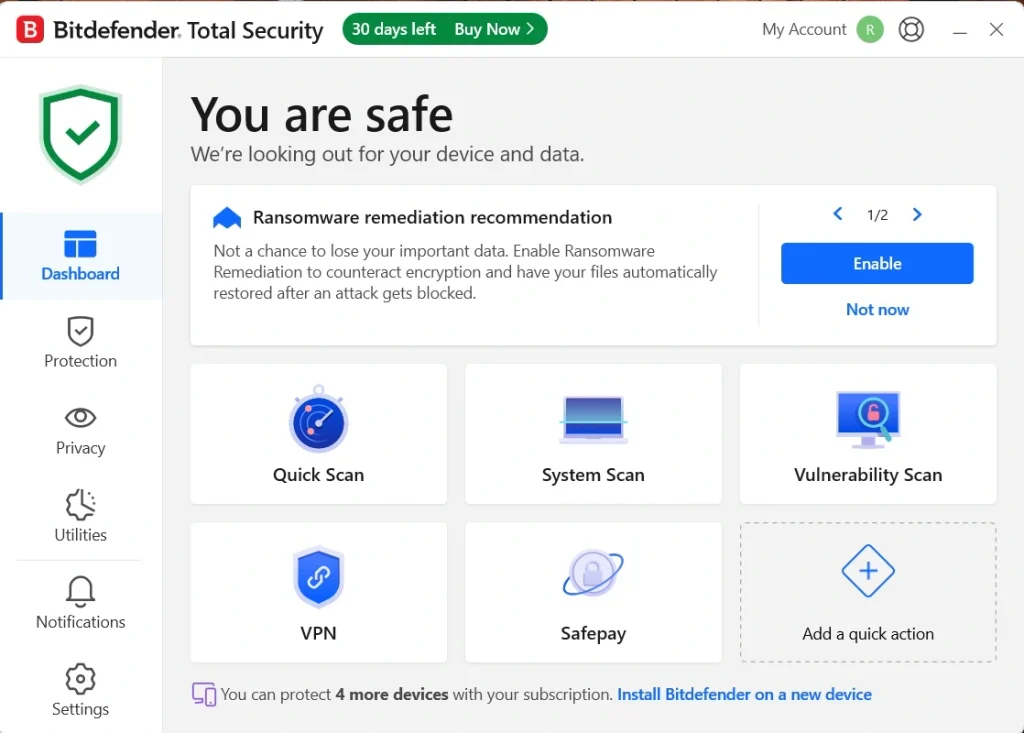
Step 1. Download and install the app from the official Bitdefender website. Open the dashboard and click Quick Scan to check the most common risk areas.
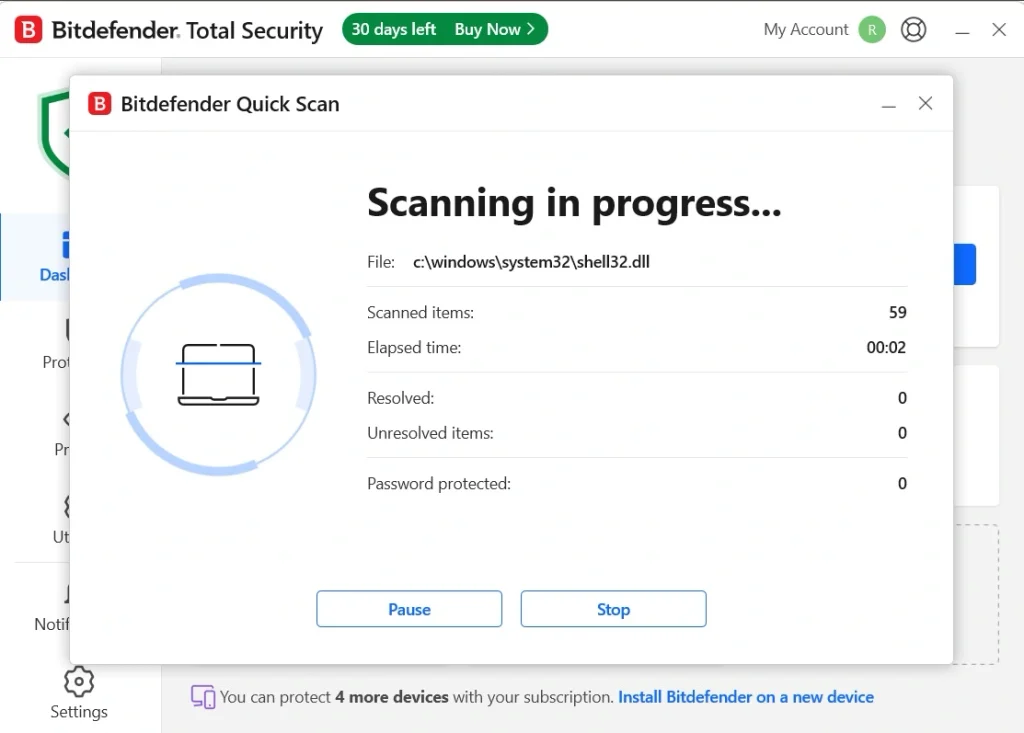
Step 2. Wait for the scanning process.
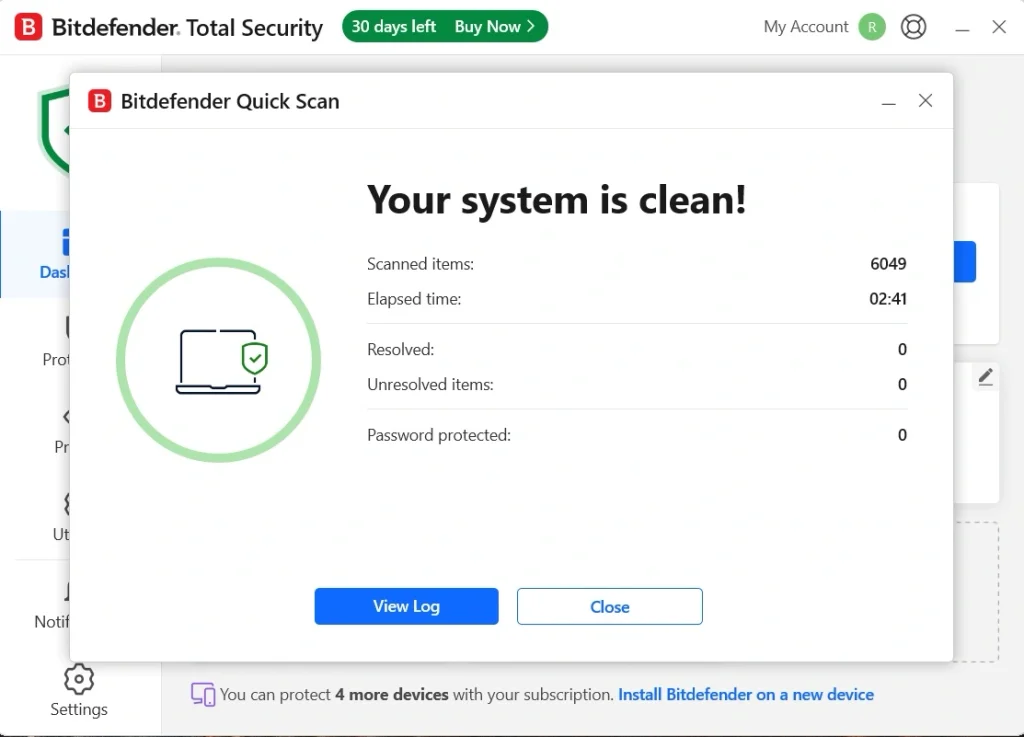
Step 3. Review the results and remove any threats found.
Why This Tool Is on Our List?
Bitdefender earned its spot because it balances strong protection with low impact. Many tools are either light or strong, but rarely both. This one delivers a good mix. It also runs quietly, so you can work without constant alerts.
Facts and Stats From Our Test
On our test laptop, the full scan took about 6 minutes. Processor use stayed low, mostly under 3 percent when we were not scanning. Our boot time went up by only about three seconds after install.
We also ran the scan while watching a video. There was no stutter or dropped frames. The real-time shield caught our safe test file in under two seconds. We saw only one update prompt in the full week of testing.
Pricing Plans Explained:
- A basic free version offers simple virus protection
- The paid plan starts at around 30 dollars for the first year
- Renewal costs more than the first year price
- Multi-device bundles are available for homes with several PCs
| Feature | Free Plan | Paid Plan |
| Virus Scanning | Yes | Yes |
| Ransomware Shield | No | Yes |
| Safe Browsing Tools | Limited | Full |
| Customer Support | Limited | Full |
Firsthand Experience
We went in expecting a heavy app, since Bitdefender has so many features. We were surprised. The tool felt calm from the first scan. It did its job without pulling the system down.
The dashboard was clean and easy to read. We did not need a guide to find the scan button. The alerts were short and clear, which made things simple.
The only issue was the push toward extra features. Some menus show offers for other Bitdefender products. Still, the core tool is solid. For a light and safe choice, it is hard to beat.
2. ESET NOD32 Antivirus
ESET NOD32 Antivirus is a favorite among people with older PCs. It is built to use very few system resources. It scans for viruses, spyware, and ransomware, and it checks downloads in real time.
The tool has a long history. Many IT experts like it because it is stable and does not bring clutter. It focuses on core protection and leaves out extras that slow down your system.
Steps to use ESET NOD32 Antivirus:
Step 1. Download the installer from the official ESET site and finish the setup. Open the app and click Scan Your Device.
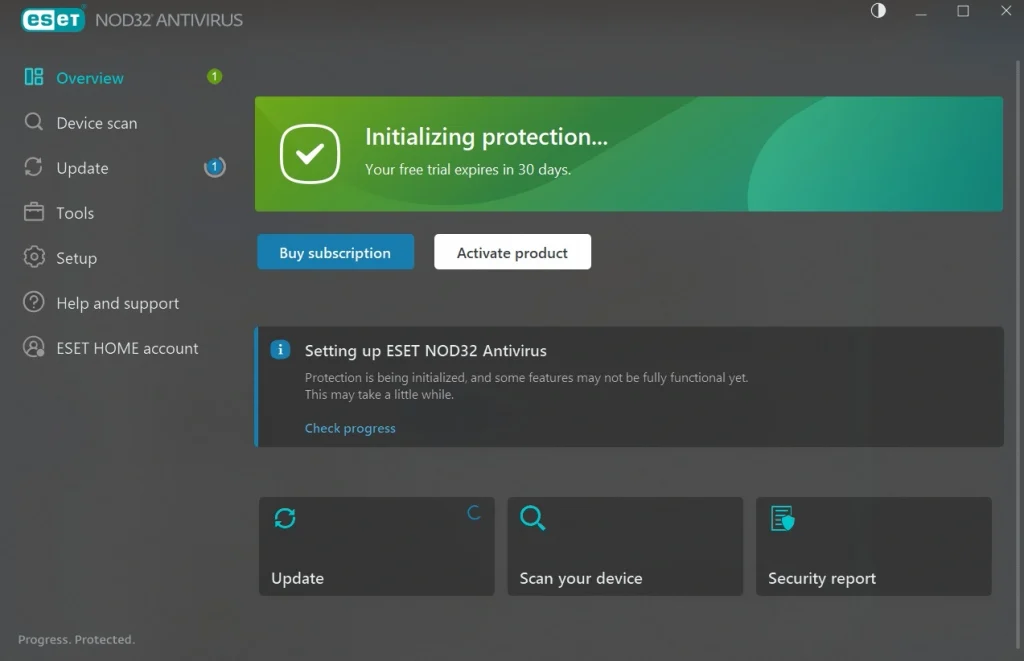
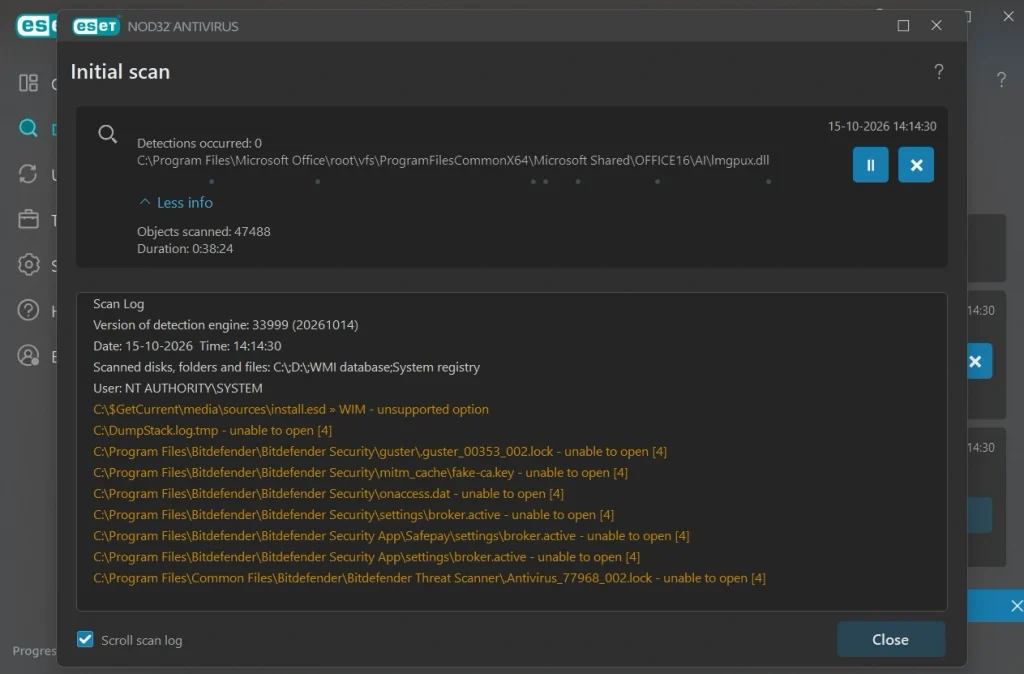
Step 2. Wait for the scan to end.
Step 3. Follow the prompts to clean any threats.
Why This Tool Is on Our List?
ESET is here because it is one of the easiest tools on low-spec hardware. Its scans take time, but they run quietly in the background. It has a small footprint and a simple layout. If your PC is old, this is a strong choice.
Facts and Stats From Our Test
The Smart Scan took about 40 minutes to finish on our laptop. That was longer than most tools we tried. The scan checked every file in detail, which is likely why it took so long.
The long scan did not hurt daily use, though. During a video playing test, we saw no lag at all. The tool also paused the scan when we started heavy tasks and picked it up again later. This kept the PC smooth. We did not see a single pop-up ad during the scanning process.
Pricing Plans Explained:
- A 30-day free trial lets you test the full tool
- The paid plan starts at around 40 dollars per year
- Plans for more devices cost a bit more
- Bundles with extra security tools are also offered
| Feature | Free Trial | Paid Plan |
| Virus Scanning | Yes | Yes |
| Real-Time Protection | Yes | Yes |
| Ransomware Shield | Yes | Yes |
| Support After Trial | No | Yes |
Firsthand Experience
ESET felt like a tool made by people who respect your time. It did not ask for much. After setup, it sat in the background and did its work.
The look is plain and a bit old-school. But that is part of the charm. Everything is where you expect it. We never felt lost.
We did notice the app has fewer extras than other tools. If you want a password manager or a VPN, you will need another product. Scans are also slow. But because they pause during heavy work, the wait never got in our way. For low-impact protection, this one stood out in our tests.
3. Webroot Antivirus
Webroot Antivirus takes a different path from most tools. It does most of its work in the cloud. This means it does not need to store large virus lists on your PC. The result is a very small app.
The install is quick, and the scans are fast. Many users like it for laptops and tablets with limited storage. It also keeps a close watch on websites and downloads while you browse.
Steps to use Webroot Antivirus:
Step 1. Install Webroot on your Windows PC. Enter your subscription key if prompted. You can find this on the official website.
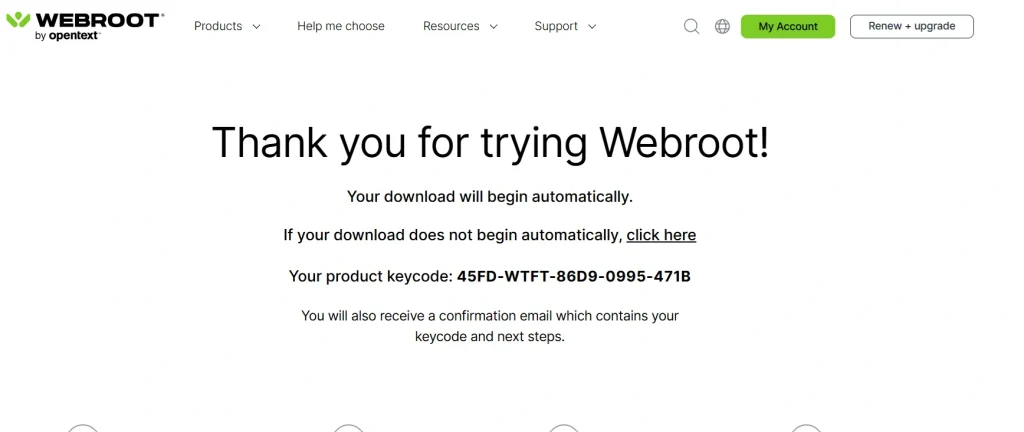
Step 2: Enter the key code in the antivirus app.
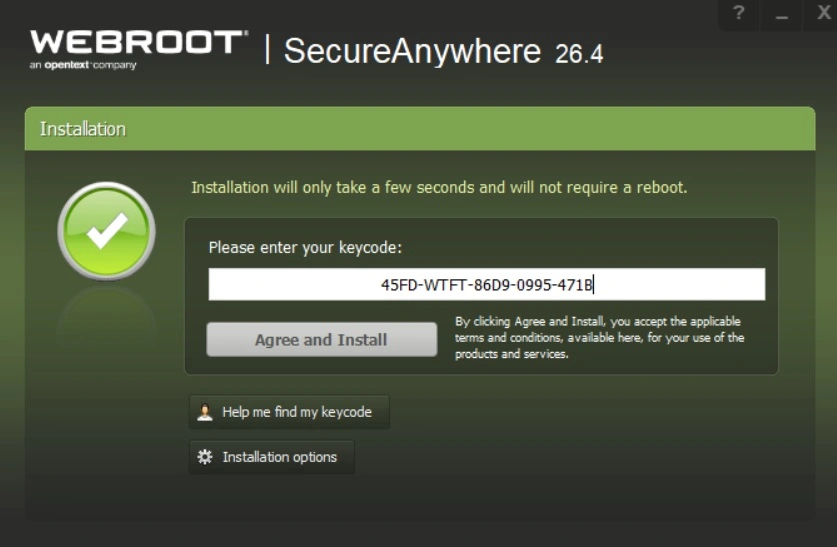
Step 3. Select the scan option and let it check your PC for viruses, malware, and other threats. Follow the recommended actions if anything is detected.
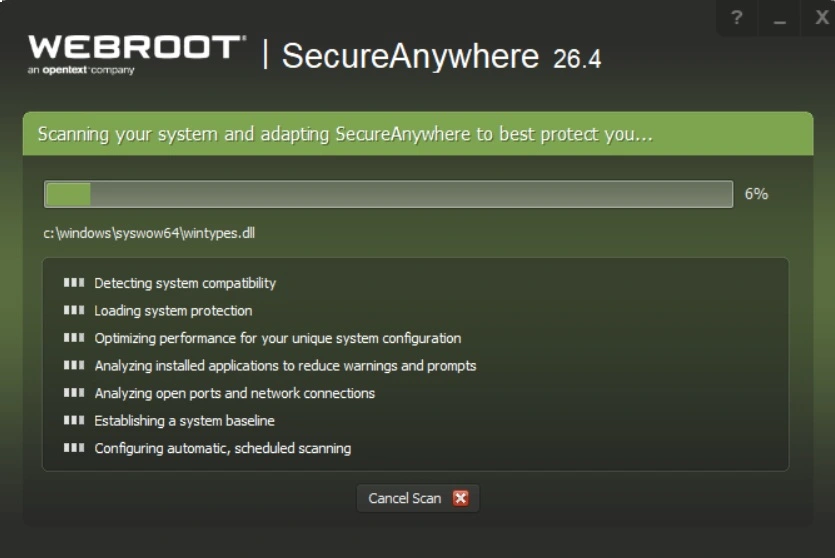
Step 4. Leave Webroot running in the background, allow it to update automatically, and check its security status regularly to keep your PC protected.
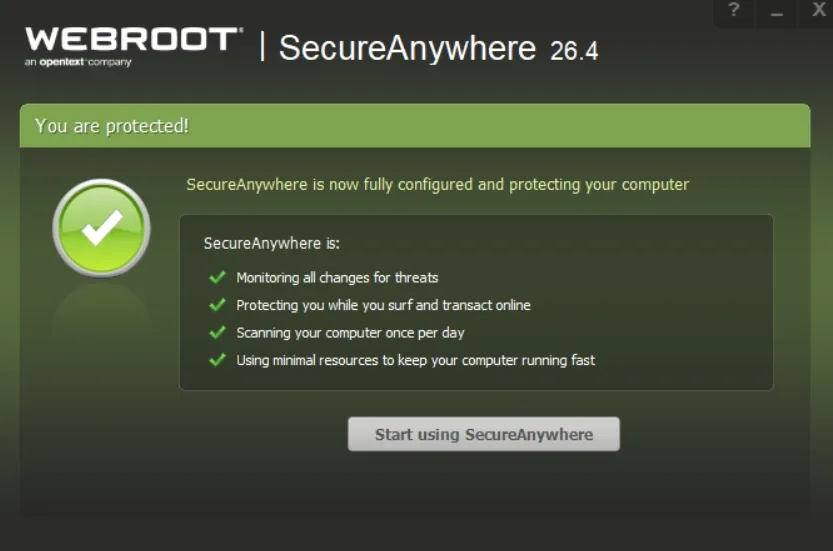
Why This Tool Is on Our List?
Webroot is on our list because of its speed. Scans finish in a very short time. The app is tiny. For people who hate waiting, it is one of the best picks.
Facts and Stats From Our Test
The first full scan took about four minutes on our test laptop. Later scans were even faster, often under two minutes. The app used about 60 MB of memory when idle. The install size was very small compared to others.
Boot time barely moved. We saw a one-second change at most. The real-time shield caught our test file right away. We also tried it while gaming for an hour, and there was no lag.
Pricing Plans Explained:
- No full free version, only a trial period
- The paid plan starts at around 30 dollars per year
- Multi-device plans cover several PCs and phones
- Bundles with a VPN and password tools are available
| Feature | Free Trial | Paid Plan |
| Fast Scanning | Yes | Yes |
| Real-Time Protection | Yes | Yes |
| Phishing Shield | Limited | Full |
| Support | Limited | Full |
Firsthand Experience
Webroot felt almost invisible. We forgot it was running. That is a good sign for a security tool. It stayed quiet and did not bother us with alerts.
The speed of the scans was the best part. We ran one in the time it took to make a cup of tea. This is a big plus if you scan often.
One thing to know is that it relies on an internet connection for the best results. If you work offline a lot, this may matter. Still, for most users, it is a fast and light choice.
4. Avira Free Security
Avira Free Security is a light security suite for Windows. It scans for viruses, spyware, and ransomware. It also checks downloads and blocks risky websites while you browse. The core tool is free, which makes it a popular pick for budget users.
The app uses cloud scanning to keep the load on your PC small. Most of the heavy work happens online, not on your machine. This helps it stay quick on older laptops. The free plan also adds a few handy extras, like a basic VPN, a password manager, and a software updater.
Steps to use Avira Free Security:
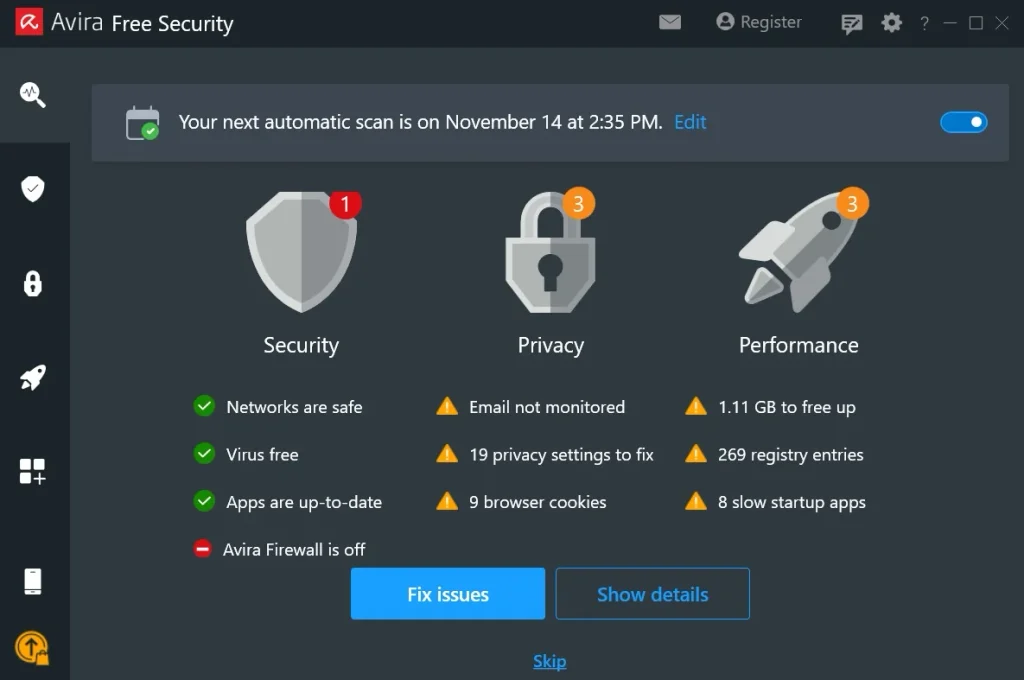
Step 1. Download and install Avira from the official website, then open the app. Click Security and run a Smart Scan to check your system.
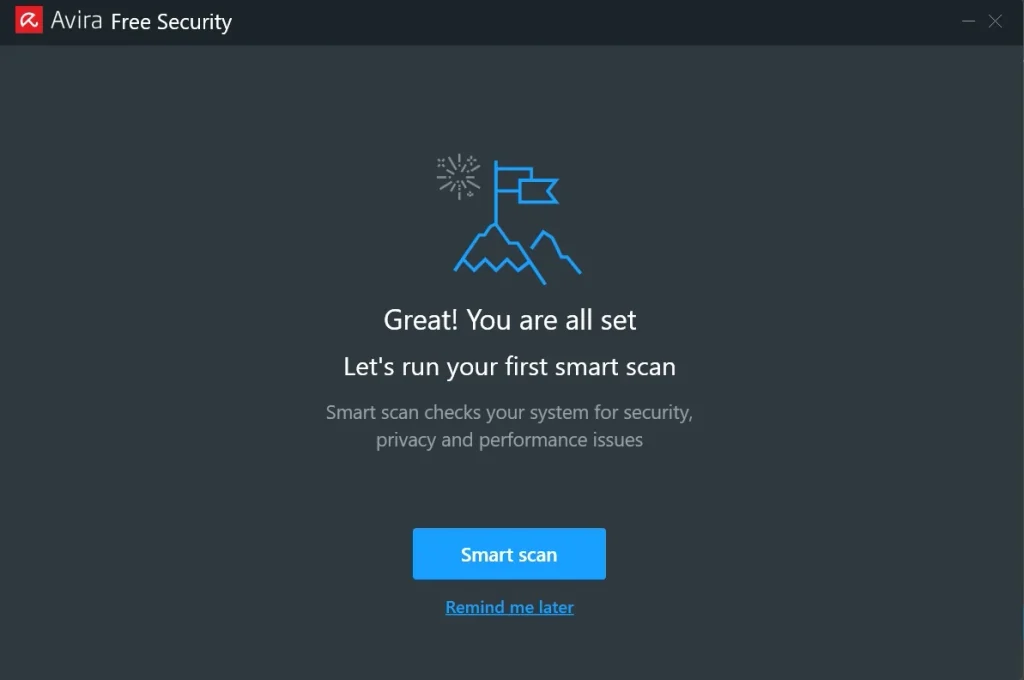
Step 2. Wait for the process.
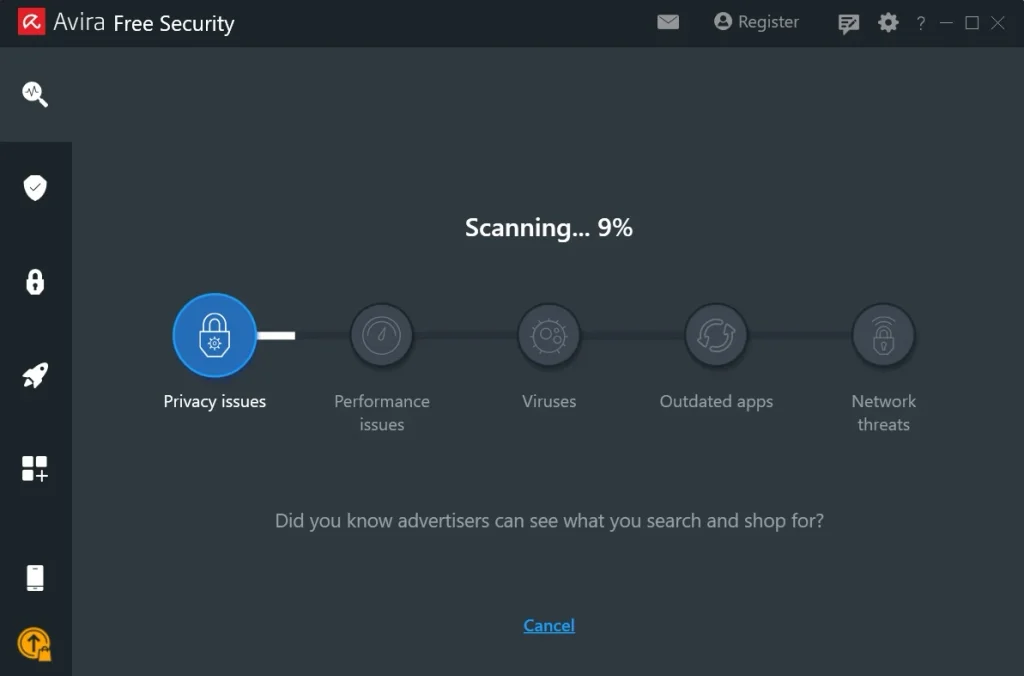
Step 3. Review the results and click Fix Issues to remove any threats found.
Why This Tool Is on Our List?
Avira is on our list because it offers real protection without a price tag. Most free tools give you very little. Avira gives a full scanner, a real-time shield, and useful extras. It also stays light, so it works well on low-spec PCs.
Facts and Stats From Our Test
The Smart Scan took about nine minutes on our test laptop. It checked system files, apps, and browser data in one pass. Idle memory use sat near 140 MB. Boot time went up by about three seconds after install.
We watched a video and used a browser with ten tabs during a scan. There was no stutter or lag. The real-time shield caught our safe test file within a few seconds. We saw a few prompts to upgrade during the week, but they were easy to close.
Pricing Plans Explained:
- The free plan covers virus protection and basic tools
- Paid plans start at around 40 dollars per year
- Paid plans add ransomware defense and stronger web tools
- Multi-device plans cover several PCs and phones
| Feature | Free Plan | Paid Plan |
| Virus Scanning | Yes | Yes |
| Real-time Protection | Yes | Yes |
| Ransomware Defense | No | Yes |
| Priority Support | No | Yes |
Firsthand Experience
Avira felt friendly and simple from the start. The setup was quick, and the first scan began in a few clicks. We did not need to change any settings to get good results.
The dashboard is clean and clear. Each tool has its own tab, so nothing felt buried. We liked the software updater, which flagged two old apps on our PC. That is a small extra, but it adds real safety.
The main downside is the upgrade prompts. They show up now and then in the free version. But they are not too pushy. For a free, light, and capable tool, Avira is a strong choice.
5. Microsoft Defender
Microsoft Defender is the security tool built into Windows 11 and 10. It is free and turns on by default. There is nothing to download or set up. It scans files, checks downloads, and blocks many common threats.
Over the years, Defender has improved a lot. Independent labs now rate it well. It is deeply tied to Windows, so it uses system resources in a smart way. For many users, it is enough.
Steps to use Microsoft Defender:
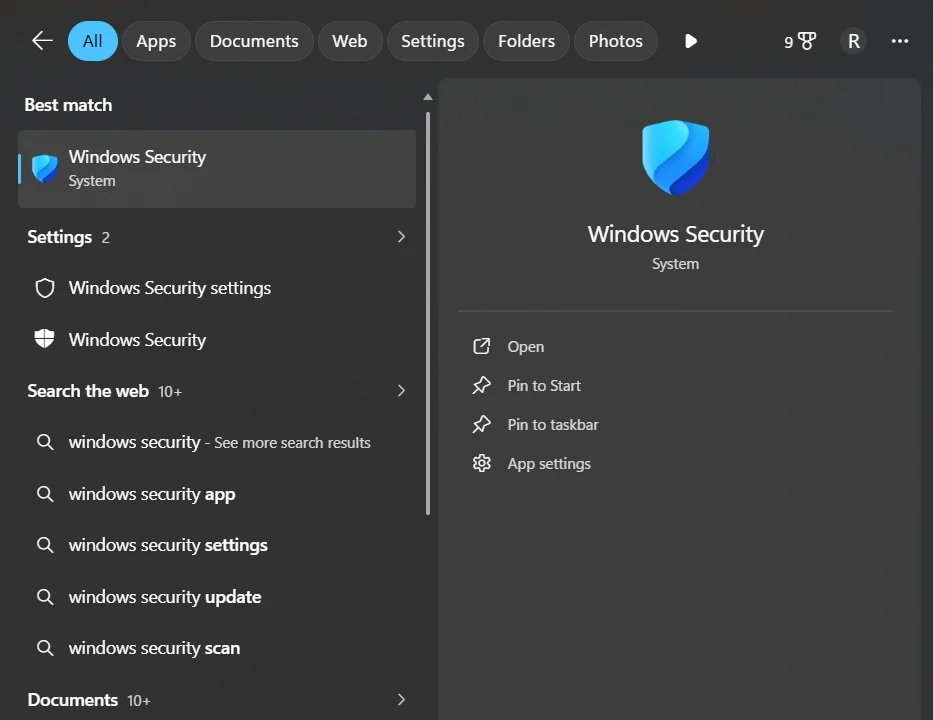
Step 1. Open the Start menu and search for Windows Security.
Step 2. Click Virus & threat protection, then choose Quick Scan.
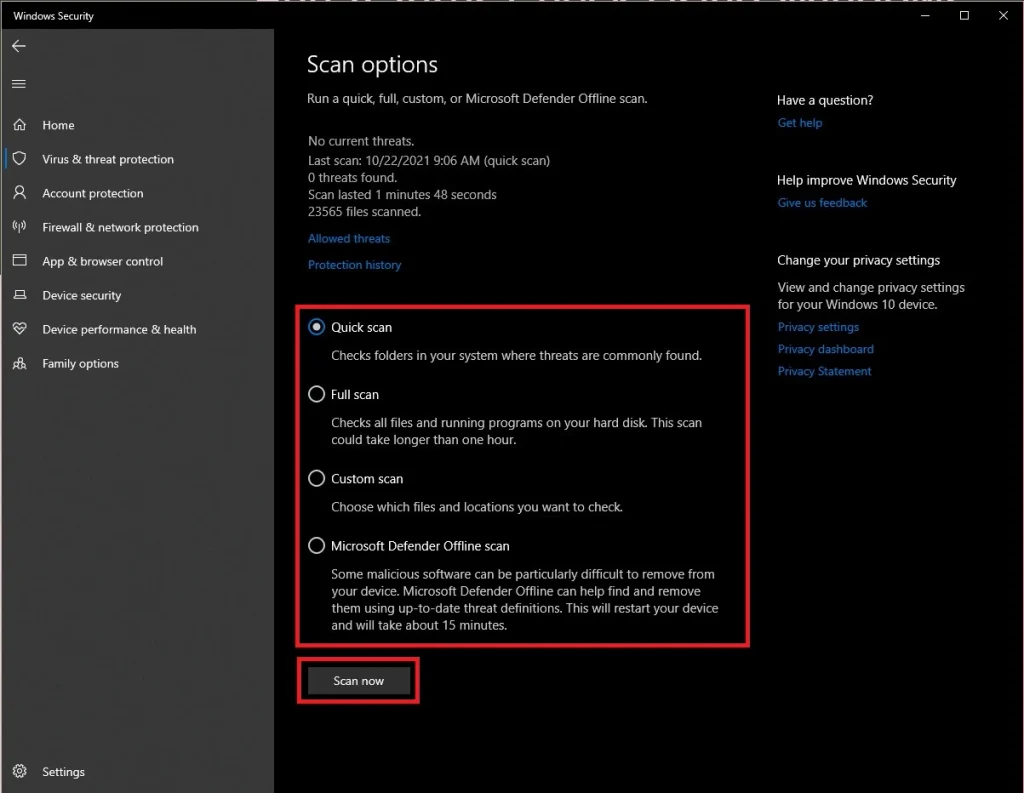
Step 3. If threats appear, click Start Actions to remove them.
Why This Tool Is on Our List?
Defender is on our list because it costs nothing and is already there. It runs well on most PCs and does not push ads. It is a smart base layer for anyone who wants simple, free safety.
Facts and Stats From Our Test
A quick scan took about two minutes on our laptop. Boot time did not change, since Defender was already part of the system.
During heavy work, we sometimes saw a short bump in disk use when scans ran. It was not a big problem. We also saw no pop-ups or sales offers.
Pricing Plans Explained:
- The built-in tool is fully free with Windows
- No sign-up or license key is needed
- An extra Defender app comes with some Microsoft 365 plans
- Extra features like device alerts are in that paid app
| Feature | Built-in (Free) | Microsoft 365 Plan |
| Virus Scanning | Yes | Yes |
| Real-Time Protection | Yes | Yes |
| Identity Alerts | No | Yes |
| Multi Device View | No | Yes |
Firsthand Experience
Defender surprised us. We expected a basic tool. What we got was a calm, steady guard that did its job. It never asked us for money or showed a single ad.
Because it is part of Windows, it feels natural. There is no extra app to learn. Updates arrive through Windows Update, so you do not need to think about them.
It does lack extras like a VPN or a password manager. And full scans are slower than some rivals. But as a free and light option, it is hard to ignore.
Is Using a Free Antivirus Tool Worth It?
Free antivirus tools are a good start. Microsoft Defender covers the basics well, and free versions from other brands add a bit more. For careful users who avoid shady sites, this may be enough. It is also a fine pick for the lightest antivirus software setup on a budget.
But free tools have limits. Extras like ransomware shields, safe banking tools, and phone support are often locked behind a paywall. If you shop online often or store private files, a paid plan adds a useful safety net.
In the end, it depends on how you use your PC. Light users can stay with free tools. If you handle money, work files, or family photos, paid protection is worth the small cost.
Conclusion
A good antivirus should guard your PC without slowing it down. The five tools in this guide prove that this is possible. Each one uses little memory, scans at a fair speed, and keeps pop-ups low. The best choice depends on your PC and your needs.
ESET stood out for older machines, and Webroot won on pure scan speed. Bitdefender gave the best mix of strength and low impact. Avira showed that a free tool can offer real protection and useful extras. Microsoft Defender proved that built-in safety can be good enough. Try a free version or trial first to see what feels right.
Remember that no tool can do everything alone. Keep Windows updated, avoid unknown links, and back up your files. Pair a smart habit with the lightest antivirus software you can find, and your PC will stay safe and fast for a long time.
FAQs
1. What is the lightest antivirus software for Windows PC?
The lightest antivirus software is one that protects your PC without using too much RAM, CPU power, or disk space. Microsoft Defender, ESET NOD32, and Webroot SecureAnywhere are options worth considering, depending on your system specifications and security needs. Before choosing one, check its impact on system performance and the protection features included in its plan.
2. Does lightweight antivirus software slow down a PC?
Lightweight antivirus software is designed to use fewer system resources, which can help reduce slowdowns during everyday tasks. However, its actual impact depends on your PC’s hardware, the type of scan running, and the number of background processes. Quick scans and idle-time scanning can help reduce interruptions while you work, browse the internet, or play games.
3. Is lightweight antivirus software enough to protect a Windows PC?
Yes, a lightweight antivirus can provide strong protection if it offers reliable malware detection, real-time threat monitoring, and regular security updates. However, performance should not be the only factor when choosing an antivirus. Look for features such as web protection, ransomware detection, and phishing prevention. Keep Windows updated and avoid downloading files from untrusted sources for better overall security.
Author Bio:
Dinesh Lakhwani 

Dinesh Lakhwani, the entrepreneurial brain behind “TechCommuters,” achieved big things in the tech world. He started the company to make smart and user-friendly tech solutions. Thanks to his sharp thinking, focus on quality and the motto of never giving up, TechCommuters became a top player in the industry. His commitment to excellence has propelled the company to a leading position in the industry.
Popular Post
Recent Post

How To Disable Cookies in Browser [Complete Guide]
So, search for a pair of shoes once online. Close the tab. By evening, those same shoes are sitting on your news site, your video app, and even your recipe blog. Nobody placed them there by chance. A cookie did. Well, yes! Cookies are small files that websites place on your device while you browse. […]

How To Disable Background Apps In Windows: 4 Quick Methods
A slow PC rarely gives a warning. One day, it simply takes longer to start. Apps open late. The fan runs loud, even when the screen is almost empty. Most people blame old hardware. Often, that is not the real reason. The real reason is hiding in plain sight. Windows keeps many apps active in […]

How to Activate Windows with a Product Key for Windows 11 & Windows 10
It always shows up at the worst time. You are halfway through a report, or about to join a video call. Then you spot it in the bottom right corner of the screen. Activate Windows. Go to Settings to activate Windows. Initially, an unactivated copy of Windows may seem like a minor inconvenience. Over time, […]

Is Easy Duplicate Finder Worth It? Honest Review
The photos folder looked normal at first glance. Then the storage warning popped up. One trip photo appeared four times. A tax PDF sat in three different folders. Two old setup files were still in Downloads, and each one was over 500 MB. Nobody plans this mess. Copies pile up slowly. A download runs twice. […]

Wise Duplicate Finder Review: Real Results from Wise Duplicate Finder
Read my honest Wise Duplicate Finder review. See features, pricing, pros and cons, and real PC test results. Find out if this free duplicate cleaner can free up your Windows storage.

How to Recover Deleted Files from Pen drive, USB Drive, SD Card
Introduction: On tech forums, you’ll often see posts like this: “I connected my pen drive to my laptop this morning, but the folder was empty. All my college project files had vanished. I don’t have a backup. Can someone help me?” Stories like this are very common. Pen drives, USB drives and SD cards are […]

How To Recover Files Deleted from the Recycle Bin [Windows 11]
Losing a file can happen in seconds. You clear your desktop, hit Delete, and empty the Recycle Bin. Then, just when you need that file again, it seems to have vanished. This guide will walk you through ways to restore files removed from the Recycle Bin. We will begin with simple fixes, then look at […]

Disk Drill Data Recovery Tool Explained: Full Review and Guide
It happens in a split second. You delete a folder by mistake. Your drive stops showing up. A photo album from your last trip just vanishes. And your stomach drops. Lost files feel personal. They are not just data. They are memories, work hours, and sometimes years of effort packed into a few gigabytes. When […]

Recover Deleted Files In Windows 11 With Software & Without
Introduction What is the first thing that goes through your mind the second an important file vanishes from a Windows 11 PC? For most people, it is a mix of panic and disbelief, followed by a frantic click through every folder that file could possibly be hiding in. It happens in a split second: one […]

