











Read my honest Wise Duplicate Finder review. See features, pricing, pros and cons, and real PC test results. Find out if this free duplicate cleaner can free up your Windows storage.
10 Time Tracking Apps for Remote Workers
Monitoring and organizing the time of the remote employees help improve the company’s overall performance. Time tracking software may help you measure the productivity of your staff. You may use the application to monitor the team’s progress, coordinate projects, cooperate and produce invoices.
But which time tracking tools are ideal for your business? We have compiled a list of the top applications to assist you to dispel this doubt. In addition, for a positive experience, consider the 10 best time tracker apps listed below.
Best 10 Time Tracking Apps for Remote Workers
We have compiled a list of the most acceptable time tracking applications available on the market to make things easier for you. So, keep reading to learn more about each thing in depth.
1. Hubstaff
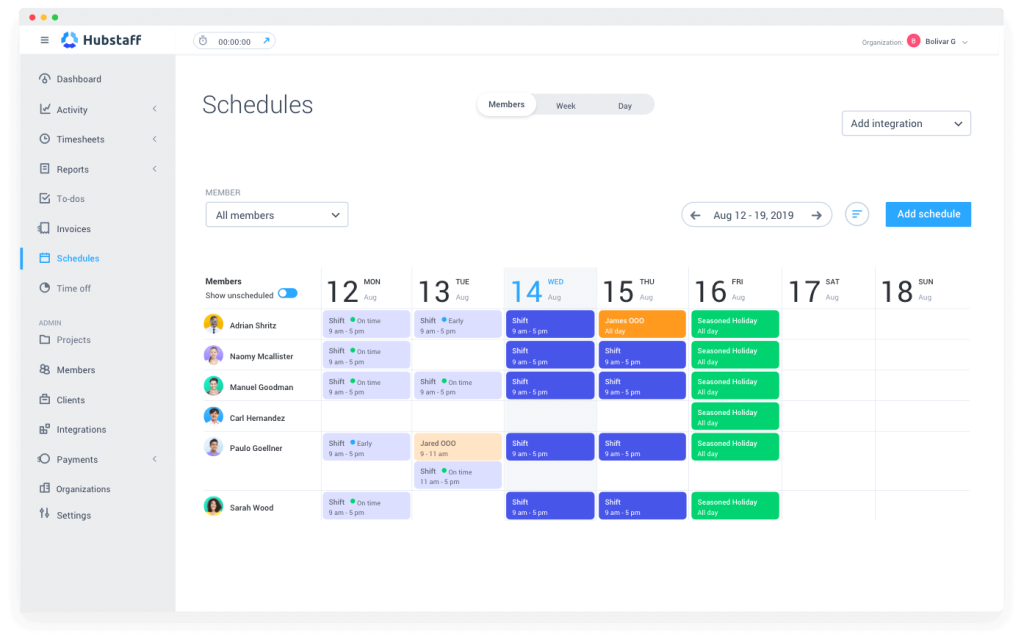
Employee time monitoring with screenshots, reporting, invoicing, scheduling, GPS tracking, monitoring, budgeting, and automatic payroll are all available through Hubstaff. It offers everything you need to track remote employees, but it’s not customizable. The free plan only includes the most basic capabilities. It provides Hubstaff Tasks, a project management application, and Hubstaff Talent, a method for locating remote talent worldwide.
Compatibility: Windows, iOS, Android, macOS, Linux, and Web browsers.
Price: Desk Free; Desk Starter; 7.00 USD; Desk Pro; 10.00 USD
Features:
- Employee GPS tracking and automatic screenshots are available.
- Offers attendance tracking, team management, and shift scheduling
- The free edition includes essential time and work tracking.
- The automatically created reports disclose details on staff performance.
Pros:
- The user interface is straightforward
- Integration of payment processors
- Online timesheet with great detail
Cons:
- For the free version, there is just one user.
- The app shows glitches sometimes.
2. TMetric
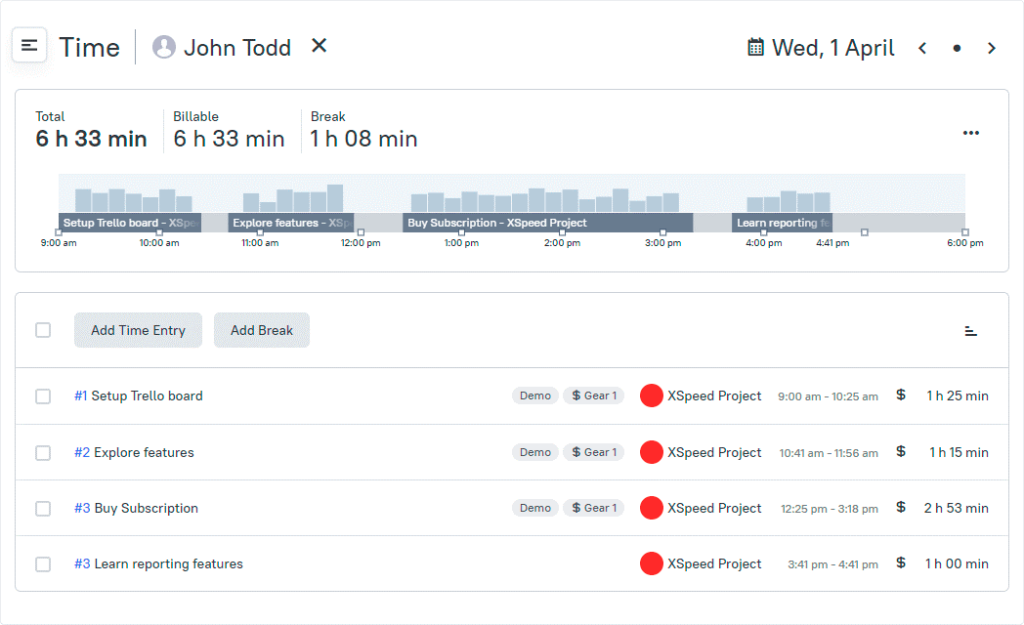
TMetric is a new free time-tracking tool designed for freelancers or small company owners. It offers an easy-to-use interface and is not restricted to many clients or projects. You may change your working hours, create and switch tasks, label each task, and view comprehensive project reports. This time tracking software allows you to change your tasks and time and add break hours using the timeline.
Compatibility: Windows, macOS, Linux, iOS, Android, and Web browser
Price: Free; Professional: $5.00/month; Business: $7.00/month
Features:
- Scalable groups for varying levels of access.
- Displays project budget and time estimates.
- Many tasks management can be readily connected with TMetric.
- Synchronization of the work of several staff teams.
Pros:
- No restrictions on users or clients.
- Easy-to-use.
- Simple to interface with a variety of services.
Cons:
- Np possibility to capture screenshots.
- Provides basic reports.
3. Rescue Time
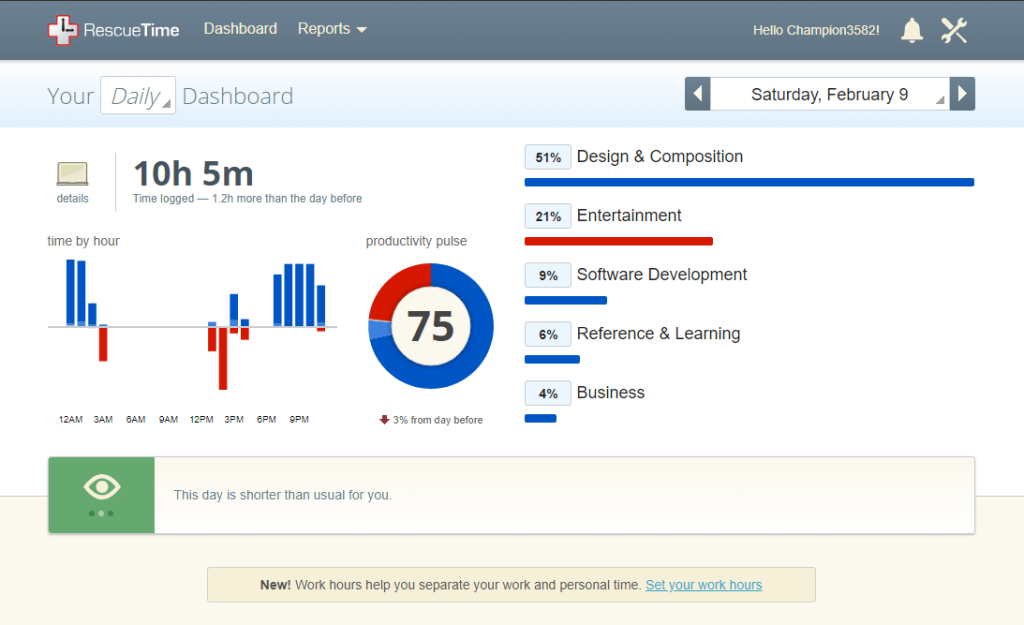
RescueTime is a time monitoring and analysis solution for remote workers accessible over the web. It eliminates distractions while tracking time spent on programs and websites, providing you with a complete picture. RescueTime assists you in understanding everyday behaviors, concentrating, and being productive. It operates in the background of your devices safely. It also records and categorizes where you spend your time.
Compatibility: Windows, Android, iOS, macOS, Chrome extension, Web browser, and Linux
Price: Lite: Free; Premium; $9.00/month
Features:
- It runs in the background and monitors time on mobile and PC.
- Interferences can be reduced by using automatic triggers.
- Ranks efficiency reports based on activity.
- Displays reports on historical and trend data.
Pros:
- Basic and straightforward app.
- Automated timekeeping
- Focus notifications in real-time
Cons:
- The free version has fewer features.
- Expensive premium version
4. Harvest
Harvest is among the best time tracking apps that create work plans and have a robust reporting feature. Plus, it allows the users to generate invoices and bills and handle payments. The application even allows freelancers to divide their billable time across many clients or projects. On the other hand, managers may utilize it to keep track of their remote employees.
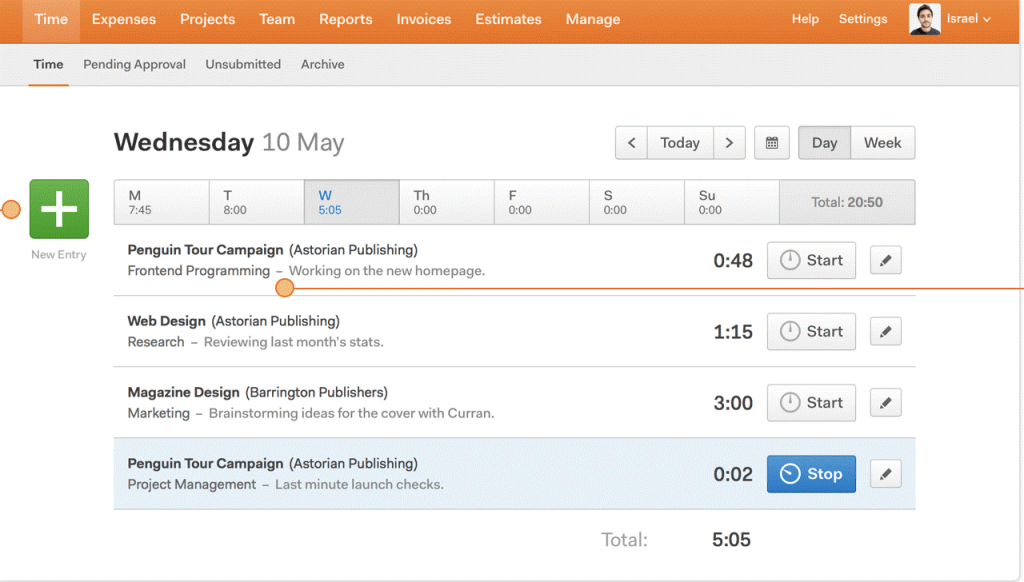
Compatibility: Windows, Android, iOS, macOS, Web browsers.
Price: Free; Pro: $12 per seat/month
Features:
- Extensive time, task, and expenditure monitoring and reporting.
- Several third-party application connectors are available.
- Customizable chargeable rates.
- Payment of invoices through the internet.
Pros:
- Bank-level security.
- Provides prompt reminders.
- Budget alerts for projects.
Cons:
- Tracking infinite projects necessitates an upgrade.
- The mobile app is sluggish sometimes.
5. Timely
Timely is a straightforward and appealing application for maintaining time spent on activities and projects. Memory, an extension, allows you to track how much time you invest in different apps. It also keeps remote employees noticeable and controllable. It uses artificial intelligence to categorize your chores and activities. It is feasible to measure KPIs arrange workers into teams and remote personnel.
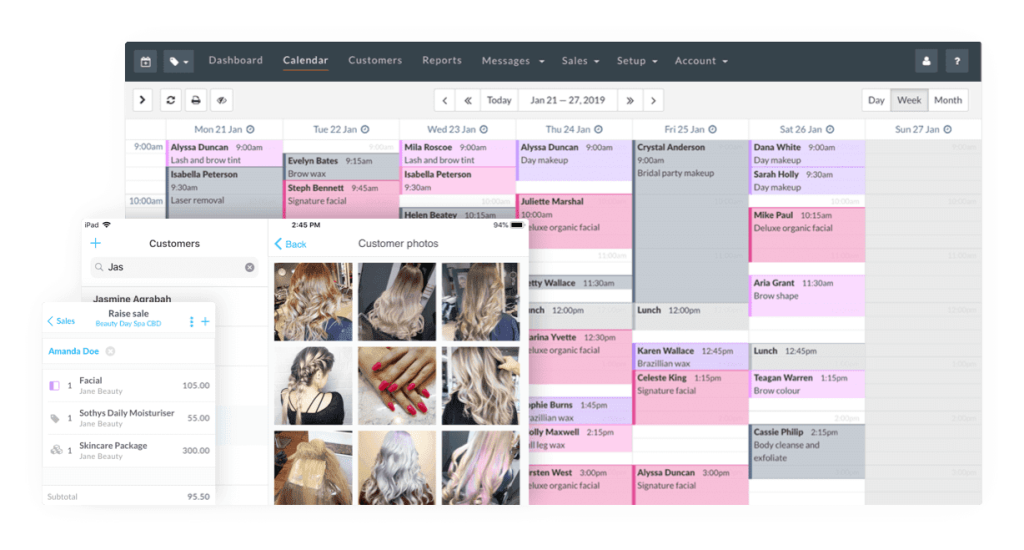
Compatibility: Windows, Linux, iOS, Android, macOS, and Web browser
Price: Starter: $8 per user/m; Premium: $14 per user/m; Unlimited: $20 per user/m.
Features:
- AI technology is used for automatic activity labeling and categorization.
- Reports on team and project management are available.
- It features extensive dashboard functionality.
- Records employee tardiness and idleness.
Pros:
- Budgeting for a project.
- Reports on overall productivity.
- A diverse set of timekeeping instruments.
Cons:
- The price of the paid version is excessive
- No free version is available.
6. Clockify
Clockify is a free time tracking and timesheet program for large and small remote teams. It is free to use for an infinite number of people. For optimum privacy and security, this time tracking software provides its servers. Clockify customers may record chargeable time for an infinite number of projects. With this tool, managers may develop, distribute, and export customized reports in various formats.
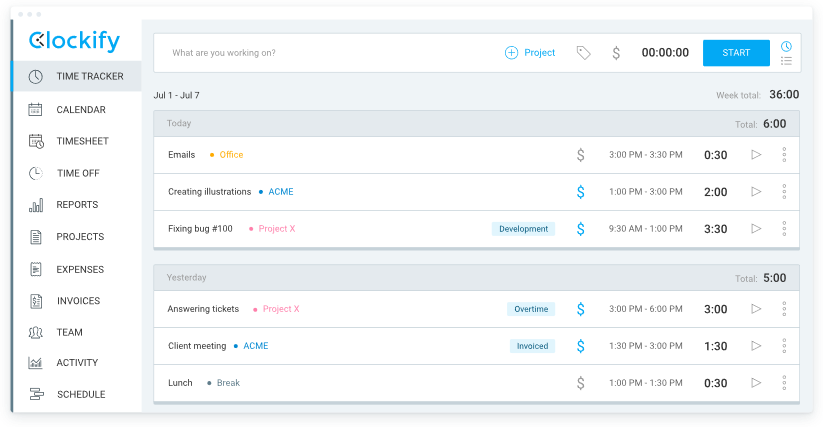
Compatibility: Windows, iOS, Android, Linux, Chromebook, and Web browsers
Price: Free; Standard: $6.99 per seat/month
Features:
- Offers a visual representation of the activities and projects.
- You may perform all computations within the app.
- Time tracking is simple and adaptable.
- Weekly summary reports are available.
Pros:
- Manually start or stop the timer
- Signing up is simple.
- All browsers are supported.
Cons:
- The unavailability of a Gantt Chart
- The server does not save automated time.
7. Desktime
DeskTime is one of the most fantastic time tracking apps for remote teams. It allows the management to monitor who misused their working hours. In real-time, it measures time and assesses staff productivity.
This tool categorizes programs and websites utilized into unproductive, productive, and neutral classifications. It monitors keyboard and mouse clicks to determine whether or not an employee is working or taking a break.
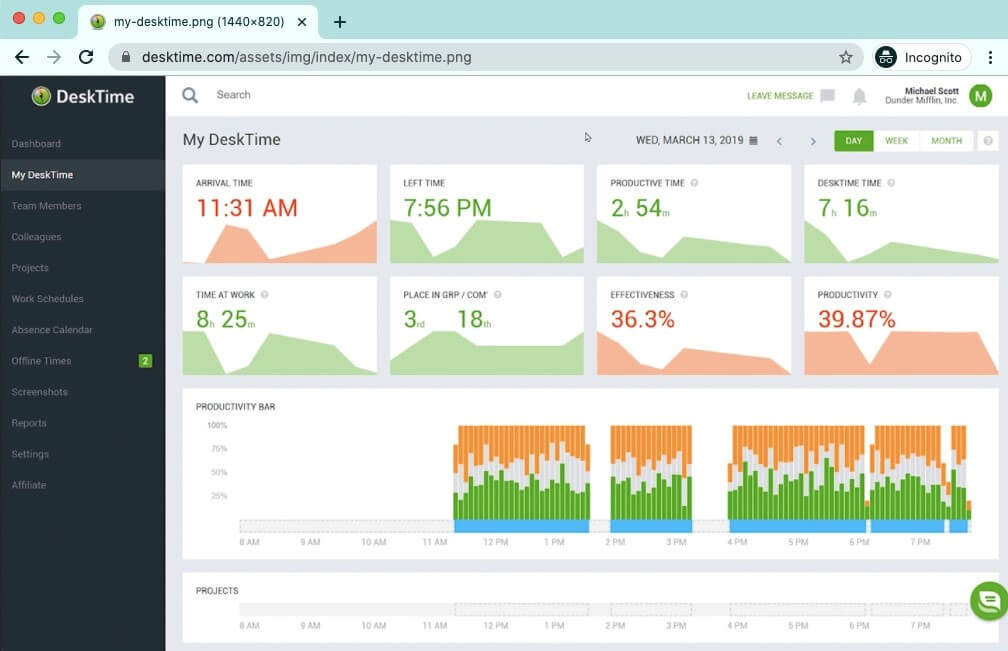
Compatibility: Windows, macOS, Linux, Android, iOS, and Web browser
Price: Lite: Free; Pro: $7.00 per user/m; Premium: $10 per user/m; Enterprise: $20 per user/m
Features:
- With its unique capabilities, it is ideal for managers and remote teams.
- There is a desktop version that may be used offline.
- Allows employees in the firm to schedule shifts more efficiently.
- You may start a new project directly from your desktop.
Pros:
- Capability to capture screenshots.
- Keystroke tracking.
- Ease in adding time to timesheets.
Cons:
- Reports are rather basic.
- Primitive desktop surveillance.
8. Timecamp
TimeCamp is another best time tracker that supports an infinite number of projects and users. It is an automated time tracking program that monitors the hours spent on tasks and categorizes them. As a result, it allows you to track people’s work throughout the day. It is feasible to automate staff payroll and deliver client bills. Over 100 different apps may be integrated with Timecamp.
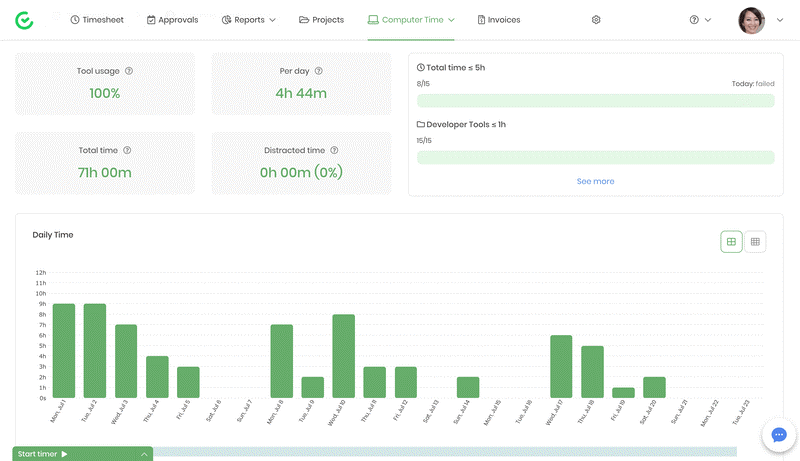
Compatibility: Windows, macOS, iOS, Android, Linux, and Web browsers.
Price: Free; Basic: $6.3 per user/m; Pro: $9 per user/m
Features:
- Benefits for thorough performance monitoring.
- Billable time tracking is available.
- Allows users to arrange their projects and collect all of the invoicing information.
- Data collecting to generate correct invoices.
Pros:
- The reporting tool is fantastic.
- It is pretty simple to move from one activity to another.
- Extremely simple to set up and utilize
Cons:
- macOS desktop software might be challenging to use at times.
- The website usually takes a long time to load.
9. Toggl Track
Toggl Track is another time tracking software and includes a web-based desktop and a mobile application. It guarantees that time inputs are automatically synced across different offline and online machines.
It has a Pomodoro timer that enables you to control your work and time without interruptions. Users may import CSV files into Toggl Track, making it simple to submit project and customer data to specified workspaces.
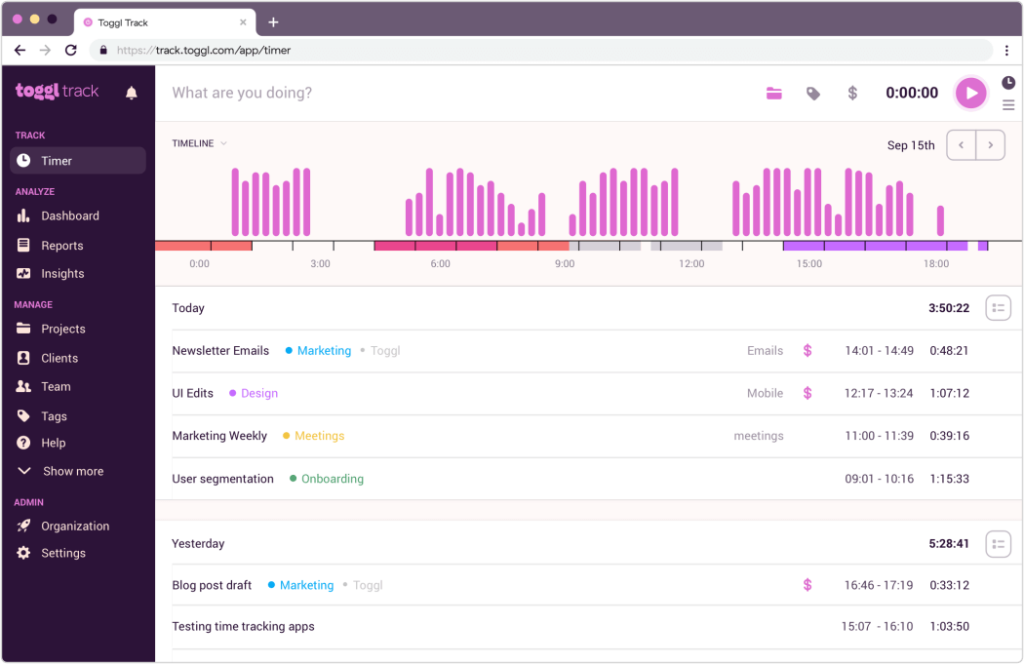
Compatibility: Windows, Linux, macOS, Android, iOS, and Web browsers
Price: Free; Starter: $9 per user/month; Premium: $18 per user/month
Features:
- The background tracking capacity implies that workers spend their time on beneficial purposes.
- Time records are automatically created when workers spend over 10 seconds on an app/website.
- Allows you to bill clients just for hours spent on work-related tasks.
- Tracking reminders are available.
Pros:
- Straightforward user interface.
- Background investigation.
- Planned email reports.
Cons:
- It is tough to generate branded invoices.
- Hard to observe all of the chores in chronological sequence.
10. TrackingTime
TrackingTime is one of the best collaborative time tracking apps that assist businesses in managing projects, tracking operating hours, and measuring productivity. The app’s base is basic, but it has a powerful task organizer that helps you stay focused by measuring your operating time in real-time.
Because the program is collaborative, you may manage your tasks, projects, and to-do checklists on a web-based interface.
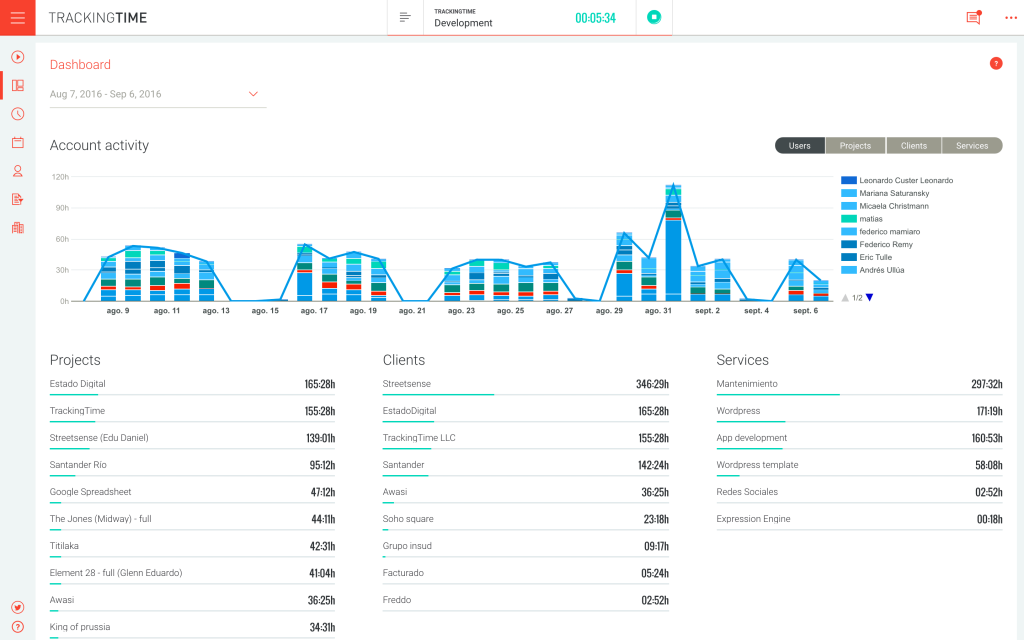
Compatibility: iphone, Android
Price: Free trial; Pro: $5 per user/month
Features:
- Assembles an online to-do list for businesses.
- Tracks the average time spent concentrating on a job or project.
- Produces billing and payroll summaries to decrease administrative effort.
- Any firm may benefit from its attendance tracker feature.
Pros:
- Capability to integrate with third-party software
- Ease of use
- Desktop and smartphone versions are available.
Cons:
- Functionality is limited.
- There aren’t enough instruments to adequately regulate personnel.
Conclusion
With increasing popularity in remote work, the biggest problem for businesses is ensuring that their employees are working correctly. So, company owners consider using a time monitoring tool to combat time fraud. If you’re thinking the same thing, choose one of the ten top time tracking software listed above.
We recommend using the Tracking Time program and Hubstaff, which provides the most significant project management tools. However, you are free to use any other app that meets your requirements.
Author Bio:
Dinesh Lakhwani 

Dinesh Lakhwani, the entrepreneurial brain behind “TechCommuters,” achieved big things in the tech world. He started the company to make smart and user-friendly tech solutions. Thanks to his sharp thinking, focus on quality and the motto of never giving up, TechCommuters became a top player in the industry. His commitment to excellence has propelled the company to a leading position in the industry.
Popular Post
Recent Post
How to Recover Deleted Files from Pen drive, USB Drive, SD Card
Introduction: On tech forums, you’ll often see posts like this: “I connected my pen drive to my laptop this morning, but the folder was empty. All my college project files had vanished. I don’t have a backup. Can someone help me?” Stories like this are very common. Pen drives, USB drives and SD cards are […]

How To Recover Files Deleted from the Recycle Bin [Windows 11]
Losing a file can happen in seconds. You clear your desktop, hit Delete, and empty the Recycle Bin. Then, just when you need that file again, it seems to have vanished. This guide will walk you through ways to restore files removed from the Recycle Bin. We will begin with simple fixes, then look at […]

Disk Drill Data Recovery Tool Explained: Full Review and Guide
It happens in a split second. You delete a folder by mistake. Your drive stops showing up. A photo album from your last trip just vanishes. And your stomach drops. Lost files feel personal. They are not just data. They are memories, work hours, and sometimes years of effort packed into a few gigabytes. When […]
Recover Deleted Files In Windows 11 With Software & Without
Introduction What is the first thing that goes through your mind the second an important file vanishes from a Windows 11 PC? For most people, it is a mix of panic and disbelief, followed by a frantic click through every folder that file could possibly be hiding in. It happens in a split second: one […]
EaseUS Data Recovery Wizard: Everything To Know
Data loss does not always come from a big disaster either. Most cases start small and boring. A drive gets formatted by mistake. A laptop freezes mid-save and restarts on its own. A memory card stops showing up after being pulled out too fast. None of these feel like emergencies at first, until you realize […]

Recuva Data Recovery Tool: Is it Actually Worth it?
When I first tried Recuva Data Recovery, I wanted to see if it could really bring back lost files. The tool is free, small in size, and promises quick recovery, which made me curious enough to test it on my own PC. The setup was fast, and the wizard guided me step by step. I […]

GetData Recover My Files Data Recovery Tool: Honest Review
A hard drive error brings a special kind of silence. Well, yes! The screen freezes, then a message appears saying the drive can’t be found or must be formatted. In that moment, years of photos and work files feel at risk. It never happens at a good time. Coffee spills near a laptop, a memory […]
Windows File Recovery: A Complete Review [Tried & Tested]
Imagine this. You spend hours perfecting a video project. You hit save. Then your laptop freezes, reboots, and when the screen comes back. The file is gone. Your stomach sinks. It’s not just you. Lost files happen all the time. A dropped hard drive, a bad update, an accidental delete, or a corrupted partition can […]
5 Best Data Recovery Software For Windows 11 and Windows 10
Introduction: A crashed drive can ruin a whole day. One minute your photos, work files, and tax records sit safe on your PC. The next minute they are gone. A power cut, a bad update, or one wrong click can wipe out years of memories and months of work in seconds. That sinking feeling is […]

