What is Email Spoofing and How to Stop It?
Last updated on May 18th, 2025 at 9:10 am
As we live in the age of information, it’s safe to say that our lives have become a lot easier with the introduction of internet. Well, you can’t complain when you’re able to pay most of your bills right from your smartphone. But, there’s also another side of the coin here, which is cyber crime. Actually digital crime can be categorized into many sub categories ranging from petty stuff to high profile scams.
When you talk about online scams, one must definitely acknowledge the irritating email spoofing practices. Not only they’re frustrating, they’re also dangerous if you’re secured enough. In this article, we aim to educate our users about email spoofing and the tips that you could implement to avoid such malicious activities from taking advantage of you.
What is Email Spoofing?
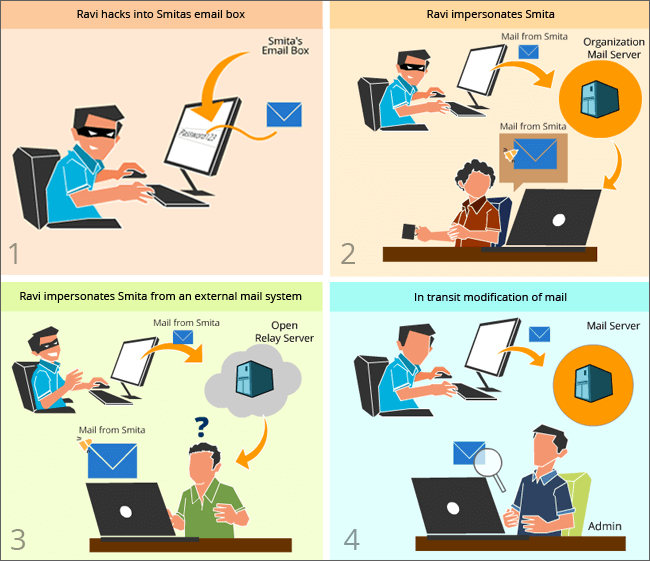
Email spoofing is an online con where the perpetrator falsifies the information of the sender email to appear that it has been sent by someone close or familiar to the receiver. Basically, you may get an email which seems to be send by someone you already know, but in fact, it’s not.
This type of digital con has been in the practice for a long time and many victims are getting scammed by email spoofing for the last few year. Yet, not many people are aware of this type of cybercrime, which is why there are tons of victims, mainly due to lack of awareness.
The cyber criminals usually alter the details such as email header and other sender’s information, so that the victim doesn’t hesitate and feel suspicious about that email. Such emails contain requests that ask for your personal information like your login details, address, and many similar things.
If you proceed and submit such requested information, they will be used for illegitimate activities or even to hack. Email Spoofing is one of the major methodologies used for phishing attacks. So, be very careful when you’re accessing your email inbox. If you’re vigilant enough, you might be the next victim of this email con.
mithi.com
How to stop Email Spoofing?
In current generating, one has to be very careful while dealing with anything that’s related to internet. Since, we store a lot of information online, it’s very important to be careful with our digital activities. As discussed earlier, Email spoofing is one of those dangerous online cons that can cause severe consequences for the victims; we should take all the necessary steps to be safe and secure. Here are a few steps you should take if you’re wondering how to stop email spoofing:
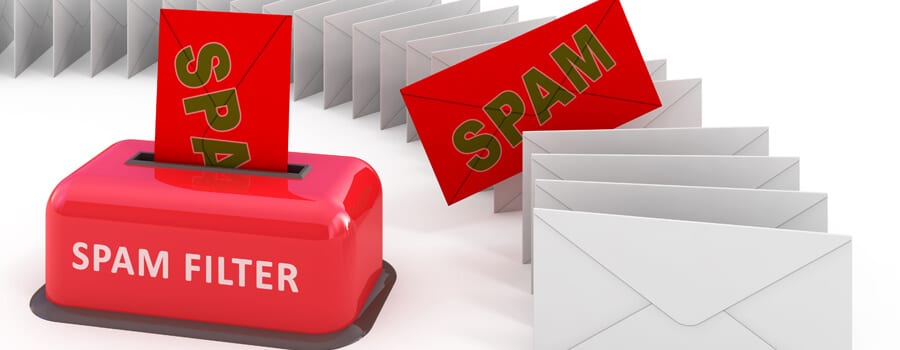
- Use Spam Filters: Many major email service providers offer powerful spam filters you can take advantage of. These spam filters usually employ several advanced algorithms that help in detecting any type of spam or scam emails related to malicious activities. Make sure that you dig into the spam filter settings of your account and tighten everything up. By doing so, you can block half of the email spoofing attacks that may target you.
source: informatics inc
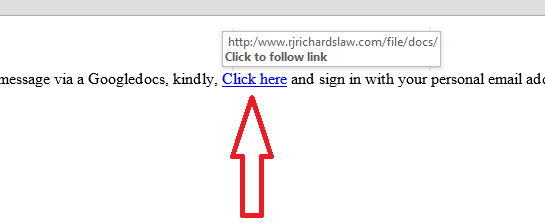
- Don’t click or download suspicious items: Well, if you can’t detect spoofed emails by looking at the basic information, you need to take care of other things. First and foremost, you need to remember that clicking on random links or downloading suspicious attachments is a digital sin. If you do so, you’re unintentionally giving access to your account. Always check the URL behind the link by hovering your cursor over the hyperlinked text.
zendesk.com
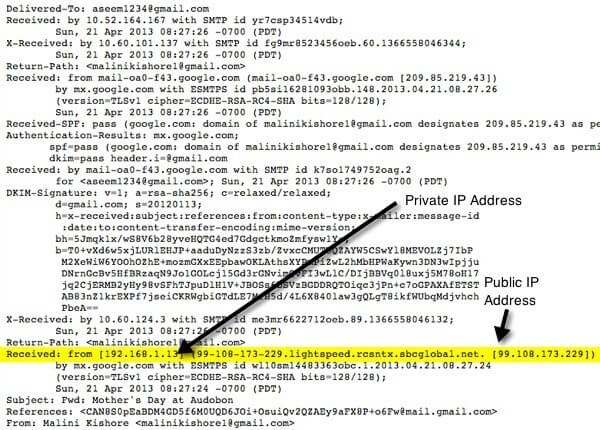
- Read and Trace the Sender: You may wonder how can you trace an email sender, but don’t worry; it’s not as difficult as you may thing. Usually, all the major email service providers offer you access to the important details for an email sender such as their IP address. You can simply click on the respective section and see their IP address. After doing so, make sure that you check and see if those details match with the previous ones from the same sender.
pcdn.co
- Don’t share your contact details publicly: Last but definitely not the least, this is one of the most simply yet effective steps to stop email spoofing. Never publicize your contact details such as email address unless it’s necessary. Make sure that you avoid posting your email address on public forums or social networks. Keeping private is the way to go if you’re planning on how to stop email spoofing.
source: cbsistatic
Conclusion
Email Spoofing is one of the most underrated cyber crimes. Thousands of victims suffer from these types of online attacks, mainly due to their lack of information and awareness. Since you’ve learned what is email spoofing and how to stop is, try to be vigilant about your email security.
Author Bio:
Dinesh Lakhwani 

Dinesh Lakhwani, the entrepreneurial brain behind “TechCommuters,” achieved big things in the tech world. He started the company to make smart and user-friendly tech solutions. Thanks to his sharp thinking, focus on quality and the motto of never giving up, TechCommuters became a top player in the industry. His commitment to excellence has propelled the company to a leading position in the industry.
Popular Post











Recent Post

How to Switch From Local To Microsoft Account On Windows
Many users begin with a local account when they set up a new Windows computer. A local account works only on that single device. It stores settings, files, and preferences locally. It does not connect to online Microsoft services. For basic offline use, it works well. However, as digital needs grow, many users want better […]

How to Switch Windows 10 to a Local Account: Complete Guide
Windows 10 allows users to sign in with either a Microsoft account or a local account. When you set up a new computer, the system often suggests using a Microsoft account. This account connects your device to Microsoft services such as Outlook, OneDrive, and the Microsoft Store. It also syncs settings, themes, and passwords across […]

How To Change Default Apps For File Types In Windows
Windows is designed to make using your computer easy. One way it does this is by assigning default apps to different file types. This means when you open a file, Windows automatically opens it with a specific program. For example, photos may open with Photos, music with Groove Music, and PDFs with Edge. These default […]

How To Adjust The Mouse Pointer Speed: Complete Guide
Using a computer every day means you use the mouse a lot. The mouse pointer moves on the screen and helps you click, scroll, and select items. Many people never think about the speed of the mouse pointer. They have used the default setting for years. This can cause small problems over time. A slow […]

How to Change Mouse Scrolling Settings In Windows
A mouse is one of the most used computer tools. People use it every day. They scroll through emails. They scroll through documents. They scroll through websites and images. The movement becomes automatic. Most users do not notice it. That is why problems often go unnoticed. Scrolling problems show up slowly. At first, it feels […]

Keyboard Light Settings: Keyboard Lighting Control [Complete Guide]
Keyboards are no longer simple typing tools. Well, yes! Over time, they have evolved to include features that improve comfort, visibility, and overall experience. One of the most useful features today is keyboard lighting. It helps users work comfortably in low-light conditions. It also reduces strain when typing for long hours. Many users first notice […]

Customizing Pointer Appearance: Complete Guide
The way your mouse pointer looks on your computer may seem like a small detail. But customizing pointer appearance can make using your PC more comfortable and visually appealing. Many users do not realize that they can change the pointer size, color, and style to fit their needs. Whether you want a bigger pointer for […]

How To Choose a Computer Monitor: Monitor Buying Guide
Buying a monitor looks easy. Many people think all screens are the same. That belief causes regret later. A monitor is not just a display. It is a daily tool. You read on it. You work on it. You relax with it. Small problems become big over time. Poor brightness hurts eyes. Bad size causes […]

How To Get Help With File Explorer in Windows 11 [Complete Guide]
File Explorer is one of the most important tools in Windows 11. It is used to open folders, view files, and manage stored data. Almost every action on a Windows computer depends on it in some way. When users open documents, save downloads, or organize photos, File Explorer is always involved. Because it is used […]

How To Fix A Frozen Computer: Complete Guide [Windows 11/10]
A frozen computer is one of the most common problems Windows users face. The screen stops responding. The mouse pointer does not move. Keyboard inputs do nothing. You may hear the fan running loudly. Sometimes the system looks alive, but nothing works. This situation often happens when you are busy or working on something important. […]

