10 Best Free Animation Software for 2026

Last updated on December 27th, 2025 at 2:59 am
Today, visual content is the number one marketing weapon—whether you want to build your brand or promote your products/services, animated videos can do everything. On the top, there are numerous animation software available in the market that can enhance your visual appearance without spending a penny. So, if you plan to take leverage from animated video marketing, we have already prepared the list of the ‘10 Best Free software to create Animations’ for our precious readers.
Top 10 Free Animation Software to Use in 2026
From Facebook to Instagram—nowadays, all the leading social media platforms are boosting video-based content more and more, making it important for online businesses to invest in video technology. Therefore, we have shortlisted the ten software to go viral:
1. TwentyThree
Rating – 4.8/5
Compatible Platform – Web-based
Number of Users – N/D
Suitable For – Advanced and Single Marketing Teams
Price – Free with upgrade options for $499 per month.
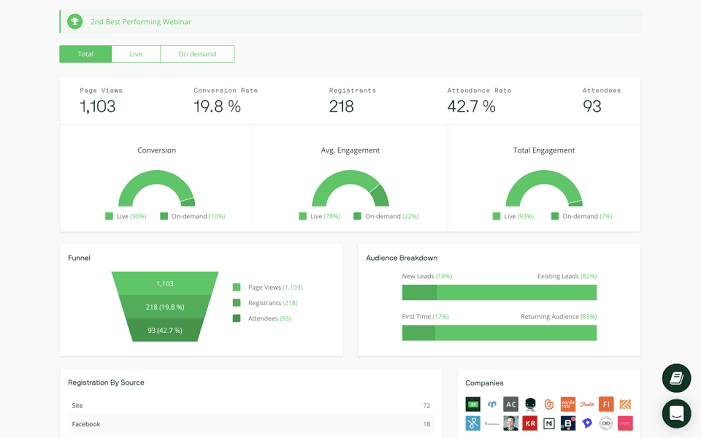
TwentyThree is a free animation software to empower marketers to develop and run dynamic video content on their websites, social media channels, webinars, etc. You can host and embed videos with their leading 4K HD player and design custom landing pages. This software can open a whole new level of video marketing options by linking CRM and marketing automation systems.
Applauding Features
- Video live streaming and looping allows marketers to distribute their content quickly.
- You can run a detailed analysis of your video marketing campaigns using an array of analytical tools.
- The tool also supports mobile screens.
- With one click, you can bulk load your content on various social media platforms.
Pros
- Good for large teams.
- Useful for hosting online events, especially webinars.
Cons
- Tricky to use for beginners.
- It is a bit difficult to showcase audiences’ live questions during long sessions.
2. Blender
Rating – 4.6/5
Compatible Platform – Windows and Mac
Number of Users – 1 to 3 million+
Suitable For – Professional Video Rendering Organisations
Price – Free
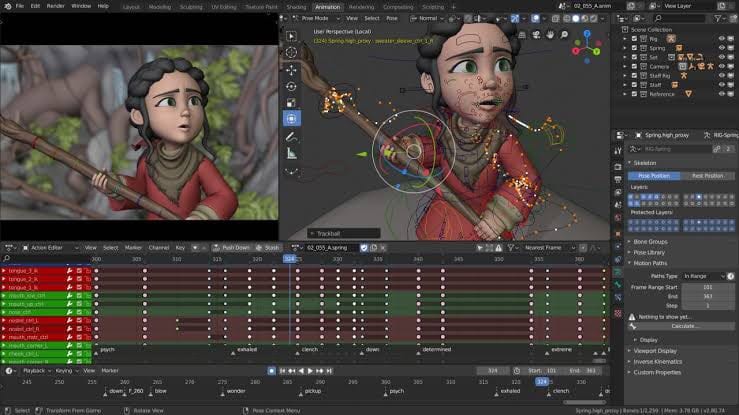
Blender is an ultra-realistic rendering system that allows smooth GPU and CPU rendering, sculpting, modeling, video editor, and more. It is a completely free and open-source 3D animation software for animators, scientists, video game creators, and other professionals worldwide. There’s a bit of a learning curve with the software that might be a little unintuitive for beginners—but, for professionals, it is perfectly free animation software.
Applauding Features
- Automated walk cycles to provide a smooth workflow.
- Characters can be easily edited and posed.
- Speed adjustment allows you to create moving characters.
- 3D tools help in developing realistic video game prototypes.
Pros
- 3D tools are highly useful in game stimulation.
- Modeling options are pretty awesome.
- Very powerful for a free tool.
Cons
- Hard to integrate with other 3D graphic tools.
- Complicated learning experience.
3. Powtoon
Rating – 4.5/5
Compatible Platform – Web-based
Number of Users – 10 million+
Suitable For – Fortune 500 Companies, Government Enterprises & SMBs
Price – Free with upgrade options for $19 per month/user.
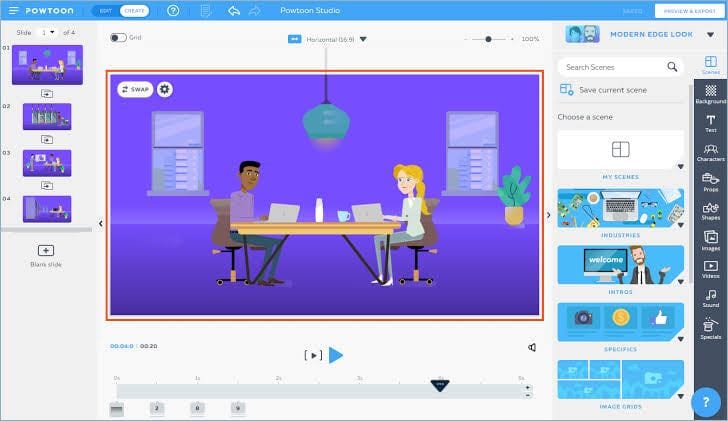
PowToon is a slightly different animation tool—it allows companies to turn everyday communication into an engaging visual experience. Overall, it is a platform to create custom videos without any additional skills using 100+ video templates, pre-made animations, royalty-free images, and soundtracks. From Fortune 500 companies to nonprofit organizations, PowToon can be used by all sizes of businesses.
Applauding Features
- Easy drag and drop menu to create enticing 3D videos and animations.
- The software includes collaboration tools to make clear communication flow among the large organizations.
- Created content can be exported to YouTube, Instagram, and other social media platforms.
- PowToon has a vast royalty-free media library and predesigned animation templates.
Pros
- Variety of templates to create professional business presentations.
- Visually appealing tutorials and instruction manuals can be created.
Cons
- Limited editing tools.
- The free version has numerous glitches.
- Slow editing and synchronizing process.
4. K-3D
Rating – 4.5/5
Compatible Platform – Windows, Mac, and Linux
Number of Users – N/D
Suitable For – 3D Animators
Price – Free
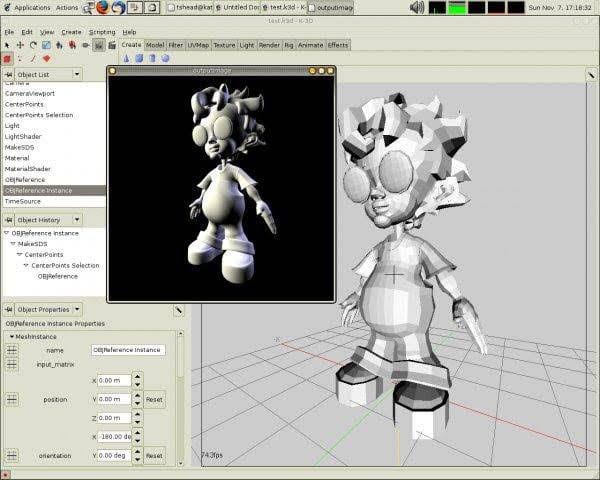
K-3D is an open-source and free 3D animation software specializing in polygonal modeling. It is a digital graphics tool that represents and approximates object surfaces using polygons. Artists can combine plugins with a visual pipeline and receive the same look of the integrated tool. To design software interfaces, this free tool is very useful for software designers.
Applauding Features
- The software comes with a detailed tutorial that shows how to use features like texturing, modeling, and shadows.
- Designers can quickly fix their mistakes by using undo/redo functionality.
- Professionals can easily design 3D animations, 2D drawings, and annotation with K-3D.
- Importing and Exporting data is swiftly possible.
Pros
- Easily learned with interactive tutorials.
- Great 3D features.
- Tool for professionals.
Cons
- For beginners, it can be hard to use.
5. BombBomb
Rating – 4.5/5
Compatible Platform – Mac, Windows, iOS, Android, and Web
Number of Users – 50,000+
Suitable For – Professional Sales and Marketing Teams
Price – Free with Pro version for $29 per month/user.
BombBomb is a great customer relationship builder slash-free software to create animations from BombBomb company. You can use this software on practically any device—both PCs and smartphones. Additionally, you can record your face as well as a screen with it. BombBomb not only helps with creating video messages but also tells when someone plays or clicks on your video link.
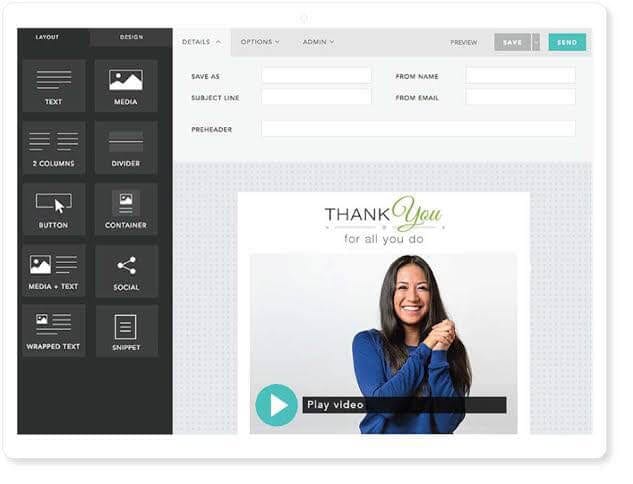
Applauding Features
- BombBomb offers a stellar content management solution to align your sales operations.
- From generating video content to distributing it, the software can do it all.
- You have a grand image library at your disposal to create dynamic marketing content and business reports.
- With analytical and social sharing options, you can smoothly streamline your videos.
- To capture leads and track ROI, BombBomb has the best video marketing tools.
Pros
- Animated email preview helps in analyzing your campaign better.
- It is a complete animation creation, distribution, and analytical tool.
Cons
- Email customization features are limited.
- A free trial is available for 14 days only.
6. CrazyTalk Animator
Rating – 4.5/5
Compatible Platform – Windows and macOS
Number of Users – N/D
Suitable For – Educationists, Hobbyists, or TV Networks
Price – Free or one time upgrade for $29.95.
CrazyTalk Animator has a vast toolkit to assist professional marketers, animators, and educationists when looking for complete free animation tool. This is a 2D facial animation program by Reallusion to create the animated face and body suites.
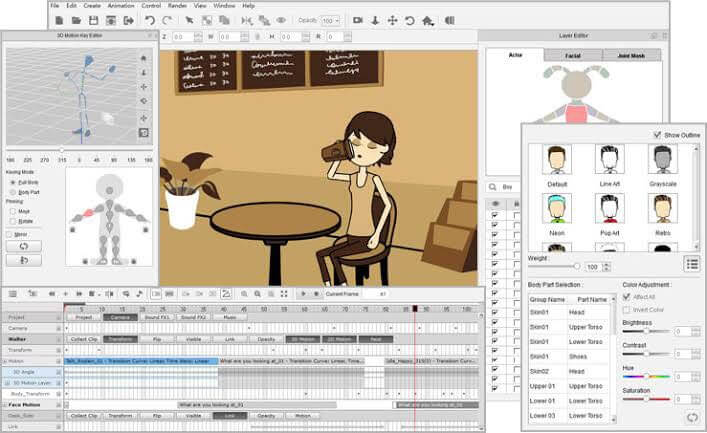
Applauding Features
- It is an amazing tool to create characters with Face Photo Fitting, Head & Hair Mesh, 3D Face Profile, Custom Eyes & Teeth, and more features.
- You can add auto motions to your videos using lip sync, audio-driven movements, and instant mood scenarios.
- You can create your cool virtual avatar with the help of Face Puppeteering, Avatar Personality, Muscle-based Control, Motion Clip & Layering, etc.
- Quickly upload your Avatars to your iDevices and share with your friends via iMessage or social media platforms.
Pros
- Booming community.
- Professional animation software.
- Give you creative freedom to explore your own way.
Cons
- Hard for beginners to learn.
- Poor tutorials.
- Limited animation features.
7. Animatron
Rating – 4.4/5
Compatible Platform – Web-based
Number of Users – N/D
Suitable For – Professional and Freelance Marketers
Price – Free with Pro version for $15 per month/user.
Animatron is a web based free animation software formed as an idea by Dmitry Skavish when he was looking for an online tool to help his daughter in creating an animation for her homework. With one simple thought, a powerful animated video maker with an easy drag and drop menu emerged. Today, the software has given creative freedom to numerous marketing agencies and freelancers to personalize their visual stories.
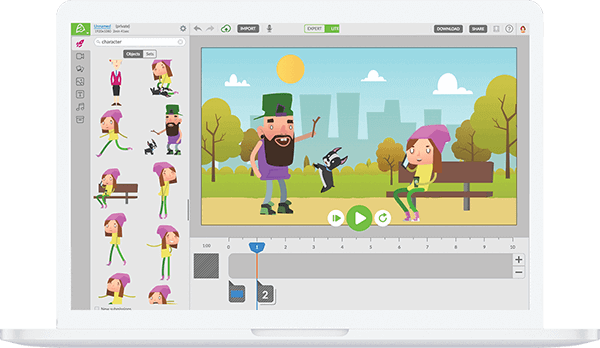
Applauding Features
- It is a perfect tool for creating video loops.
- The software supports mobile screens, so you can also create video content on your smartphones.
- Strict privacy options are available to secure your content.
- Bulk uploading is very fast and simple.
Pros
- Good free alternative for tools like Adobe After Effects.
- Large photo and sound library.
- Helpful tutorials.
Cons
- Complicated learning curve.
- Time-consuming and confusing features.
8. Synfig Studio
Rating – 4.2/5
Compatible Platform – Windows
Number of Users – N/D
Suitable For – All Type of Businesses
Price – Free
Synfig Studio is an open-source and free animation software including drawing tools, onion skins, keyframes, and so much more. The software is good for front-end and back-end animation creations such as bitmap, vector graphics, etc. Additionally, you can use pressure-sensitive tablets to create hand drawings and animations. For 2D animations, we highly recommend this tool.
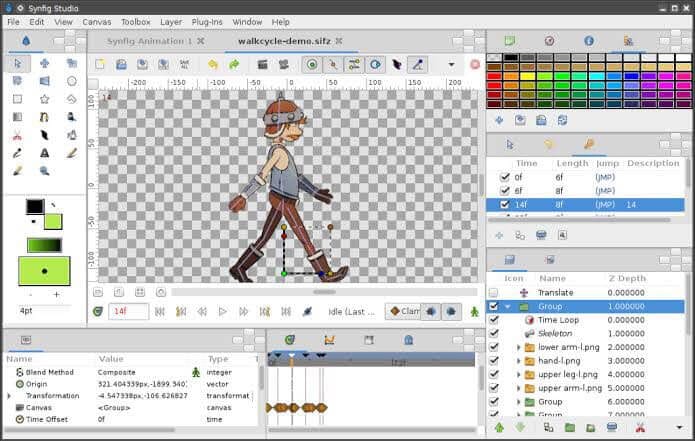
Applauding Features
- For a smooth workflow, the software can automatically append keyframes.
- The software offers an alternative to manual tweening so that the animator does not have to draw every frame.
- Open source renders farm management software supports Synfig.
- With the curved gradients, animators can stimulate soft shading.
- A wide range of real-time effects can be applied to layers like radical blurs, color tweaks, and more.
Pros
- Totally free.
- Plugin connectivity helps to extend the tool.
- Tutorials are available on Udemy.
Cons
- Complicated learning curve.
- A powerful computer is required to run it.
9. iSpring Free
Rating – 4/5
Compatible Platform – Windows, iOS, and Android
Number of Users – N/D
Suitable For – School and College Students
Price – Free
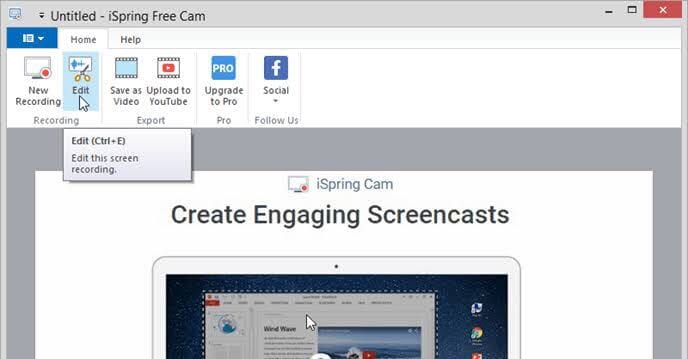
iSpring Free is a 100% free software for school and college students. Users can create tests using 3 question types, time limits, number of attempts, and feedback. Moreover, students can enhance their presentations with web objects and YouTube videos. Also, it can convert PowerPoint presentations into HTML5 or SCORM to easily share online. If you want to create online courses and tutorials, iSpring Free has all the right features for you.
Applauding Features
- It helps in publishing online courses.
- The content importing and exporting process is quick.
- Boring presentations can be converted into interactive content.
- There are plenty of different video templates available.
Pros
- User-friendly software.
- Good for learning.
- Easy PPT conversion.
Cons
- No inbuilt-text-to-speech option.
- Limited animation features.
10. Animaker
Rating – 3.9/5
Compatible Platform – Web-Based
Number of Users – 8 million+
Suitable For – Professional Marketers
Price – Free with upgrade option for $19 per month/user.
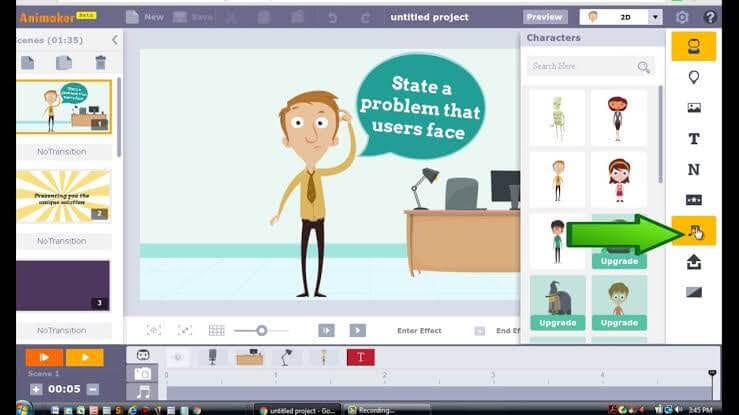
Animaker is a DIY free animation software for beginners with an easy drag and drop menu. With this software, you can primarily make six types of videos—Infographics, 2D, Whiteboard, 2.5D, Typography, and Handcraft. Additionally, full HD support and numerous graphics templates are available for users to pick from. The audio features are also very powerful, including text to speech, background music, voiceover, and the option to use soundtracks from Animaker’s sound library.
Applauding Features
- Easy drag and drop menu to quickly create amazing animated videos.
- Option to use the vast pre-made templates, characters, and soundtracks.
- Advanced marketing content can be effectively designed, such as infographics, whiteboard videos, etc.
- You can quickly share your creations on your social media platforms.
- The software provides strong privacy options.
Pros
- Simple learning curve.
- Good for professional marketing purposes.
Cons
- Video quality is poor for the free version.
- It is based on FLASH technology, which isn’t anymore supported by new web browsers.
Time to Animate!
People, 2026 is the perfect time to create stunning animated content and beautifully market your brand. With the free animation software, you can easily promote your business digitally and generate organic growth without spending a penny. So, do try our suggested free animation tools and share your experiences with us!
Author Bio:
Dinesh Lakhwani 

Dinesh Lakhwani, the entrepreneurial brain behind “TechCommuters,” achieved big things in the tech world. He started the company to make smart and user-friendly tech solutions. Thanks to his sharp thinking, focus on quality and the motto of never giving up, TechCommuters became a top player in the industry. His commitment to excellence has propelled the company to a leading position in the industry.
Popular Post











Recent Post

Resolving Microphone Detection Problems: Latest Guide [2026]
Microphones are important tools in daily life. People use them for office meetings, online classes, interviews, gaming, customer support, and content creation. When a system fails to detect a microphone, communication stops at once. This situation can cause stress and confusion. Many users believe the microphone is damaged. In reality, most problems are simple and […]

How To Switch To A Dark Background Theme In Windows [2026]
Most people spend many hours each day in front of a computer screen. Office work, online classes, editing, browsing, and streaming all require long screen time. A bright white background may look clean at first. However, over time, it can feel sharp and tiring. The strong contrast between white backgrounds and black text may cause […]

How to Switch From Local To Microsoft Account On Windows
Many users begin with a local account when they set up a new Windows computer. A local account works only on that single device. It stores settings, files, and preferences locally. It does not connect to online Microsoft services. For basic offline use, it works well. However, as digital needs grow, many users want better […]

How to Switch Windows 10 to a Local Account: Complete Guide
Windows 10 allows users to sign in with either a Microsoft account or a local account. When you set up a new computer, the system often suggests using a Microsoft account. This account connects your device to Microsoft services such as Outlook, OneDrive, and the Microsoft Store. It also syncs settings, themes, and passwords across […]

How To Change Default Apps For File Types In Windows
Windows is designed to make using your computer easy. One way it does this is by assigning default apps to different file types. This means when you open a file, Windows automatically opens it with a specific program. For example, photos may open with Photos, music with Groove Music, and PDFs with Edge. These default […]

How To Adjust The Mouse Pointer Speed: Complete Guide
Using a computer every day means you use the mouse a lot. The mouse pointer moves on the screen and helps you click, scroll, and select items. Many people never think about the speed of the mouse pointer. They have used the default setting for years. This can cause small problems over time. A slow […]

How to Change Mouse Scrolling Settings In Windows
A mouse is one of the most used computer tools. People use it every day. They scroll through emails. They scroll through documents. They scroll through websites and images. The movement becomes automatic. Most users do not notice it. That is why problems often go unnoticed. Scrolling problems show up slowly. At first, it feels […]

Keyboard Light Settings: Keyboard Lighting Control [Complete Guide]
Keyboards are no longer simple typing tools. Well, yes! Over time, they have evolved to include features that improve comfort, visibility, and overall experience. One of the most useful features today is keyboard lighting. It helps users work comfortably in low-light conditions. It also reduces strain when typing for long hours. Many users first notice […]

Customizing Pointer Appearance: Complete Guide
The way your mouse pointer looks on your computer may seem like a small detail. But customizing pointer appearance can make using your PC more comfortable and visually appealing. Many users do not realize that they can change the pointer size, color, and style to fit their needs. Whether you want a bigger pointer for […]

How To Choose a Computer Monitor: Monitor Buying Guide
Buying a monitor looks easy. Many people think all screens are the same. That belief causes regret later. A monitor is not just a display. It is a daily tool. You read on it. You work on it. You relax with it. Small problems become big over time. Poor brightness hurts eyes. Bad size causes […]

