












A slow PC rarely gives a warning. One day, it simply takes longer to start. Apps open late. The fan runs loud, even when the screen is almost empty. Most people blame old hardware. Often, that is not the real reason. The real reason is hiding in plain sight. Windows keeps many apps active in […]
Art Text Review: Best 3D Text Editing Design App for Mac
A few years back Adobe Photoshop was the most popular and only great app available on Mac to edit graphics. But not all could spend and buy this expensive app. So, if you are looking for an alternative that is as great as Illustrator and inexpensive, we’ve got it covered.
Luckily, here’s the budget-friendly alternative that you can use and it’s called Art Text.
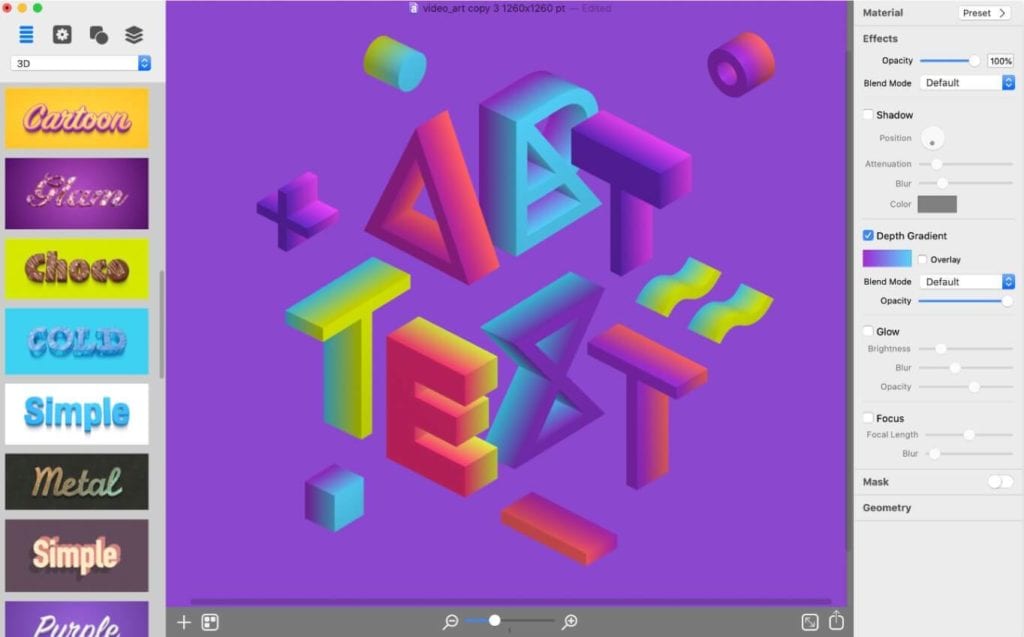
Developed by BeLight Software Art Text fills the gap with a feature-rich and powerful tool. Using this creative tool, you can make spectacular texts. This might sound too good to be true but you’ve got easy to use inexpensive, 70+ templates tools.
Also Read: Swift Publisher 5 Review: Desktop Publishing Tool For Mac
Why Art Text Designing Tool for Mac?
Art Text available for just $29.99 is exceptionally easy to use graphic software for Mac users. As the name explains this software focuses on creating different 2D and 3D text styles that can make your writing look more attractive.
It can be used to create text effects for buttons, websites, photos, presentations, and brochures.
To help keep you focused it comes with a dark interface and creative process. Laid out in a logical way this powerful tool has a slew of features to offer. Used and liked by both beginners and professionals this editing tool for Mac gives you a preview pane, template selector, option to add images, shapes, layers, and all that can be used to create smooth and eye-catchy texts.
At a time, you can open more than one object and see each window that contains its own set of tools. This makes switching and editing different objects easy. The artboard of the current window turns translucent allowing you to see what’s behind the window. This is useful when you use full- screen mode.
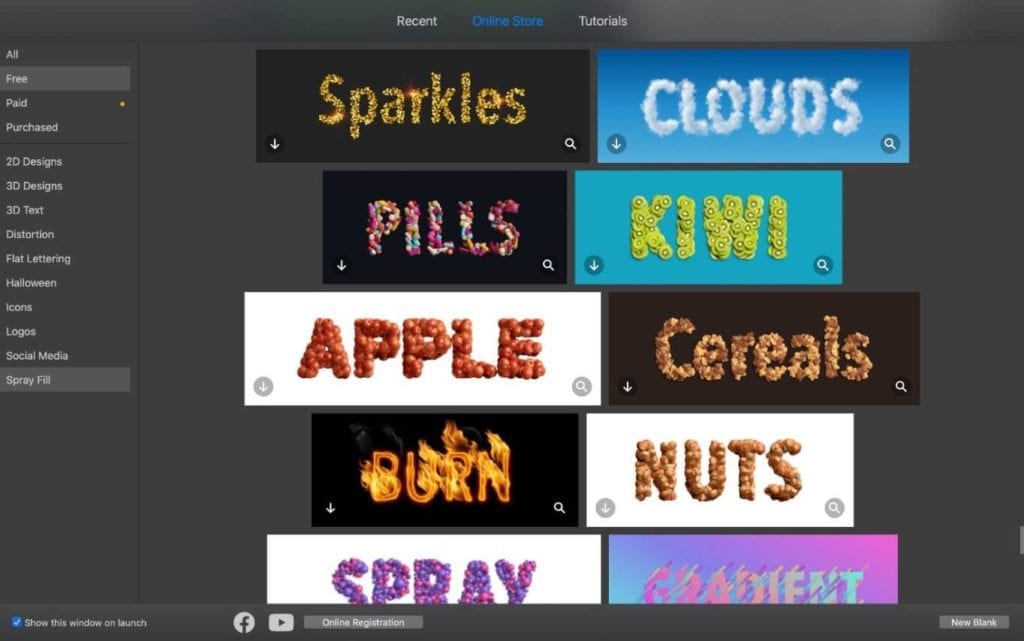
Besides this Art Text has a lot to offer. To know all that read further.
What can you use Art Text for?
This graphic and editing tool for Mac can be used to create graphics that people would be stunned to see. With the help of this tool, you can create typography graphics for company Logo, brochure, flyer headlines, postcard greetings and a lot more.
This app even offers tools to create layering and typography graphics that let’s add artistic text effects.
Equipped with a wide selection of text styles, effects, unlimited presets, you can give wings to your creativity and impress everyone by what you can do.
Using this ingenious piece of software you can turn pieces of text into art with just a few clicks.
Highlights
- Offers more than 750 vector icons
- 32 flash flare, sparkle, light objects, shapes
- 570+ background and textures
- Geometric transformations
- 300+ 3D effects and textures
- Options to convert 2D elements
| Pros | Cons |
| Value for money design software for 2D and 3D text and graphics | No vector output |
| High quality text effects and graphics | Some text templates are paid |
| Intuitive and user-friendly app | No iOS companion |
| Huge library of built in templates | |
Moving forward with Art Text you will never feel restricted. This tool lets you bend pixels at your will and show your talent. Most importantly, the software is quick and responsive and looks great on Retina Display.
This tool makes implementing a 3D modelling experience real and with the help of it you can convert any text, symbol, or pictogram to 3D. Art Text comes with great distortion, fills, and other effects. You write like you hand painted, used a water color all in a highly realistic manner.
How to use Art Text?
Art Text comes with 70+ customizable templates that make it easy to use. Each template you see can be modified and edited according to your liking. You can add an element via drag-drop and then can export it to a TIFF, PNG, JPEG, PDF, or EPS in the resolution of your choice. Moreover, you can send it to social networks and cloud services using Mac’s shared extensions.
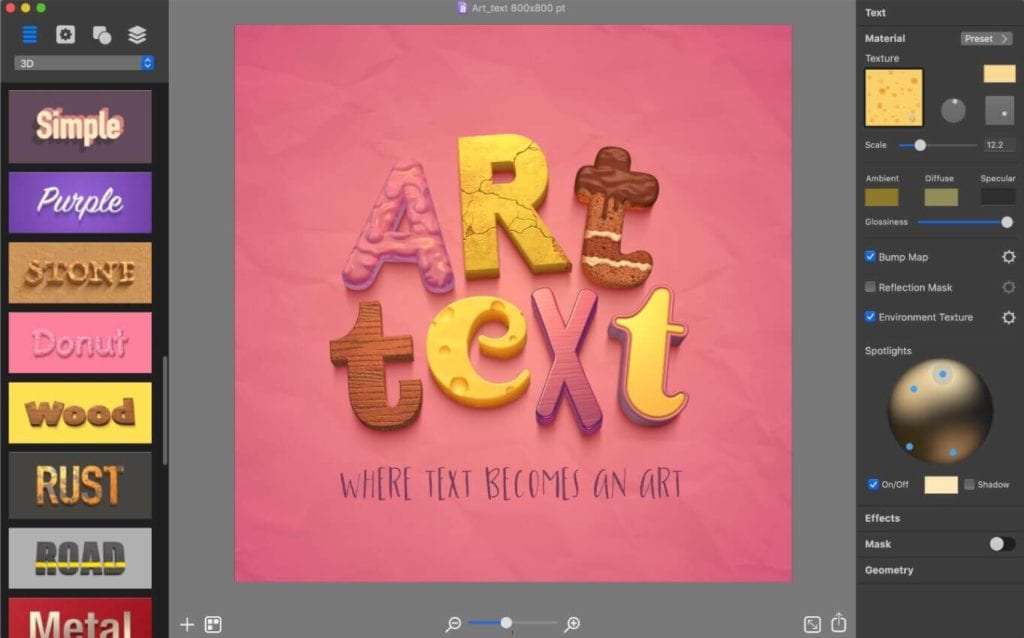
Using this tool is a delight, but when there are glitches no one likes it. When switching to full screen mode on 5K display you might face some issues. Therefore, be cautious when doing that. Although the team behind it is working to fix all bugs, it might take a while.
But this doesn’t mean that tool is not good. Using it you can constrain the aspect ratio. For that simply hold down the Shift key and drag a corner; this will not work if you use handles on sides of the elements. For professionals, it is a great tool if they keep overlooking the limitation of no CMYK support.
With this time as the team is working on Art Text, there have been certain changes. Now you can create catchy paraphrase graphics and then share them to Facebook as 3D photos. Alongside the Font Distortion Effects can be used to show some added creativity. Using it you can edit fonts beyond regular typeface options. With the help of this tool and certain tweaks that you can learn when you use it you can turn the edged font to rounded corners, create random holes, etc.
This means if you are looking for an alternative to Adobe Photoshop to create typography graphics or text effects, you can turn to Art Text 4 at a very lesser price. Try using the newest features like Spray Fill, colored balls, clouds, autumn leaves, or even LEGO bricks. These are some of my favourites so don’t just sit, get the app and start creating beautiful headings and text based graphics.
If you want to see how it works you can get the trial version of it. Also, you can fill your photo objects or create new ones using the templates as they are customizable.
We hope you will give this text editing a tool. Do let us know how you find it and if you find anything missing. Your feedback is valuable.
Author Bio:
Dinesh Lakhwani 

Dinesh Lakhwani, the entrepreneurial brain behind “TechCommuters,” achieved big things in the tech world. He started the company to make smart and user-friendly tech solutions. Thanks to his sharp thinking, focus on quality and the motto of never giving up, TechCommuters became a top player in the industry. His commitment to excellence has propelled the company to a leading position in the industry.
Popular Post
Recent Post

How to Activate Windows with a Product Key for Windows 11 & Windows 10
It always shows up at the worst time. You are halfway through a report, or about to join a video call. Then you spot it in the bottom right corner of the screen. Activate Windows. Go to Settings to activate Windows. Initially, an unactivated copy of Windows may seem like a minor inconvenience. Over time, […]

Is Easy Duplicate Finder Worth It? Honest Review
The photos folder looked normal at first glance. Then the storage warning popped up. One trip photo appeared four times. A tax PDF sat in three different folders. Two old setup files were still in Downloads, and each one was over 500 MB. Nobody plans this mess. Copies pile up slowly. A download runs twice. […]

Wise Duplicate Finder Review: Real Results from Wise Duplicate Finder
Read my honest Wise Duplicate Finder review. See features, pricing, pros and cons, and real PC test results. Find out if this free duplicate cleaner can free up your Windows storage.

How to Recover Deleted Files from Pen drive, USB Drive, SD Card
Introduction: On tech forums, you’ll often see posts like this: “I connected my pen drive to my laptop this morning, but the folder was empty. All my college project files had vanished. I don’t have a backup. Can someone help me?” Stories like this are very common. Pen drives, USB drives and SD cards are […]

How To Recover Files Deleted from the Recycle Bin [Windows 11]
Losing a file can happen in seconds. You clear your desktop, hit Delete, and empty the Recycle Bin. Then, just when you need that file again, it seems to have vanished. This guide will walk you through ways to restore files removed from the Recycle Bin. We will begin with simple fixes, then look at […]

Disk Drill Data Recovery Tool Explained: Full Review and Guide
It happens in a split second. You delete a folder by mistake. Your drive stops showing up. A photo album from your last trip just vanishes. And your stomach drops. Lost files feel personal. They are not just data. They are memories, work hours, and sometimes years of effort packed into a few gigabytes. When […]

Recover Deleted Files In Windows 11 With Software & Without
Introduction What is the first thing that goes through your mind the second an important file vanishes from a Windows 11 PC? For most people, it is a mix of panic and disbelief, followed by a frantic click through every folder that file could possibly be hiding in. It happens in a split second: one […]

EaseUS Data Recovery Wizard: Everything To Know
Data loss does not always come from a big disaster either. Most cases start small and boring. A drive gets formatted by mistake. A laptop freezes mid-save and restarts on its own. A memory card stops showing up after being pulled out too fast. None of these feel like emergencies at first, until you realize […]

Recuva Data Recovery Tool: Is it Actually Worth it?
When I first tried Recuva Data Recovery, I wanted to see if it could really bring back lost files. The tool is free, small in size, and promises quick recovery, which made me curious enough to test it on my own PC. The setup was fast, and the wizard guided me step by step. I […]

