












The photos folder looked normal at first glance. Then the storage warning popped up. One trip photo appeared four times. A tax PDF sat in three different folders. Two old setup files were still in Downloads, and each one was over 500 MB. Nobody plans this mess. Copies pile up slowly. A download runs twice. […]
Is Avast Driver Updater Worth It? A Hands-On Analysis
A driver file sounds like a boring, invisible thing. But it can quietly drag down a computer’s speed over weeks without anyone noticing why. A graphics card starts to stutter halfway through a video. A printer sits plugged in, powered on, and still shows up as offline.
None of these problems look like a big hardware fault on the surface. Most of the time, they come down to one small driver that has been sitting untouched for years.
Getting the correct driver update on your own is not as easy as it sounds. Every part inside a computer, the network chip, the audio card, the graphics unit, comes from a different manufacturer with its own separate download page. Finding the exact model, checking it actually matches your setup, and installing it the right way often turns into an hour lost across a dozen browser tabs. Grab the wrong file, and a device can end up working worse than it did before.
This article looks at a tool built to take that whole job off your hands. Ahead, we go through what it actually does, what it costs, how it held up during real use on a PC, and whether it earns a permanent spot on a Windows machine.
Avast Driver Updater Explained: Setup, Pros, Cons, and Cost
Stick around till the end for a straight answer on whether it is worth your time.
Part 1: Brief Overview: Avast Driver Updater
Avast Driver Updater is a Windows program made by Avast, a company known for its security software. Its one job is simple. It scans your computer, finds drivers that are old, broken, or missing, and replaces them with fresh versions pulled from a large online library. The company says this library holds tens of millions of driver files, which covers most common and rare devices alike.
The tool aims at regular users who do not want to hunt for drivers themselves. It runs a scan, shows a clear list of problems, and lets you fix them in a few clicks. It also creates a restore point before changes, so you can undo an update if something goes wrong.
Quick features:
- Automatic Driver Scans — Detects outdated, missing, or corrupt drivers in minutes.
- One‑Click Updates — Installs the latest drivers without manual searching.
- Backup & Restore — Creates a safety net so you can roll back if updates cause issues.
- Malware‑Checked Drivers — Ensures updates are safe before installation.
- Performance Optimization — Improves boot speed, graphics, audio, and network stability.
- Large Hardware Database — Supports 1,300+ brands and millions of devices.
- Scheduled Scans — Lets you automate checks at regular intervals.
Part 2: Reasons People Choose Avast Driver Updater for Their PC
Many users pick this software because it removes the guesswork from driver care. Here is why it stands out for everyday PC owners.
- Saves time: Manual driver hunting can eat a whole afternoon. This tool finds and fixes issues in minutes.
- Cuts down on errors: Picking the wrong driver version by hand is a common mistake. The program matches drivers to your exact hardware.
- Backed by a known name: Avast has years of experience in PC software, which adds a layer of trust.
- Improves stability: Fresh drivers often fix crashes, freezes, and random restarts tied to hardware conflicts.
- Boosts performance: Updated graphics and sound drivers can smooth out lag in games and media playback.
- Runs quietly in the background: Scheduled scans mean you do not have to remember to check manually.
Part 3: Key Features Explained: Avast Driver Updater Tool
Beyond the basics, this software packs a few features that shape how well it performs day-to-day. Here is a closer look at each one.
Deep System Scan
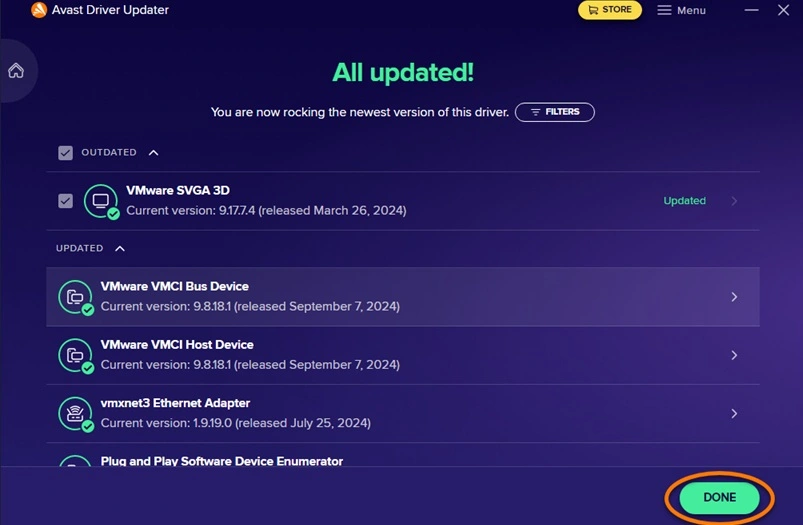
The scan checks every connected device, from your motherboard chipset to your printer and webcam. It reads the current driver version and compares it against its own records. This step usually finishes within a few minutes, even on older machines with many devices attached.
Driver Database
This is the heart of the tool. A large, regularly updated library of driver files sits behind every scan result. Because the database is so wide, it can often find replacements for devices that smaller tools miss, including printers and scanners from smaller brands.
One Click Update All
Instead of updating drivers one by one, users can select every flagged item and update them together. This single action downloads and installs all needed files in sequence, which is a major time saver for machines that have not been checked in years.
Backup and Restore
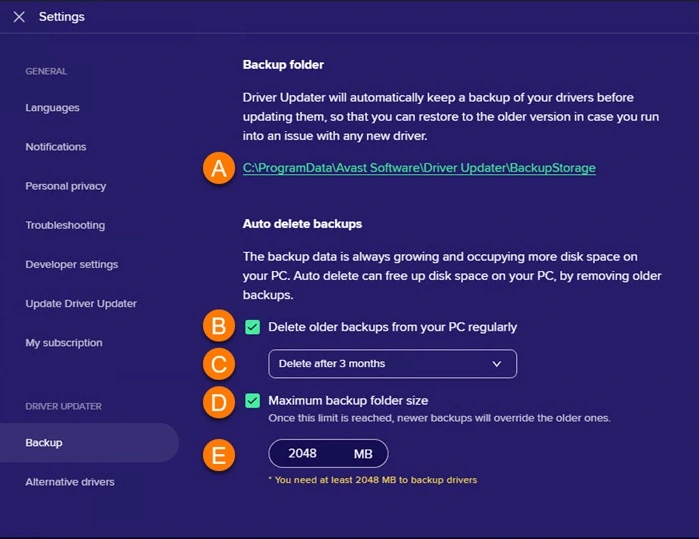
Before any driver is replaced, the tool saves a copy of the old version. If a new driver causes trouble, such as a display glitch or audio issue, you can roll it back with one click. This safety step is one of the more reassuring parts of the program.
Detailed Driver Reports
After each scan, the tool shows a report listing every driver checked, its current version, and the newer version available. This transparency helps users understand exactly what changed on their system.
Filter Option to Refine Results
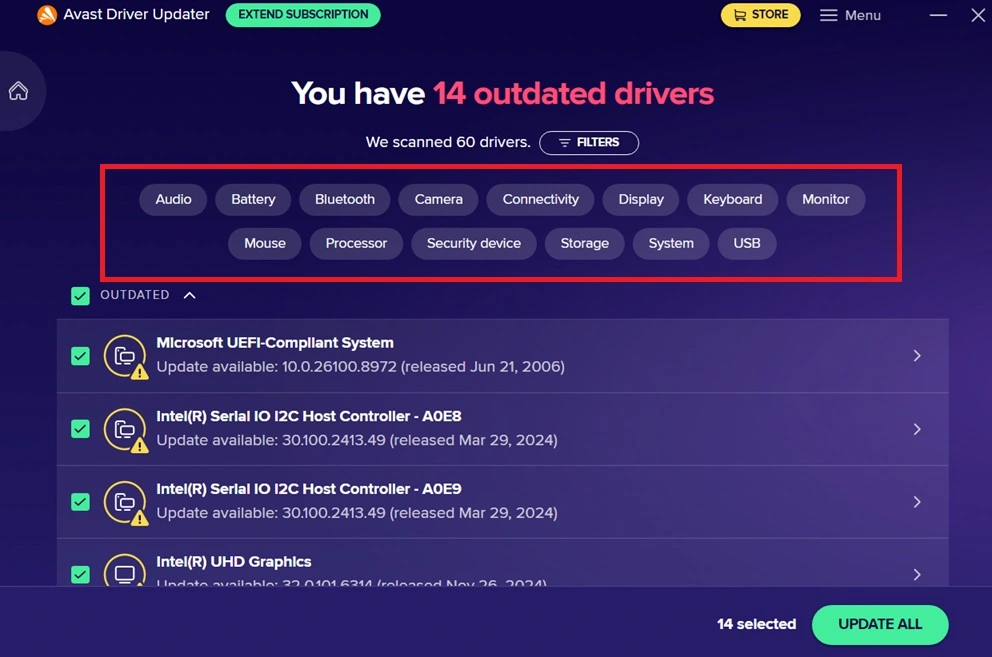
After a scan, the results list can include many drivers at once, which is not always easy to sort through. A filter option lets users narrow the list by category, such as showing only graphics drivers or only network ur audio drivers. This makes it simpler to focus on one type of update at a time instead of scrolling through a long, mixed list.
Part 4: How to Use Avast Driver Updater Tool: Step-by-Step Guide
Getting started with this program does not require any technical background. The setup process is short, and the interface guides you through each stage with clear labels and buttons.
Once installed, the tool asks for a quick scan before showing any paid options. This lets new users see the actual condition of their drivers before deciding whether to buy a plan. Below is the full process from download to finished update.
Step 1: Visit the official Avast website and download the installer file. Run it and follow the on-screen prompts. The setup takes only a minute or two, and no restart is usually needed to begin using the app. Open the program, and the scan will begin right away.
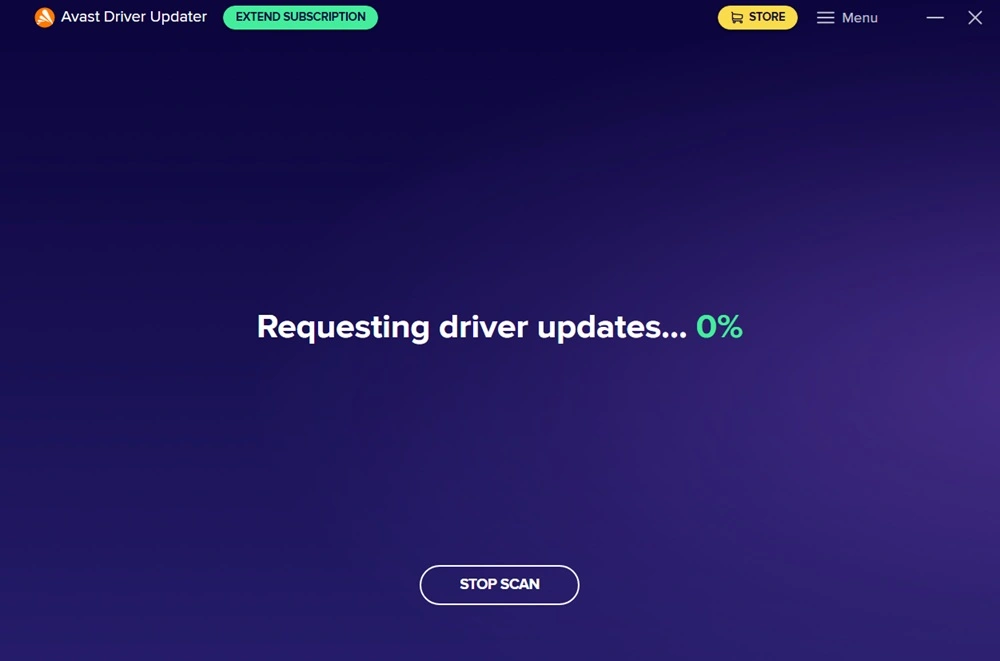
Step 2: The tool will check your hardware list against its driver database. Once finished, it shows a list of drivers that are missing, outdated, or damaged, along with their current and available versions.
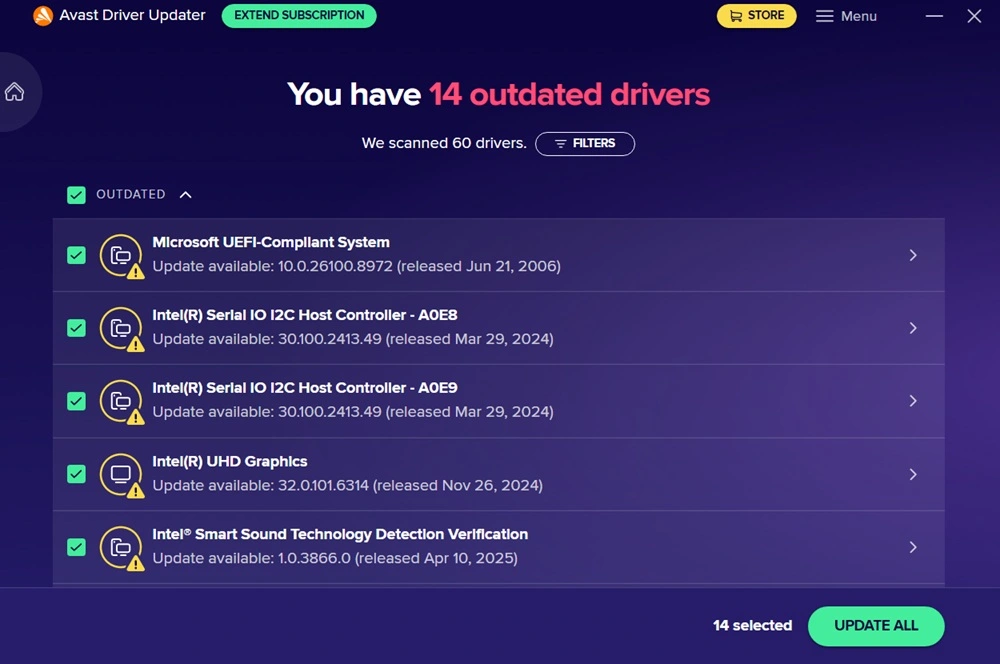
Step 3: Review the list and choose to update all drivers at once, or pick specific ones. The free scan shows results, but installing updates usually requires the paid version. After payment, click Update, wait for downloads to finish, and restart your PC if prompted.
Part 5: Where Avast Driver Updater Shines and Where It Falls Short
No software is perfect, and this tool has both strong points and a few gaps worth knowing before you buy. Here is a fair look at both sides.
Pros:
- Clean Interface — Simple layout, easy to navigate even if you’re not tech‑savvy.
- Fast Scans — It quickly identified outdated drivers across Wi‑Fi, audio, and graphics.
- Automatic Updates — No need to manually search for drivers; it handles downloads and installs.
- Backup & Restore — Gave me peace of mind when updating, since I could roll back if something broke.
- Performance Boost — After updates, my system booted faster, and apps ran more smoothly.
- Large Database — Supports thousands of devices and brands, so it rarely misses hardware.
Cons:
- Subscription Cost — $43.99/year feels steep compared to free alternatives.
- Free Plan Limitations — The trial only scans; you can’t actually update drivers without paying.
- Occasional Update Failures — A couple of drivers needed multiple attempts before installing correctly.
- Windows Only — No support for macOS or Linux, limiting its reach.
- Driver Source Transparency — It doesn’t show where drivers are pulled from, which might bother advanced users.
Part 6: Pricing Plans: Avast Driver Updater Tool
Avast Driver Updater Pricing Plans
- Annual Plan — $43.99 USD/year
- Covers 1 Windows PC.Works out to $3.67 USD/month. Includes automatic driver scanning, malware‑checked updates, and backup/restore options. Subscription renews automatically unless canceled.
- 30‑day money‑back guarantee available.
- Free Trial — 30 days
- Allows scanning and previewing outdated drivers. Updates are limited until purchase.
- No credit card required for activation.
Subscription Details
- Continuous subscription model — renews each year automatically to ensure uninterrupted service.
- Payment methods — credit/debit card or PayPal.
- Cancellation — via your Avast Account before the next billing date.
- Renewal notice — sent 65 days before renewal with updated pricing.
Included Features
- Scans for outdated, missing, or corrupt drivers.
- Checks drivers for malware before installation.
- Supports 1,300+ hardware brands.
- Back‑up and restore functionality for driver versions.
- Optimizes graphics, audio, and network performance.
Business Benefits
- Reduces security risks from vulnerable drivers.
- Improves system stability and reduces crashes.
- Enhances hardware performance for multimedia and design tasks.
- Simplifies driver management for IT teams.
Free VS Paid Plan: Avast Driver Updater
Here’s a detailed comparison table showing the Free vs Paid Plan for Avast Driver Updater.
| Feature | Free Plan | Paid Plan |
| Driver Scan | ✅ Full system scan available | ✅ Full system scan available |
| Driver Update | ❌ Updates not applied automatically | ✅ Automatic driver updates |
| Driver Backup & Restore | ❌ Not included | ✅ Included for safe rollback |
| Malware‑Checked Drivers | ❌ Limited verification | ✅ All drivers checked for malware |
| Performance Optimization | ⚠️ Basic improvements only | ✅ Full optimization for speed and stability |
| Hardware Compatibility Check | ❌ Not available | ✅ Included for 1,300+ hardware brands |
| Customer Support | ❌ Community forum only | ✅ Priority support via Avast |
| License Coverage | Free trial (no activation required) | 1 PC per license |
| Money‑Back Guarantee | ❌ Not applicable | ✅ 30‑day refund policy |
| Price | Free (limited features) | $43.99 USD/year (≈ ₹3,700 INR) |
| Renewal | ❌ No renewal | ✅ Auto‑renewal with cancellation option |
Summary:
The free plan is ideal for scanning and identifying outdated drivers, while the paid plan unlocks full functionality. Automatic updates, backups, malware‑checked drivers, and performance boosts.
Part 7: Honest Feedback of Using Avast Driver Updater On My PC
When I first installed the tool, the interface felt clean and straightforward. The scan was quick, and it immediately flagged several outdated drivers I hadn’t realized were causing minor issues.
I appreciated that the results were neatly categorized, showing which drivers were critical and which were optional, so I didn’t feel overwhelmed.
During the update process, the tool worked smoothly, downloading and installing drivers without me needing to hunt them down manually. The backup and restore feature gave me peace of mind, since I could roll back if something went wrong.
After 2-3 days of use, I’d say the tool is reliable but not flawless. The paid plan unlocks the real value, since the free version only scans without fixing. For someone who wants a “set it and forget it” solution, it’s worth the subscription. Still, if you’re comfortable manually updating drivers, you might find the price a little steep compared to alternatives like IObit Driver Booster or Auslogics Driver Updater.
Part 8: How Avast Driver Updater Is Rated Around the World
Avast Driver Updater is rated between 3.8 and 4.2 stars globally, praised for its ease of use, large driver database, and rollback safety, but criticized for its subscription cost and occasional mismatches. It consistently ranks among the top three driver update tools in 2026.
Expert Reviews
- PC Guy Review (2026)
- Strengths: Fast scanning, 70M+ driver database, automatic backups, and simple interface.
- Weaknesses: $43.99/year subscription, occasional mismatches, Windows‑only support.
- Verdict: Best for older PCs or non‑technical users who want automation.
- Worldmetrics Ranking (2026)
- Ranked #2 worldwide behind Kaspersky Security Cloud.
- Highlighted as best value with rollback support and ease of use.
- Criticism: Subscription model may not suit advanced users.
- Dealarious Store Review (2026 update)
- Pros: One‑click updates, driver backup/restore, low resource use.
- Cons: Expensive, Windows‑only, doesn’t show driver sources.
- Overall rating: 4/5 stars.
Ratings Table
| Source | Rating | Strengths | Weaknesses |
| PC Guy | 3.8/5 | Fast scans, huge database | Pricey, occasional mismatches |
| Worldmetrics | #2 globally | Rollback safety, ease of use | Subscription cost |
| Dealarious | 4/5 | One‑click updates, backup | Expensive, Windows‑only |
Key Takeaways
- Best suited for older PCs (2010–2018) where OEM driver support has ended.
- Subscription cost ($43.99/year) is the most common complaint worldwide.
- The rollback feature is a major plus, ensuring safety if updates cause issues.
- Not essential for new systems — manufacturer sites often provide safer drivers.
Conclusion
Avast Driver Updater fills a real gap for users who do not want to spend hours chasing driver files across different manufacturer websites. Its large database, simple design, and safety features like backup and restore make it a solid pick for people who want their PC to run smoothly without deep technical knowledge.
That said, it is not a must-have for everyone. Users comfortable using Windows Update or visiting manufacturer sites directly may not see enough value to justify the yearly cost. It works best for those with older or mixed hardware setups, where manual driver hunting becomes a real chore.
Based on my own use and the wider feedback from other users, this tool earns its place as a dependable option in the driver updater space. It will not solve every PC problem, but for the specific job it is built for, it performs well and backs up its promises with real safety nets.
FAQs
Is Avast Driver Updater safe to use on my PC?
Yes, it is generally considered safe. It comes from an established software company and includes a backup step before every driver change, which lowers the risk of permanent damage from a bad update.
Does Avast Driver Updater work on all versions of Windows?
It supports most modern versions of Windows, including Windows 10 and Windows 11. It does not work on Mac or Linux systems, so users on those platforms will need a different solution.
Can I use Avast Driver Updater for free?
You can run a free scan to see which drivers need attention, but actually installing those updates requires a paid subscription. There is a free trial period available for users who want to test the full features first.
Author Bio:
Dinesh Lakhwani 

Dinesh Lakhwani, the entrepreneurial brain behind “TechCommuters,” achieved big things in the tech world. He started the company to make smart and user-friendly tech solutions. Thanks to his sharp thinking, focus on quality and the motto of never giving up, TechCommuters became a top player in the industry. His commitment to excellence has propelled the company to a leading position in the industry.
Popular Post
Recent Post
Wise Duplicate Finder Review: Real Results from Wise Duplicate Finder
Read my honest Wise Duplicate Finder review. See features, pricing, pros and cons, and real PC test results. Find out if this free duplicate cleaner can free up your Windows storage.
How to Recover Deleted Files from Pen drive, USB Drive, SD Card
Introduction: On tech forums, you’ll often see posts like this: “I connected my pen drive to my laptop this morning, but the folder was empty. All my college project files had vanished. I don’t have a backup. Can someone help me?” Stories like this are very common. Pen drives, USB drives and SD cards are […]

How To Recover Files Deleted from the Recycle Bin [Windows 11]
Losing a file can happen in seconds. You clear your desktop, hit Delete, and empty the Recycle Bin. Then, just when you need that file again, it seems to have vanished. This guide will walk you through ways to restore files removed from the Recycle Bin. We will begin with simple fixes, then look at […]

Disk Drill Data Recovery Tool Explained: Full Review and Guide
It happens in a split second. You delete a folder by mistake. Your drive stops showing up. A photo album from your last trip just vanishes. And your stomach drops. Lost files feel personal. They are not just data. They are memories, work hours, and sometimes years of effort packed into a few gigabytes. When […]
Recover Deleted Files In Windows 11 With Software & Without
Introduction What is the first thing that goes through your mind the second an important file vanishes from a Windows 11 PC? For most people, it is a mix of panic and disbelief, followed by a frantic click through every folder that file could possibly be hiding in. It happens in a split second: one […]

EaseUS Data Recovery Wizard: Everything To Know
Data loss does not always come from a big disaster either. Most cases start small and boring. A drive gets formatted by mistake. A laptop freezes mid-save and restarts on its own. A memory card stops showing up after being pulled out too fast. None of these feel like emergencies at first, until you realize […]

Recuva Data Recovery Tool: Is it Actually Worth it?
When I first tried Recuva Data Recovery, I wanted to see if it could really bring back lost files. The tool is free, small in size, and promises quick recovery, which made me curious enough to test it on my own PC. The setup was fast, and the wizard guided me step by step. I […]

GetData Recover My Files Data Recovery Tool: Honest Review
A hard drive error brings a special kind of silence. Well, yes! The screen freezes, then a message appears saying the drive can’t be found or must be formatted. In that moment, years of photos and work files feel at risk. It never happens at a good time. Coffee spills near a laptop, a memory […]
Windows File Recovery: A Complete Review [Tried & Tested]
Imagine this. You spend hours perfecting a video project. You hit save. Then your laptop freezes, reboots, and when the screen comes back. The file is gone. Your stomach sinks. It’s not just you. Lost files happen all the time. A dropped hard drive, a bad update, an accidental delete, or a corrupted partition can […]

