











A slow computer makes it hard to focus. Programs take too long to open. Free space keeps shrinking until the disk is almost full. This happens to most PC owners at some point. Even new machines can slow down after a while. That is the exact problem cleanup tools are built to solve. They comb […]
How To Download Old PC Games Today
Have you ever thought about how to download old PC games? Maybe you’re longing for those childhood favorites. Or perhaps you’re intrigued by gaming history. Either way, downloading old PC games can unlock a treasure trove of fun and memories.
Remember the thrill of playing your first game? The excitement of new levels and hidden secrets? With old PC games, you can feel that joy all over again. And the best part? Many of these classic games are still out there, just waiting for you to discover them.
But how can you download those games safely? This guide has got you covered. From finding the right games to taking the necessary precautions, we’ll walk you through everything. Whether you’re a gaming veteran or just starting your journey, this guide is here to help.
Part 1: How to Download Old PC Games?
Follow these steps:
NOTE: Make sure your computer can run the game. Old computer games may have different requirements. Check if your system meets these requirements before downloading. This can save you from potential problems later.
Step 1: Start by using search engines to find your favorite games. Keywords like “Download old PC games” can help you find what you are looking for. Try different combinations of words to get the best results.

Step 2: Look for trusted websites that offer old PC games. Make sure the site is reputable. Read reviews and do some research. This can help ensure that the site is safe and secure.

Step 3: Follow the instructions on the website to download the game. Sometimes, you might need to create an account. Be sure to follow all the steps carefully to avoid any issues. Once downloaded, install the game on your PC. Follow the installation instructions provided. Make sure to install all necessary components. This will ensure the game runs smoothly.
Part 2: Precautions to Take
When you download a games, it’s important to take certain precautions. These measures help protect your computer and personal data. By being careful, you can avoid issues like malware, data loss, and compatibility problems.
This section will guide you through the key precautions to take, ensuring a safe and enjoyable experience while downloading your favorite old PC games.
Let’s get started!
- Use antivirus software: Always have antivirus software active when you download old computer games. This can help protect your computer from malware and viruses.
- Check file size: Make sure the file size matches what’s listed on the website. If the file size is too large or too small, it could be a sign of a problem.
- Read user reviews: User reviews can warn you about potential issues. Look for reviews that mention any problems or concerns. This can help you avoid downloading problematic files.
- Backup your data: Before downloading, back up important data. This can help prevent data loss in case something goes wrong.
- Use a secure connection: Download PC games using a secure internet connection. Avoid using public Wi-Fi. This can help protect your personal information.
Part 3: Advantages/Disadvantages of Downloading Old PC Games
By understanding these pros and cons, you can make an informed decision about whether it’s worth the effort. This section will explore the benefits, such as nostalgia and variety, and the potential drawbacks, like compatibility issues and security risks.
Let’s take a closer look at the upsides and downsides of downloading old computer games.
Advantages:
- Nostalgia: Relive memories with old favorites. Enjoy the games that you loved as a child.
- Variety: Enjoy a wide range of games from different genres. Discover games that you might have missed.
- Low cost: Many old games for PC are free or cheap. Save money while enjoying great games.
Disadvantages:
- Compatibility issues: Some games may not work on modern systems. You might need to use compatibility tools or emulators.
- Security risks: There is a risk of downloading malware. Always use trusted sites and antivirus software.
- Quality: Graphics and gameplay might not match modern standards. Be prepared for a different gaming experience.
Part 4: Top Sites to Download Old PC Games
Finding the best sites to download old games for PC can be a daunting task, given the vast number of options available. However, knowing where to look can make the process much easier and safer. In this section, we’ll explore some of the top sites for downloading old computer games.
Each site has its own unique features, pros, and cons. By understanding what each site offers, you can choose the best one to meet your needs and start enjoying your favorite classic games. Let’s dive into the top sites-
1. GOG.com

Website Address: https://www.gog.com/en/
GOG.com, short for “Good Old Games,” is a platform renowned for its extensive library of classic PC games. It was created with the mission to offer DRM-free games, ensuring a hassle-free gaming experience without restrictive digital rights management. GOG.comnot only provides a wide range of old PC games but also ensures they are compatible with modern systems.
This makes it a popular choice for gamers looking to relive their favorite classics without dealing with compatibility issues.
Pros:
- DRM-free downloads, frequent sales.
- Enjoy hassle-free gaming without restrictive DRM.
Cons:
- Some rare titles might not be available. You might not find every game you are looking for.
2. Internet Archive
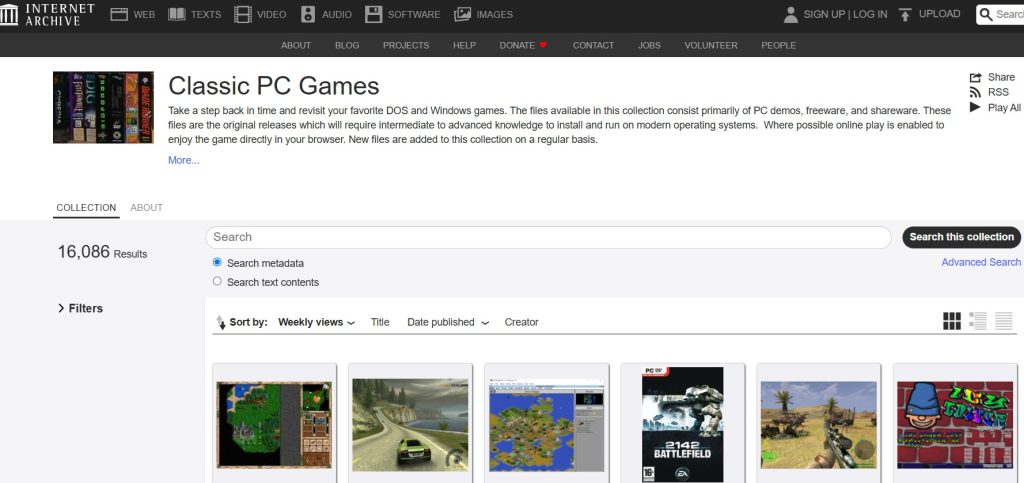
Website Address: https://archive.org/
The Internet Archive is a non-profit digital library that offers a vast collection of old PC games for free. It is well-known for preserving a wide variety of media, including books, music, and software. The Internet Archive aims to provide universal access to all knowledge, making it a valuable resource for gamers looking to download old computer games. Its collection spans decades, offering games from different eras and genres, all available for free download.
Pros:
- Free access, a large variety of games.
- Enjoy a wide selection of classic games without spending money.
Cons:
- The interface can be confusing. You might need some time to navigate the site.
3. Steam

Website Address: https://store.steampowered.com/
Steam is one of the largest digital distribution platforms for PC gaming, developed by Valve Corporation. While it is widely known for hosting modern games, Steam also has a dedicated section for classic and retro games. This makes it a versatile platform where gamers can find both the latest releases and timeless classics. Steam’s robust community features, frequent discounts, and vast library make it a go-to destination for downloading old PC games.
Pros:
- Frequent discounts, large community.
- Enjoy great deals and connect with other gamers.
Cons:
- Some games require additional software.
- You might need to install extra programs to run the games.
4. Abandonia

Website Address: http://www.abandonia.com/
Abandonia is a dedicated platform for abandonware, which refers to software that is no longer supported or sold by its original publisher. It focuses on old games for PCs that are no longer available in the market. Abandonia offers a curated selection of classic games, along with detailed reviews and historical information. This makes it a great resource for gamers interested in exploring the rich history of PC gaming.
Pros:
- Free games.
- Detailed reviews.
- Discover classic games and read in-depth reviews.
Cons:
- Limited updates.
- The site might not have the latest games or updates.
5. My Abandonware

Website Address: https://www.myabandonware.com/
My Abandonware is a website that specializes in providing access to thousands of old PC games that are considered abandonware. The site features an extensive library of games from the ’70s to the early 2000s, making it a treasure trove for retro gaming enthusiasts. My Abandonware is known for its user-friendly search features and comprehensive game descriptions, helping gamers find and download their favorite old computer games with ease.
Pros:
- Extensive library.
- Easy search.
- Find and download your favorite games easily.
Cons:
- Download speeds may vary.
- You might experience slow downloads at times.
Part 5: Writers’ Tips
When downloading old PC games, it’s crucial to check the game’s compatibility with your operating system. Some classic games may not run smoothly on modern systems, but there are solutions. Compatibility modes, patches, and even third-party programs can help bridge the gap.
Emulators are particularly useful for running old games on new machines. They replicate the environment of older systems, allowing you to play games as if they were on their original hardware. This way, you can enjoy the game without encountering frustrating technical issues.
Here are a few tips:
- Check compatibility: Always check if the game works with your operating system. Some PC games might need compatibility modes or patches.
- Use forums: Gaming forums can provide valuable tips and tricks. Join forums to get help and share experiences.
- Try emulators: If a game doesn’t run, consider using an emulator. Emulators can help run old games on modern systems.
- Be patient: Some downloads may take time, especially for large games. Be patient and wait for the download to complete.
- Enjoy the experience: Take your time to enjoy the nostalgia and fun. Relive the joy of playing your favorite PC games.
Conclusion
Downloading old PC games can be a rewarding experience. It allows you to relive the past and discover classic games. With the right approach, you can download old computer games safely and enjoy them on your modern PC. Always remember to take precautions. Use trusted websites and read reviews. This will help you avoid any potential issues.
So, are you ready to download an old game and dive into the world of retro gaming? Start your journey today and rediscover the joys of PC gaming. It’s a great way to experience gaming history and have fun at the same time.
FAQs:
1. Is it legal to download old PC games?
It depends on the game’s licensing. Some games are classified as freeware or abandonware, meaning they are legally free to download and play. However, other games may still be protected by copyright, and downloading them without permission could be illegal. To avoid legal issues, always check the game’s legal status before downloading. Some websites offer games with proper licensing, ensuring that you can enjoy your favorite old PC games without breaking any laws. When in doubt, look for official re-releases or digital distribution platforms that have acquired the rights to distribute the game legally.
2. Can I run old PC games on a modern computer?
Many PC games can run on modern systems, but you may encounter compatibility issues. Older games were designed for hardware and operating systems that are now outdated. To overcome these issues, you might need compatibility tools, patches, or emulators. Compatibility tools and patches can modify the game to work with modern systems, while emulators replicate the environment of older hardware, allowing you to play the game as if it were on its original system. Online guides and forums can provide detailed instructions on how to get specific games running on modern computers.
3. Are there any risks in downloading old computer games?
Yes, there are risks involved in downloading old games, primarily related to malware and security threats. Malicious software can be hidden in game files, posing a risk to your computer and personal data. To mitigate these risks, always use trusted websites and have antivirus software active while downloading. Additionally, read user reviews and research the site before downloading to ensure it’s reputable. Taking these precautions can help you avoid potential security issues and enjoy your favorite old PC games safely.
4. Where can I find support for old games?
Support for old games can often be found in online forums and communities dedicated to retro gaming. These platforms are filled with experienced gamers who can provide valuable advice and troubleshooting tips. Websites like GOG.com also offer support for the games they distribute, including patches and compatibility fixes. Additionally, many classic games have fan communities that create unofficial patches and modifications to improve compatibility and performance on modern systems. Joining these communities can provide you with the support you need to enjoy old PC games to their fullest.
Author Bio:
Dinesh Lakhwani 

Dinesh Lakhwani, the entrepreneurial brain behind “TechCommuters,” achieved big things in the tech world. He started the company to make smart and user-friendly tech solutions. Thanks to his sharp thinking, focus on quality and the motto of never giving up, TechCommuters became a top player in the industry. His commitment to excellence has propelled the company to a leading position in the industry.
Popular Post
Recent Post

Fortect Software Review: The Ultimate PC & Mobile Cleaning, Optimization & Security Tool
Slow computers are a common problem for almost every Windows user. Well, yes! Over time, your PC picks up junk files. These files sit quietly in the background. They take up space and slow things down. Programs open slower. Windows takes longer to boot. Even simple tasks like opening a folder can feel sluggish. There […]
CCleaner PC Optimizer Review: A Complete Guide for Windows Users
If your computer has started to feel slow, you are not alone. Most Windows PCs slow down over time. Junk files pile up. The registry gets messy. Too many apps open when you start your PC. All this adds up and makes even a good machine feel tired. This is where a PC cleaner tool […]
Auslogics Duplicate File Finder: Full Review and User Guide
A computer quietly gathers clutter over time. This includes duplicate photos, repeated downloads, and forgotten backups hiding in random folders. This buildup slowly eats away at storage and can make even a fast PC feel sluggish. Manually finding and deleting duplicates is tedious. It means checking every folder, comparing file names, and guessing which copies […]
CCleaner Duplicate File Finder: Key Features, Pricing, Step-by-Step Guide and More
Every computer collects junk over time. Right? Well, yes! Photos often get copied twice. Documents get saved in two folders by mistake. Old downloads pile up and never get deleted. This slowly eats up your storage space, and most people do not even notice until their drive is almost full. That is where a duplicate […]
Duplicate File Finder Pro: A Complete Review, Everything You Should Know
Computers collect thousands of files over time. Well, yes! Many of them end up being duplicates created by backups, downloads, or accidental copies. These extra files take up valuable storage space and make it harder to keep everything organized. Finding and removing them manually can take hours. Right? Duplicate File Finder Pro is a tool […]
Top 3 Duplicate File Finder for Windows 11 & Windows 10
If your PC storage keeps filling up even after you delete big files, duplicate files could be the real reason. Most of us save the same photo twice, download a document more than once, or copy a whole folder by mistake. Over months and years, these duplicate files pile up quietly. You do not even […]
Monitor Screen Calibration Guide: Everything You Should Know
Your monitor shows colors every single day. But are those colors actually correct? Most people never stop to check this. They just use the screen as it comes out of the box. This habit can lead to wrong colors in photos, videos, and work files. Colors may look too warm or too cold without you […]
How To Check Installed RAM and RAM Slots [Complete Guide]
RAM plays an important role in how smoothly a computer runs. Short for Random Access Memory, it stores the data and instructions that Windows and active applications need at any given moment. From opening multiple browser tabs to running games and productivity software, RAM helps keep everything responsive. A system with limited memory may experience […]

What is Microsoft Autopilot Everything You Need To Know
Technology has changed the way companies manage computers. Well, yes! Employees now work from offices, homes, and remote locations. Setting up devices manually for every worker takes time and effort. It can also create mistakes that slow down productivity. This is where Microsoft Autopilot becomes useful. It helps businesses prepare and deploy Windows devices with […]

