











A slow computer makes it hard to focus. Programs take too long to open. Free space keeps shrinking until the disk is almost full. This happens to most PC owners at some point. Even new machines can slow down after a while. That is the exact problem cleanup tools are built to solve. They comb […]
How to Find Your iPhone From an Android Device?
Introduction
Mobile phones are the necessary daily gadget that functions the maximum amount of work for the user and help to communicate with people. It will be a disaster if you lose your iPhone anywhere on the street or office and have no idea how to recover it. Mostly you will panic and return to where you might have lost the iPhone. In another case, you will consider contacting the police department to help you find your iPhone.
Do you think that by taking the help of the police, you can recover your iPhone? Instead of doing hard work and spending ample time looking for your iPhone, you can learn basic hacks to find your iPhone from your Android device. It is possible that if you have two devices connected, Android/iOS or iOS/iOS, you can simply track the phone’s location. In rare cases, if you have no connection between your device, you can use these hacks to find your iPhone.
Placing a call or sending a message to Recover your iPhone
It is the simplest and prior process that everyone should try when they find their iPhone is missing. You can easily place a call or send a message that displays on your home screen in case you lose your phone. If someone stole your phone, then this process is not beneficial. However, it is an antique process and does not require any third-party application or process to recover the phone.
Sometimes placing a call or sending a text to find the phone may be effective. If anybody finds your phone, that person can receive your call and give a response. In rare situations, if your phone does not respond and you get to hear unreachable or switched off, that means your phone is in danger. In this situation, it becomes hard to recover your iPhone, so you need different hacks and procedures to locate your device.
Top Hacks to Track iPhone from Android Phone?
In case of a lost iPhone, you can use these popular tricks and hacks to recover your phone easily. All you need is a trusted Android device that can be your secondary phone or anyone from the family to access these iPhone recovery processes.
1. Track your iPhone via iCloud
Relocating your iPhone device with the help of iCloud is the most accurate process if your data is on or your phone is using any Wi-Fi. With the help of an Android device, you can open iCloud storage in your browser and find your property. Follow the step-by-step process to get your iPhone location.
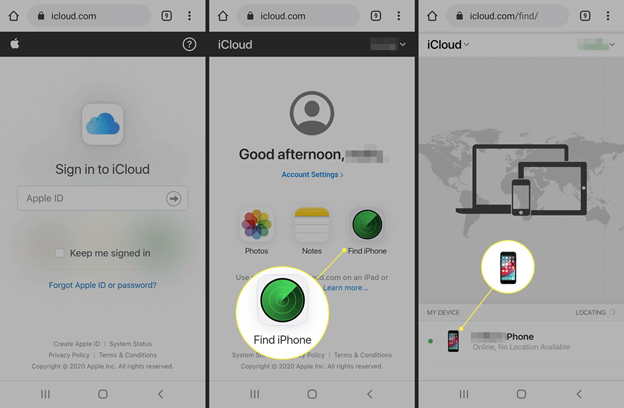
- Open the incognito mode of your mobile browser and search for iCloud.
- Log in with your Apple ID to iCloud.
- After completing the login process, you will see an option to Find iPhone.
- You can activate this feature to enable the location of your device, and with the help of another iOS or your iCloud storage, you can track the iPhone’s location.
Additionally, you will find multiple options in Find iPhone settings like
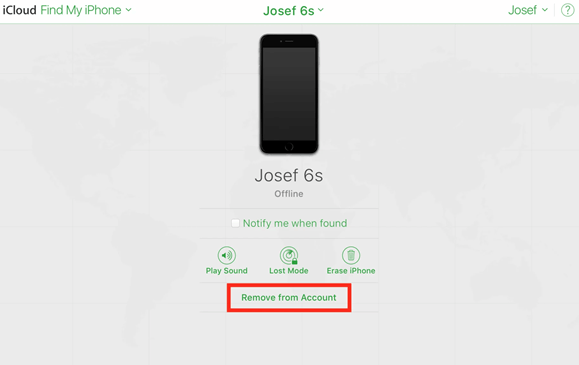
- Play sound: it will produce a loud and vibrant noise in your iPhone device even if turned off.
- Lost mode: this feature helps you to secure your phone from hackers and other third-party invaders to access your iPhone.
- Erase iPhone/iPad: In the inverse situation, you can erase all your data from the device so that if any invader unlocks your phone, he cannot miss using your personal belongings. Additionally, it won’t delete your cloud storage data, so all the files in cloud storage will be safe.
2. Using Google Maps Timeline
Google map timeline is device-located software that can be useful for finding your iPhone. If you have enabled all the settings necessary to recover your iPhone from this software, it will give you the location and directions of the phone. However, this process only applies if you have installed the Google Timeline app on your iPhone.
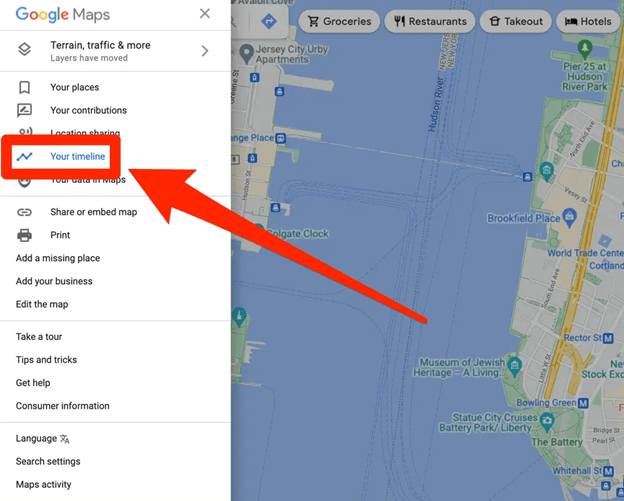
Tracking the phone with the help of a Google map type line is very accurate, but the recovery success rate is slightly less. You can easily check out the location history and places you have been, or your phone is traveling with the help of the software. Follow these simple steps to enable the setting before you lose your phone:
- Ensure you have installed the Google Maps application on your iPhone and are allowed permission to access the location.
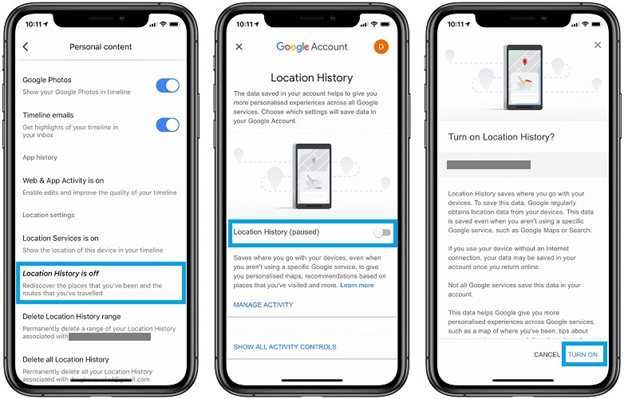
- Open your Android device and go to Google Maps -> Settings.
- To track the location, make sure that your phone tracking feature is enabled.
- Now you can Easily track your device location by managing your location history.
All the previous locations you have been to, and the current location of a device will be available on an Android phone. You can easily travel to the location to get your phone back.
3. GPS Tracking Software (Life 360)
Tracking your iPhone with the help of GPS software is an opt-out to be a successful way of recovering your mobile. But this process also requires pre-installed software in your iOS device so that in case of loss or theft, you can easily track your device from your Android mobile. You need to download a trusted application with the highest tracking rate on your Android and IOS device.
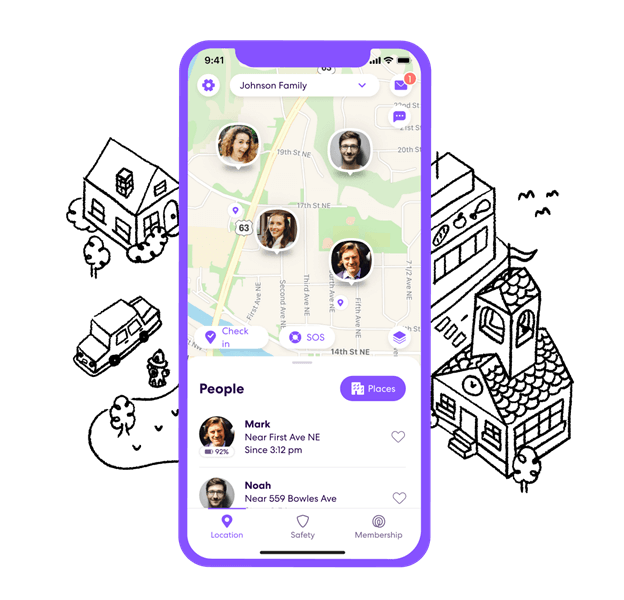
One of the most popular applications for GPS tracking is Life 360, available for both Play Store and Apple Store. Once you install this application and your iOS device, you need to log in and enable the GPS tracking setting so that you can easily find it through your Android device whenever you lose your phone. Follow the steps to find your iPhone with the Life 360 application.
- Install the 360 application in your Android mobile.
- Login with the correct credential info.
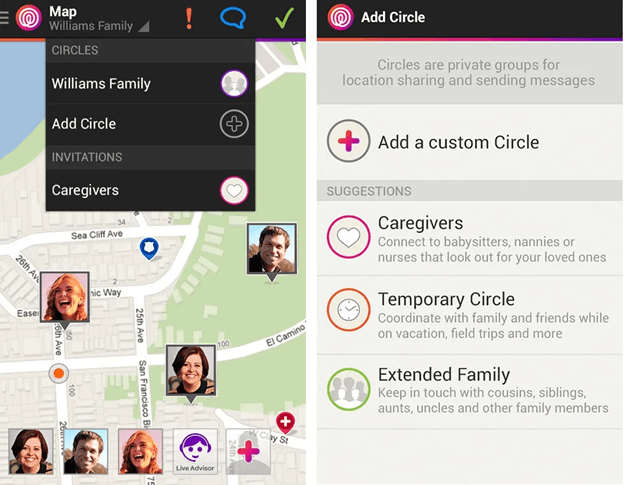
- Create a circle and add your secondary and family mobile devices.
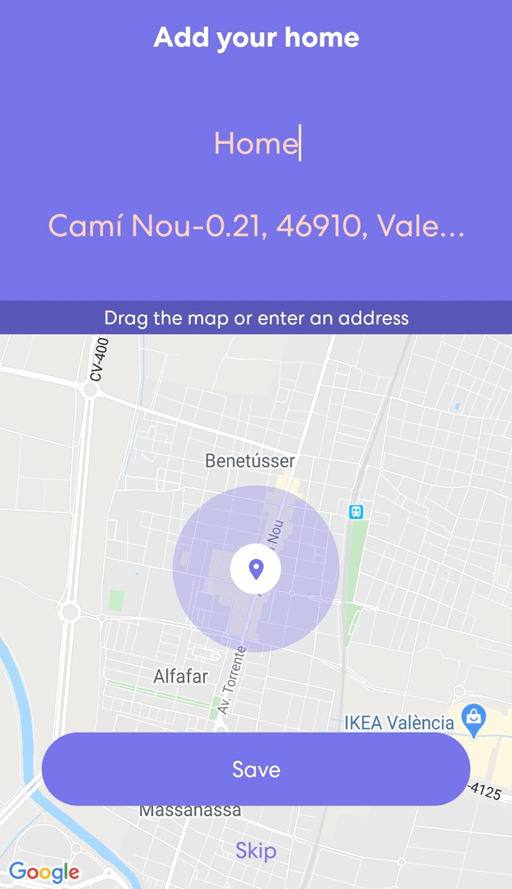
- After creating a circle or bubble you can track the information and location of your close ones.
- Now you have a location and live status of every device connected to your Life 360 application.
4. With the help of Cocospy
Cocospy is another mobile tracking application that allows users to find the location of their lost device. Initially, the parents used this application to track lost mobile devices and for parents to find their children’s activity. With the help of Cocospy, you can easily track your phone by following the same pre-installation process of Life 360. You can easily track your iPhone location using GPS until your sim card is active on your mobile.
- Open the official website of cocospy.com
- Sign up to get access to the Cocospy service.
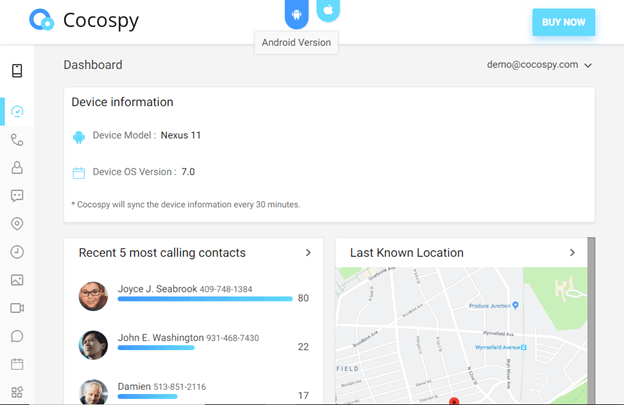
- It will bring you to the dashboard where you can search for your contacts or dial the number that you want to search for.
- It will show the information about the device and show the last active location of your phone.
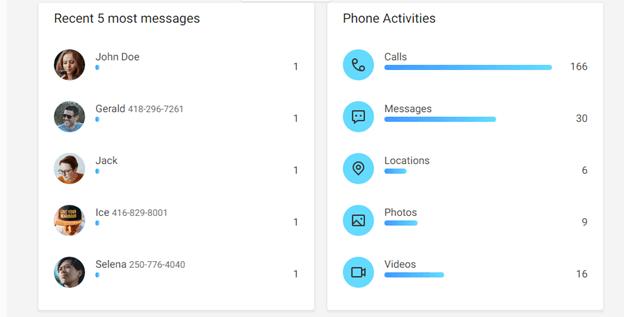
- You can also check the recent activities that took place on the phone.
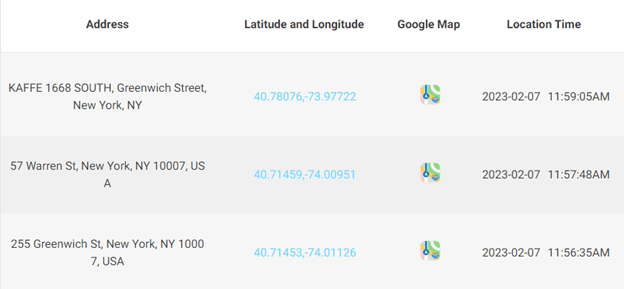
- When you open the map, it will give you the coordinate and the location address from the Google map.
5. Family Orbit Application
Family orbit application is the most used application by parents to monitor children’s activity. However, this application is also beneficial in tracking your lost iPhone with your Android device. To track your iPhone with the help of a Family Orbit application, you need to pre-install and sync both your Android and IOS device before you lose it. You can download this application from the official website and connect devices so that you can monitor the activity.
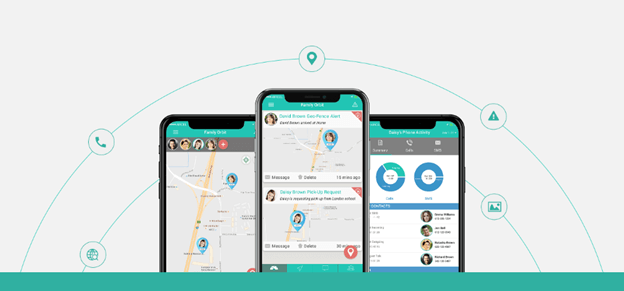
When you have the family or but application in your Apple device, and you lose it, it will become very easy to track your phone within a few seconds. Moreover, if your phone doesn’t have active cellular data or Wi-Fi connectivity, in that situation also, the application will track your mobile. Besides tracking family orbit offers multiple features:
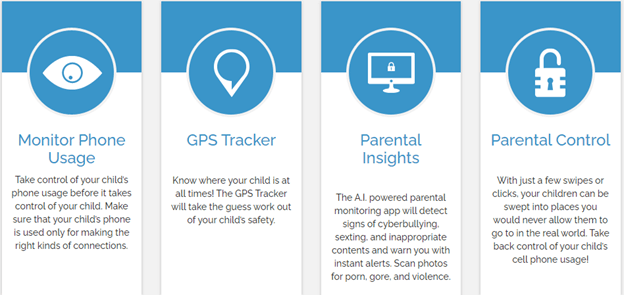
- It gives the live location of your secondary device.
- You can create a family place by adding multiple devices on your main phone to track their activity.
- You can also monitor your children’s activity, including photo contacts and traveling speed.
- This application lets you chat and share photos and videos with your family members.
Check out the process to find your iPhone with the Family Orbit app:
- Install the application on your iOS devices or open the official website of family orbit.com.
- Sign up for your main device as an administrator role.
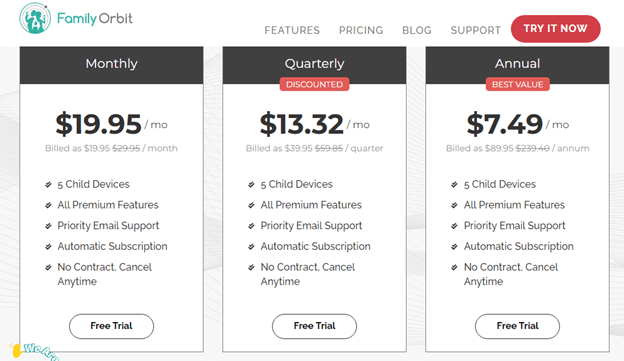
- Purchase the subscription as per your requirement.
- You want to track and check the info on the subordinate mobile devices.
- Once you finish linking the devices, it will give you options to access different sections of secondary devices and track their location.
How to use Track iPhone via the Find iPhone application?
When you have multiple iOS devices, this application is reliable and gives accurate information about your lost device. If you are logged in with multiple iOS devices with the same id, with the help of the Find My iPhone application, you can trace the location of your lost property. Another device with the same email id will give you the accurate distance and the direction to fetch your lost iPhone.
Conclusion
Recovering a lost iPhone is easy by enabling the essential setting in your iPhone. Some multiple hexes and features give you various options to track the activity and location of your lost device. Make sure to download any of the locating software and enable the essential settings that help you to Find your iPhone from an Android Device in the worst case. All these processes are completely vice versa, so if you lose your Android or iOS, this software can easily help you locate any of your mobiles.
FAQs
Q1 Can I recover my stolen iPhone with the Find My iPhone setting?
Yes, you can easily track the location of your device with the help of the Find My iPhone setting. In case of phone theft, contacting the authority to help you recover your phone would be best.
Q2 What should I do if I don’t synchronize my phone with any tracking applications?
It would be best that you contact the police authority and ask them to help you find your device in the location you have been. Keep on calling and sending messages so that if anyone finds your phone can help you.
Q3 Is it safe to install a third-party application for tracking an iPhone?
Make sure to download reliable and trusted applications so that you won’t face any trouble. All third-party applications are not fraud; check out the reviews before using any application.
Author Bio:
Dinesh Lakhwani 

Dinesh Lakhwani, the entrepreneurial brain behind “TechCommuters,” achieved big things in the tech world. He started the company to make smart and user-friendly tech solutions. Thanks to his sharp thinking, focus on quality and the motto of never giving up, TechCommuters became a top player in the industry. His commitment to excellence has propelled the company to a leading position in the industry.
Popular Post
Recent Post

Fortect Software Review: The Ultimate PC & Mobile Cleaning, Optimization & Security Tool
Slow computers are a common problem for almost every Windows user. Well, yes! Over time, your PC picks up junk files. These files sit quietly in the background. They take up space and slow things down. Programs open slower. Windows takes longer to boot. Even simple tasks like opening a folder can feel sluggish. There […]

CCleaner PC Optimizer Review: A Complete Guide for Windows Users
If your computer has started to feel slow, you are not alone. Most Windows PCs slow down over time. Junk files pile up. The registry gets messy. Too many apps open when you start your PC. All this adds up and makes even a good machine feel tired. This is where a PC cleaner tool […]

Auslogics Duplicate File Finder: Full Review and User Guide
A computer quietly gathers clutter over time. This includes duplicate photos, repeated downloads, and forgotten backups hiding in random folders. This buildup slowly eats away at storage and can make even a fast PC feel sluggish. Manually finding and deleting duplicates is tedious. It means checking every folder, comparing file names, and guessing which copies […]

CCleaner Duplicate File Finder: Key Features, Pricing, Step-by-Step Guide and More
Every computer collects junk over time. Right? Well, yes! Photos often get copied twice. Documents get saved in two folders by mistake. Old downloads pile up and never get deleted. This slowly eats up your storage space, and most people do not even notice until their drive is almost full. That is where a duplicate […]
Duplicate File Finder Pro: A Complete Review, Everything You Should Know
Computers collect thousands of files over time. Well, yes! Many of them end up being duplicates created by backups, downloads, or accidental copies. These extra files take up valuable storage space and make it harder to keep everything organized. Finding and removing them manually can take hours. Right? Duplicate File Finder Pro is a tool […]
Top 3 Duplicate File Finder for Windows 11 & Windows 10
If your PC storage keeps filling up even after you delete big files, duplicate files could be the real reason. Most of us save the same photo twice, download a document more than once, or copy a whole folder by mistake. Over months and years, these duplicate files pile up quietly. You do not even […]

Monitor Screen Calibration Guide: Everything You Should Know
Your monitor shows colors every single day. But are those colors actually correct? Most people never stop to check this. They just use the screen as it comes out of the box. This habit can lead to wrong colors in photos, videos, and work files. Colors may look too warm or too cold without you […]

How To Check Installed RAM and RAM Slots [Complete Guide]
RAM plays an important role in how smoothly a computer runs. Short for Random Access Memory, it stores the data and instructions that Windows and active applications need at any given moment. From opening multiple browser tabs to running games and productivity software, RAM helps keep everything responsive. A system with limited memory may experience […]

What is Microsoft Autopilot Everything You Need To Know
Technology has changed the way companies manage computers. Well, yes! Employees now work from offices, homes, and remote locations. Setting up devices manually for every worker takes time and effort. It can also create mistakes that slow down productivity. This is where Microsoft Autopilot becomes useful. It helps businesses prepare and deploy Windows devices with […]

