












Introduction: On tech forums, you’ll often see posts like this: “I connected my pen drive to my laptop this morning, but the folder was empty. All my college project files had vanished. I don’t have a backup. Can someone help me?” Stories like this are very common. Pen drives, USB drives and SD cards are […]
Top 10 Benefits of Rooting Your Android Device
Have you ever tried rooting your Android device?! Well if you haven’t yet, consider it if you’re a fan of optimizing your device with extraordinary features. Rooting an Android device used to be a highly complex process, but with more information available now, anyone can easily root their Android device and reap the benefits out of it.
For people who’re wondering how to root android, it’s better to first educate themselves about what exactly a rooted Android device offers. A rooted Android device is basically a device that can provide you the ultimate Android experience with rich features and options. Continue reading to find out the best 10 benefits of rooting your Android device.
Advantages of Rooting Android Devices:
Android has completely disrupted the mobile devices section, whether it is smartphone or a tablet. But, did you know that Android has a much deeper functionality, which you can enjoy if you root your android device? Well, that’s exactly what you’re going to learn now.
Uninstall unnecessary Bloatware
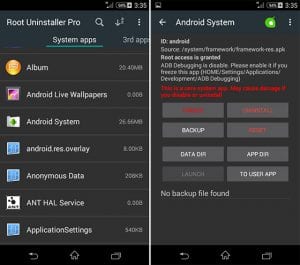
Except a few Android device models, majority of the Android devices are packed with pre-installed software either by the manufacturer or carrier. These apps are mostly of no use and more importantly they take up decent amount of your storage. Rooting your Android allows you to remove these unwanted bloatware programs.
source: wondershare
Block the annoying Ads
Well, no one loves the irritating advertisements while using their Android devices. You can pretty much block the Ads in your browser easily, but blocking Ads from all of your Android apps need something special. Rooting your Android device is that something special here, as you can simply block all types of Ads on your Android device.
guidingtech
Install Specially-developed Apps
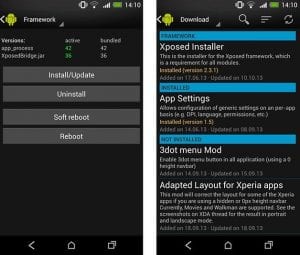
If you’ve ever used someone using a rooted Android device, you must’ve noticed some unique apps, which you couldn’t find them being compatible with your Android device. Well, there are a lot of Android apps that are specifically developed to work on rooted android devices exclusively. These apps bring a lot of features of functionality to your device.
wondershare
Enhanced Battery Life and Speed
Probably the most loved advantage of rooting android device is the elated battery life. Rooting your Android device offers you a much better battery life of your device along with boosted performance of your device as well.
Everyone loves a greater batter life for their Android device, so why not try rooting your Android device and enjoy the premium battery life.

Source: androidcentral
Comprehensive Backups
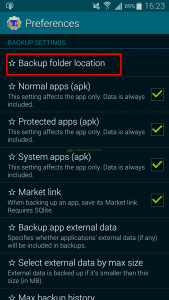
Well, with a normal android device, you can backup most of the important data and settings, but not all. On the other hand, a rooted Android device lets you backup byte to byte of your Android device, which is a much better option. Rooted android devices have special backup apps through which you can backup your entire data.
source: highonandroid
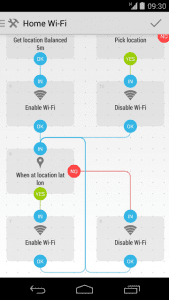
Automate the programs and tasks
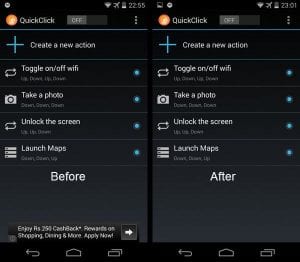
Would you like to have your WiFi turned off automatically when you leave your place? How about your Google Maps turning on automatically when you plug your phone to the car dock? Well, these are just a couple of examples, as there are many more automations you can do with a rooted android device.
source: llamalab
Greater Customization options
This has to be the most adored benefits of rooting android, for the people who love to tweak their device to be more visually appealing. A rooted android lets you change pretty much anything in your Android under the looks category. You can change textures, colors, add background images to custom locations, and many more.
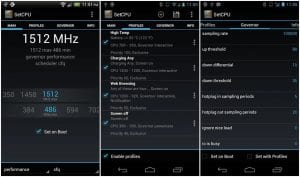
CPU Cloaking
Do you feel that your android device is getting slower with each day? Well, root your Android device and overcloak your device, which lets you enjoy a much faster performing android device. Cloaking has been the go-to thing for a lot of Android users who wants to improve the performance of their device.
source: phonearena
Firewall for effective data usage
Firewall is not a new thing for you, if you’re a desktop user. A firewall not only saves you from suspicious and malicious connections, but it also saves you a lot of data while using internet. Now, you can enjoy the services of a firewall on your Android device, if you root it.
Install Custom Roms
This is probably the best advantage of rooting android device, as a custom rom completely changes your android device for better. There are several custom roms out there that not only offer you a wider range of features, but they also unlock the truest potential of your Android device.

source: fonpit
Conclusion
The above-mentioned aspects are only a few of the benefits of rooting android, as there are much more you can get from a rooted Android device. But make sure that you know what you’re doing, while rooting Android, as any mishap can potentially make your device dead. Furthermore, if your android device is still under the warranty period, better to wait until that period ends and then continue with rooting your device.
Author Bio:
Dinesh Lakhwani 

Dinesh Lakhwani, the entrepreneurial brain behind “TechCommuters,” achieved big things in the tech world. He started the company to make smart and user-friendly tech solutions. Thanks to his sharp thinking, focus on quality and the motto of never giving up, TechCommuters became a top player in the industry. His commitment to excellence has propelled the company to a leading position in the industry.
Popular Post
Recent Post

How To Recover Files Deleted from the Recycle Bin [Windows 11]
Losing a file can happen in seconds. You clear your desktop, hit Delete, and empty the Recycle Bin. Then, just when you need that file again, it seems to have vanished. This guide will walk you through ways to restore files removed from the Recycle Bin. We will begin with simple fixes, then look at […]

Disk Drill Data Recovery Tool Explained: Full Review and Guide
It happens in a split second. You delete a folder by mistake. Your drive stops showing up. A photo album from your last trip just vanishes. And your stomach drops. Lost files feel personal. They are not just data. They are memories, work hours, and sometimes years of effort packed into a few gigabytes. When […]

Recover Deleted Files In Windows 11 With Software & Without
Introduction What is the first thing that goes through your mind the second an important file vanishes from a Windows 11 PC? For most people, it is a mix of panic and disbelief, followed by a frantic click through every folder that file could possibly be hiding in. It happens in a split second: one […]

EaseUS Data Recovery Wizard: Everything To Know
Data loss does not always come from a big disaster either. Most cases start small and boring. A drive gets formatted by mistake. A laptop freezes mid-save and restarts on its own. A memory card stops showing up after being pulled out too fast. None of these feel like emergencies at first, until you realize […]

Recuva Data Recovery Tool: Is it Actually Worth it?
When I first tried Recuva Data Recovery, I wanted to see if it could really bring back lost files. The tool is free, small in size, and promises quick recovery, which made me curious enough to test it on my own PC. The setup was fast, and the wizard guided me step by step. I […]

GetData Recover My Files Data Recovery Tool: Honest Review
A hard drive error brings a special kind of silence. Well, yes! The screen freezes, then a message appears saying the drive can’t be found or must be formatted. In that moment, years of photos and work files feel at risk. It never happens at a good time. Coffee spills near a laptop, a memory […]

Windows File Recovery: A Complete Review [Tried & Tested]
Imagine this. You spend hours perfecting a video project. You hit save. Then your laptop freezes, reboots, and when the screen comes back. The file is gone. Your stomach sinks. It’s not just you. Lost files happen all the time. A dropped hard drive, a bad update, an accidental delete, or a corrupted partition can […]

5 Best Data Recovery Software For Windows 11 and Windows 10
Introduction: A crashed drive can ruin a whole day. One minute your photos, work files, and tax records sit safe on your PC. The next minute they are gone. A power cut, a bad update, or one wrong click can wipe out years of memories and months of work in seconds. That sinking feeling is […]

How To Update NVIDIA Drivers On Windows 11/10 PC
Learn how to update NVIDIA drivers on Windows 11/10 with simple methods, safety tips, and easy steps for smoother gaming and better PC performance.

