











Imagine this. You spend hours perfecting a video project. You hit save. Then your laptop freezes, reboots, and when the screen comes back. The file is gone. Your stomach sinks. It’s not just you. Lost files happen all the time. A dropped hard drive, a bad update, an accidental delete, or a corrupted partition can […]
10 Best Yoga Apps for iOS and Android Devices
Yoga has incredible physical and mental health benefits. That you already know! So, let’s not talk about that and discuss how you can do yoga anytime and anywhere?
With the best yoga apps, you can perform relaxing yoga asanas whenever you have free time. You can simply open a yoga app on your phone or wearable iOS and Android and achieve your fitness goals.
Today, the TC has gone through different yoga apps for weight loss, mental health, and many other services. After doing some mindful meditation and asanas, we have picked the ten best yoga apps for you. Let’s say Om and start yoga now!
10 Best Yoga Apps for iOS and Android — Time to Relax
Yoga helps to connect your body with your mind. Using the best yoga apps, you can connect with a healthy and happy life. So, let’s not waste any moment and download the following ten yoga apps on your iOS and Android.
1. Yoga | Down Dog by Yoga Buddhi Co. (Android/iOS)
App Store Rating: 4.8/5
Play Store Rating: 4.9/5
Compatible iOS: iOS 9.3 or higher
Compatible Android: Android 4.2 or higher
Number of Users: 1,000,000+
Price: Free with in-app purchase. Membership for $7.99/month.
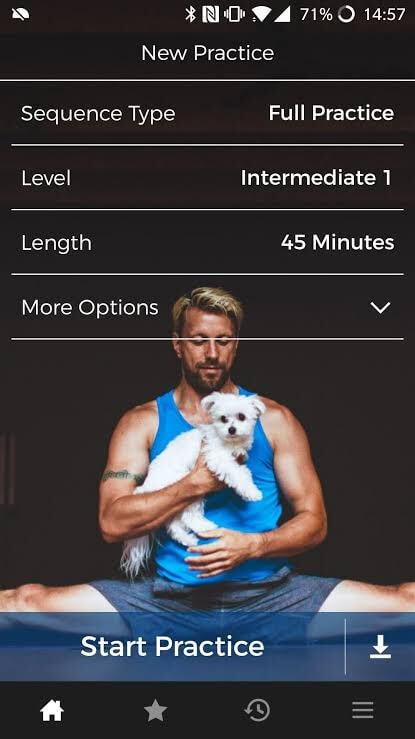
Down Dog is the best yoga app that you can find out there. Unlike most of the yoga apps, it won’t offer the same pre-recorded videos to follow daily. With over 60,000 different configurations, it lets you perform different yoga sessions as per your need. Importantly, it is a beginner-friendly yoga app that can introduce you to the divine world of meditation and asanas.
Relaxing Features
- Explore multiple yoga practices, including Vinyasa, Gentle, Restorative, Ashtanga, Chair, Yin, and more.
- Special back strengthening exercises that you can further customize targeting Backbends, Low Back Opening, or Back Strength.
- Receive instructions from 6 different yoga teachers in 6 different languages.
- Focus on 20 different areas to sharpen your postures.
Pros
- Configurable sessions.
- Multilingual support.
- Easy to use.
Cons
- Won’t allow you to download sessions.
- Limited information for novice users.
- Unstable loading speed.
2. Yoga | Daily Yoga by Daily Yoga Culture Technology Co., Ltd. (Android/iOS)
App Store Rating: 4.7/5
Play Store Rating: 4.6/5
Compatible iOS: iOS 10.0 or higher
Compatible Android: Android 4.4 or higher
Number of Users: 5,000,000+
Price: Free with in-app purchase. Allow customizing your own plan.
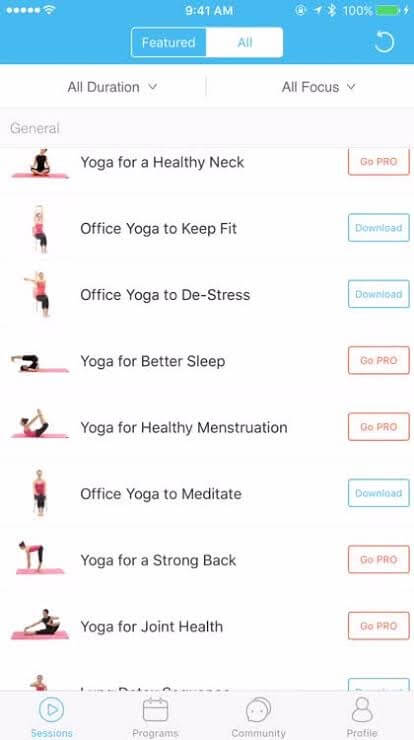
Daily Yoga is a Google Play Editor Choice app for weight loss, body strengthening, and more. Highly professional yoga instructors develop all video classes for beginner and advanced yogis. You can configure your sessions based on duration, goal, level, and yoga style. To stay positive during the prevailing uncertain times, it is a perfect app.
Relaxing Features
- Various HD yoga classes from beginner to advanced users.
- Daily Yoga app offers 500+ asanas, 1000+ yoga guides, meditation plans suiting men and women physiques.
- Together 40+ yoga coaches from around the world are available in your pocket.
- A large yoga enthusiast community that helps you stay motivated and focused.
- Customize your yoga plan based on your fitness goals.
Pros
- Track your daily activities.
- Adjust to your habits.
- Large community support.
- Very easy to navigate.
Cons
- Limited features in the free version.
- No Chromecast support.
3. Yoga for Beginners | Mind+Body by Fast Builder Limited (Android/iOS)
App Store Rating: 4.7/5
Play Store Rating: 4.6/5
Compatible iOS: iOS 10.0 or higher
Compatible Android: Android 4.1 or higher
Number of Users: 500,000+
Price: Membership starts at $29.99/month.
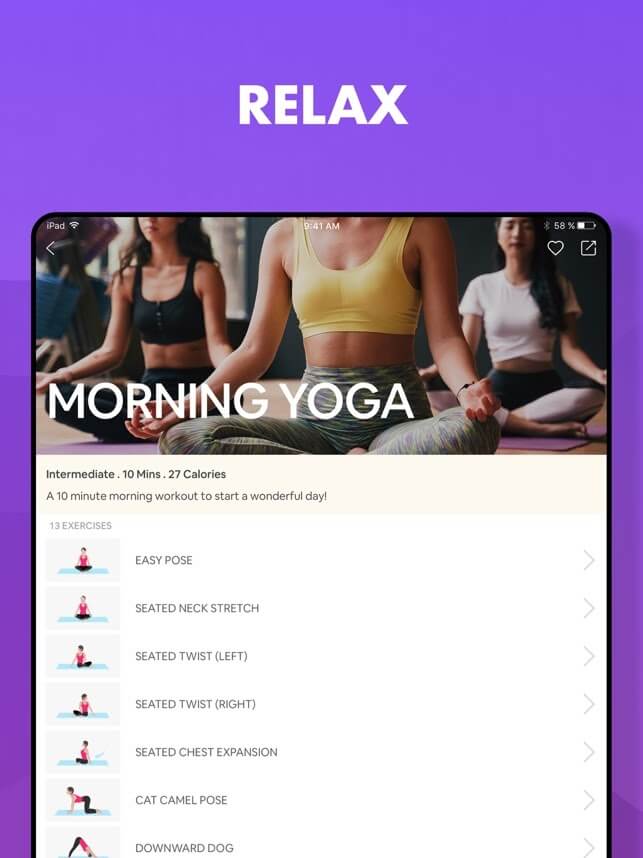
Want to meditate, relax and de-stress yourself? Then, Yoga for Beginners is the best yoga app for you. It is a perfect yoga app to get started and soothe your mind at your home. Especially, today when you can’t visit yoga studios to learn yoga asanas from the experts, this app can bring yoga teachers to you.
Relaxing Features
- Handcrafted yoga sessions for beginners to easily learn complicated postures.
- Soothing voice guidance sends relief to your mind and soul.
- A 100% beginners-friendly app can be used by anyone — adults and kids.
- Now, you have your personal yoga studio in your pocket to take control of your fitness.
Pros
- Excellent app for beginners.
- Easy to use.
- Explain every pose in detail.
Cons
- The Android version has limited features than the iOS version.
- Only one-timer.
- Slow loading speed.
4. Keep Yoga-Meditation & Fitness by Keep, Inc. (Android/iOS)
App Store Rating: 4.5/5
Play Store Rating: 4.7/5
Compatible iOS: iOS 10.0 or higher
Compatible Android: Varies with Device
Number of Users: 1,000,000+
Price: Free with in-app purchases.
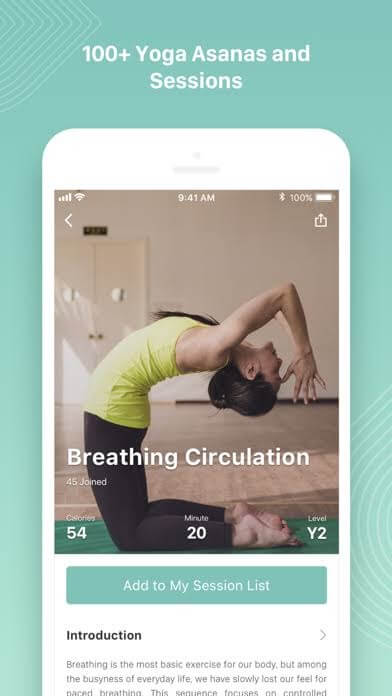
Keep Yoga is the best yoga app for meditation and relaxation. With over 400 asanas, 10 yoga session plans, and powerful 7 meditation courses. It is a great yoga app for weight loss, relaxing the mind, boosting immunity, improving sleep, and calming your soul. From beginners to expert yogis, everyone can gain something from this app. Based on your yoga proficiency level, you can select the perfect exercises.
Relaxing Features
- Over 400+ yoga poses and 10+ yoga sessions by experienced yoga instructors.
- Better achieve your goals with a guiding voice, detailed descriptions, and professional video lessons.
- With 15 minutes a day, you will know how to breathe, train your mind, better focus, and improve your mental health.
- Define your different fitness goals, including immunity boost, weight loss, relaxation exercises, and more.
- Share your achievements and progress with your friends to stay motivated.
Pros
- Send motivational reminders.
- Well explained lessons.
- Great for meditation.
Cons
- Video and audio glitches.
- Narration often stuck.
5. Pocket Yoga by Rainfrog, LLC (Android/iOS)
App Store Rating: 4.8/5
Play Store Rating: 4.4/5
Compatible iOS: iOS 12.0 or higher
Compatible Android: Android 4.0.3 or higher
Number of Users: 100,000+
Price: $3.50 along with in-app purchases.
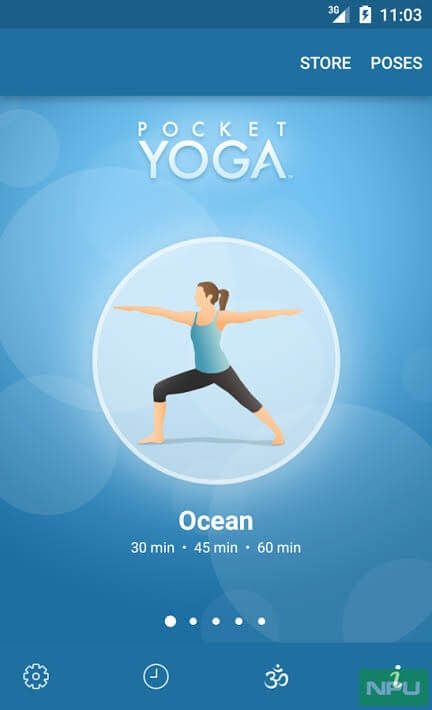
Pocket Yoga app is literally bringing yoga in your pocket. This app lets you practice yoga exercises at your own pace in the comfort of your home. Simply layout your yoga mat, select your yoga session from 27 different sessions, and start your workout. You can learn different yoga poses from the yoga dictionary containing a deep explanation of the correct postures, alignments, and benefits.
Relaxing Features
- Fully explained voice and visual instructions to walk you through every pose.
- More than 200 perfectly illustrated pose images to correctly perform complex asanas.
- A vast dictionary of poses containing the description and benefits of each pose.
- You can anytime review your progress.
- Sync your personal music library with the classes.
Pros
- Lessons by professional yoga instructors.
- Ongoing progress tracking.
- Easy to use.
Cons
- No free trial.
- Not good for beginners.
- Not free.
6. cure.fit by CureFit Healthcare Private Limited (Android/iOS)
App Store Rating: 4.8/5
Play Store Rating: 4.4/5
Compatible iOS: iOS 12.2 or higher
Compatible Android: Varies with Device
Number of Users: 5,000,000+
Price: Free with in-app purchases.
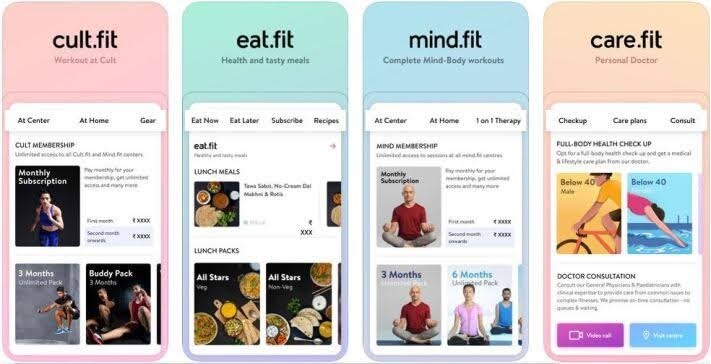
cure.fit isn’t just the best yoga app. It is a complete physical and mental approach that helps you be a better version of yourself every day. cure.fit is a combination of fun workouts, powerful yoga poses, delicious and healthy food. It is currently active in major 18 Indian cities and helping people meet their weight loss, cardiovascular, muscle strength, stamina, and other goals.
Relaxing Features
- With over 200 fitness centres, cure.fit offers professionally designed exercises for athletes and beginners.
- Through eat.fit you can bring delicious and healthy meals to your home.
- Using mind.fit, you can welcome calmness and happiness in your life with various yoga breathing and meditation techniques.
- care.fit is your personal doctor that can provide virtual consultation, free follow-ups, and maintain your digital medical records.
Pros
- Complete healthcare program.
- Easy to chase and track your goals.
- Many personal training programs with professionals.
Cons
- Limited availability.
- Too confusing for a simple yoga experience.
7. Yoga Studio: Poses & Classes by Fit For Life LLC (Android/iOS)
App Store Rating: 4.2/5
Play Store Rating: 4.2/5
Compatible iOS: iOS 10.0 or higher
Compatible Android: Android 4.1 or higher
Number of Users: 100,000+
Price: Free with in-app purchases.
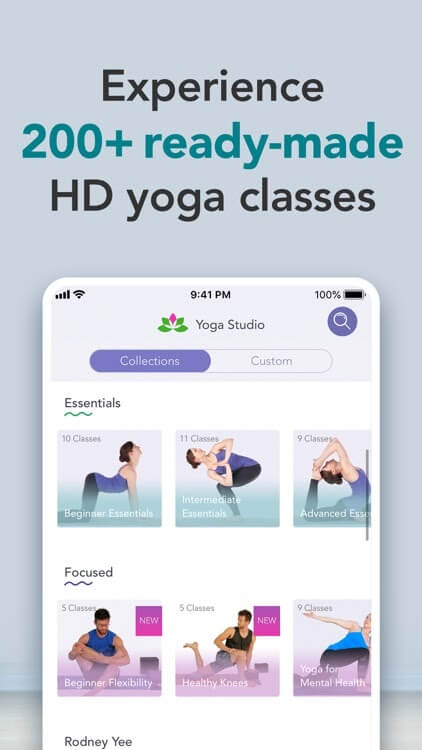
Want to master yoga poses in the comfort of your home? Get the Yoga Studio app to access HD yoga video classes with full professional teacher commentary. All classes are designed to target beginner, intermediate, and advanced yoga students. If you want to try something different, you can customize your class poses with a simple sequencing tool. For further ease, you can download classes for offline access without an internet connection or broadcast classes on your TV with Chromecast.
Relaxing Features
- Over 100 readymade yoga and meditation classes with a duration between 5 to 60 minutes.
- Use a custom class tool to create your own yoga flow.
- Track your fitness goals using the daily or weekly class schedules.
- Gigantic library of over 280 poses with detailed explanation to master complicated yoga asanas.
- A huge collection of classes, including Family Yoga, Chakra Yoga, Yoga for Back Pain, Deep Relaxation, and many more.
- Quickly search your classes based on focus, ability, duration, or intensity level.
Pros
- Well explained poses.
- 7 days free trial.
Cons
- Classes might be too simple for regular yoga practitioners.
- No free features.
8. Yoga-Go: Yoga For Weight Loss by A.L. AMAZING APPS LIMITED (Android/iOS)
App Store Rating: 4.0/5
Play Store Rating: 3.9/5
Compatible iOS: iOS 13.0 or higher
Compatible Android: Android 8.0 or higher
Number of Users: 10,000,000+
Price: Free with in-app purchases.
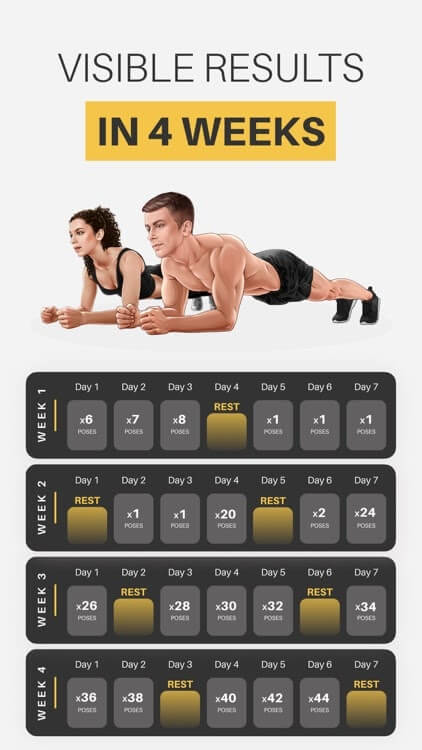
Your search for the best yoga app for weight loss should end up with Yoga Go. You can get smart training plans for beginners, daily workout guides, and results tracking options to lose weight. It can combine fitness and weight loss plans together so you can obtain a toned and healthy body in a breeze. Also, the app ensures to maintain a balance of emotions and hormones in your body.
Relaxing Features
- Exercises are focused on weight loss, control, figure-sculpting, and mind strengthening.
- Special fat-burning workouts to tone your tummy fat.
- Helps to track your weight loss progress, calories burnt, and workout time.
- Yoga Go help to reduce your everyday stress, sculpt your body, and even improve your sex life.
- Within 7-30 minutes of yoga classes, you can burn out up to 200 calories per session.
Pros
- Simple to use.
- Progress sharing option.
Cons
- No free trial.
- Limited personalization.
- Confusing layout.
9. Face Yoga Face Exercises by Daily Apps (Android/iOS)
App Store Rating: 4.2/5
Play Store Rating: 3.9/5
Compatible iOS: iOS 11.0 or higher
Compatible Android: Android 6.0 or higher
Number of Users: 50,000+
Price: Free with in-app purchases. Subscription for $9.99 weekly with a 3 day free trial.
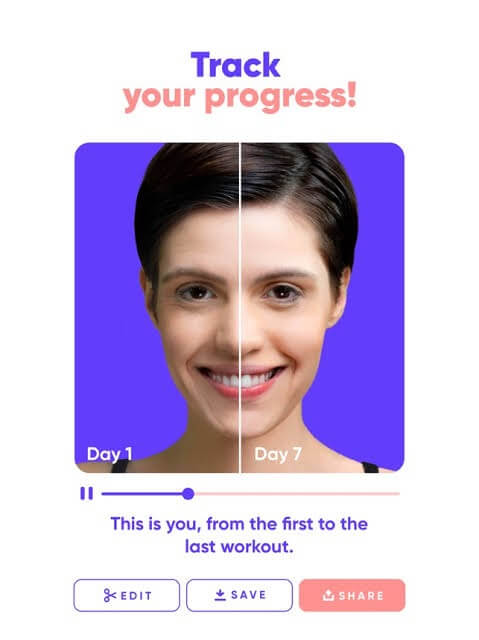
Yoga for the face! Yep, this is the best yoga app for people who are suffering from cervical pain or any other kind of facial disorder. Plus, if you want to rejuvenate your face, this app is perfect for you. Additionally, if you don’t have time for full 30 minutes yoga sessions, you can perform 5 minutes of face exercises anytime and anywhere.
Relaxing Features
- To look young and relaxed within 5 minutes, you can log in to the app anytime.
- As per the app developer’s claim, you can experience results within one week.
- More than 30 facial exercises to tone and relax your face muscles.
- All the exercises are based on academic research and come with detailed explanations.
Pros
- Scientifically-proven face exercises.
- Well-explained exercises.
Cons
- Expensive.
- Only offers face exercises.
10. Yoga International by Yoga International (Android/iOS)
App Store Rating: 4.4/5
Play Store Rating: 1.7/5
Compatible iOS: iOS 9.0 or higher
Compatible Android: Varies with Device
Number of Users: 50,000+
Price: Free with in-app purchases. 30 days free trial.
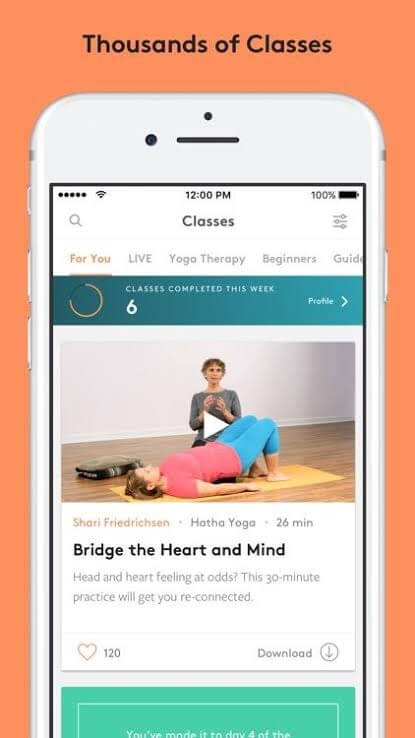
With a new daily live class, the Yoga International app helps to lose weight, meditate, and so much more. Based on your yoga expertise level, you can find many goals and challenges, including vinyasa, Hatha, Kundalini, Yin, and more. Some of the best yoga instructors will come to your home daily and help you achieve your fitness goals.
Relaxing Features
- A wide range of yoga sessions from quick 15 minutes to over an hour.
- The special yoga lessons by experts like Wrist Pain, Functional Movement, Strong Core Challenge, iRest Yoga Nidra, and many more.
- More than 500 yoga instructors offer over 1000 practice classes for beginners and experts.
- Download and save your favorite yoga lessons to practice offline anytime and anywhere.
- Daily live yoga classes in both English and Spanish languages.
Pros
- Helpful podcasts and articles.
- Live yoga class daily.
- Attractive interface.
- Free trial.
- Multilingual.
Cons
- A buggy program.
- Expensive courses.
Just Yoga!
Whether you want to achieve a toned body or de-stress yourself, yoga is the only solution. Yoga is a lifestyle that you can adopt today to stay healthy and improve your immunity. With the best yoga apps, you can learn yoga in the comfort of home from the master yogis and lead a healthy life.
You can use any yoga app from our recommendations and quickly achieve your fitness goals. Let’s not wait up anymore and download the best yoga app and put your yoga mat to some use. After a mindful yoga session, do share your experience with us!
Dinesh Lakhwani
Author Bio:
Dinesh Lakhwani 

Dinesh Lakhwani, the entrepreneurial brain behind “TechCommuters,” achieved big things in the tech world. He started the company to make smart and user-friendly tech solutions. Thanks to his sharp thinking, focus on quality and the motto of never giving up, TechCommuters became a top player in the industry. His commitment to excellence has propelled the company to a leading position in the industry.
Popular Post
Recent Post

5 Best Data Recovery Software For Windows 11 and Windows 10
A crashed drive can ruin a whole day. One minute your photos, work files, and tax records sit safe on your PC. The next minute they are gone. A power cut, a bad update, or one wrong click can wipe out years of memories and months of work in seconds. That sinking feeling is why […]

How To Update NVIDIA Drivers On Windows 11/10 PC
Learn how to update NVIDIA drivers on Windows 11/10 with simple methods, safety tips, and easy steps for smoother gaming and better PC performance.

Top AI Features Hidden Inside Windows 11
Explore the top AI features in Windows 11, from Copilot to Recall, plus safety tips and simple steps to use each tool the right way.

Customize Your Screen Saver Settings in Windows [Easy Steps]
Learn how to customize screen saver settings in Windows 11 with easy steps, safety tips, and simple tricks to personalize your PC screen.

Driver Easy Windows Driver Updater Tool Review: Tried & Tested
In-depth information about Driver Easy’s functions and features can be found in our review. Learn how to update drivers more easily with this tool for a more seamless computer experience.

Is Avast Driver Updater Worth It? A Hands-On Analysis
A full review of Avast Driver Updater covering features, setup steps, pricing, pros and cons, and real PC results, to help you decide if it is worth buying.

IObit Driver Booster 13 (PRO) Review: [Tried & Tested]
IObit Driver Booster 13 is built for one purpose: keeping your PC drivers up to date. Well, yes! Outdated drivers can cause crashes, slowdowns, and hardware issues. This tool scans fast and updates with one click. The interface is simple. Even beginners can use it without confusion. Updates are pulled from a huge database, covering […]

Auslogics Driver Updater: A Detailed Walkthrough [2026]
This comprehensive review covers the key features, pros, and cons, pricing, and a final verdict on Auslogics’ driver update utility. Learn how it stacks up against manual driver maintenance.

5 Best Driver Updater Tools for Windows to Use (Free and Paid)
Introduction: Most people blame their PC for problems that a driver caused. A driver works like a bridge between your hardware and your operating system. When this bridge cracks, strange things start to happen. Screens flicker without reason. Printers go silent mid-task. Games freeze or crash out of nowhere. Manually finding the right driver is […]

