Wondershare Anireel Review
Last updated on September 8th, 2025 at 6:52 am
Introduction
One of the easiest and more common ways of promoting business now is through digital media types, like videos. Businesses, solo professionals, content creators, and more prepare explainer-type videos and vivid expressions to attract more viewers and retain customers. One useful type of explainer video-making software in this regard is Wondershare Anireel.
Users can operate this software to add attractive video customizations and prepare fun presentations. They share them across communication channels, knowledge base platforms, and sales practices.
After knowing its uses, we decided to test out the app’s functions and performance personally. Read ahead to know our discovery.
Anireel- Brief Overview
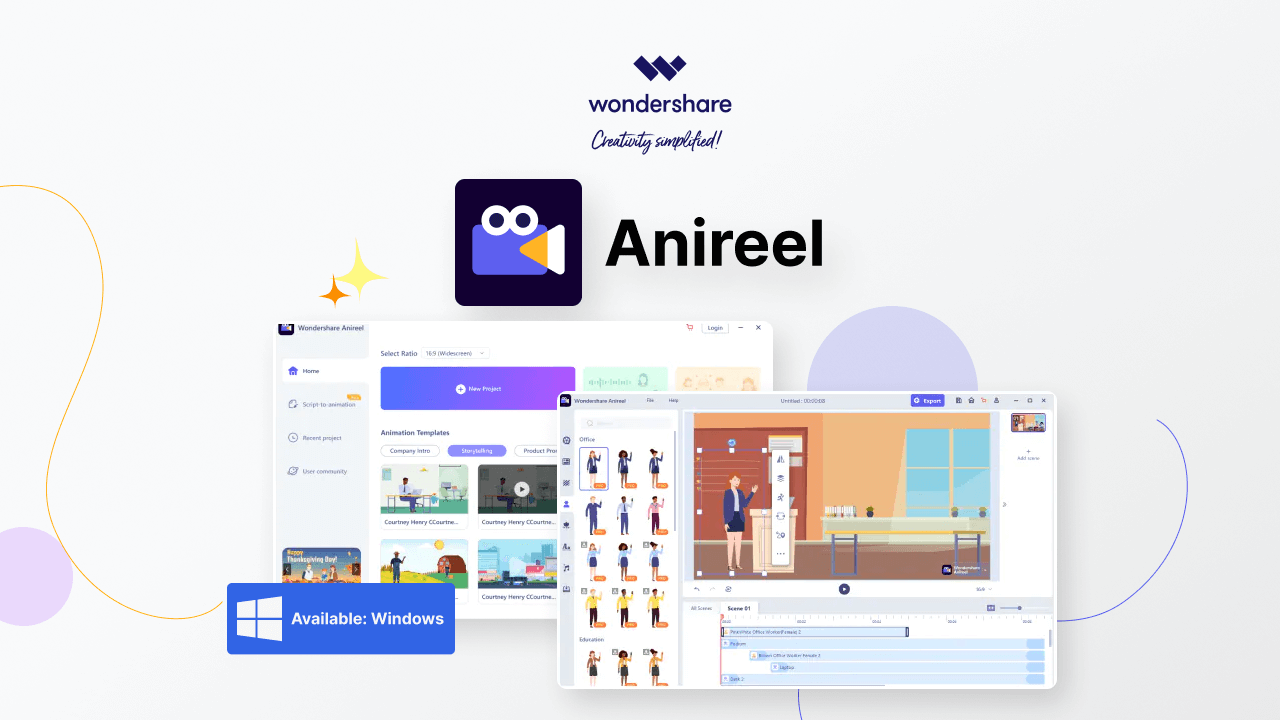
Anireel is the simplest animated video maker software that businesses, freelancers, and regular users can utilize to make detailed explainer videos. These content types are valuable sources of information and engagement tools in the business sector, e-learning, and sales-centric platforms.
Users can create intuitive, fun, and innovative animation-centric explainer videos using many customizable elements for knowledge base and communication. You can use a drag-and-drop editor to add props, actions, characters, and audio to videos. There are pre-set animation templates for the main users to utilize and benefit from.
We found this software to have a simple and easily navigable UI and robust character customization features. Overall, the features available are top-notch as well.
Basic Specifications
Compatible OS: Windows 11/10/8.1
How to Get: Microsoft Store
Price: Individuals (Monthly)- USD 19.99 per month, Individuals (Annual)- USD 9.99 per month, Team/Business- Quoted price.
Disk Size: 2 GB of disk space should stay available.
Compatible RAM Support: 4 GB of RAM.
Pros
- Tutorials and user guides are available to guide users.
- Tons of drag-and-drop characters, actions, props, text, and audio assets are commercially available except for audio.
- 70+ high-quality video templates suitable for each scene can be used with one click, reducing the production cost and time.
- The FAQ section adds a lot of useful details for reference.
- One can only remove the watermark from videos with the Bundle or Standard plans.
- Tons of drag-and-drop characters, actions, props, text, and audio assets are commercially available except for audio.
- You can export files in 1080p, MP4, GIF, MOV, WEBM with transparent channel, MP3, WAV, etc.
- Simple custom branded character
- One-click processing for the script to animation.
- 57 available voices for Text-to-Speech
- Around 200,000 TTS (Text-to-Speech) characters are present for selection each month.
- Pro assets are constantly upgraded.
Cons
- Not possible to use one account for multiple devices.
- Do not support macOS.
- Do not support iOS/Android.
Features of Anireel
The explainer video-making software, Anireel, comes with simplistic and user-friendly editing and video creation features. One can add many free assets (and premium assets for paid users) to their project files, modifying specifications like the color/size.
While we tried to use this app, we could easily access and use the drag-and-drop functionality to pick the best-animated characters and themes for the project. It is also simple to import different file types and edit those into the explainer videos using Anireel. Here, we discuss further the best features we found.
Interface/Home Screen
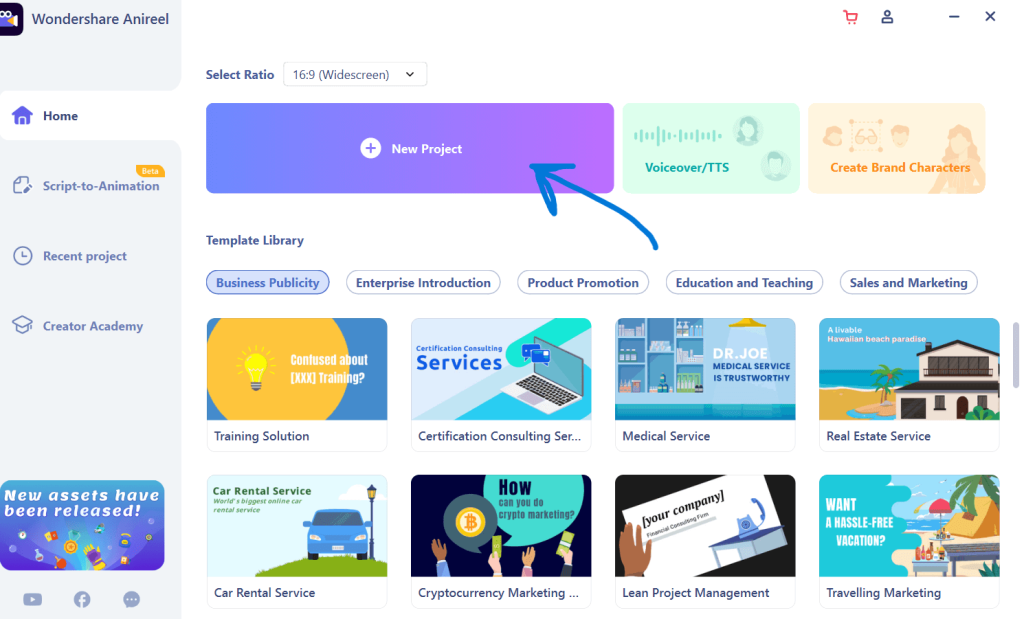
The interface in Anireel is so simple to understand, access, and use on a regular basis. After completing the final registration process, you can open the software to its home screen, which contains all major features on display.
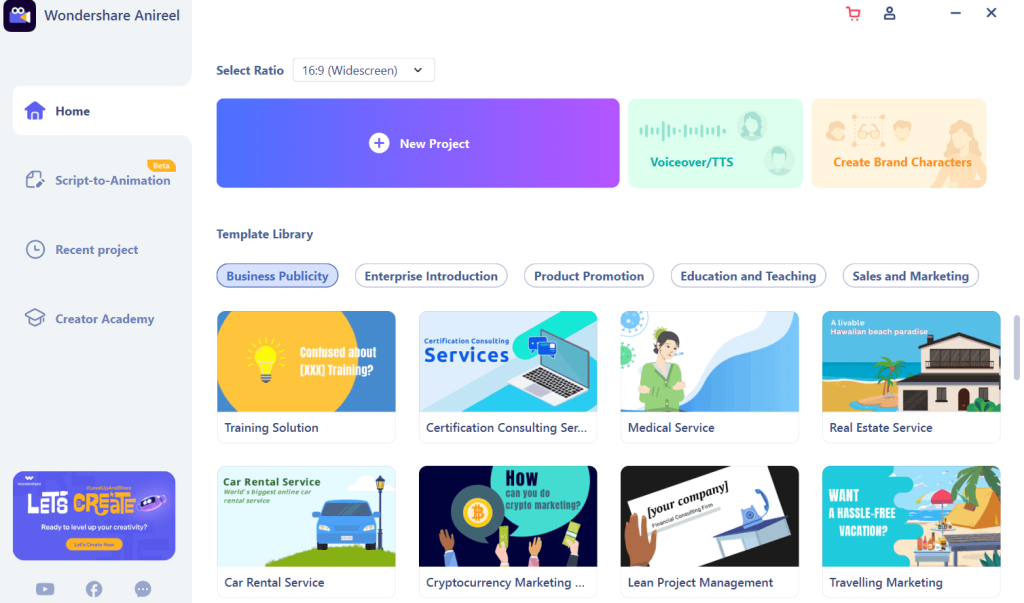
You can adjust the preferred aspect ratio for your project, choosing between desktop-based Widescreen (16:9), Instagram-centric size (1:1), and Portrait mode (9:16). Other features/sections like the Creator Academy, Voiceover/TTS, and Recent Projects are also accessible through the home screen.
Prepare Brand Characters
This explainer video-making software allows users to create their personalized brand characters with animation support. You can customize the gender, facial features, clothing, and style of the characters.
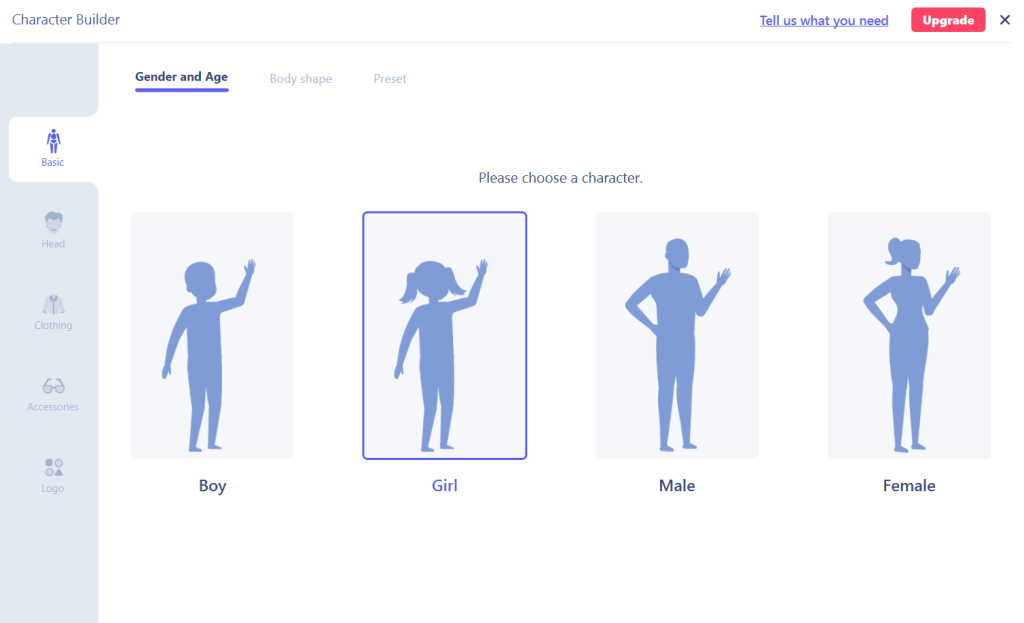
Also, check and decide which accessories to add and develop a unique and relevant IP character for your explainer videos.
Script-to-Animation
This automated feature promises one-click creation of the best video results based on some pre-set sample formats. You can choose the type of video you require, and the AI software will evaluate and prepare a suitable file for posting.
TTS/Voiceover
While trying out this feature, we added the necessary text that would play in the background of the explainer videos and tutorials we created. The process and quality were relatively good.
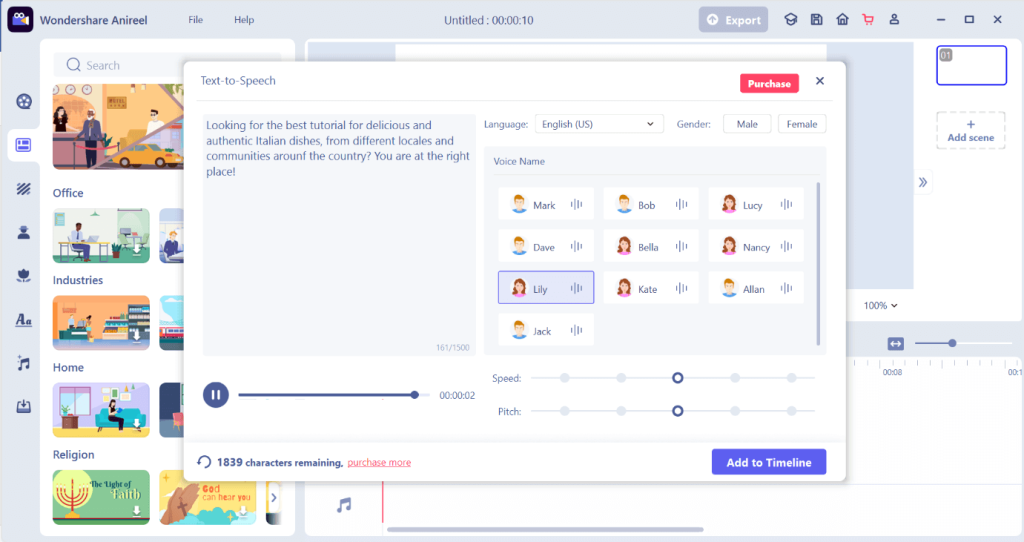
For all users, around 2000 characters are allowed for the text to be added. You can choose between different characters, including male and female choices, and between different languages (supports upto 41 languages). Easily adjust the pitch and speed of the voiceover as well before adding it to your video.
Template Library
One of the best things about Anireel is the availability of pre-set effects and templates and the ability to custom-create elements. A vast library of templates is available for specific themes, uses, and targeted audiences.
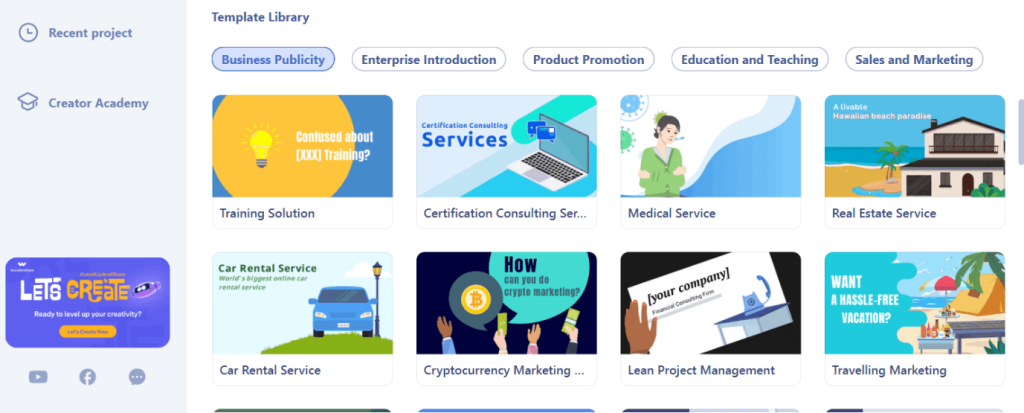
You can choose between different categories, each catering to certain fields, like Business Publicity, Education/Teaching, Product Promotion, Enterprise Education, and Sales and Marketing. Choose one tab and click on whichever template you require.
Diverse Input/Output formats
This software accepts a wide range of formats for new project creation. Most variety is available as per the video formats, including top types like .MPG, .MPEG, .MP4, .3GP, .MOV, .FLV, .GIF, and more. Under these variations, only specific codecs are supported, like Sorenson H263 and Sorenson Spark for FLV and F4V. For the latter, H264 codecs are also allowed.
The audio formats that are supported on this software includes .MP3, .M4A, .WMA, .WAV, .OGG, etc. Image formats include .BMP, .JPG, .PNG, .TIF, .JPEG, etc.
How to Use Anireel For Creating Customer Explainer Videos?
Creating explainer videos on Anireel is smooth and non-complicated due to the easy-to-use interface. Following the steps accurately would allow you to create top-rated videos with high engagement and CTR potential.
Step 1: Download and install Wondershare Anireel. Then, follow all necessary installation steps and launch the software on your device.
Step 2: Click on the New Project option.
Step 3: Drag and drag elements like the background, characters, and text from the left-hand panel. If you have created a custom character already, add them to the screen from the My Character section.
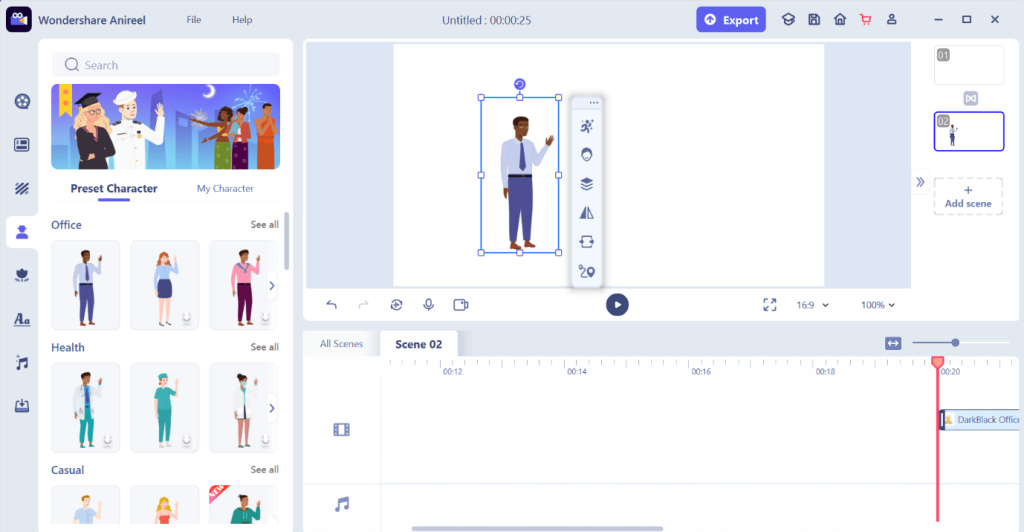
Step 4: Add further customizations to characters, if necessary, from the pop-up menu beside the character.
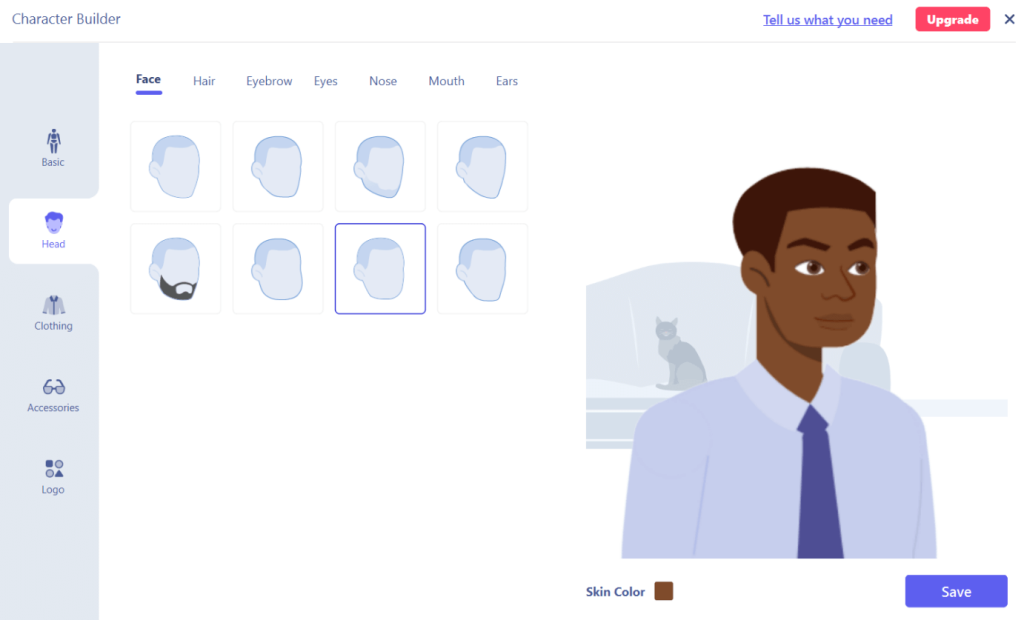
Add changes like skin color, face shape, hairstyle, and other modifications. Click Save.
Step 5: Insert other elements like title and audio. Use the timeline at the lower part of the screen to keep track of adding the right customizations at specific timings.
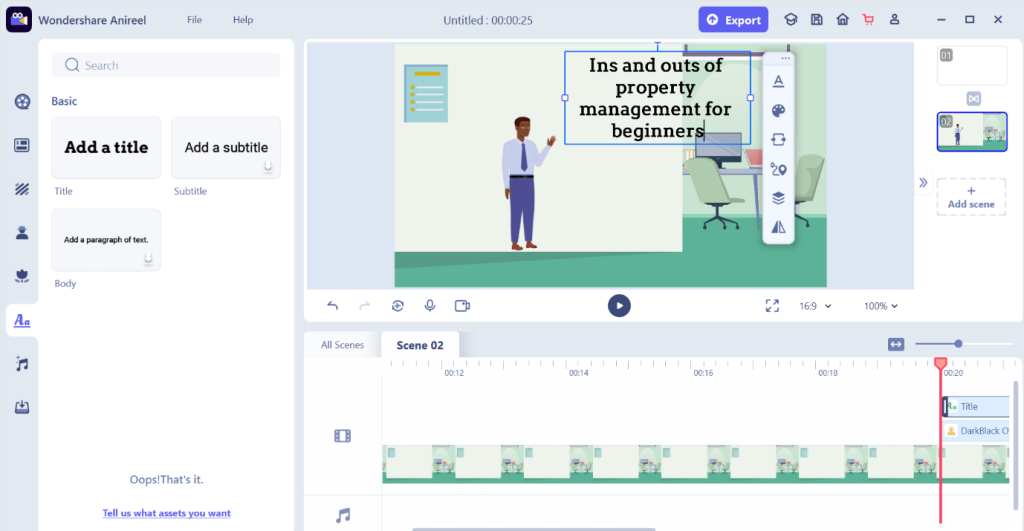
Step 6: After completing all customizations, click on the Export button at the top. Add a file name and select saving location, resolution, and other output specifications.
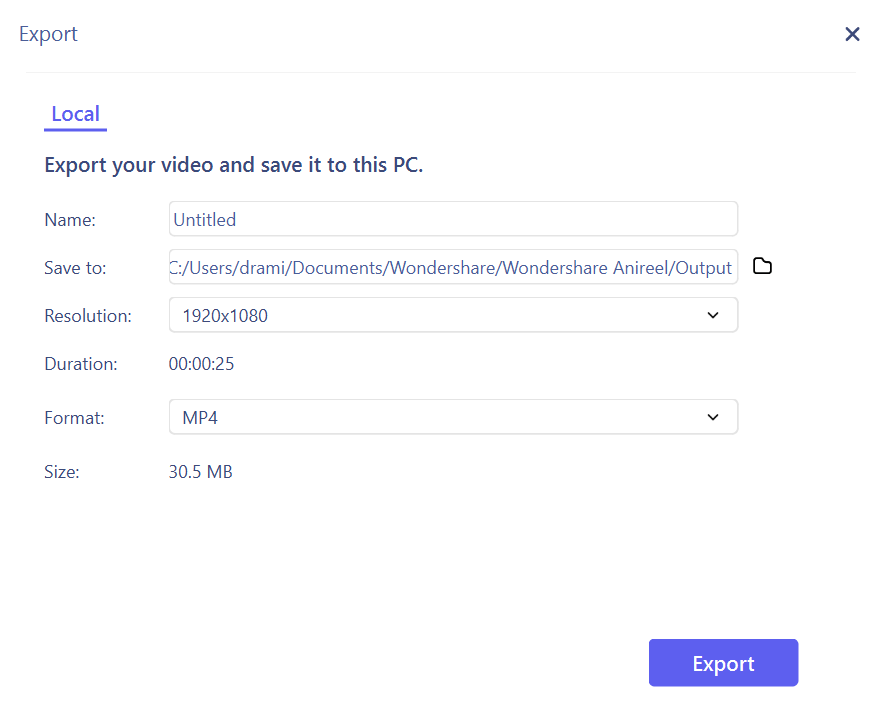
Press the Export button after completing.
Conclusion
Overall, Anireel is a comprehensive software to use for high-quality and fun animated explainer video development. You can easily add voice overs, prepare a personalized character, and include advanced effects and styles. Even the pre-built templates we found were simple to use and appealing, despite their relatively generic nature.
If you found this guide helpful and want to try it out, go ahead. Of course, check out the free trial first for a better understanding of the uses.
Author Bio:
Dinesh Lakhwani 

Dinesh Lakhwani, the entrepreneurial brain behind “TechCommuters,” achieved big things in the tech world. He started the company to make smart and user-friendly tech solutions. Thanks to his sharp thinking, focus on quality and the motto of never giving up, TechCommuters became a top player in the industry. His commitment to excellence has propelled the company to a leading position in the industry.
Popular Post











Recent Post

Resolving Microphone Detection Problems: Latest Guide [2026]
Microphones are important tools in daily life. People use them for office meetings, online classes, interviews, gaming, customer support, and content creation. When a system fails to detect a microphone, communication stops at once. This situation can cause stress and confusion. Many users believe the microphone is damaged. In reality, most problems are simple and […]

How To Switch To A Dark Background Theme In Windows [2026]
Most people spend many hours each day in front of a computer screen. Office work, online classes, editing, browsing, and streaming all require long screen time. A bright white background may look clean at first. However, over time, it can feel sharp and tiring. The strong contrast between white backgrounds and black text may cause […]

How to Switch From Local To Microsoft Account On Windows
Many users begin with a local account when they set up a new Windows computer. A local account works only on that single device. It stores settings, files, and preferences locally. It does not connect to online Microsoft services. For basic offline use, it works well. However, as digital needs grow, many users want better […]

How to Switch Windows 10 to a Local Account: Complete Guide
Windows 10 allows users to sign in with either a Microsoft account or a local account. When you set up a new computer, the system often suggests using a Microsoft account. This account connects your device to Microsoft services such as Outlook, OneDrive, and the Microsoft Store. It also syncs settings, themes, and passwords across […]

How To Change Default Apps For File Types In Windows
Windows is designed to make using your computer easy. One way it does this is by assigning default apps to different file types. This means when you open a file, Windows automatically opens it with a specific program. For example, photos may open with Photos, music with Groove Music, and PDFs with Edge. These default […]

How To Adjust The Mouse Pointer Speed: Complete Guide
Using a computer every day means you use the mouse a lot. The mouse pointer moves on the screen and helps you click, scroll, and select items. Many people never think about the speed of the mouse pointer. They have used the default setting for years. This can cause small problems over time. A slow […]

How to Change Mouse Scrolling Settings In Windows
A mouse is one of the most used computer tools. People use it every day. They scroll through emails. They scroll through documents. They scroll through websites and images. The movement becomes automatic. Most users do not notice it. That is why problems often go unnoticed. Scrolling problems show up slowly. At first, it feels […]

Keyboard Light Settings: Keyboard Lighting Control [Complete Guide]
Keyboards are no longer simple typing tools. Well, yes! Over time, they have evolved to include features that improve comfort, visibility, and overall experience. One of the most useful features today is keyboard lighting. It helps users work comfortably in low-light conditions. It also reduces strain when typing for long hours. Many users first notice […]

Customizing Pointer Appearance: Complete Guide
The way your mouse pointer looks on your computer may seem like a small detail. But customizing pointer appearance can make using your PC more comfortable and visually appealing. Many users do not realize that they can change the pointer size, color, and style to fit their needs. Whether you want a bigger pointer for […]

How To Choose a Computer Monitor: Monitor Buying Guide
Buying a monitor looks easy. Many people think all screens are the same. That belief causes regret later. A monitor is not just a display. It is a daily tool. You read on it. You work on it. You relax with it. Small problems become big over time. Poor brightness hurts eyes. Bad size causes […]

