What To Do When You Accidentally Drop AirPods in Water? (6 Solutions)
Last updated on September 2nd, 2023 at 5:06 am
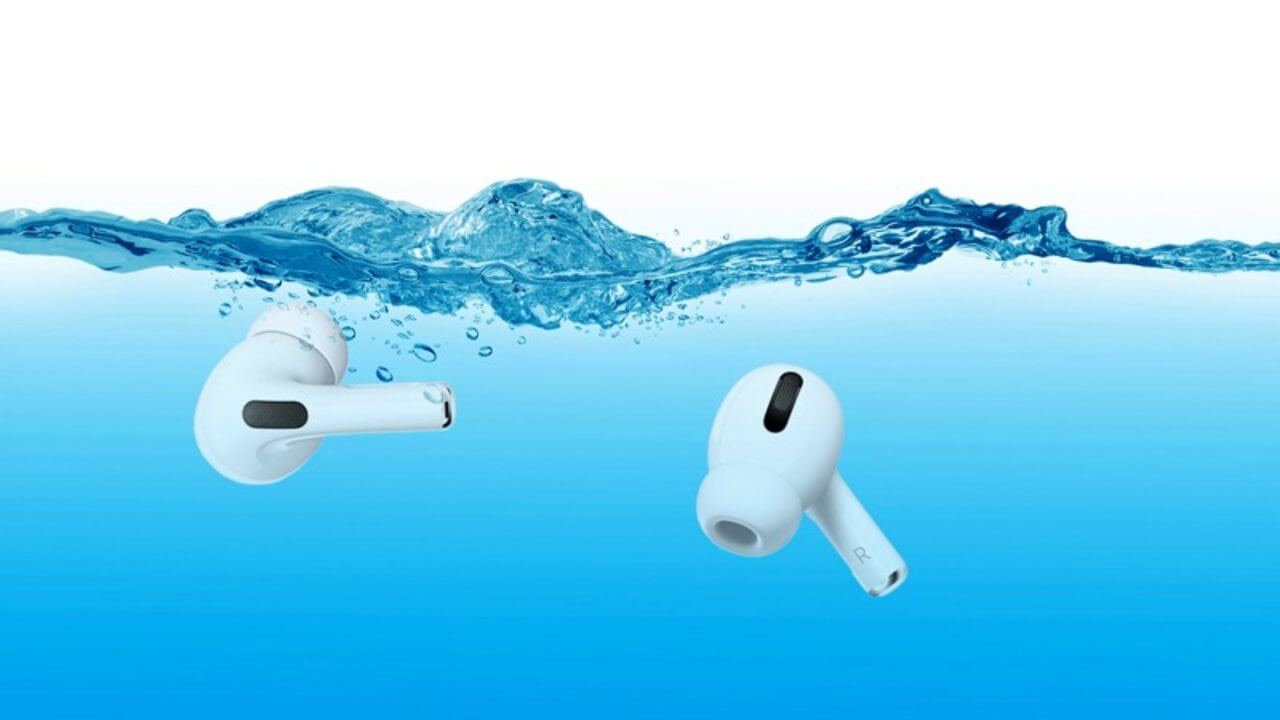
Your heart might go out when you accidentally drop your AirPods in water. Today, Apple AirPods have made our life easier. They let us listen to music while working out or talking on a phone while driving your car.
But unfortunately, when you drop AirPods in water, there is no way to fix it. As a result, water can permanently damage your priced AirPods.
Okay, we are kidding. There are some water damages that you can fix. Our team ran extensive research and dropped AirPods into different water levels to see what to do when you accidentally drop AirPods in water. And we found many solutions that we are about to unfold ahead. So, let’s get moving.
Is AirPods Waterproof?
Any AirPods model is not waterproof or sweatproof. On the other hand, some newer models are water and sweat-resistant. As a result, you should not shower or swim with them. Also, avoid using AirPods in saunas, steam rooms, or while skiing. Furthermore, please do not wash them under the faucet or washing machine or subject them to other water-related activities.
Apple has introduced five models of AirPods yet. Unfortunately, the first, second, and Max AirPods are neither water nor sweat-resistant. On the other hand, the AirPods Pro and AirPods 3rd generation are water and sweat-resistant. Based on this trend, we may expect future models to have the same or higher water and sweat resistance.
AirPods 1st and 2nd generation, as well as AirPods Max, do not have an official IP rating. The IP rating of the AirPods Pro and AirPods 3rd generation is IPX4.
Are AirPods Charge Cases Waterproof?
AirPods charging cases are classified into three types: normal charging cases, wireless charging cases, and MagSafe charging cases.
The first and second generations of AirPods come with the usual charging case. You can, however, purchase a wireless charging case for them. The AirPods Pro used to come with a Wireless Charging Case, but they now come with a MagSafe Charging Case (which isn’t waterproof). The third version of AirPods also includes a MagSafe Charging Case. However, it is waterproof.
In short, the MagSafe Charging Case for AirPods 3rd Generation is the only one that is water and perspiration-proof. The rest of the products, including the AirPods Pro Wireless and MagSafe Charging Cases, are not water resistant. On the other hand, the open-design cover for AirPods Max clearly lacks such protection.
Is the AirPods Pro and 3rd Generation Water-resistance Solid?
Although the AirPods Pro and 3rd generations are water and perspiration-resistant, this is not a permanent condition. Water resistance qualities of AirPods may decline over time as the seals degrade due to constant use, wear and tear, drops, and so on. Furthermore, chemicals in soap, face wash, lotions, fragrances, sunscreen, oil, hair dye, and other cosmetics can impair water seals and membranes.
There is no established parameter for determining whether or not the seal is compromised. As a result, take extra precautions when using your previous AirPods.
6 Things to Do When You Drop AirPods in Water
That heart-stopping moment when you drop your AirPods into water doesn’t have to end in catastrophe and another costly charge on your card. Let’s take a look at a few solutions for saving your AirPods from water damage.
Solution 1. Gently Wipe Your AirPods
You dropped your AirPods in water, and they are now soaked. Simply dry them well with a microfiber towel and leave them upside down to air out before attempting to connect or use them.
The charging case should follow the same procedure. If your AirPods appear dry after a few minutes of drying time, go ahead and use them. However, don’t give up if they still don’t work. A few more complex methods may be able to revive those drenched AirPods.
After dropping them in water, do not put your AirPods back in the charging case. The enclosed compartment will prevent the AirPods from drying properly, and any water that leaks out will damage your AirPods case.
Solution 2. Use Desiccant Sachets
If it appears like your AirPods are still retaining moisture, get a container and some desiccant sachets. These small paper packets with the words “do not eat!” are frequently found in the shoe, electronics, and another product packaging.
The beads in these packets absorb moisture. Fill the container with a few sachets and your damp AirPods, then seal it for a few hours. This should remove any lingering moisture from the AirPods, restoring their dryness and functionality.
When your AirPods are dry, try connecting them to your iPhone. Remember to listen to them first. Even if they are connected, the audio quality may be permanently degraded.
You might be tempted to try the traditional dry rice trick for drying wet phones (If you don’t know, soaking your phone in a container of uncooked rice will absorb up all the moisture over in a few hours). We don’t advocate doing this with AirPods. The rice grains and particles can get caught within the AirPods, causing more harm than benefit. If this approach does not work, move on to the next solution.
Solution 3. Use Cotton Swabs
Take an acceptable cotton swab that you usually use to clean your ears. Rub your fingers together to remove any fine cotton threads that may have broken and clogged the inside. Then, carefully dry up any liquid that may have gotten inside the charging case using a Q-tip.
Caution: The charging case’s end features connectors for charging AirPods. When cleaning with the cotton swab, make sure not to force it down or dislocate it.
Solution 4. Face Down Your Charging Case
Apple suggests opening the AirPods case and laying it down. Then, make sure you drop your charging case open and leave it unattended for a few hours.
Solution 5. Remove Water from Speakers
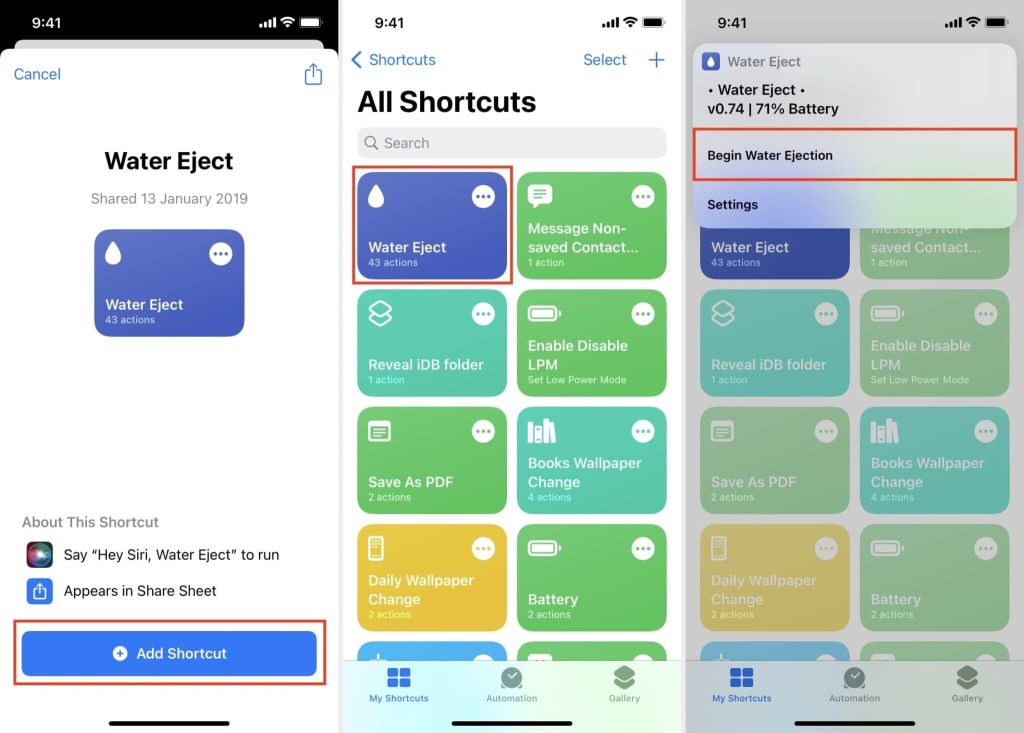
Playing noises at a specific frequency can cause the liquid to leak through the speaker mesh. Begin by pairing your AirPods with your iPhone or iPad. Then, remove the water from your AirPods using the Water Eject shortcut. The procedure is comparable to Apple’s Water Eject feature, available on newer Apple Watches.
Here’s how to use Water Eject when you accidentally drop AirPods in water:
1) On your iPhone, tap the iCloud link to download the Water Eject shortcut.
Tap Add Shortcut on iOS 15 and later. Before you tap the iCloud link, ensure you allow untrusted shortcuts if you’re on iOS 14 or earlier.
2) On the My Shortcuts page, hit the Water Eject option.
3) A notification should be displayed. To begin the process, tap Begin Water Ejection.
Alternatively, you can get rid of the water if you don’t want to install an untrusted shortcut on your iPhone. You can either utilize free third-party apps or go to a website that simply plays the sound to eject the water.
Other apps can do this, but we pick Sonic because it is free on the App Store and performs an excellent job. After installing the program, you can experiment with the sound frequency to see which works best. Finally, press the Play button to eliminate the water from your iPhone speaker.
To remove any water from the speakers, you might also use a website called Online Tone Generator.
Solution 6. Keep Your AirPods Under the Fan
Aside from the ways listed above, you may also consider placing your AirPods near a fan or in a warm location to accelerate water evaporation.
Additional Tips to Prevent the Future AirPods Water Damage Incidents
Follow these guidelines to keep your AirPods from getting wet and ensure they last a long time:
- Check your jeans, pants, and shirt pockets before washing them.
- Never put wet or sweaty AirPods in their case without first wiping them down.
- It is fine to keep your water-resistant iPhone near a water bottle or glass of juice on your desk. But always take extra precautions not to leave your MacBook or AirPods near water. We hope you will follow suit.
- Wearing your AirPods in the rain is not a good idea.
- Invest in a waterproof AirPods case. However, this will only protect your charging case when it is closed. AirPods will still be susceptible to water after being removed from the case.
Parting Remarks
Don’t get sad when you drop your AirPods in the water. As you can see, there are ways to protect your AirPods from water damage. But prevention is always better.
So, be mindful before taking your AirPods near water. And if a fateful accident happens, follow the above-mentioned solutions. If your AirPods are under warranty, contact your nearest Apple Store.
That’s it for now! Keep on following us for more tips and tricks.
Author Bio:
Dinesh Lakhwani 

Dinesh Lakhwani, the entrepreneurial brain behind “TechCommuters,” achieved big things in the tech world. He started the company to make smart and user-friendly tech solutions. Thanks to his sharp thinking, focus on quality and the motto of never giving up, TechCommuters became a top player in the industry. His commitment to excellence has propelled the company to a leading position in the industry.
Popular Post











Recent Post

Keyboard Light Settings: Keyboard Lighting Control [Complete Guide]
Keyboards are no longer simple typing tools. Well, yes! Over time, they have evolved to include features that improve comfort, visibility, and overall experience. One of the most useful features today is keyboard lighting. It helps users work comfortably in low-light conditions. It also reduces strain when typing for long hours. Many users first notice […]

Customizing Pointer Appearance: Complete Guide
The way your mouse pointer looks on your computer may seem like a small detail. But customizing pointer appearance can make using your PC more comfortable and visually appealing. Many users do not realize that they can change the pointer size, color, and style to fit their needs. Whether you want a bigger pointer for […]

How To Choose a Computer Monitor: Monitor Buying Guide
Buying a monitor looks easy. Many people think all screens are the same. That belief causes regret later. A monitor is not just a display. It is a daily tool. You read on it. You work on it. You relax with it. Small problems become big over time. Poor brightness hurts eyes. Bad size causes […]

How To Get Help With File Explorer in Windows 11 [Complete Guide]
File Explorer is one of the most important tools in Windows 11. It is used to open folders, view files, and manage stored data. Almost every action on a Windows computer depends on it in some way. When users open documents, save downloads, or organize photos, File Explorer is always involved. Because it is used […]

How To Fix A Frozen Computer: Complete Guide [Windows 11/10]
A frozen computer is one of the most common problems Windows users face. The screen stops responding. The mouse pointer does not move. Keyboard inputs do nothing. You may hear the fan running loudly. Sometimes the system looks alive, but nothing works. This situation often happens when you are busy or working on something important. […]

How to Upgrade Computer RAM: Complete Guide
Upgrading RAM is one of the simplest ways to improve a computer. It helps the system feel faster and smoother. Apps open quicker. Browsers handle more tabs. Games and tools run with less delay. Many users search for how to upgrade computer RAM because it gives real results without high cost. You do not need […]

How To Clean Your Computer Keyboard: Complete Guide
A computer keyboard is touched more than almost any other device you own. It is used during work, study, gaming, and casual browsing. Fingers carry natural oils, sweat, and dirt. Small food crumbs fall between keys without notice. Dust settles each day slowly. Over time, this creates a hidden layer of grime. Many users do […]
Computer Mouse Buying Guide for Beginners and Advanced Users
Buying a mouse looks easy at first. Many people think all mouse work the same way. Well, that idea often leads to regret later. A mouse affects comfort, speed, and daily work. It matters for office tasks, gaming, design, and study. The right choice reduces strain and improves control. The wrong one feels annoying every […]

How To Overclock a Computer: A Complete Guide
Overclocking is the process of making your computer run faster than its factory settings. It mainly affects the processor, graphics card, and sometimes memory. Many people choose this method to improve performance without buying new hardware. It is popular among gamers, video editors, and users who run heavy software. When done properly, overclocking can give […]

How To Find Password Saved on This Computer: Complete Guide
Many people forget their login details at some point. It happens often. We create many accounts every year. Each one needs a username and a password. Over time, it becomes hard to remember all of them. That is why computers offer ways to store login details. These saved details help users sign in faster. They […]

