WhatsApp Channel: A Step-by-Step Guide

Last updated on September 8th, 2024 at 5:50 pm
Introduction
WhatsApp Channels is a feature that streamlines communication between individuals and groups within WhatsApp. WhatsApp Channels enable users to communicate with a bigger audience as compared to standard WhatsApp accounts, which are primarily meant for individual or small group discussions. They can be used by businesses to connect with clients, provide assistance, and even launch marketing initiatives.

Benefits of Using WhatsApp Channels
WhatsApp Channels provide several advantages to both organizations and individuals:
- Attract more Audience: WhatsApp Channels make it possible to broadcast messages to many users at once, making it a useful tool for disseminating information.
- Increased Customer Engagement: By enabling you to address specific queries and problems, WhatsApp Channels make it simpler to conduct personalized conversations with customers.
- Cost-Effective Communication: When compared to traditional SMS marketing, WhatsApp Channels are a more affordable way to reach out to customers.
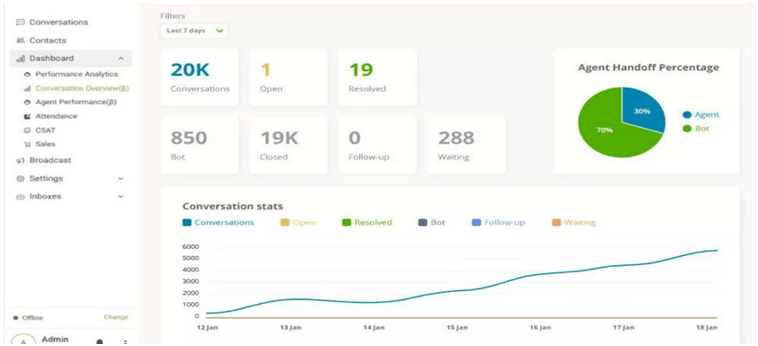
- Real-time statistics: You can modify your communication approach by using real-time analytics to learn how messages are being received and how consumers are responding.
- Multi-Media Support: This feature enhances interaction by enabling you to transmit documents, videos, photos, and more in addition to text messages.

How Do I Create WhatsApp Channels?
Let’s see the process for WhatsApp Channels for iOS and Android devices.
Step:1 Set Up a WhatsApp Business Account:
A company creates a WhatsApp Business Account, also known as a WhatsApp Professional Account, to be able to access WhatsApp tools for business. Companies are required to register for WhatsApp with their name and phone number in the same way that individuals do to use the messaging service for business purposes. To establish their credibility, they must also provide a few additional details.
How to set up a WhatsApp business account?
- Follow the normal app installation instructions after downloading the free app from the Apple App Store (iOS) or Google Play Store (Android).
- You’ll need to sign up. This includes entering the phone number in an international format that you want to use for business.
- After that, decide how you want to be contacted to verify this number: Call or text.
- You’ll get a 6-digit verification code in either case.
- Give WhatsApp access to your contacts in your phone book.
- Enter the information requested for your account, including the business name, category, profile picture (typically your logo), and address.
- You can now make a WhatsApp business profile that contacts can view to promote your brand more effectively.
- You’re ready to go! You can begin communicating with people who have your phone number in their phone book.
Making a WhatsApp Business Account is the first step in setting up a WhatsApp Channel. After creating a WhatsApp business account, start by carrying out the following:
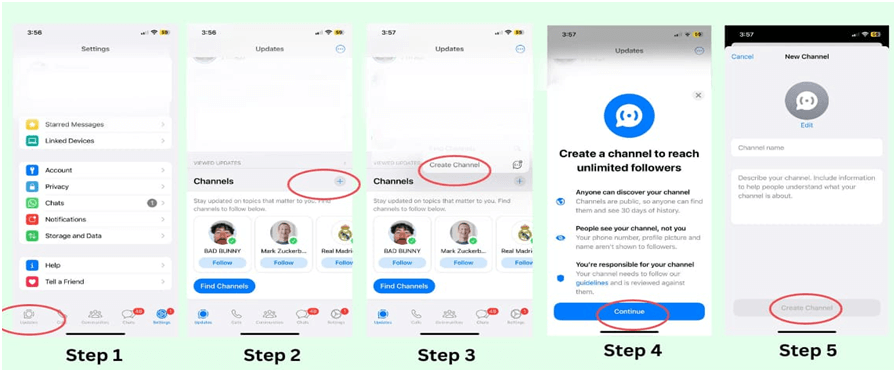
Apple iOS
1. Open WhatsApp on your iPhone and choose the Updates option.
2. Tap on the “+” (plus) icon and choose “Create Channel.”
3. To go further, click “Get Started” and follow the directionson the screen.
4. Assign a name to your “channel”. You can change this name if necessary, in the future, so don’t worry.
5. Create a unique icon, photo, and description for your channel.
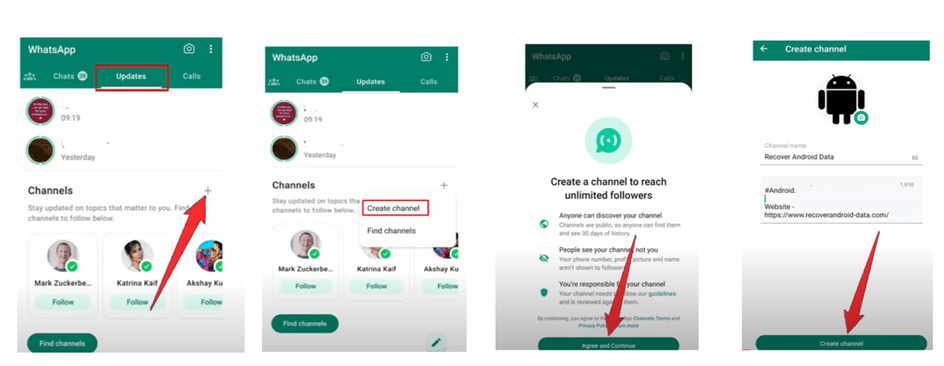
For Android:
- Open WhatsApp on your Android device and choose the Updates tab.
- After selecting the “plus” icon, pick “New channel” from the menu.
- After reading the directions, just click “Continue” to continue.
- Select a “channel” based on your requirements. Remember that you have the option of changing this name if necessary.
- To make your channel more distinctive, quickly add a description and an icon.
- When you’re done configuring your channel, click “Create channel” to end the setup.
Step 2: Prepare Your Business Information
Before starting the verification procedure, make sure you have the necessary data ready:
- Business Name: Make sure it corresponds to your registered business name.
- Business Address: Include your company’s physical address, including city and postal/ZIP code.
- Business Email Address: If available, use an authentic business email address.
- Business Website: If applicable, share the URL to your company’s website.
Step 3: Verifying Your Business
Businesses may build trust with users using WhatsApp’s authentication process. You must first finish the verification process, which entails verifying your company’s legitimacy, to receive a verified badge.
Follow these steps to start your WhatsApp business account’s verification process:
1. Open the WhatsApp business application
2. Press the three dots that will appear at the upper-right corner of the display of your mobile screen to access the “Settings” menu.
3. Select ‘Business Tools’ from the Settings menu: “Business tools” can be found there. Tap it.
4. Click the ‘Verify Your Business’ button. Select “Verify your business” in the drop-down option.
Step 4: Wait for a response from WhatsApp
After completing the verification process, you might need to wait while WhatsApp reviews and confirms your business
Step 5: Display the Verified Badge
When your business is validated, a verified emblem will appear next to your business name on the WhatsApp Business account profile. This symbol informs clients that they are dealing with a legitimate company.
Remember to maintain your business information on your WhatsApp Business page correct and up to date, as this helps create trust with your customers.
Choosing the Right WhatsApp Channel for Your Business
WhatsApp has various channel types, each with unique features and applications. Decide which one best fits your company’s objectives:
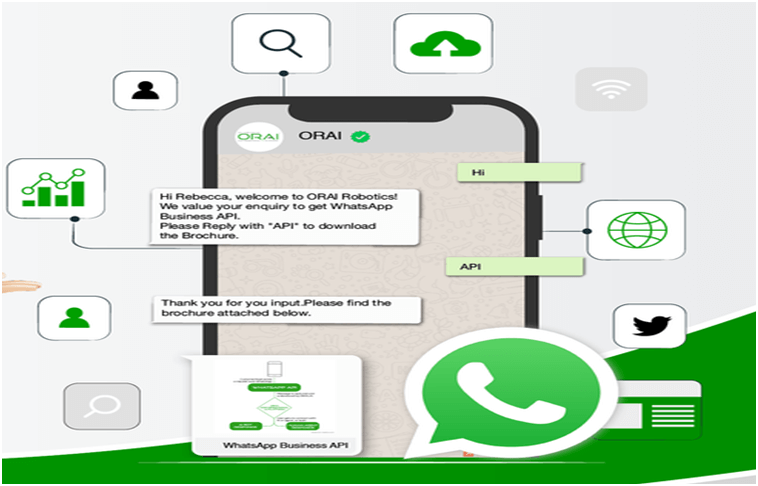
- WhatsApp Business API: This channel provides automated messaging and interaction with other business tools, making it ideal for big enterprises with significant messaging volumes.
- WhatsApp Business App: This channel offers a straightforward user experience for connecting with clients and is perfect for small and medium-sized enterprises.
- WhatsApp Business Web: This feature improves accessibility by enabling you to manage your business account from a web browser.
How to Use WhatsApp Channels Effectively
Let’s look at how to use your WhatsApp Channel now that you’ve set it up.
Building Your Contact List
The success of your WhatsApp Channel depends on the size and quality of your contact list. Encourage customers to opt-in to receive messages and use other marketing channels to promote your WhatsApp presence.
Making Customer Interactions More Customized
Personalized messages can be created using consumer data. Adapt your content to the preferences and previous interactions of your audience and use their names whenever possible.
Broadcast Messages
Ensure your broadcast messages are interesting and useful. To prevent being seen as spam, make sure they are pertinent and helpful to your audience.
Delivering Customer Support
WhatsApp Channels are a useful tool for delivering customer support. Inquiries are answered quickly, and difficulties faced by customers are resolved helpfully.
Marketing with WhatsApp
Boost your marketing efforts by using WhatsApp Channels. Communicate with your audience about promotional materials, new product announcements, and special deals.
How Do WhatsApp Analytics Work?
WhatsApp Analytics provides you with helpful data regarding the effectiveness of your campaigns and messages. Here’s how to employ them correctly:

Tracking Message Delivery
To make sure your messages reach their intended recipients, keep track of their delivery status.
Monitoring User Engagement
Track read confirmations, response rates, and click-through rates on shared links to gauge user engagement.
Using Analytics to Enhance Strategy
Refine your communication strategy using the information from WhatsApp Analytics. Determine trends, improve messaging, and improve customer interactions.
How Different Industries Benefit from WhatsApp Channels
Learn how different sectors, including e-commerce and healthcare, use WhatsApp Channels to improve customer engagement and spur growth:
E-commerce
Benefits
- Order Updates: E-commerce companies can send order confirmations, shipment updates, and shipping notifications via WhatsApp Channels, keeping customers informed and interested throughout the purchasing process.
- Personalized Product Recommendations: E-commerce platforms can send personalized product recommendations by examining customer preferences and purchase history, increasing the likelihood of cross-selling and upselling.
- Customer support: WhatsApp offers a great customer contact and support channel, enabling e-commerce businesses to address problems quickly and effectively.
Healthcare
Benefits:
- Appointment Reminders: To decrease no-shows and improve scheduling, healthcare providers may employ WhatsApp to send appointment reminders.
- Prescription Updates: Patients can get updates on their prescriptions, reminders about when to take their medications, and other medication-related details via WhatsApp.
- Telemedicine: Telehealth providers can use WhatsApp to communicate with patients, securely share medical records, and hold online consultations.
3. Travel and Hospitality
Benefits:
- Itinerary Information: Travel companies and airlines can send travelers’ WhatsApp account information about their itineraries, flight updates, and travel suggestions.
- Booking Confirmations: In addition to sending check-in instructions and promotions for on-site services, hotels and resorts may also send booking confirmations.
- Emergency Assistance: WhatsApp can be a dependable communication tool for assisting travelers in the event of travel delays or emergencies.
4. Retail
Benefits:
- Customer Loyalty Programmes: Customers can sign up for loyalty programs through WhatsApp, giving them the chance to accrue rewards and discounts.
- Promotions and discounts: Retailers can notify their customers of special promotions, discounts, and flash sales to increase traffic to their brick-and-mortar locations or online storefronts.
- Feedback Gathering: Retailers can use WhatsApp to ask for customer feedback, which will help them improve their goods and services.
5. Financial Services
Benefits:
- Account notifications, transaction notifications, and security notifications can all be sent via WhatsApp by banks and other financial institutions.
- Customer inquiries: Customers can use WhatsApp as a convenient way to get information regarding their accounts, report problems, or get help with money-related issues.
- End-to-end encryption provided by WhatsApp ensures the transmission of sensitive financial information in a secure manner.
6. Real Estate
Benefits:
- Property Listings: Real estate agents can use WhatsApp to communicate property listings, images, and videos with prospective purchasers or tenants.
- Virtual Tours: Clients can explore properties remotely with the help of virtual property tours made possible by WhatsApp.
- Appointment Scheduling: Potential buyers can use WhatsApp to communicate with real estate agents and arrange property viewings.
7. Education
Benefits:
- Important notifications: Class schedules and changes can be sent to parents, students, and faculty members by educational institutions.
- Parent-Teacher Communication: For parent-teacher conferences, progress reports, and educational support, parents and teachers can interact via WhatsApp.
- Homework Assignments: Teachers can use WhatsApp to distribute reading materials and homework assignments, as well as to respond to students’ questions.
8. Food & Beverage industry
Benefits:
- Ordering and Delivery: Dining establishments and food delivery companies can use WhatsApp to enable online ordering, promote special offers, and provide delivery updates.
- Menus and promotions: Customers may quickly share menus, daily specials, &and promotional offers, which increases orders and engagement.
- Feedback from customers: WhatsApp may be used to gather testimonials, ratings, and reviews that help eateries improve their offerings.
9. NPO’s
Benefits:
- Donor Engagement: By sharing updates on their initiatives, successes, and fundraising efforts via WhatsApp, non-profits may engage their donors and supporters.
- Fundraising: Non-profits can use WhatsApp to advertise events and campaigns for fundraising, making it simple for supporters to donate.
- Volunteer Coordination: WhatsApp can be used as a platform for organizing outreach initiatives, volunteer efforts, and event organizing.
What are the Potential Challenges and Solutions?
WhatsApp Channels provide benefits, but there are drawbacks as well. Here are some typical issues and solutions for them:
- Handling a Large Number of Messages: Having a large amount of messages arrive on your WhatsApp Channel can be challenging. To swiftly respond to frequently asked queries, you can employ chatbots and automatic responses.
- Avoiding Spammy Behavior: Don’t send too many unwanted messages or promotions. Stick to sending messages to people who want them to keep a good reputation.
- Technical Issues: Sometimes, your WhatsApp Channel might have technical problems.
What Are the Emerging Features and Updates?
WhatsApp is constantly adapting to accommodate its users’ shifting needs. You should be aware of the following new changes and features:
- WhatsApp Payments: Consider using WhatsApp Payments to make it easier for your consumers to transact with you.
- WhatsApp Business API Improvements: Keep up with the latest updates on the new features and integrations that the WhatsApp Business API is offering.
- WhatsApp for Business Groups: Make the most of this feature to encourage participation and community among your audience.
Tips to Create a Successful WhatsApp Channel
To ensure your WhatsApp Channel thrives, adhere to these guidelines, and maintain a customer-centric approach, you can construct a prosperous WhatsApp channel that serves your business interests and effectively engages your audience.
- Establishing a thriving WhatsApp channel, as outlined in the provided article, necessitates meticulous planning and implementation.
- Develop precise goals for your WhatsApp channel, such as boosting sales, offering customer support, or enhancing brand recognition.
- Construct an appealing WhatsApp business profile featuring a recognizable logo, a concise business description, and readily accessible contact details.
- Formulate a content strategy encompassing regular updates, pertinent messages, and captivating multimedia elements like images and videos.
- Tailor your messages to cater to individual customer preferences and requirements.
- Segment your audience to dispatch focused messages and exclusive offers.
- Leverage WhatsApp automation tools for message scheduling and efficient handling of customer inquiries.
- Adhere to WhatsApp’s policies and regulations to ensure your marketing efforts remain compliant.
- Obtain explicit opt-in consent from customers before sending messages, preventing any perception of spam.
- Concentrate on delivering value to your customers through informative and beneficial content.
Conclusion
In a time when good communication is essential for both individuals and organizations, WhatsApp Channels have become a potent tool for streamlining interactions, boosting engagement, and accelerating growth. WhatsApp Channels are ideal for people looking for effective communication solutions as well as for businesses of all kinds due to their extensive range of features, advantages, and potential uses.
Author Bio:
Dinesh Lakhwani 

Dinesh Lakhwani, the entrepreneurial brain behind “TechCommuters,” achieved big things in the tech world. He started the company to make smart and user-friendly tech solutions. Thanks to his sharp thinking, focus on quality and the motto of never giving up, TechCommuters became a top player in the industry. His commitment to excellence has propelled the company to a leading position in the industry.
Popular Post











Recent Post

How To Switch To A Dark Background Theme In Windows [2026]
Most people spend many hours each day in front of a computer screen. Office work, online classes, editing, browsing, and streaming all require long screen time. A bright white background may look clean at first. However, over time, it can feel sharp and tiring. The strong contrast between white backgrounds and black text may cause […]

How to Switch From Local To Microsoft Account On Windows
Many users begin with a local account when they set up a new Windows computer. A local account works only on that single device. It stores settings, files, and preferences locally. It does not connect to online Microsoft services. For basic offline use, it works well. However, as digital needs grow, many users want better […]

How to Switch Windows 10 to a Local Account: Complete Guide
Windows 10 allows users to sign in with either a Microsoft account or a local account. When you set up a new computer, the system often suggests using a Microsoft account. This account connects your device to Microsoft services such as Outlook, OneDrive, and the Microsoft Store. It also syncs settings, themes, and passwords across […]

How To Change Default Apps For File Types In Windows
Windows is designed to make using your computer easy. One way it does this is by assigning default apps to different file types. This means when you open a file, Windows automatically opens it with a specific program. For example, photos may open with Photos, music with Groove Music, and PDFs with Edge. These default […]

How To Adjust The Mouse Pointer Speed: Complete Guide
Using a computer every day means you use the mouse a lot. The mouse pointer moves on the screen and helps you click, scroll, and select items. Many people never think about the speed of the mouse pointer. They have used the default setting for years. This can cause small problems over time. A slow […]

How to Change Mouse Scrolling Settings In Windows
A mouse is one of the most used computer tools. People use it every day. They scroll through emails. They scroll through documents. They scroll through websites and images. The movement becomes automatic. Most users do not notice it. That is why problems often go unnoticed. Scrolling problems show up slowly. At first, it feels […]

Keyboard Light Settings: Keyboard Lighting Control [Complete Guide]
Keyboards are no longer simple typing tools. Well, yes! Over time, they have evolved to include features that improve comfort, visibility, and overall experience. One of the most useful features today is keyboard lighting. It helps users work comfortably in low-light conditions. It also reduces strain when typing for long hours. Many users first notice […]

Customizing Pointer Appearance: Complete Guide
The way your mouse pointer looks on your computer may seem like a small detail. But customizing pointer appearance can make using your PC more comfortable and visually appealing. Many users do not realize that they can change the pointer size, color, and style to fit their needs. Whether you want a bigger pointer for […]

How To Choose a Computer Monitor: Monitor Buying Guide
Buying a monitor looks easy. Many people think all screens are the same. That belief causes regret later. A monitor is not just a display. It is a daily tool. You read on it. You work on it. You relax with it. Small problems become big over time. Poor brightness hurts eyes. Bad size causes […]

How To Get Help With File Explorer in Windows 11 [Complete Guide]
File Explorer is one of the most important tools in Windows 11. It is used to open folders, view files, and manage stored data. Almost every action on a Windows computer depends on it in some way. When users open documents, save downloads, or organize photos, File Explorer is always involved. Because it is used […]

