signNow Review: Is It The Right Electronic Signature Software?
Last updated on February 4th, 2025 at 3:11 pm
Introduction
signNow brings the power of cloud technology to the electronic signature. Launched in 2011, it is now a part of the airSlate Business Cloud software suite. We’ve conducted a detailed research and used signNow to bring an honest review of this effective tool.
With the increase in business operations, the workload of documents management team increases significantly. So, with little left for the businesses, teams resort to the comprehensive electronic signature software. No need to worry as we’ve an effective and useful tool for your e-signing needs.
Let us dive into all details about signNow, including its specifications, advantages, possible issues, and key features. Start using signNow with the guidance of detailed steps for signing different documents electronically.
signNow- An Overview
signNow is an enterprise-grade e-signature solution offering unlimited capabilities to users. It helps individuals and businesses to create, send, and sign digital documents. The tool aims to offer all leading functionalities like document storage, multi-party signing, audit reports, templates, and legally binding signatures.
signNow stands high on the modern needs of businesses in the competitive world looking for innovative solutions. It can not only help sign documents electronically but is rich in features useful for businesses. signNow is perfect for small businesses, medium enterprises, and big companies looking for dedicated document management solutions.
Not only this, signNow offers a range of quick integrations and APIs for entering the existing workflows of businesses.
signNow Basic Specifications
Compatible OS: iOS, Android, Mac, and Windows.
How to Get: Sign up for a Free Trial
Price: Available in four different pricing options-
| Plan Type | Business plan | Business Premium plan | Enterprise plan | Business Cloud plan |
| Pricing | 8 USD per user monthly | 15 USD per user monthly | 30 USD per user monthly | 50 USD per user monthly |
Disk size: Used online, offers Cloud.
Compatible RAM support: Used online, offers Cloud.
signNow Pros
After knowing about the basic specifications of signNow, the following are some of its biggest advantages.
- Flexible use
It is easy to use signNow on mobile and desktop to add flexibility to business operations. It is available on Google Play, Apple’s App Store, and quick online use for desktops.
- Standard and Advanced features
It is easy for beginners or professionals to use signNow according to their immediate needs. It offers standard and advanced e-signing options along with numerous other functionalities for serving different clients.
- Facilitates complex workflows
Digital signatures are a tool for business workflows. signNow takes the next step in solving the complex e-signature workflow.
- Adds to security in business operations
It allows quick protection of businesses’ sensitive information with all leading security compliances. These include CCPA, HIPAA, 21 CFR Part 11, PCI DSS certification, SOC 2 Type 2 certified, and GDPR.
- Quick integration
Businesses can use signNow without leaving existing CRM or productivity apps, as it offers multiple integration opportunities.
- Ideal for different businesses
signNow is the perfect e-signature tool for financial services, government institutions, the healthcare sector, insurance real estate, and the higher education sector.
- Additional branding capabilities
While signing documents and managing workflow is the basic advantage of signNow, it is rich in other branding features. Businesses can create custom logos, and customize emails and communication for additional branding.
signNow Cons
Like any other tool, signNow is not free from certain concern points. Some of these are:
- It doesn’t allow customizing colors or design of the documents.
- It lacks a content library.
- It doesn’t allow recurring payments through the platform.
signNow Features
After going through detailed advantages and the possible points of concern with signNow, it all comes down to the main features of this electronically signed document. Businesses or individuals can go for the features mentioned below to find their applicability according to their immediate needs:
- Standard e-signature tool
It allows quick document signing using the legally-binding signatures for employees, partners, or customers.
- Advanced e-signature tool
signNow helps add signs, multiple signers, multiple roles, replace signers, and delete roles to unlock the advanced e-signature capabilities.
- Dedicated account management
SignNow offers quick account creation, editing account information, and changing settings for tracking different signed documents.
- Documents and templates
It is easy for professionals to create, organize, and manage different documents or templates in their signNow account.
- Team collaboration
It helps businesses optimize team collaboration by sending quick invites to people, sharing documents, and tracking team activity.
- Fillable fields
It is easy to transform any document into an interactive fillable form on signNow.
- Security and authentication
It allows businesses to keep the data confidential using advanced authentication and encryption options.
- Mobile apps
signNow understands the power of flexible working. Hence, it offers an iOS and Android applications for quick e-signing of important documents using smartphones only.
- Industry-leading compliances
It is easy for businesses to protect documents with industry-leading security and global compliance standards like HIPAA compliance.
- API and integrations
signNow helps smoothen workflow for quick integration with CRMs, cloud storage services, and different apps. Some of the popular integrations include Salesforce, Microsoft Teams, and Dynamics 365.
- Business cloud
Not only e-signing documents, signNow offers business cloud for document generation, workflow automation, web forms, robotic process automation, and contract management.
- Dedicated customer support
Lastly, signNow is synonymous with effective customer support. Users can quickly access the live chat or email support available 24*7 for helping in events of need. Some of the other support sources for signNow users include a searchable knowledge base and FAQ page.
How to Use signNow For Electronically Signing Documents?
The quick steps to use signNow for electronically signing documents are:
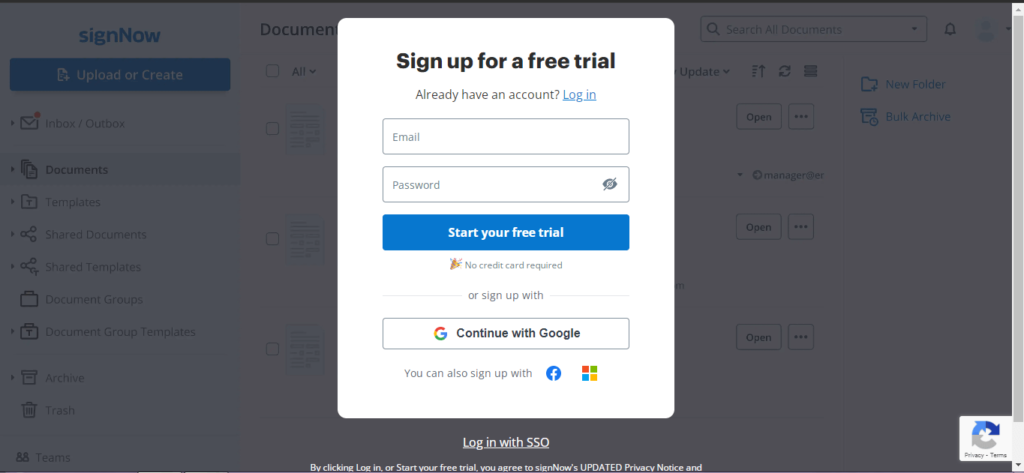
Step 1: Go to https://www.signnow.com/ and enter the login details.
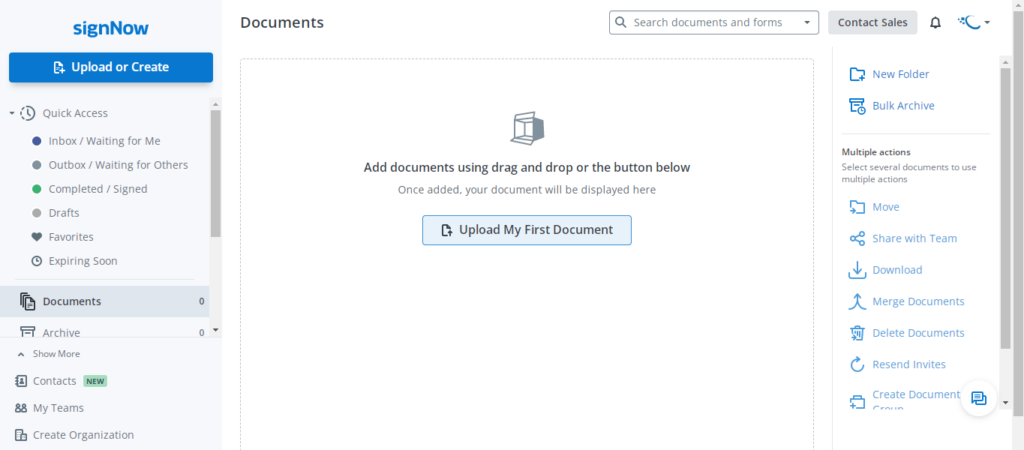
Step 2: Select the “Upload My First Document” option to upload the document.
Step 3: Go to the “Fill Out Now” option located on the left side of the platform.
Step 4: Now select the “My Signature” option in the “Fill Out Now” tab.
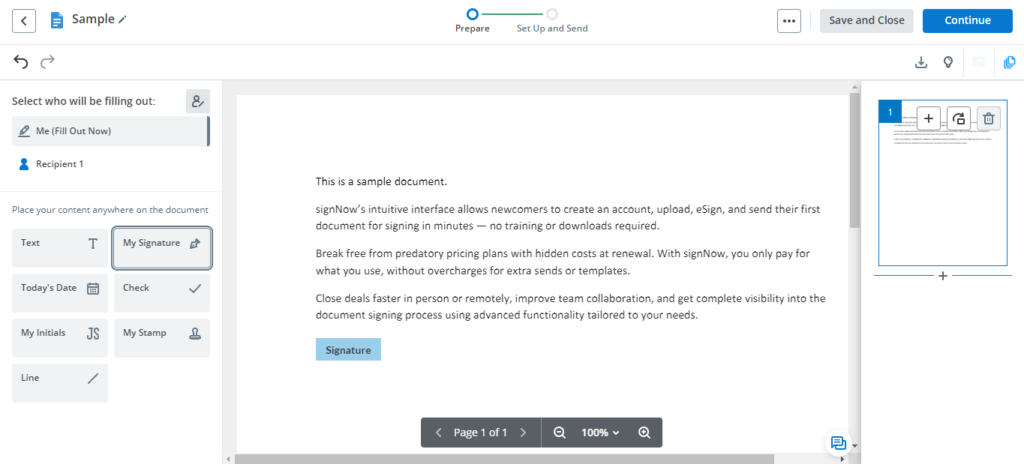
Alt text: selecting the my signature option
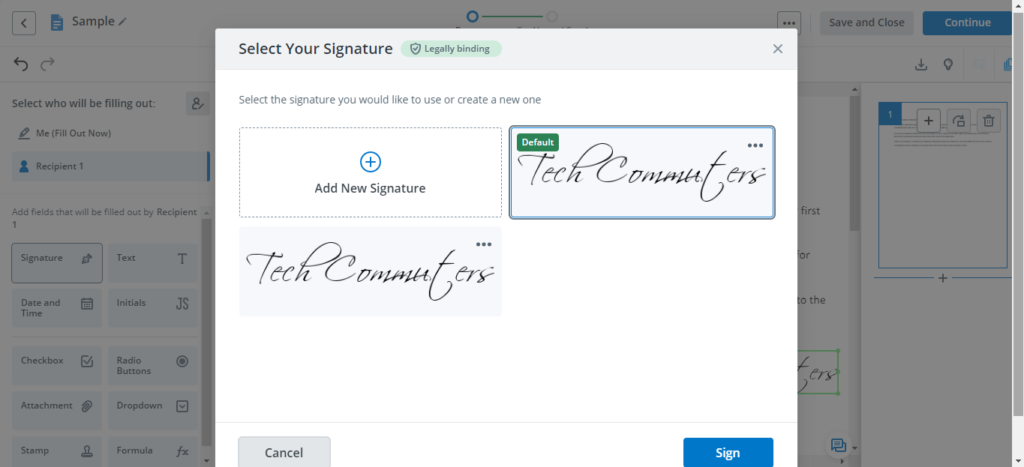
Step 5: Next, select the signature for the document according to your needs. It is easy to select from the previously created signature or add a new signature.
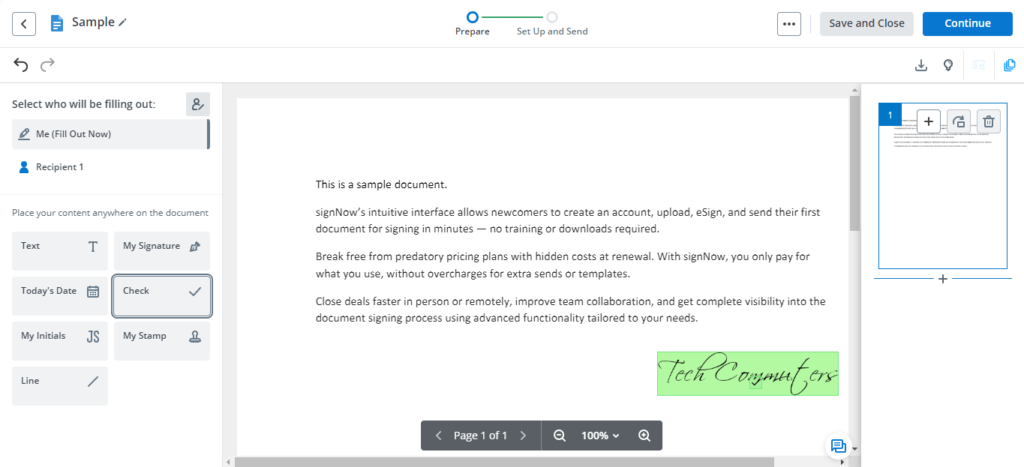
Step 6: Now add the signature to the document’s required position.
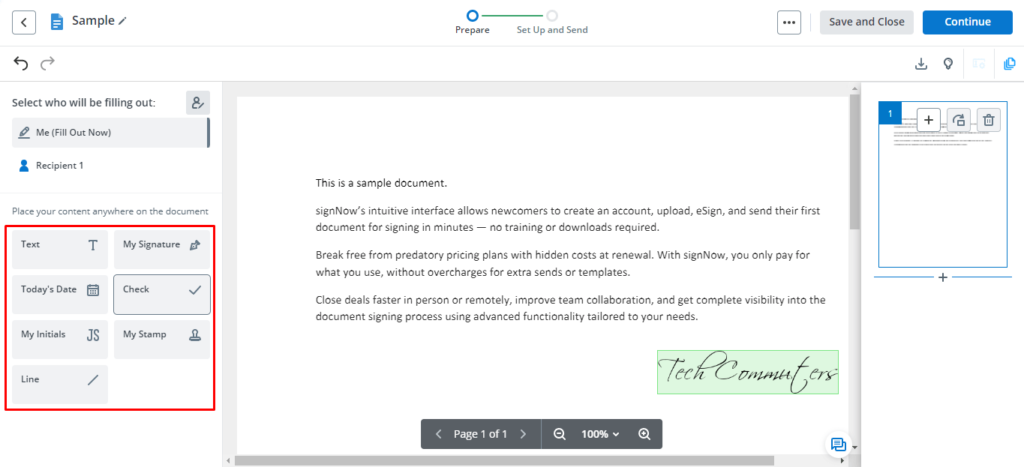
Step 7: It is easy to add text, today’s date, check, initials, stamp, or line, along with signatures on signNow. All these options are available for quick access in the “Fill Out Now” tab.
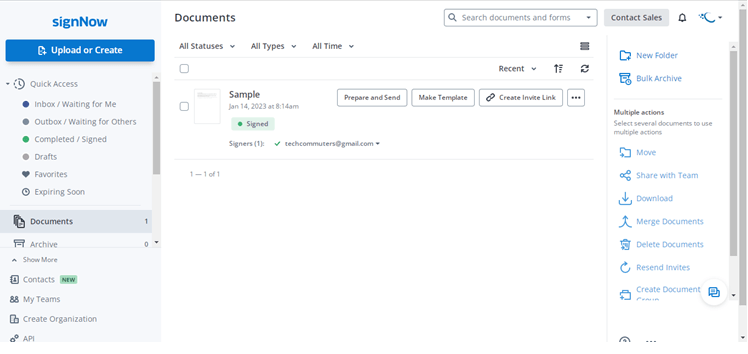
Step 8: Click on the “Save and Close” option to save the signed document. It will appear on the dashboard with different options.
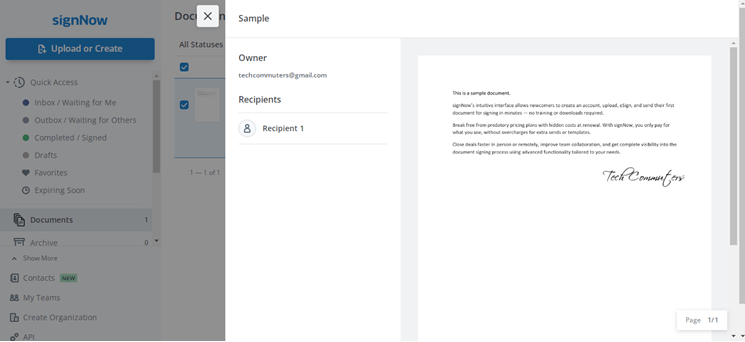
Step 8: It is easy to preview the saved document before sending it ahead.
Parting Words
Hope everything is clear to our readers about the useful electronic signature software- signNow. It is a powerful software facilitating document creation, approval, and movement. It is easy for beginners or professionals to go through its details and start using signNow using the detailed steps mentioned above.
Hence, signNow is an advanced electronic signature solution with different features for helping companies handle document signing effectively.
Author Bio:
Dinesh Lakhwani 

Dinesh Lakhwani, the entrepreneurial brain behind “TechCommuters,” achieved big things in the tech world. He started the company to make smart and user-friendly tech solutions. Thanks to his sharp thinking, focus on quality and the motto of never giving up, TechCommuters became a top player in the industry. His commitment to excellence has propelled the company to a leading position in the industry.
Popular Post











Recent Post

Resolving Microphone Detection Problems: Latest Guide [2026]
Microphones are important tools in daily life. People use them for office meetings, online classes, interviews, gaming, customer support, and content creation. When a system fails to detect a microphone, communication stops at once. This situation can cause stress and confusion. Many users believe the microphone is damaged. In reality, most problems are simple and […]

How To Switch To A Dark Background Theme In Windows [2026]
Most people spend many hours each day in front of a computer screen. Office work, online classes, editing, browsing, and streaming all require long screen time. A bright white background may look clean at first. However, over time, it can feel sharp and tiring. The strong contrast between white backgrounds and black text may cause […]

How to Switch From Local To Microsoft Account On Windows
Many users begin with a local account when they set up a new Windows computer. A local account works only on that single device. It stores settings, files, and preferences locally. It does not connect to online Microsoft services. For basic offline use, it works well. However, as digital needs grow, many users want better […]

How to Switch Windows 10 to a Local Account: Complete Guide
Windows 10 allows users to sign in with either a Microsoft account or a local account. When you set up a new computer, the system often suggests using a Microsoft account. This account connects your device to Microsoft services such as Outlook, OneDrive, and the Microsoft Store. It also syncs settings, themes, and passwords across […]

How To Change Default Apps For File Types In Windows
Windows is designed to make using your computer easy. One way it does this is by assigning default apps to different file types. This means when you open a file, Windows automatically opens it with a specific program. For example, photos may open with Photos, music with Groove Music, and PDFs with Edge. These default […]

How To Adjust The Mouse Pointer Speed: Complete Guide
Using a computer every day means you use the mouse a lot. The mouse pointer moves on the screen and helps you click, scroll, and select items. Many people never think about the speed of the mouse pointer. They have used the default setting for years. This can cause small problems over time. A slow […]

How to Change Mouse Scrolling Settings In Windows
A mouse is one of the most used computer tools. People use it every day. They scroll through emails. They scroll through documents. They scroll through websites and images. The movement becomes automatic. Most users do not notice it. That is why problems often go unnoticed. Scrolling problems show up slowly. At first, it feels […]

Keyboard Light Settings: Keyboard Lighting Control [Complete Guide]
Keyboards are no longer simple typing tools. Well, yes! Over time, they have evolved to include features that improve comfort, visibility, and overall experience. One of the most useful features today is keyboard lighting. It helps users work comfortably in low-light conditions. It also reduces strain when typing for long hours. Many users first notice […]

Customizing Pointer Appearance: Complete Guide
The way your mouse pointer looks on your computer may seem like a small detail. But customizing pointer appearance can make using your PC more comfortable and visually appealing. Many users do not realize that they can change the pointer size, color, and style to fit their needs. Whether you want a bigger pointer for […]

How To Choose a Computer Monitor: Monitor Buying Guide
Buying a monitor looks easy. Many people think all screens are the same. That belief causes regret later. A monitor is not just a display. It is a daily tool. You read on it. You work on it. You relax with it. Small problems become big over time. Poor brightness hurts eyes. Bad size causes […]

