Top 5 Online Tools to Convert Audio & MP3 Files 2026

Last updated on December 28th, 2025 at 9:58 am
Witnessing the rapid advancement in audio technology, Audio and MP3 converters have become super essential tools for pros and non-professionals. Although we deal with a broad variety of audio file formats, including MP3, WAV, AAC, FLAC, and others, it is quite imperative to face a lot of compatibility problems when trying to play music on various platforms or devices.
Fortunately, Audio converters can help us with this. You can easily convert audio files between formats with these useful tools, ensuring seamless compatibility and improving your listening experience. Having a reliable audio converter at your disposal can be extremely beneficial, regardless of your genre—audiophile, podcaster, or simply someone who enjoys making playlists.
So, how do audio converters work?
Well, a dedicated audio converter functions by first decoding the original format of an audio file and then re-encoding it into a different format. This includes:
- Decoding: To extract the audio data, the program reads the encoding of the source file.
- Processing: To preserve the original quality and apply customized parameters, like bit rate adjustments, the retrieved data is processed.
- Encoding: The chosen format is used to store the processed audio data. Make sure it supports both your source and target formats by looking at the supported formats. Some of the common formats include MP3, WAV, AAC, FLAC, and more.
Having a high-quality converter ensures minimal loss in audio fidelity during this transformation.
How to choose the best tool to convert audio?
When selecting a good audio converter solution, make sure you consider the following factors:
- Ease of Use: Search for simple procedures and user-friendly interfaces.
- Speed: Verify whether the tool produces lag-free, fast conversions.
- Quality: Make sure there isn’t much quality degradation, particularly for professional use.
- Extra Features: Keep an eye out for extras like cloud integration, editing capabilities, and batch conversion.
- Pricing: To fit your budget, compare free and premium choices.
Now the question arises, whether you should select an Online MP3 Converter or an Offline audio conversion software. To ease your decision, we have drafted a small comparison of both so that you can make an ideal decision.
Audio/MP3 Converters – Online Vs. Offline
| Feature | Online Tools | Offline Tools |
| Accessibility | Accessible from any internet-connected device | Installation is necessary for some devices. |
| Cost | Free or Fremium versions are available. | A one-time purchase or subscription might be necessary. |
| Speed | Depends on the speed of the Internet. | Quite faster because there is no need for uploading or downloading |
| Functionality | Basic to moderate | Advanced, including editing and batch processing See Examples |
| Privacy | Data exposure risk | Comparatively safer because the files stay on the device |
Now that you know how to select the best online audio or MP3 converter tool for your device, let’s have a look at some of the most effective solutions that suit the needs and preferences of every type of user.
Comparison Table of Top 5 Online Audio Converters in 2026
| Tool | Supported Formats | Key Feature | Pricing | Rating |
|---|---|---|---|---|
| Convertio | MP3, WAV, AAC, FLAC, etc. | Cloud storage integration | Freemium | 4.8/5 |
| Online Audio Converter | MP3, OGG, AAC, WAV | Batch conversion | Free | 4.7/5 |
| Zamzar | MP3, AIFF, FLAC, M4A | Wide format support | Paid | 4.6/5 |
| AnyConv | MP3, WAV, M4A, OGG | Fast processing | Free | 4.5/5 |
| CloudConvert | MP3, AAC, FLAC, WAV | Custom output settings | Freemium. | 4.8/5 |
Top 5 Tools for Converting Audio/MP3 Online In 2026
So, without any further ado, let’s start reviewing each of these web-based audio conversion tools to consider using in 2026.
1. Convertio
WEBSITE LINK: https://convertio.co/
One of the most useful tools is Convertio, a powerful online converter that handles more than 300 formats. Users don’t need to download any software because it runs totally in the cloud. Although it’s a formidable competitor for general file conversions, its audio conversion tools are strong and provide a decent mix of functionality and usability.
FEATURES:
- Supports more than 300 files, such as documents, photos, audio, and video.
- Processing in the cloud lessens the strain on nearby devices.
- Multiple files can be processed at once thanks to batch conversion features.
- Connects to Dropbox and Google Drive, two well-known cloud storage providers.
- Privacy is ensured by automatically deleting files after 24 hours.
ADVANTAGES:
- Quick conversion times and excellent results.
- Interface that is easy to use and appropriate for all ability levels.
- It operates directly in browsers and doesn’t require installation.
- Provides developers that require integration with an API.
DISADVANTAGES:
- The free version can only convert files up to 100 MB in size.
- A paywall protects some of the more sophisticated features.
How To Use Convertio On Your Device?
To get started with Convertio, all you have to do is:
STEP 1: Go to the Convertio website.

STEP 2: Upload the audio file or files from your cloud storage or device.

STEP 3: From the dropdown menu, choose the output format you want.
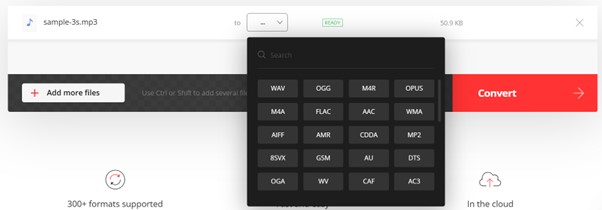
STEP 4: Press “Convert” and watch for the procedure to finish.

Get your files converted straight from the website.

2. Online Audio Converter
WEBSITE LINK: https://online-audio-converter.com/
Users may rapidly convert audio files without installing Online Audio Converter, a flexible web-based utility that supports over 3416 formats. Although it may not have as many features as some all-in-one converters, it nonetheless successfully meets the demands of users who are mostly interested in converting audio files between various formats, such as MP3, WAV, FLAC, etc.
FEATURES:
- Supports a large number of widely used audio formats – MP3, OGG, WAV, WMA & others.
- Entirely web-based. Hence, no downloads are necessary.
- A straightforward UI that makes it easy to use for both newbies and professional users.
- Enables users to modify the quality and bitrate settings before conversion.
- Ensures privacy by erasing files following processing.
ADVANTAGES:
- Speedy processing, especially for bigger files.
- Beginners can easily navigate it because of its intuitive design.
- No need to install any program.
DISADVANTAGES:
- Restricted functionality in contrast to certain offline tools.
- Performance is reliant on Internet speed.
HOW TO USE ONLINE AUDIO CONVERTER ON YOUR DEVICE?
To get started with Online Audio Converter, all you have to do is:
STEP 1: Go to the official website of Online Audio Converter.

STEP 2: Start uploading the audio files which you would like to convert.

STEP 3: Choose the output format you want and alter the settings if needed to get the desired output.
STEP 4: Press the “Convert” button and watch for the procedure to finish.

When your converted file is ready, download it and save it in your designated folder.
3. Zamzar
WEBSITE LINK: https://www.zamzar.com/
With compatibility for more than 1200 file formats, Zamzar is a well-known online converter and one of the most flexible tools on the market right now. It is a fantastic option for customers who value a simple converting process because of its strength, which is its simplicity and ease of use. Even though it might not have the newest features or the fastest speeds, it often produces dependable results.
FEATURES:
- Users are notified via email alerts when the conversion is complete.
- Supports a large number of file formats in addition to audio.
- Usability is improved via a straight forward drag-and-drop interface.
- When converting several files at once, batch processing features save time.
- Developers who require integration into applications can access the API.
ADVANTAGES:
- Incredibly flexible, offering a wide variety of format choices.
- It’s amazing how quickly little files can be converted.
- Clear instructions are given at every stage, making it simple to operate.
- Dependable customer service is supported whenever access is required.
DISADVANTAGES:
- For heavy users, the daily limit on free usage may be limiting.
- Slower than competitors’ performance when handling larger files.
HOW TO USE ZAMZAR ON YOUR DEVICE?
To get started with Zamzar, all you have to do is:
STEP 1: Visit the official Zamzar’s website.

STEP 2: Similar to the counterpart, just upload your audio file/files.

STEP 3: From the on-screen dropdown menu, select the preferred output format.

STEP 4: If you would like notifications, enter your email address (optional).

After it’s finished, click “Convert Now” to download your converted file.
4. AnyConv
WEBSITE LINK: https://anyconv.com/
AnyConv is a user-friendly online converter renowned for handling various file kinds fast and having an intuitive UI. Its UI may not be the most aesthetically pleasing, but it is useful and reasonably simple to use. For customers who need a flexible converter that can work with a wide range of file types, AnyConv is a good option.
FEATURES:
- Supports more than 100 file formats, including popular audio formats like WAV and MP3.
- Enables batch processing and lets users convert many files at once.
- Completely available online; no program installation or registration is needed.
- Offers excellent editing capabilities (such as bitrate modification) before transcoding.
- User data is handled securely and is automatically deleted after processing.
ADVANTAGES:
- It is user-friendly due to its quick setup approach and low conversion stages.
- Free; no subscriptions or other costs are needed.
- Despite being a free service, the result is of good quality.
DISADVANTAGES:
- Some users’ demands may be limited by the few supported formats in comparison to other converters on this list.
- It can be annoying when processing speeds are slower during periods of high usage.
HOW TO USE ANYCONV ON YOUR DEVICE?
Using AnyConv is pretty straightforward, just follow the steps below:
STEP 1: Go straight to AnyConv’s website using whatever browser you’re using at the time!

STEP 2: Use the drag-and-drop function or the upload button on the website itself to upload the audio file or files you choose!

STEP 3: Choose your favorite export format from the on-screen options!

STEP 4: Just hit the “Convert” button to get started with the audio conversion process in a jiffy!

Once done, you can go ahead download the converted audio file on your favorite device.
5. CloudConvert
WEBSITE LINK: https://cloudconvert.com/
With its wide range of customization options, CloudConvert is a powerful online converter that lets users manage quality settings while converting. For users who value speed, flexibility, and control over their conversions, CloudConvert is a strong candidate thanks to its user-friendly interface, powerful capabilities, and quick processing.
FEATURES:
- More than 200 formats were supported, including music, video, and image conversions.
- This platform’s API connectivity makes it simple for developers to automate processes.
- Control over quality (bitrate/sample rate) during conversions with advanced options.
- The ability to merge files allows you to combine several tracks before completing the output.
- Secure processing techniques are used because user privacy is a top priority for the tool.
ADVANTAGES:
- This tool dependably produces high-quality outputs.
- It is appropriate for both novice and expert users due to its flexible API.
- Support for batch processing saves time overall and greatly increases production.
- Easy navigation is made possible by a user-friendly UI.
DISADVANTAGES:
- Requires payment after free limits are exceeded, which can discourage infrequent users.
- Some people have complained about navigation issues, which could make the experience less enjoyable!
HOW TO USE CLOUDCONVERT ON YOUR DEVICE?
To get started with CloudConvert, all you have to do is:
STEP 1: Use your preferred browser to visit CloudConvert’s website directly!

STEP 2: Upload your audio files or, if relevant, include a URL link.

STEP 3: Before continuing, choose the output format and make any necessary adjustments to the settings.

STEP 4: Press the “Convert” button to start the appropriate processing!

Directly download the finished converted files!

Bottom Line
In conclusion, choosing the top online audio converter for 2026 will rely on personal preferences like supported file types, usability, speed, and security features provided by each of the tools mentioned above— which offer special benefits like flexibility in formats handled & rich customization possibilities. Having said that, Convertio stands out for its wide format support and user-friendly interface.
Besides that, I would suggest CloudConvert, particularly if you need high-quality outputs and configuration flexibility. Its extensive feature set makes it appropriate for both novice and expert users, and it guarantees that privacy and security protocols are maintained at every stage of the process!
PEOPLE ALSO ASK:
Q1. Is it safe to utilize online audio converters?
A1: The majority of internet audio converters are safe to use, however, watch out for websites that contain malware or advertisements. Prior to uploading your files, always review the terms and conditions of the website and user evaluations.
Q2. Is it possible to convert several audio files at once?
A2: You can convert numerous files at once with some online audio converters that support batch conversion. This feature might only be available with premium accounts or paid versions, though.
Q3. Is it possible to edit or cut audio files online?
A3. Well, a few online audio converters allow you to clip or trim audio files, among other basic editing functions. However, you might need to use specialized audio editing software for more complex editing tasks.
Q4: Are the converting speed and file size restricted in any way?
A4. A lot of online audio converters, particularly those that are free to use, do have restrictions on the size of the files or the speed at which they can convert. Before uploading your files, make sure to review the terms and conditions of the website.
NEXT READ:
5 Best Audio Editing Software for Windows 10/11 PC
Top 10 Best Audio Mixer Software
MP3 Editor App- Top 10 Audio Editing Apps for Android and iOS
Author Bio:
Dinesh Lakhwani 

Dinesh Lakhwani, the entrepreneurial brain behind “TechCommuters,” achieved big things in the tech world. He started the company to make smart and user-friendly tech solutions. Thanks to his sharp thinking, focus on quality and the motto of never giving up, TechCommuters became a top player in the industry. His commitment to excellence has propelled the company to a leading position in the industry.
Popular Post











Recent Post

How to Switch Windows 10 to a Local Account: Complete Guide
Windows 10 allows users to sign in with either a Microsoft account or a local account. When you set up a new computer, the system often suggests using a Microsoft account. This account connects your device to Microsoft services such as Outlook, OneDrive, and the Microsoft Store. It also syncs settings, themes, and passwords across […]

How To Change Default Apps For File Types In Windows
Windows is designed to make using your computer easy. One way it does this is by assigning default apps to different file types. This means when you open a file, Windows automatically opens it with a specific program. For example, photos may open with Photos, music with Groove Music, and PDFs with Edge. These default […]

How To Adjust The Mouse Pointer Speed: Complete Guide
Using a computer every day means you use the mouse a lot. The mouse pointer moves on the screen and helps you click, scroll, and select items. Many people never think about the speed of the mouse pointer. They have used the default setting for years. This can cause small problems over time. A slow […]

How to Change Mouse Scrolling Settings In Windows
A mouse is one of the most used computer tools. People use it every day. They scroll through emails. They scroll through documents. They scroll through websites and images. The movement becomes automatic. Most users do not notice it. That is why problems often go unnoticed. Scrolling problems show up slowly. At first, it feels […]

Keyboard Light Settings: Keyboard Lighting Control [Complete Guide]
Keyboards are no longer simple typing tools. Well, yes! Over time, they have evolved to include features that improve comfort, visibility, and overall experience. One of the most useful features today is keyboard lighting. It helps users work comfortably in low-light conditions. It also reduces strain when typing for long hours. Many users first notice […]

Customizing Pointer Appearance: Complete Guide
The way your mouse pointer looks on your computer may seem like a small detail. But customizing pointer appearance can make using your PC more comfortable and visually appealing. Many users do not realize that they can change the pointer size, color, and style to fit their needs. Whether you want a bigger pointer for […]

How To Choose a Computer Monitor: Monitor Buying Guide
Buying a monitor looks easy. Many people think all screens are the same. That belief causes regret later. A monitor is not just a display. It is a daily tool. You read on it. You work on it. You relax with it. Small problems become big over time. Poor brightness hurts eyes. Bad size causes […]

How To Get Help With File Explorer in Windows 11 [Complete Guide]
File Explorer is one of the most important tools in Windows 11. It is used to open folders, view files, and manage stored data. Almost every action on a Windows computer depends on it in some way. When users open documents, save downloads, or organize photos, File Explorer is always involved. Because it is used […]

How To Fix A Frozen Computer: Complete Guide [Windows 11/10]
A frozen computer is one of the most common problems Windows users face. The screen stops responding. The mouse pointer does not move. Keyboard inputs do nothing. You may hear the fan running loudly. Sometimes the system looks alive, but nothing works. This situation often happens when you are busy or working on something important. […]

How to Upgrade Computer RAM: Complete Guide
Upgrading RAM is one of the simplest ways to improve a computer. It helps the system feel faster and smoother. Apps open quicker. Browsers handle more tabs. Games and tools run with less delay. Many users search for how to upgrade computer RAM because it gives real results without high cost. You do not need […]

