Top 10 Benefits of Rooting Your Android Device

Last updated on June 3rd, 2024 at 5:14 pm
Have you ever tried rooting your Android device?! Well if you haven’t yet, consider it if you’re a fan of optimizing your device with extraordinary features. Rooting an Android device used to be a highly complex process, but with more information available now, anyone can easily root their Android device and reap the benefits out of it.
For people who’re wondering how to root android, it’s better to first educate themselves about what exactly a rooted Android device offers. A rooted Android device is basically a device that can provide you the ultimate Android experience with rich features and options. Continue reading to find out the best 10 benefits of rooting your Android device.
Advantages of Rooting Android Devices:
Android has completely disrupted the mobile devices section, whether it is smartphone or a tablet. But, did you know that Android has a much deeper functionality, which you can enjoy if you root your android device? Well, that’s exactly what you’re going to learn now.
Uninstall unnecessary Bloatware
Except a few Android device models, majority of the Android devices are packed with pre-installed software either by the manufacturer or carrier. These apps are mostly of no use and more importantly they take up decent amount of your storage. Rooting your Android allows you to remove these unwanted bloatware programs.
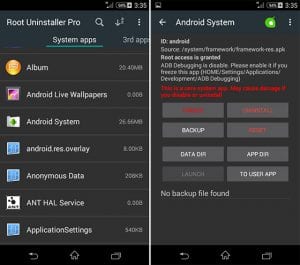
source: wondershare
Block the annoying Ads
Well, no one loves the irritating advertisements while using their Android devices. You can pretty much block the Ads in your browser easily, but blocking Ads from all of your Android apps need something special. Rooting your Android device is that something special here, as you can simply block all types of Ads on your Android device.
guidingtech
Install Specially-developed Apps
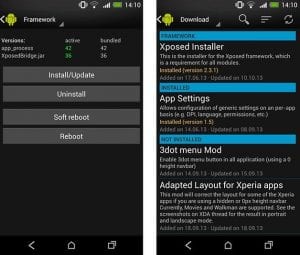
If you’ve ever used someone using a rooted Android device, you must’ve noticed some unique apps, which you couldn’t find them being compatible with your Android device. Well, there are a lot of Android apps that are specifically developed to work on rooted android devices exclusively. These apps bring a lot of features of functionality to your device.
wondershare
Enhanced Battery Life and Speed
Probably the most loved advantage of rooting android device is the elated battery life. Rooting your Android device offers you a much better battery life of your device along with boosted performance of your device as well.
Everyone loves a greater batter life for their Android device, so why not try rooting your Android device and enjoy the premium battery life.

Source: androidcentral
Comprehensive Backups
Well, with a normal android device, you can backup most of the important data and settings, but not all. On the other hand, a rooted Android device lets you backup byte to byte of your Android device, which is a much better option. Rooted android devices have special backup apps through which you can backup your entire data.
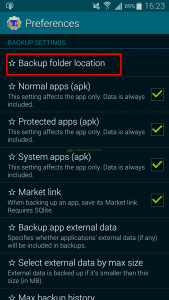
source: highonandroid
Automate the programs and tasks
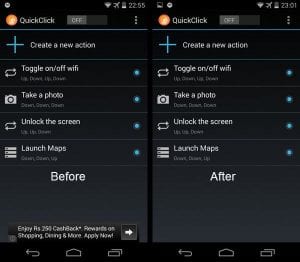
Would you like to have your WiFi turned off automatically when you leave your place? How about your Google Maps turning on automatically when you plug your phone to the car dock? Well, these are just a couple of examples, as there are many more automations you can do with a rooted android device.
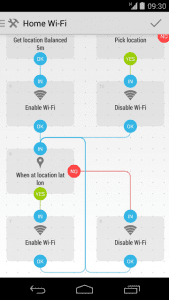
source: llamalab
Greater Customization options
This has to be the most adored benefits of rooting android, for the people who love to tweak their device to be more visually appealing. A rooted android lets you change pretty much anything in your Android under the looks category. You can change textures, colors, add background images to custom locations, and many more.
CPU Cloaking
Do you feel that your android device is getting slower with each day? Well, root your Android device and overcloak your device, which lets you enjoy a much faster performing android device. Cloaking has been the go-to thing for a lot of Android users who wants to improve the performance of their device.
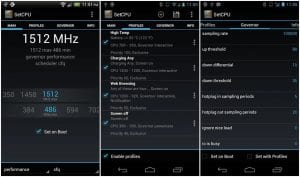
source: phonearena
Firewall for effective data usage
Firewall is not a new thing for you, if you’re a desktop user. A firewall not only saves you from suspicious and malicious connections, but it also saves you a lot of data while using internet. Now, you can enjoy the services of a firewall on your Android device, if you root it.
Install Custom Roms
This is probably the best advantage of rooting android device, as a custom rom completely changes your android device for better. There are several custom roms out there that not only offer you a wider range of features, but they also unlock the truest potential of your Android device.
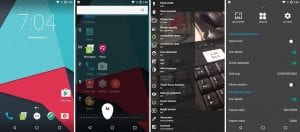
source: fonpit
Conclusion
The above-mentioned aspects are only a few of the benefits of rooting android, as there are much more you can get from a rooted Android device. But make sure that you know what you’re doing, while rooting Android, as any mishap can potentially make your device dead. Furthermore, if your android device is still under the warranty period, better to wait until that period ends and then continue with rooting your device.
Author Bio:
Dinesh Lakhwani 

Dinesh Lakhwani, the entrepreneurial brain behind “TechCommuters,” achieved big things in the tech world. He started the company to make smart and user-friendly tech solutions. Thanks to his sharp thinking, focus on quality and the motto of never giving up, TechCommuters became a top player in the industry. His commitment to excellence has propelled the company to a leading position in the industry.
Popular Post











Recent Post

Resolving Microphone Detection Problems: Latest Guide [2026]
Microphones are important tools in daily life. People use them for office meetings, online classes, interviews, gaming, customer support, and content creation. When a system fails to detect a microphone, communication stops at once. This situation can cause stress and confusion. Many users believe the microphone is damaged. In reality, most problems are simple and […]

How To Switch To A Dark Background Theme In Windows [2026]
Most people spend many hours each day in front of a computer screen. Office work, online classes, editing, browsing, and streaming all require long screen time. A bright white background may look clean at first. However, over time, it can feel sharp and tiring. The strong contrast between white backgrounds and black text may cause […]

How to Switch From Local To Microsoft Account On Windows
Many users begin with a local account when they set up a new Windows computer. A local account works only on that single device. It stores settings, files, and preferences locally. It does not connect to online Microsoft services. For basic offline use, it works well. However, as digital needs grow, many users want better […]

How to Switch Windows 10 to a Local Account: Complete Guide
Windows 10 allows users to sign in with either a Microsoft account or a local account. When you set up a new computer, the system often suggests using a Microsoft account. This account connects your device to Microsoft services such as Outlook, OneDrive, and the Microsoft Store. It also syncs settings, themes, and passwords across […]

How To Change Default Apps For File Types In Windows
Windows is designed to make using your computer easy. One way it does this is by assigning default apps to different file types. This means when you open a file, Windows automatically opens it with a specific program. For example, photos may open with Photos, music with Groove Music, and PDFs with Edge. These default […]

How To Adjust The Mouse Pointer Speed: Complete Guide
Using a computer every day means you use the mouse a lot. The mouse pointer moves on the screen and helps you click, scroll, and select items. Many people never think about the speed of the mouse pointer. They have used the default setting for years. This can cause small problems over time. A slow […]

How to Change Mouse Scrolling Settings In Windows
A mouse is one of the most used computer tools. People use it every day. They scroll through emails. They scroll through documents. They scroll through websites and images. The movement becomes automatic. Most users do not notice it. That is why problems often go unnoticed. Scrolling problems show up slowly. At first, it feels […]

Keyboard Light Settings: Keyboard Lighting Control [Complete Guide]
Keyboards are no longer simple typing tools. Well, yes! Over time, they have evolved to include features that improve comfort, visibility, and overall experience. One of the most useful features today is keyboard lighting. It helps users work comfortably in low-light conditions. It also reduces strain when typing for long hours. Many users first notice […]

Customizing Pointer Appearance: Complete Guide
The way your mouse pointer looks on your computer may seem like a small detail. But customizing pointer appearance can make using your PC more comfortable and visually appealing. Many users do not realize that they can change the pointer size, color, and style to fit their needs. Whether you want a bigger pointer for […]

How To Choose a Computer Monitor: Monitor Buying Guide
Buying a monitor looks easy. Many people think all screens are the same. That belief causes regret later. A monitor is not just a display. It is a daily tool. You read on it. You work on it. You relax with it. Small problems become big over time. Poor brightness hurts eyes. Bad size causes […]

