











Introduction Is Bluetooth on Windows 11 giving issues? You have come to the right place. In this post, we will discuss how to fix Windows 11 Bluetooth not working. Generally, the Bluetooth problems are caused due to some software issues, but they can also be related to hardware malfunctioning. Therefore, before we get into details, […]
How To Remove Snapchat Filters From Saved Photos (Updated)?
As chat and messaging apps take communication to the next level Snapchat becomes a revolutionary ideology. Youngsters love this app because it is not a regular text and emoji chat app. It’s like a fresh breeze that offers unique ways to share pictures and short videos in Status. The main popularity of Snapchat comes from cool and interesting Filters.
You can find an awesome range of filters on Snapchat, using which you can redefine your regular looking photos. From wicked cat to blowing kisses you can find plenty of filters.
However, if you aren’t a fan of filters or just want to remove Snapchat filters from the saved photos, you can do that too. To learn how to delete filters from saved pics you just need to follow the step by step instructions given in the article.
Ways to Remove Snapchat Filter from Saved Pictures
Note: Previously, using Magic Eraser you could easily delete Snapchat filters. But now, this tool has been permanently removed from Snapchat. Therefore, if you want to edit or delete filters from a saved image you need to follow the steps explained below.
So, let’s get started with the process and learn how to get rid of filters from a picture.
Note: If no filters are added to an image you cannot edit them. This means you can edit the picture that has filters added to it.
Instructions to remove the Snapchat filter from a saved picture.
1. Launch Snapchat app
2. Tap Memories to load the Saved images
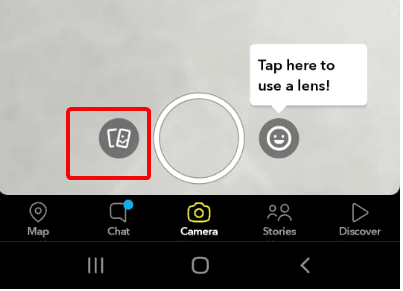
3. Select the image you want to edit and remove the filter from.
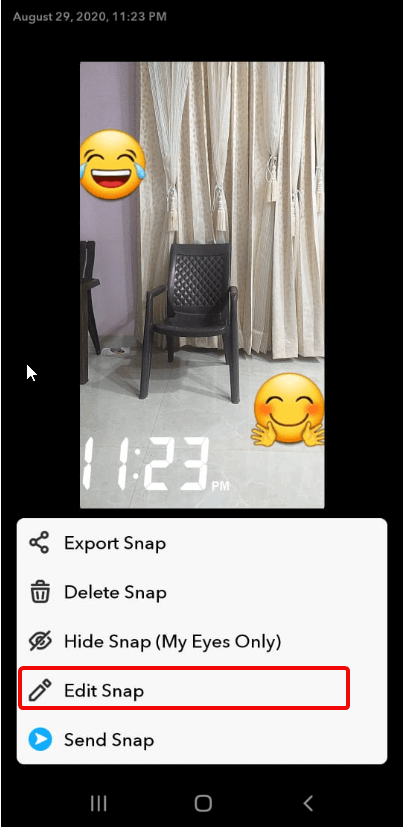
4. Once the image is loaded tap three vertical dots present at the top right corner.
5. Doing so will show different options at the bottom of the screen.
6. Tap Edit Snap.
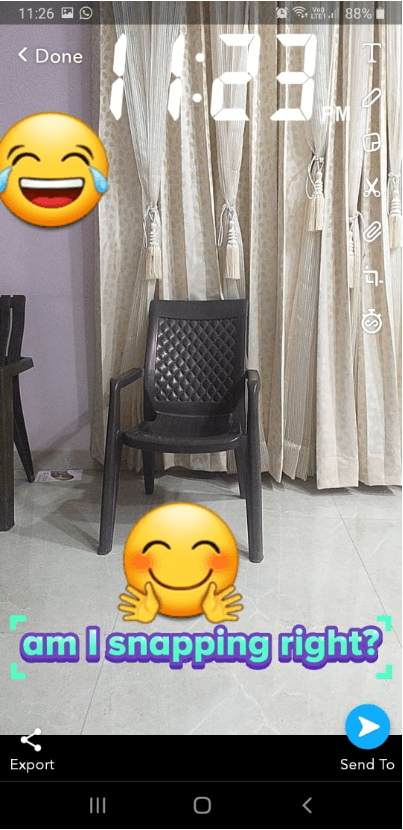
7. You can now edit the image. To add more filters like stickers, text, or time-lapse swipe left on the screen. You can use these and other filters to change the images. Alongside can crop images, correct color, and do a lot more.
Also Read: How to View Someone’s Snapchat Story without them Knowing?
8. Once the editing is finished; tap Done.
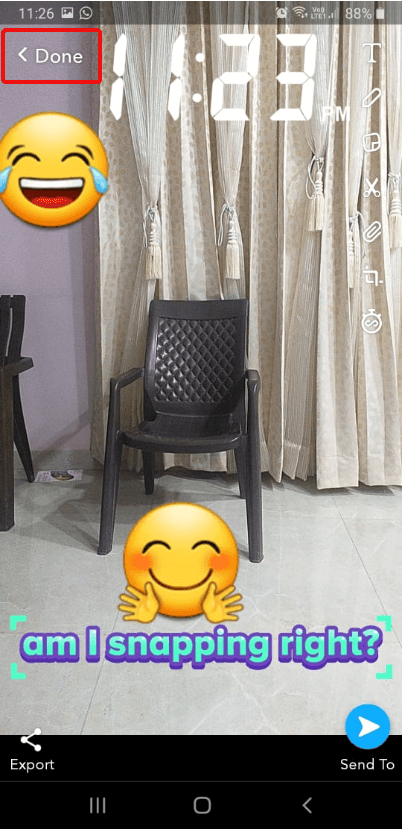
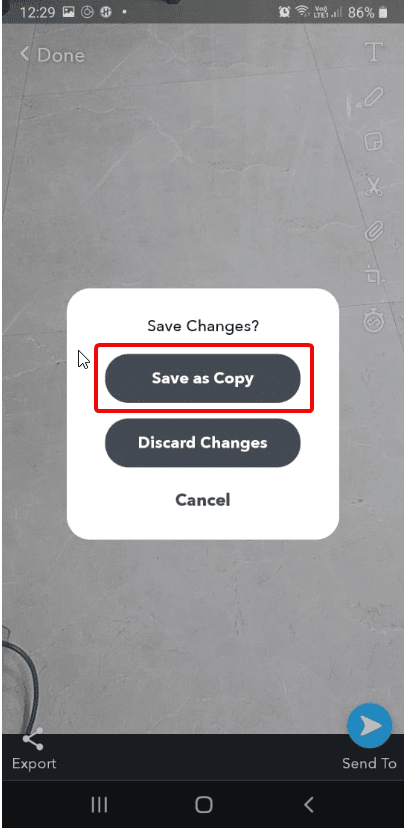
9. When prompted, make sure you tap Save as Copy option.
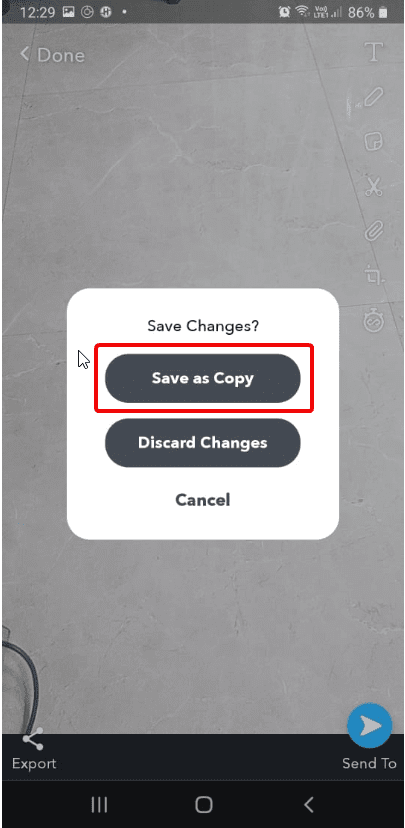
10. This will ensure that you have both original and edit images with Snapchat filters.
In addition to this, if you want to remove stickers from pictures, then you can do that too.
How to Tweak Photos with Snapchat?
Snapchat is highly creative and constantly improving. Adding or removing the filter from Snapchat photos is a hassle-free job. This is all possible because of the interesting features offered by Snapchat. To remove stickers from Snapchat, follow the steps below:
1. Open Snapchat app
2. Tap Memories section
3. Select the image from which you can to delete sticker
4. Tap the three stacked dots at the top right corner
5. Next, tap the sticker you wish to remove.
Note: Until you see Trash bin icon on the right-side list do not remove your finger
6. Once the Trash icon appears drag and drop the sticker.
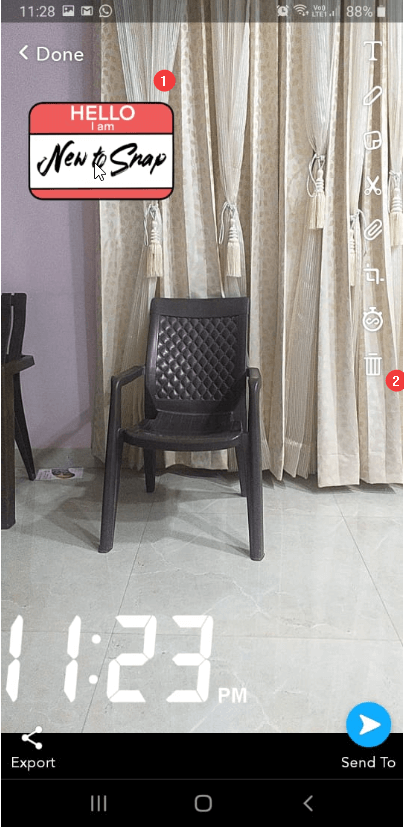
7. Repeat the process for all the stickers you wish to remove.
8. Tap the Done button to save the edited image.
Note: Alongside removing stickers from the same window you can add more stickers too.
9. Once done, remember saving the image by tapping Done > Save as Copy.
Can I remove Snapchat Emoji also from a Save Image?
Yes, if you have added an emoji you can delete that too from Snapchat. To do, so follow the steps explained above. However, if the emoji is added via keyboard then you need to follow the steps explained below:
1. Launch Snapchat app > Memories > Select image to edit
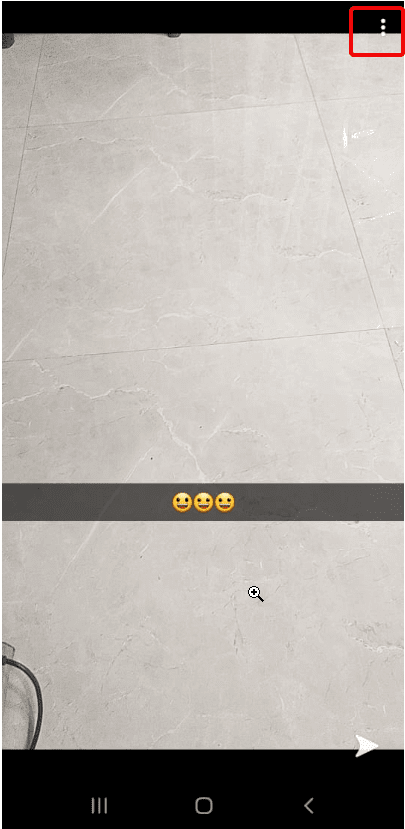
2. Tap three dots at the top right-corner > Edit Snap.
3. Tap Emoji.
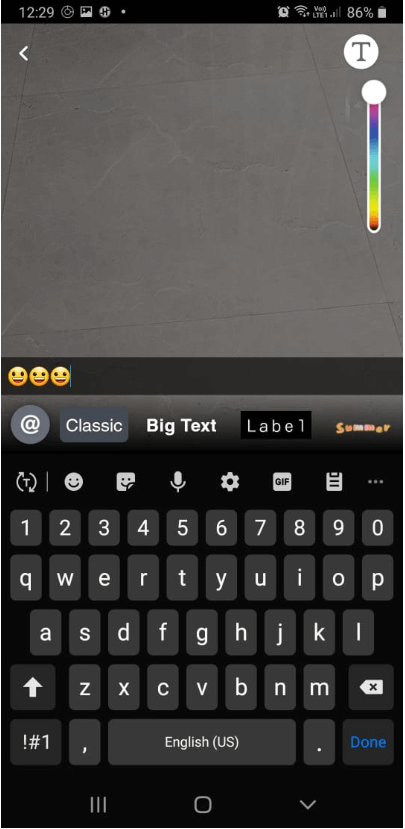
4. You will now get the edit text option. Tap Backspace to delete the emoji and leave it blank
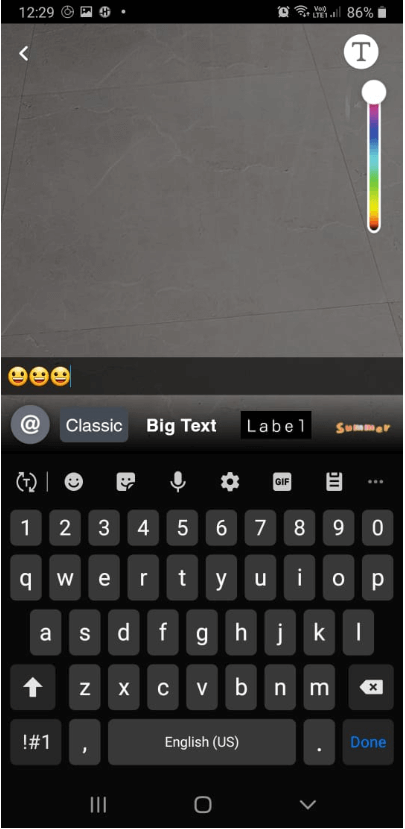
5. When done tap Done > Save as copy.
That’s it using these simple steps you can easily remove filters from Snapchat.
Can I cancel the purchased filters?
We understand, sometimes you just want to cancel purchases. But before canceling purchased Snapchat filters, review how the refund works.
Note: The refund process is different for Snapchat app purchases and online purchases.
Here’s how to cancel Filters ordered online, bought as a guest, and purchased online.
How to cancel Filters ordered online
To cancel Filters bought online follow the steps below:
- Visit Create Your Own website and log in
- Click ☰ in the top-left corner > “My Orders”
- Select the Filters you want to cancel > click Trash icon and confirm cancellation
To cancel Filters bought online as a guest follow the steps below:
- Open your order confirmation email
- Click the link that reads “Click here to view details about your Filter” > Cancel
Refunds for Filters purchased online
Note: If you cancel the purchase before the filter goes live, you can get a full refund.
However, if you cancel the purchase while the filter is active, then you get the refund on a pro-rata basis. This means you will be charged for the time your order was active!
Moreover, if you cancel an Annual Filter after it starts to run you won’t be able to get a refund as the amount is paid
How to cancel in-app purchased Filters
To cancel Filters you made in Snapchat:
- Tap ⚙️ in My Profile to open Settings
- Tap “On-Demand Geofilters” > select the filter you want to cancel > Cancel
Refunds for Filters purchased in the Snapchat app
Unfortunately, no refund is issued for the purchases made in the Snapchat app. To learn more about it click here.
Monster Snap App
It won’t be wrong to call Snapchat a monster snap app as it offers features to add interesting objects to your boring photos. In addition to this, it provided effective and simple ways to remove the filter from Snapchat saved photos.
So, it is truly an amazing app that is going to change the history of photo communication apps. This was a quick guide to remove Snapchat filters from saved photos. If you know of any other tips, feel free to comment below.
Author Bio:
Dinesh Lakhwani 

Dinesh Lakhwani, the entrepreneurial brain behind “TechCommuters,” achieved big things in the tech world. He started the company to make smart and user-friendly tech solutions. Thanks to his sharp thinking, focus on quality and the motto of never giving up, TechCommuters became a top player in the industry. His commitment to excellence has propelled the company to a leading position in the industry.
Popular Post
Recent Post

How to Reset Network Settings on Windows 11
Are you facing connectivity issues? Follow these instructions to reset network settings on your Windows 11 and fix the connectivity problems. The network settings on the PC manages internet connectivity. However, in some cases, due to outdated network adapters and incompatible configuration issues like slow connection and dropped connection, no wireless connectivity occurs. If you […]
Bitdefender Internet Security Review
As the cybersecurity needs of users are growing, Bitdefender has come up with comprehensive Internet security software that is designed to keep you safe 24/7. Bitdefender Internet Security is a one-stop solution for all your security needs. We’ve got a chance to test this powerful tool and to check its compatibility with other security solutions […]

How to Uninstall Cortana from Windows 11
Is Microsoft’s digital assistant bothering you? Do you want to uninstall it? You’ve come to the right place; here, we will explain removing Cortana on Windows 11. Although Microsoft doesn’t give a straightforward way to uninstall it, there are still ways. Why Uninstall Cortana? It is not like Microsoft’s cloud-based digital assistant; Cortana takes too […]

What is brand risk protection and why does it matter?
Today’s security professionals have become familiar with the idea that every organization has an attack surface that describes its global exposure to threats against internal and cloud applications, devices, users, and data. The attack surface grows as greater connectivity, cloud applications and myriad new types of device are adopted as an organization expands its digital […]
How to Use VPN on Synology NAS
We all want to secure our remote access for daily needs & projects. But how to get it done is a big question. Using a VPN this problem can be easily solved as it creates an encrypted tunnel to secure network connection. Acronym for Virtual Private Network (VPN) hides IP addresses allowing users to navigate […]
5 Best Label Designing and Printing Software
Be it product branding or marketing; labels play a significant role in selling a product. In fact, the label helps to distinguish your products from others. Therefore, the designing and printing of your product label need to be perfect. And for this, we will talk about the best 5 label designing and printing software. Using […]

CamSurf Review: A Better Way to Make Friends and Find Dates?
Due to recent events, the way people meet and greet has totally changed. Now, you no longer find dates or make friends in social gatherings or via mutual friends. Today, everything is virtual — from work to making new friends. Therefore, virtual dating and chat apps are getting highly popular these days. Among all the […]
How to Fix Instagram Reels Not Working (10 Methods)
Whether you want to follow the latest trends or wish to engage with your Instagram followers, IG Reels can help you with everything. But what if Instagram Reels are not working for you? Sounds scary! But it is possible. Despite Instagram being one of the most popular photos sharing platforms, it still faces numerous technical […]
iMyFone Filme – Tool that Makes Video Editing Easier for You
If one thing associated with Covid-19 outbreak that made life easier for people is evolution in video & digital platforms. Working and studying from home has seen a surge in demand for more quality videos. Recorded lectures, presentations, and other forms of video content are easily available now in HD quality, thanks to video editing […]

