10 Best Music Players for Windows PC in 2026

Last updated on December 27th, 2025 at 2:55 am
Listening habits on Windows PCs have changed a lot in recent years. Some users still prefer offline music libraries, while others rely fully on streaming. Because of this shift, a good music player in 2026 needs to handle both local files and online content without slowing the system or confusing the user.
The best music players today focus on sound quality, library control, and ease of use. Whether you manage thousands of audio files or just want a simple player for daily listening, the right software can make a clear difference in how enjoyable music feels on a Windows PC.
Before You Start, First Know The Answer To These Questions:
1. Will switching music players mess up my existing music library
Many users worry about losing playlists or file organization. Most modern players scan folders without changing files. However, custom playlists may need to be recreated when switching software.
2. Does a music player slow down Windows performance over time
Lightweight players usually have little impact on system speed. Heavier streaming apps can use more memory, especially when running in the background, which matters on older PCs.
3. What happens if a music player stops getting updates
A player without updates may still work, but future Windows changes can cause bugs or compatibility issues. Choosing software with active development reduces this long term risk.
How to Choose the Best Music Player for Windows
Picking the right music player depends on how you listen to music and how much control you want. Some players focus on simplicity, while others offer deep customization and advanced features. The points below explain what really matters when choosing a music player in 2026.
• Audio format support
A good player should handle common formats like MP3, AAC, FLAC, and WAV without extra plugins.
• Sound quality controls
Equalizers and sound enhancement options help tailor music to your headphones or speakers.
• Library management
Strong sorting and tagging tools make it easier to organize large music collections.
• Streaming support
Some players combine local music with streaming, which is useful for mixed listening habits.
• System performance
Lightweight players run smoothly even on older PCs without using too much memory.
• Customization options
Themes, layouts, and shortcuts improve long term comfort and usability.
• Offline playback
Offline access matters for users who store music locally or travel often.
• Update and support history
Players that receive regular updates tend to stay stable and compatible with new Windows versions.
Top 5 Music Players Comparison
The table below compares the most popular music players for Windows in 2026. Each one serves a different type of listener, from offline collectors to streaming focused users.
| Music Player | Best For | Music Source | Key Strength | Notes |
| MusicBee | Local music libraries | Offline files | Advanced library management | Ideal for large collections |
| Spotify | Streaming users | Online streaming | Huge music catalog | Requires internet |
| Winamp | Classic users | Offline files | Custom skins and plugins | Familiar interface |
| Amazon Music | Prime members | Streaming and downloads | Integrated subscription access | Best with paid plan |
| Groove Music | Casual listeners | Local files | Simple and clean design | Limited advanced features |
10 Best Music Players for Windows 10/11 in 2026
After using all the top-rated music streaming software available on the Microsoft Store, our tech and music-loving team has narrowed down the ten best apps to play music on a Windows computer. If you want to upgrade your audio player for PC, you give a try to the following programs:
1. Musicbee
Software Rating: 5/5
Compatible Windows OS: Windows 10 version 14393.0 or higher Architecture
Appropriate User Age: 3+
Supporting Formats: MP3, M4A, FLAC, Musepack, WavPack, Ogg, Opus, Tak, and more.
Price: Free
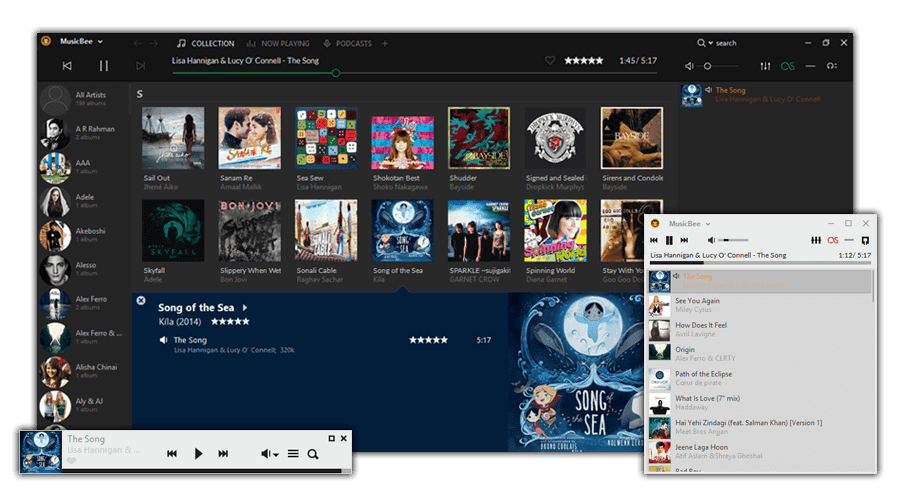
Musicbee is the most buzzing music player for PC. It is a music manager and player to easily find, play, and manage your favorite audio files. You can turn your computer into a personal jukebox by using auto-tagging to clean the music library and syncing your playlists with multiple devices. Musicbee makes content management easy with different types of progressive bars.
Melodious Features
- Amplify the sound quality with the 10-band or 15-band Equalizer and DSP effects.
- Gapless playback enables users to listen to music without interruption.
- With logarithmic volume scaling or normalize volume streaming, you can smoothly control volume.
- Musicbee appearance can be customized by selecting in-built skins or downloading from the software add-ons.
- Easily sync music collection with other devices, including Android and Windows phones.
Pros
- Smart tagging to sort the music library.
- Simple to customize playback.
- Great file conversion.
Cons
- Complicated learning curve for beginners.
2. Spotify
Software Rating: 4.5/5
Compatible Windows OS: Windows 10 version 14393.351 or higher
Appropriate User Age: 12+
Supporting Format: MP3, FLAC, AAC, M4P, and more.
Price: Free. Spotify Premium membership costs $9.99 per month and $4.99 for students.
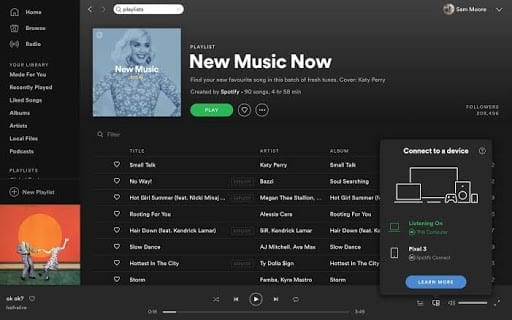
Spotify is a lot more than the best music player for Windows 10/11. It is an online audio player that can stream any track, allows you to play ready-made playlists, listen to podcasts, and so much more. Based on the artist, song, and album name, you can browse music tracks and build your awesome playlist. If you are a music creator, you can upload your track on Shopify and get famous overnight.
Melodious Features
- You can play any song, artist, album, and playlist online.
- There are hundreds of playlists available in every mood and genre.
- You can enjoy podcasts, videos, audiobooks, and even stream radio.
- Premium users can download soundtracks and play offline without ads.
- You can view the lyrics and profile of the artist on Shopify.
Pros
- The free tier offers amazing features.
- Easy to share and use.
- Supports podcasts, audiobooks, and radio.
- Stay connected to top music charts.
Cons
- Not available in all countries.
- Too many ads in the free version.
- It is more of a music streaming app.
3. Winamp
Software Rating: 4.5/5
Compatible Windows OS: Windows 2000 or higher Architecture
Appropriate User Age: 3+
Supporting Formats: MP3, MIDI, WAV, WMA, and more.
Price: Free
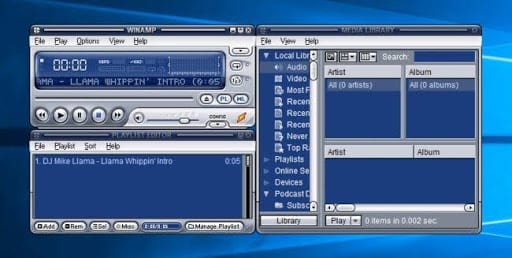
Winamp is the most trusted and old music player for Windows. It was originally developed by Justin Frankel and Dmitry Boldyrev, which they later sold to AOL in 1999 for $80 million. Next, kin was Radionomy in 2014 for this free music software. Winamp comes with numerous extensions with skins and plugins. The sharp music visualization, playlist, and large online community support make Winamp a great music player for PC.
Melodious Features
- Winamp scans your entire system for media files so you can create a personalized Media Library database.
- Auto-tagging helps in analyzing audio using the Gracenote services.
- Using an RSS media feeds aggregator, Winamp can display articles, download and stream media content.
- Winamp supports portable media players and Mass Storage Compliant devices.
- Winamp Remove facilitates remote playback of unprotected media files via the internet.
Pros
- A large collection of skins.
- Good search and playlist functionality.
- Extendable through numerous plugins.
- Awesome sound quality.
Cons
- No major update in a long time.
- Cluttered interface.
- Too bulky in size.
4. Amazon Music
Software Rating: 4/5
Compatible Windows OS: Windows 10 version 14393.0 or higher Architecture
Appropriate User Age: 12+
Supporting Format: MP3, FLAC, AAC, M4P, and more.
Price: Free with Amazon Prime membership. Amazon Music Unlimited for $7.99 per month.
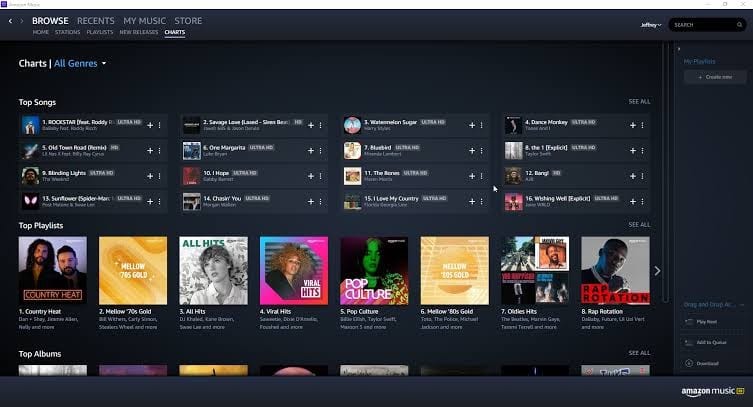
Amazon Music is an awesome music player for PCs offered by Amazon. You can access millions of songs and browse various albums and artists. There are plenty of different ready-made playlists available to set your mood. You can even enjoy the latest playlists and Amazon original music on the app.
Melodious Features
- Music in multiple regional languages without ads.
- Block songs with explicit lyrics anywhere you listen to Amazon Music.
- Play music already available in your system.
- It offers streaming in HD quality as well as Ultra HD and 3D playback.
- You can browse from two million songs based on artists, albums, and collection names.
Pros
- A large collection.
- Good audio quality.
- HD quality streaming.
Cons
- Expensive tool.
5. Groove Music
Software Rating: 4/5
Compatible Windows OS: Xbox One, Windows 10 Mobile version 14393.0 or higher, Windows 10 version 18362.0 or higher, Windows 8 Mobile, Windows 8.1
Appropriate User Age: Not Rated
Supporting Formats: MP3, FLAC, AAC, M4A, WAV, WMA, AC3, 3GP, 3G2, and AMR.
Price: $9.99 per month.
Groove Music is the best music player for Windows 11, Windows 10, Windows 8.1, Windows 8, and Xbox. The Groove catalog has over 50 million tracks. It is a subscription-based platform where users have to pay a monthly charge to enjoy unlimited music. You can upload playlists from OneDrive or your hard disk to the Groove Music app.
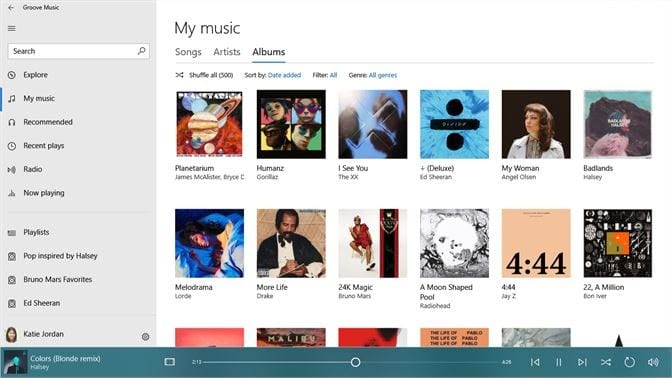
Melodious Features
- It works on PCs, tablets, smartphones, and even Xbox consoles.
- You can smoothly manage your playlist based on any occasion.
- Using this software, you can make music collections from the cloud.
- It can be used to listen to the radio on the web.
Pros
- Supported by multiple platforms.
- Playlists can be imported from cloud storage.
Cons
- Not free.
- The software hasn’t been updated since 2013 on the Microsoft store.
6. VLC Media Player
Software Rating: 4/5
Compatible Windows OS: Windows 10 version 14393.0 or higher, Xbox One, Windows 8.1
Appropriate User Age: 3+
Supporting Formats: MPEG, AVI, 3GP, OGG, WAV, DTS, MXF, WMA, and more.
Price: Free
VLC Media Player is an open-source and free cross-platform app to play music on Windows PC users. The software can stream audio and video files both on desktop operating systems as well as mobile platforms. Basically, it is a VideoLAN project that also offers VLMC, DVBlast, multicat, and x264.
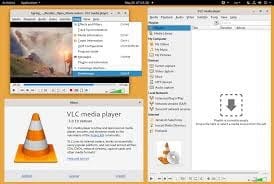
Melodious Features
- The VLC media player is free from spyware and ads.
- It can be used on multiple screen sizes such as tablets, PCs, and mobile phones.
- You can play MP3 tracks without any interruptions.
- This software is available on Linux, macOS, Unix, iOS, Android, and Windows.
Pros
- Supports large bandwidth.
- Light and free software.
- Ad-free media player.
Cons
- Limited functions.
- Poor interface.
7. MediaMonkey
Software Rating: 4/5
Compatible Windows OS:
Appropriate User Age: 3+
Supporting Formats: MP3, AAC, WMA, FLAC, MPC, APE, and WAV.
Price: Free. Single Pro version for $24.95.
MediaMonkey is a digital media player and media library application developed by Ventis Media Inc. It is a perfect music player for Windows and Android operating systems, including extendable plugins and numerous management tools. The base program is available as freeware, but a premium gold license unlocks multiple media collections, organization tools, and so much more.
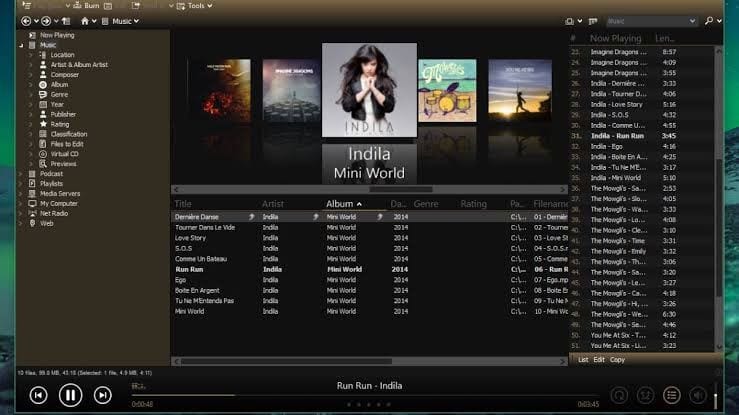
Melodious Features
- You can rip music from Audio CDs and encode it into the most supported formats.
- MediaMonkey music library can organize and categorize your music collection.
- It can extract playlists and ratings from other media players such as Winamp and Windows Media Player.
- You can sync MediaMonkey with most portable audio devices such as iPod, iPhone, Palm Pre, and all Android devices.
- The software supports various third-party plugins, including Last.fm scrobbler, Winamp 2 API, and more.
Pros
- Amazing cataloging options.
- Useful in removing duplicates from the library.
- It can pull metadata from the web.
- Works with almost any UPnP or DLNA-enabled media player.
Cons
- Multiple errors.
- Not multiple user-friendly.
- Metadata accuracy is spooky.
8. foobar2000
Software Rating: 3.8/5
Compatible Windows OS: Windows 10 version 14393.0 or higher
Appropriate User Age: 3+
Supporting Formats: MP3, MP4/M4A, CD Audio, WMA, Vorbis, Opus, FLAC, WavPack, WAV, AIFF, Musepack, and more.
Price: Free
foobar2000, abbreviated as fb2k, is a freeware audio player for Windows PC. This software is popular for its high modular design, substantial features, and stellar user flexibility. The user interface is fully customizable with standard skin elements, different dials and buttons, and smoother VU meters. Additionally, it is an extendable software that allows users to download various third-party interface tools.
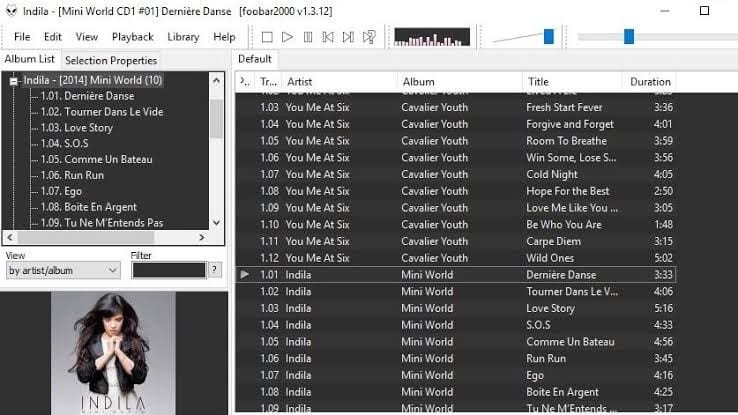
Melodious Features
- Using the add-ons, the software can read the APE, AC3, DTS, SACD, and other audio formats.
- You can burn CDs, stream kernels, and enjoy WASAPI output compatibility.
- foobar2000 can be integrated with iPods.
- Users can configure the foobar2000 Media Library with automated folder watching and Windows Media streaming.
Pros
- It is extremely lightweight.
- Functionality can be easily extended.
- Supports a large range of audio formats.
- ReplayGain support.
- Fully customizable.
Cons
- It is not easy to apply a new skin.
- Outdated plugins.
- Locked files and folders can’t easily be managed.
9. Bread Player
Software Rating: 3.8/5
Compatible Windows OS: Windows 10 version 14393.0 or higher, Xbox One
Appropriate User Age: 3+
Supporting Formats: MP3, FLAC, AIFF, and more.
Price: $64.99
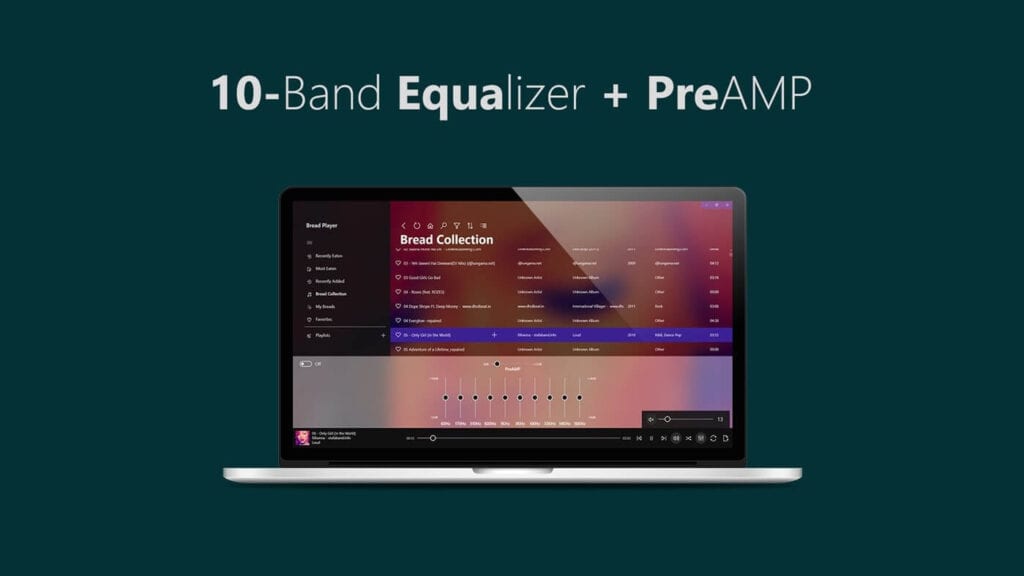
Bread Player is the most featured music player for Windows. The software can play music, create playlists, style UI, and organize your audio files. Bread Player is free from all ads and other distractions. It is integrated with a 10-band Equalizer + PreAMP and Last.fm Scrobbling. With plenty of different customizing options, you can easily make it your default media player.
Melodious Features
- Bread Player supports OneDrive and Media Server streaming.
- Offer all the basic song player functions such as repeat, shuffle, volume, etc.
- Easy drag and drop menu to sort, filter, and organize multiple playlists.
- You can enhance the user experience using third-party plugins.
Pros
- Fluent UI design.
- Highly customizable.
- Real-time play history.
- Private playlists.
Cons
- Bit expensive.
10. AIMP
Software Rating: 3.5/5
Compatible Windows OS: Windows 10 version 14393.0 or higher
Appropriate User Age: 12+
Supporting Formats: MP3, Dolby, Opus, FLAC, WAV, Speex, and more.
Price: Free
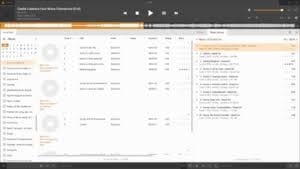
AIMP or Artem Izmaylov Media Player is a freeware music player for Windows and Android developed by a Russian developer. It was originally based on the BASS audio library. However, in version 3, a new audio engine and full support for ReplayGain, along with a transparent music library interface, are available.
Melodious Features
- AIMP is directly supported by DirectSound, ASIO, and WASAPI audio interviews.
- Inbuilt 18-band equalizer and sound effects include Tempo, Echo, Speed, Chorus, Voice Remover, etc.
- It can load entire media files present in the RAM of your computer.
- It is able to cache up to 60 seconds.
Pros
- Multiple audio formats support.
- Lightweight skinning.
- BASS library.
- Easy playlist management.
Cons
- Cluttered interface.
- Not open source.
- Buggy software.
Conclusion
Music players for Windows in 2026 offer more variety than ever. Tools like MusicBee and Winamp remain strong choices for users who store music locally and want full control over their libraries. Spotify and Amazon Music focus on streaming convenience, making them better for users who prefer instant access to large catalogs without managing files.
The best music player depends on listening habits rather than popularity alone. Offline collectors, casual listeners, and streaming fans all have different needs. Choosing a player that matches how you listen will lead to better performance, easier navigation, and a more enjoyable music experience overall.
FAQs
1. Which music player is best for offline music on Windows
MusicBee and Winamp are strong choices for offline listening. They support many audio formats and offer good library control without requiring an internet connection.
2. Do music players affect sound quality
Yes, music players can affect sound quality through equalizers and audio processing. A good player allows users to adjust sound settings to match their headphones or speakers.
3. Is streaming better than local music files Streaming offers convenience and access to large libraries, while local files give full control and offline access. The better option depends on personal listening habits.
Author Bio:
Dinesh Lakhwani 

Dinesh Lakhwani, the entrepreneurial brain behind “TechCommuters,” achieved big things in the tech world. He started the company to make smart and user-friendly tech solutions. Thanks to his sharp thinking, focus on quality and the motto of never giving up, TechCommuters became a top player in the industry. His commitment to excellence has propelled the company to a leading position in the industry.
Popular Post











Recent Post
How To Fix Issues Downloading from the Microsoft Store On Windows
Introduction: Downloading apps from the Microsoft Store should be a simple task. You open the Store, search for an app, and click install. In most cases, the process works without any problem. However, there are times when the download does not start. In some cases, it may stay stuck at a certain percentage. You may […]
How To Fix Windows Update Issues Easily On Windows [2026]
Introduction Windows updates play an important role in keeping a computer stable and secure. They bring new features, fix known bugs, and improve overall performance. When updates work as expected, the system runs smoothly. However, when they fail, users often face slow performance, missing features, or security risks. This is why it becomes important to […]

How To Check If Your PC Is Infected? [Complete Guide]
Computers now sit at the center of almost everything we do. Well, yes! From sending emails to watching videos, we depend on them without much thought. Because of this, even a small issue can disrupt daily tasks. One common problem is hidden malware. It does not always show clear signs at first. It can enter […]
Repair Apps And Programs: Repair Apps That Aren’t Working
Computers have become an essential part of everyday life, supporting work, study, communication, and entertainment. Most of these activities rely on apps and programs, so when one stops functioning, even simple tasks can be disrupted. Common problems include error messages, frozen screens, or apps that fail to open. On Windows systems, such issues often arise […]
Troubleshooting Microphone Privacy Settings: Complete Guide
Sound is a basic part of how we use computers today. People attend meetings, record audio, speak to others, and use voice tools almost every day. A working microphone makes all these tasks easy. When the microphone fails, even simple work becomes difficult. Many users first think the device is broken. In reality, the issue […]
Windows Sound Settings – Sound Control Panel: Complete Guide
Sound plays an important role in how we use a computer every day. It supports both work and leisure. You need it for meetings, videos, music, and alerts. When audio fails, even simple tasks become difficult. Many users feel stuck when sound issues appear. This usually happens because they are not familiar with Windows Sound […]

Run a Troubleshooter For PC Issues Windows: Complete Guide
A computer plays an important role in everyday life. People use it for work, study, communication, and entertainment. When a problem appears, it can interrupt everything. Even a small issue can waste time and create frustration. Many users feel unsure about how to fix such problems. They often think they need expert help. In reality, […]
![Adjusting Audio Output Settings Complete Guide [2026]](https://www.techcommuters.com/wp-content/uploads/2026/03/Adjusting-Audio-Output-Settings-Complete-Guide.webp)
Adjusting Audio Output Settings: Complete Guide [2026]
Sound is part of almost everything we do on a computer. It lets you watch videos, join calls, play music, and hear alerts. When the audio stops working the right way, it can interrupt both work and daily use. That is why adjusting audio output settings matters for every user. Many people get unsure when […]

Artificial Intelligence Explained: Concepts, Terminology, Benefits, and Future Trends
Artificial Intelligence, or AI, is basically computers doing things that usually need a human brain. We’re talking about stuff like learning from experience, figuring out problems, understanding language, and making decisions. It’s not magic, just a lot of data, pattern-spotting, and math behind the scenes. Now, AI doesn’t actually think or feel like we do. […]

Resolving Microphone Detection Problems: Latest Guide [2026]
Microphones are important tools in daily life. People use them for office meetings, online classes, interviews, gaming, customer support, and content creation. When a system fails to detect a microphone, communication stops at once. This situation can cause stress and confusion. Many users believe the microphone is damaged. In reality, most problems are simple and […]

