Artificial Intelligence Explained: Concepts, Terminology, Benefits, and Future Trends
Artificial Intelligence, or AI, is basically computers doing things that usually need a human brain. We’re talking about stuff like learning from experience, figuring out problems, understanding language, and making decisions. It’s not magic, just a lot of data, pattern-spotting, and math behind the scenes.
Now, AI doesn’t actually think or feel like we do. It’s not conscious. It just processes information, finds patterns, and runs calculations. Sometimes, the results look pretty clever, almost human, but it’s all code and algorithms.
AI isn’t just one program. It’s a whole field with a bunch of different tools and systems. Some AIs answer your questions online. Others recommend what you might like to watch next or flag weird activity on your bank account.
Most people use AI every day without even noticing. If your phone unlocks when it sees your face, that’s AI. When your inbox sorts your emails, or you get eerily accurate search results, that’s AI quietly doing its thing in the background.
This article takes a deep dive into AI, covering its concepts, applications, and what the future holds.
I. FLUQs: Top Questions Answered
1. What are the different types of AI, and how do they work?
AI can be categorized by its functions and goals. Narrow AI handles specific tasks such as chatbots or image recognition. Machine learning enables systems to improve through data, while deep learning applies layered neural networks for advanced pattern detection. Generative AI produces new content, and agentic AI can plan and execute actions. Each type serves distinct practical applications.
2. How does Generative AI generate text, images, or code?
Generative AI creates content by learning patterns from large amounts of data. For text, it predicts the next words in a sentence. For images, it turns written descriptions into pictures. For code, it can suggest functions or fix errors.
3. What exactly are AI agents and agentic AI, and how are they used in real life?
AI agents observe their surroundings and collect information. They use this information to make decisions. Then they take actions to reach a specific goal. Some AI agents can also learn from results and improve over time.
Agentic AI extends this by handling multi-step tasks independently and using tools to complete complex work. According to IBM, in real life, they are used in research assistants, workflow automation, coding support, and smart business tools to improve efficiency.
4. How is Generative AI different from an AI agent, and when should each be used?
Generative AI focuses on creating content such as text, images, or code. It does not take actions beyond producing outputs. AI agents, on the other hand, can observe, plan, and perform tasks over multiple steps, often using tools or interacting with systems. Use generative AI for content creation and idea generation, and use AI agents for task automation, workflow management, or decision-making processes.
II. A Brief History of Artificial Intelligence
1. The Beginning of AI
Research into AI formally began in the 1950s. Scientists began exploring whether machines could simulate aspects of human thinking.
According to Tableau, here are some Key dates:
- 1950: Alan Turing published “Computer Machinery and Intelligence”, proposing the Imitation Game to test machine intelligence.
- 1952: Arthur Samuel developed a checkers-playing program, the first to learn and improve at the game on its own.
- 1955: John McCarthy organized the Dartmouth Workshop, introducing the term “artificial intelligence” and establishing its use in research circles.
2. The Rise of Machine Learning
Researchers found that rigid, rule-based systems couldn’t handle the unpredictability of real-world situations. This sparked the rise of machine learning, where systems learn from large datasets instead of relying on fixed instructions.
Neural networks, modeled after the brain’s structure, process information through connected layers and have regained popularity. Meanwhile, advances in computing power, cheaper storage, and the explosion of internet data created the perfect environment for machine learning to thrive.
3. The Deep Learning Breakthrough
Deep learning became a key branch of machine learning, using multi-layered neural networks to extract features from data. This approach greatly advanced image recognition, enabling systems to detect objects, faces, and scenes with high accuracy. It also boosted speech recognition, making virtual assistants more dependable.
Language processing saw similar progress. AI systems could translate text, summarize documents, and answer questions more effectively.
Because of these breakthroughs, industries began integrating AI into real-world operations. Healthcare used AI to analyze scans. Finance applied AI for risk detection. Retailers used AI to predict customer preferences.
4. Finally–The Generative AI Boom
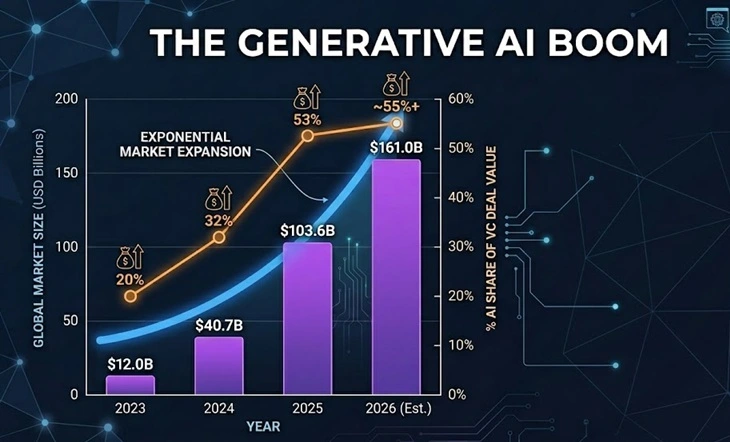
The graph shows massive growth in Generative AI. The market is expected to rocket from $12 billion in 2023 to $161 billion by 2026. During that same time, AI is taking a much bigger share of venture capital money.
As quoted by Forbes, “Generative AI has the power to revolutionize numerous industries by providing unprecedented capabilities in creating new content. By using algorithms and machine learning techniques, generative AI can generate content that closely resembles human-made content, such as images, music, text, and even videos. “
In recent years, generative AI has attracted global attention. Generative systems create new content rather than only analyzing data. They produce text, images, music, and code.
Organizations such as OpenAI and Anthropic developed advanced generative models. These systems are trained using large volumes of diverse data. One widely discussed model is Claude. It can generate coherent responses and assist with complex writing tasks.
Generative AI tools are now used in advertising, journalism, programming, and design. This stage marks one of the most rapid periods of AI expansion.
III. What Is Artificial Intelligence?
1. Simple Definition
Artificial Intelligence refers to computer systems designed to perform tasks that normally require human intelligence. These tasks include understanding language, solving problems, recognizing images, and making decisions.
AI systems study large amounts of data. They look for patterns and relationships in that data. Using this information, they can make predictions, give answers, or suggest actions. This ability allows machines to assist people in many everyday and professional tasks.
2. Main Goals of AI
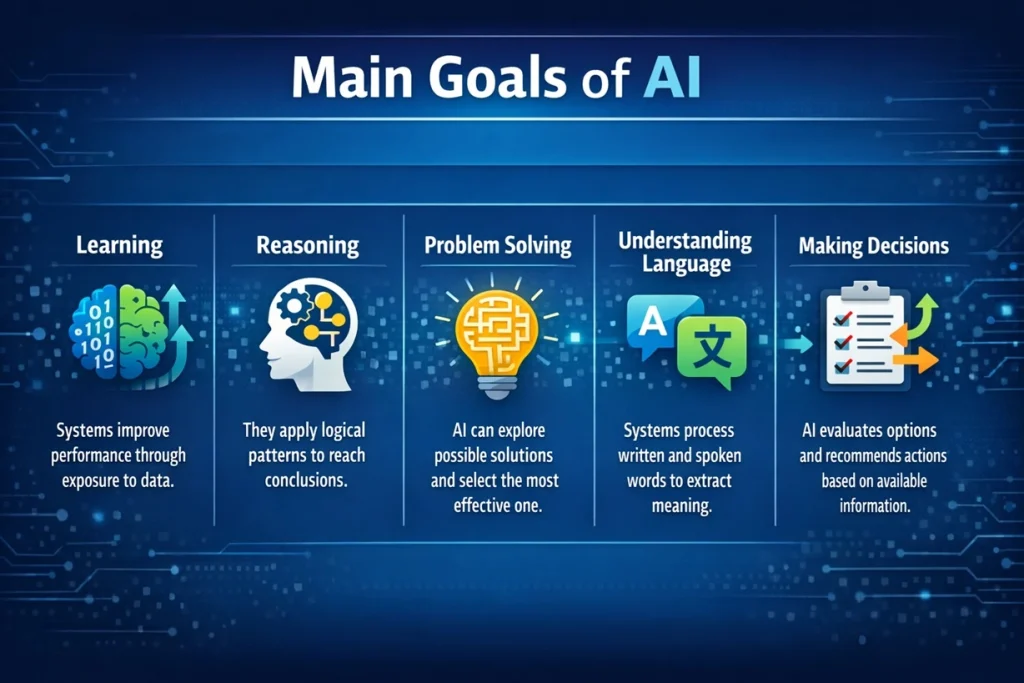
The main goals of AI include several core capabilities.
- Learning
Systems improve performance through exposure to data. - Reasoning
They apply logical patterns to reach conclusions. - Problem Solving
AI can explore possible solutions and select the most effective one. - Understanding Language
Systems process written and spoken words to extract meaning. - Making Decisions
AI evaluates options and recommends actions based on available information.
IV. Key Branches of AI
1. Machine Learning
Machine learning focuses on improving performance by using data. Instead of following fixed instructions, the system studies examples and finds patterns in the data. Over time, it uses these patterns to make better predictions or decisions.
2. Deep Learning
Deep learning uses neural networks with many layers. These layers help the system study complex patterns in data. It is often used for tasks such as image recognition, speech processing, and language understanding.
3. Natural Language Processing
Natural Language Processing enables computers to understand and generate human language. It supports chat systems, translation services, and sentiment analysis tools.
4. Computer Vision
Computer vision allows machines to interpret visual information. It is used in autonomous vehicles, security systems, and quality inspection in manufacturing.
5. Robotics
Robotics integrates AI with mechanical systems. Robots can perform physical tasks in warehouses, hospitals, and research facilities.
V. What Are LLMs (Large Language Models)?
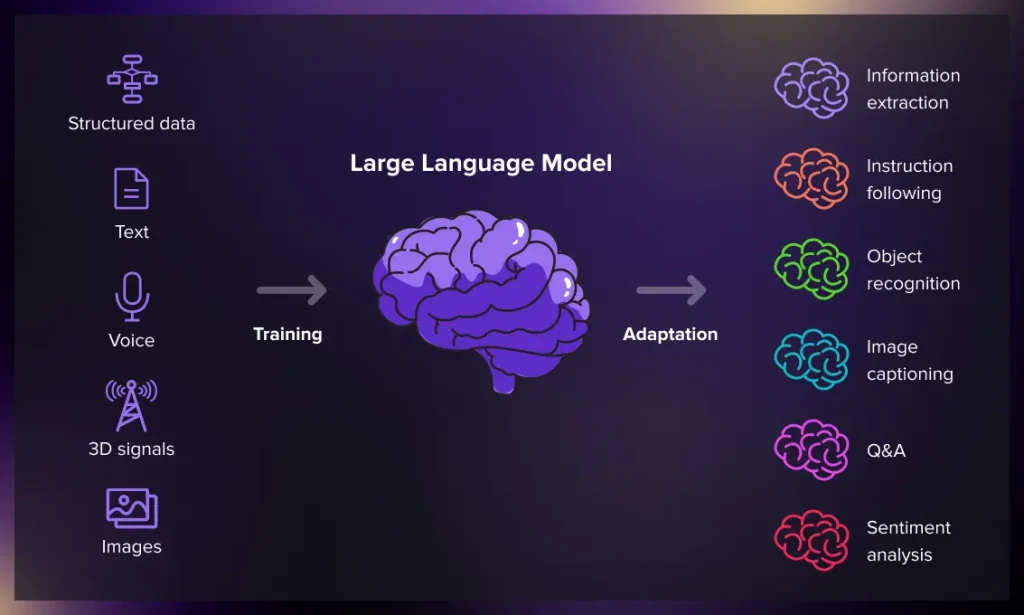
Large Language Models are advanced systems trained on extensive text data. They learn relationships between words and sentences.
When given input text, the model predicts likely next words based on probability. It does this repeatedly to form responses. These models power chat interfaces, writing assistants, and document analysis tools. They support summarization, translation, and question answering.
Because of their broad training, they handle many topics. This flexibility makes them central to modern AI applications.
VI. What Is Generative AI?
As quoted by Amazon Web Services, Generative artificial intelligence (generative AI) is a type of AI that can create new content and ideas, including conversations, stories, images, videos, and music.
Generative artificial intelligence, often called generative AI, is a type of AI that can create new content. This content can include conversations, stories, images, videos, music, or even computer code. The system learns from large amounts of existing data and then uses that knowledge to produce new results.
Generative AI studies patterns in language, images, and other information. When a user gives a prompt or request, the system predicts and generates a response based on what it has learned. This is why generative AI is widely used for writing, design, media creation, and software development.
Types of Generative AI
- Text Generation – Creates written content such as articles, emails, summaries, or conversations.
- Image Generation – Produces images or artwork from text descriptions.
- Video Generation – Generates short videos or animations based on prompts.
- Audio and Music Generation – Creates speech, sound effects, or music.
- Code Generation – Writes or suggests computer code and helps fix errors.
What is the Difference between AI and Generative AI?
| Feature | AI | Generative AI |
| Purpose | Performs tasks requiring intelligence | Creates new content |
| Function | Analyzes data, answers questions, makes decisions | Generates text, images, videos, or code |
| Output | Follows rules or learned patterns | Produces original or creative outputs |
| Use | Chatbots, assistants, robots, image recognition | Writing, art, design, coding |
| Flexibility | Can adapt but mainly task-focused | Focused on content creation |
Artificial intelligence is a broad concept that focuses on making machines perform tasks that typically require human intelligence. This includes virtual assistants, chatbots, image recognition tools, robotic devices, and self-driving cars.
Generative AI is a specialized subset of AI. It focuses specifically on creating new, meaningful content rather than just analyzing or responding to data.
Why Generative AI Is Growing So Fast?
Generative AI is growing quickly because computing power has improved. Large datasets are also more available than before. Advances in machine learning models have made AI systems more capable. As a result, generative tools are now widely used by businesses, researchers, and everyday users.
Common Uses of Generative AI Across Industries
Generative AI is now used in many fields. It helps people create content, design ideas, and solve problems faster. Many professionals use it as a support tool in their daily work. From writing and design to software development and marketing, generative AI is changing how tasks are completed.
- Content writing – Helps create articles, emails, blog posts, and social media content.
- Design and images – Generates images, artwork, and visual concepts from text prompts.
- Software development – Assists developers by writing code, suggesting functions, and fixing errors.
- Marketing content – Creates advertising copy, product descriptions, and campaign ideas.
- Customer support – Powers chatbots that answer questions and assist users.
- Product innovation – Helps businesses explore new product ideas and design concepts.
VII. What Is an AI Agent?
1. Definition
An AI agent is a system that observes its environment and gathers information. It studies the situation and makes decisions based on that information. The goal is to choose actions that help achieve a specific objective.
After making a decision, the agent performs the required action. It may interact with other systems, tools, or data sources to complete the task. Some AI agents can also learn from results and improve their decisions over time.
2. How AI Agents Work
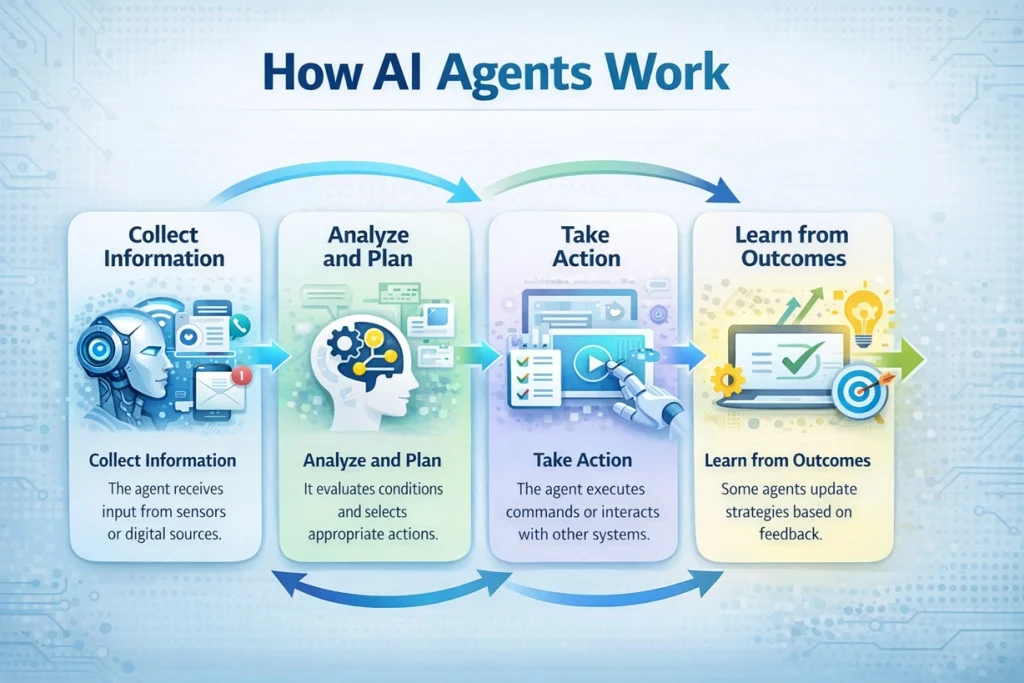
- Collect Information
The agent receives input from sensors or digital sources. - Analyze and Plan
It evaluates conditions and selects appropriate actions. - Take Action
The agent executes commands or interacts with other systems. - Learn from Outcomes
Some agents update strategies based on feedback.
3. Key Components of an AI Agent
Most AI agents work through a few basic parts.
- Input or sensors – These collect information from the environment.
- Decision system – This analyzes the information and selects the best action.
- Action system – This carries out the chosen step.
- Learning mechanism – Some agents improve by studying results and feedback.
These components allow the system to operate in a structured and logical way.
4. How AI Agents Make Decisions
AI agents use data and rules to guide their decisions. Some systems follow predefined instructions. Others use machine learning to analyze patterns in large datasets. More advanced agents can evaluate several options and select the most effective one.
In many cases, the agent also considers its goal before acting. This helps the system choose actions that move it closer to the desired result.
5. Where AI Agents Are Used
AI agents are used in many modern technologies. They help automate tasks and manage digital systems.
- Virtual assistants that schedule meetings or answer questions
- Customer support systems that respond to user requests
- Recommendation engines that suggest products or media
- Autonomous robots that navigate physical environments
- Smart software tools that manage workflows and data
These applications show how AI agents can assist people and reduce manual effort.
6. Why AI Agents Are Important
AI agents make systems more flexible and capable. Instead of following simple commands, they can adapt to different situations. They can handle tasks that involve several steps. This makes them valuable in business operations, research, and digital services.
As AI technology continues to improve, agents are expected to become more advanced. They will likely play a larger role in automation, decision support, and intelligent software systems.
VIII. What Is Agentic AI?
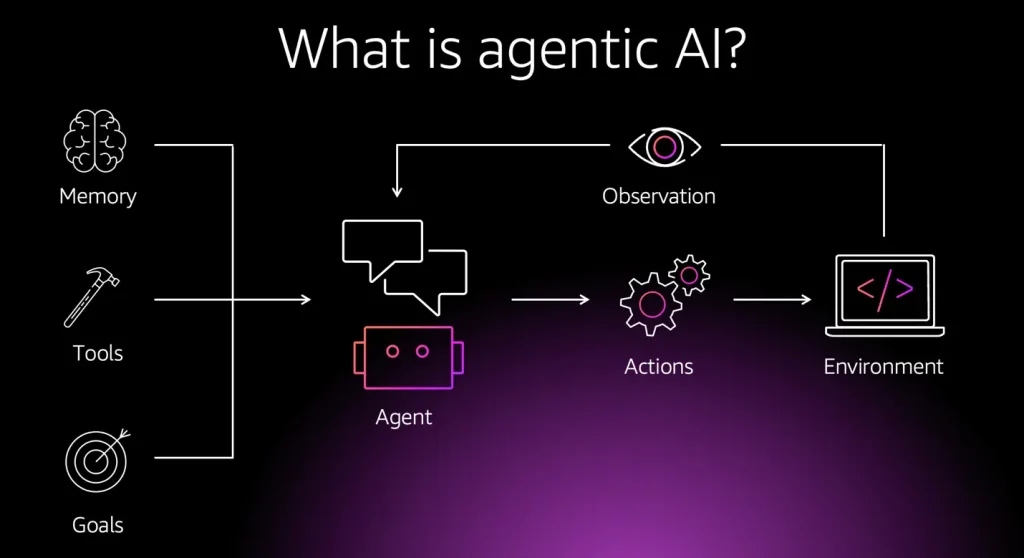
1. Meaning of Agentic Systems
Agentic systems are a newer type of AI designed to work with greater independence. Instead of waiting for every instruction, they can plan steps and take action on their own. This allows them to handle tasks that involve multiple stages and changing conditions.
These systems usually break a large task into smaller steps. First, they analyze the situation and gather the needed information. Then they decide what action to take next. They may repeat this process until the task is complete.
Human guidance is still important. However, these systems do not require constant supervision. They can manage much of the process on their own. Because of this ability, agentic systems are becoming useful for complex digital tasks, workflow automation, and business operations.
2. What Is an Agentic AI Chatbot?
An agentic AI chatbot is more advanced than a basic chatbot. It does more than answer questions. It can manage tasks from start to finish.
First, it understands the request. Then it breaks the task into stages. It may search for information, use tools, and analyze the results.
After that, it brings everything together and delivers the final output. Because of this step-by-step process, agentic chatbots can solve more complex problems than traditional chat systems.
3. How an Agentic AI Chatbot Works
An agentic AI chatbot starts by understanding the user’s request. It gathers the needed information. Then it analyzes the task and creates a simple plan. The chatbot may search for data or use other tools. It follows each step until the task is complete. Finally, it delivers the result and may learn from the outcome.
4. Agentic AI vs Regular AI
Regular AI systems are designed to analyze data and perform specific tasks. They usually follow clear instructions or predefined rules. Agentic AI works in a more independent way. These systems can plan steps, make decisions, and complete tasks with limited human input.
Understanding the difference helps explain how newer AI systems are becoming more capable and autonomous.
| Feature | Agentic AI | Regular AI |
| Decisions | Acts on its own | Follows instructions |
| Tasks | Handles multi-step tasks | Does simple tasks |
| Learning | Adapts from results | Limited learning |
| Tools | Can use external tools | Uses built-in functions |
| Supervision | Needs little help | Needs guidance |
According to Google Cloud, Agentic AI is a type of artificial intelligence that can make decisions and take action on its own.
Unlike regular AI, which mostly follows commands or analyzes data, agentic AI can set goals, plan steps, and complete tasks with little human input.
This ability makes agentic systems useful for complex work. Businesses can use them to automate processes, manage workflows, and improve efficiency.
5. Examples of Agentic AI
Agentic AI is already being used in several areas. These systems help complete tasks that normally take a lot of time and coordination.
Some common examples include:
- AI research assistants that collect information and summarize findings.
- Workflow automation systems that handle approvals and routine processes.
- Coding assistants that write, test, and improve software code.
- Smart business tools that organize tasks and manage operations.
As these systems improve, agentic AI will likely play a larger role in digital work and automation.
7. Regular AI vs Agentic AI vs Generative AI
Artificial Intelligence has evolved into different forms based on what the system is designed to do. Some AI systems simply analyze data or follow instructions. Others can create new content. The newest systems can even plan and complete tasks on their own.
Understanding the difference between Regular AI, Generative AI, and Agentic AI helps explain how modern AI tools are used in real life.
| Feature | Regular AI | Generative AI | Agentic AI |
| Purpose | Analyze data or perform specific tasks | Create new content | Complete tasks and reach goals |
| How it Works | Follows rules or learned patterns | Generates text, images, or code | Plans steps and takes actions |
| Task Type | Single or simple tasks | Content creation | Multi-step tasks |
| Independence | Needs instructions | Responds to prompts | Works more independently |
| Examples | Recommendation systems, spam filters | AI writing tools, image generators | Workflow automation, research assistants |
Summary:
Regular AI is designed to analyze data and perform specific tasks. It follows rules or patterns learned from data. This type of AI is commonly used in recommendation systems, fraud detection, and spam filters. Its main role is to process information and provide useful results.
Generative AI focuses on creating new content such as text, images, or code.
Agentic AI goes a step further. It can plan actions, break tasks into steps, and complete them with little human help. This makes agentic systems useful for managing complex workflows and automated processes.
IX. Trending AI Terms in Search Trends
Artificial Intelligence is evolving quickly, and new terms appear as the technology grows. Many of these terms are now common in online searches because people want to understand how modern AI tools work. Knowing these popular AI terms helps users follow discussions about new technologies, tools, and trends shaping the future of AI.
- Chatbots: AI programs that simulate conversation and answer questions through text or voice.
- Automation: The use of AI to perform tasks with little or no human effort.
- Prompt Engineering: Writing clear instructions to get better responses from AI systems.
- Responsible AI: Developing AI systems that are fair, safe, and reliable.
- AI Ethics: Guidelines that address moral issues such as bias, fairness, and privacy.
- Explainable AI: AI systems designed to clearly show how they make decisions.
- Artificial General Intelligence (AGI): A future concept where AI could perform many tasks at a human level.
X. Advantages of Artificial Intelligence
- AI processes vast amounts of data quickly.
- It improves productivity across industries.
- It operates continuously without fatigue.
- It reduces repetitive administrative work.
- It supports informed decision-making through data analysis.
XI. Disadvantages and Risks of AI
- Outputs may contain bias.
- Information may sometimes be inaccurate.
- Privacy risks exist if data is misused.
- Automation may change job structures.
- Development costs can be high.
Also Read: The Biggest AI-Run Cyber Attacks Of All Time
XII. How Efficient and Trustworthy Is AI?
AI is becoming more efficient, but trust is still a work in progress. While AI can summarize documents with nearly 100% accuracy, it still “hallucinates” or makes mistakes on complex tasks about 30% of the time.
Because of this, most businesses still require a human to check AI work before it is finished.
To build more trust, the industry is focused on making AI more transparent and keeping human oversight for important decisions.
XIII. Modern AI Trends
Artificial Intelligence is evolving rapidly, with new technologies and applications emerging each year. Modern AI trends reflect advances in generative models, autonomous systems, and integration with everyday tools. These trends show how AI is moving from research labs into practical, real-world applications across industries.
Key trends in AI today:
- Generative AI Expansion: AI systems are increasingly creating text, images, video, and code, driving innovation in marketing, design, and software development.
- AI Agents and Agentic Systems: More AI tools can plan, make decisions, and complete multi-step tasks independently, improving workflow automation.
- Large Language Models (LLMs): Powerful LLMs support chatbots, virtual assistants, and content generation across multiple domains.
- AI in Everyday Devices: Smart home devices, wearable tech, and IoT systems are using AI to provide personalized experiences and real-time automation.
- Ethical and Responsible AI Focus: Organizations are prioritizing fairness, transparency, and accountability in AI systems to address bias and privacy concerns.
XIV. Interesting Facts and Statistics About AI (2026)
AI is changing the world fast. It is expected to create 12 million more jobs than it replaces by the end of 2026. People who know how to use AI now earn about 23% more money than those who don’t.
However, AI uses a lot of power. One big AI data center can use as much electricity as 100,000 homes. Because of this, many new energy projects are now using wind and solar power to keep up with the demand.
In 2026, the most in-demand AI skills are less about deep coding and more about how you partner with AI to get work done. Here are the top three skills you should learn:
- Advanced Prompt Engineering: This is now the “literacy” of 2026. It’s the ability to design complex, multi-step instructions that get AI to produce high-quality, professional results.
- AI Data Storytelling: Since AI can now crunch numbers instantly, the value has shifted to humans who can look at those results and explain what they mean and what the company should do next.
- AI Workflow Integration: Employers are looking for people who can connect different AI tools (like using one to research and another to automate emails) to build a faster, smoother way of working.
XV. Challenges Facing Modern AI
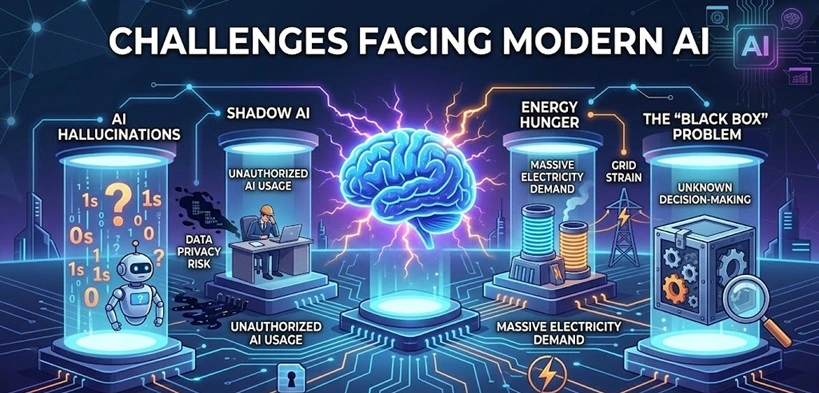
As AI becomes a central part of our lives in 2026, it faces several critical hurdles:
- AI Hallucinations: Models still sometimes present false information as an absolute fact, making reliability a major concern for healthcare and legal work.
- Shadow AI: Many employees use AI tools without company permission, which creates huge risks for data privacy and “leaking” private company secrets.
- Energy Hunger: Keeping the world’s AI running requires massive amounts of electricity, putting a heavy strain on power grids and the environment.
- The “Black Box” Problem: It is often hard to see how an AI reached a specific decision, leading to calls for more “Explainable AI” so humans can stay in control.
XVI. The Future of Artificial Intelligence
In 2026, AI is moving beyond simple assistants. Autonomous Agents are becoming our digital teammates. They don’t just answer questions. They can manage projects, conduct scientific research, and even help design new AI.
Looking ahead to 2027, the focus is shifting again. “Physical AI” will put smart systems into robots and wearable devices. These systems will help us interact with and navigate the real world.
XVII. The Real Risk of AI-generated Content
The future of AI content will see more checks on low-quality material. AI spam has affected search results, so Google and other platforms are acting. They will get better at spotting poor content, making original and helpful information more important.
Not all AI content will be punished, but avoiding low-quality work is key to protect search rankings, stay visible in AI search tools like ChatGPT and Perplexity, and keep trust with users.
How to Use AI Content Safely?
Not all AI content will get penalized. Many people use AI to make their writing clearer, sharper, and more engaging, and Google understands that. The real issue is low-quality AI content, which Google actively filters out.
A few tips to stay on the safe side:
- Prioritize quality: Raw AI output usually isn’t strong enough on its own.
- Edit and add your touch: Don’t publish straight from AI. Do research, add your perspective, and polish it.
- Share your insights: Your experience and unique viewpoint are what make content stand out.
- Think of AI as a helper: Use it to improve your writing, not to replace it.
_________________________________________________________________________
Conclusion
Artificial Intelligence is a fast-growing field that includes machine learning, deep learning, generative systems, and agentic models.
At the same time, AI raises ethical, social, and economic challenges. Users need to be aware of risks like bias, privacy issues, and job changes. Understanding AI concepts helps individuals and organizations use these tools effectively and responsibly while making informed decisions.
In the end, the future of AI belongs to those who use it wisely.
FAQs:
What Is the Difference Between Machine Learning and Artificial Intelligence?
Artificial Intelligence is the larger field that covers all systems designed to simulate intelligent behavior. Machine learning is a specific approach within that field. It focuses on learning patterns from data rather than following fixed instructions.
How Are AI Agents Different from Regular Chatbots?
Regular chatbots often follow predefined scripts. AI agents can observe environments, create plans, and perform multi-step tasks. They may use tools and adjust behavior based on outcomes.
Is Artificial Intelligence Safe for Businesses and Daily Use?
AI can be safe when deployed responsibly. Proper data protection, ongoing monitoring, and compliance with regulations are necessary. With these measures in place, AI can support daily activities and business operations effectively.
Author Bio:
Dinesh Lakhwani 

Dinesh Lakhwani, the entrepreneurial brain behind “TechCommuters,” achieved big things in the tech world. He started the company to make smart and user-friendly tech solutions. Thanks to his sharp thinking, focus on quality and the motto of never giving up, TechCommuters became a top player in the industry. His commitment to excellence has propelled the company to a leading position in the industry.
Popular Post











Recent Post
Artificial Intelligence Explained: Concepts, Terminology, Benefits, and Future Trends
Artificial Intelligence, or AI, is basically computers doing things that usually need a human brain. We’re talking about stuff like learning from experience, figuring out problems, understanding language, and making decisions. It’s not magic, just a lot of data, pattern-spotting, and math behind the scenes. Now, AI doesn’t actually think or feel like we do. […]

Resolving Microphone Detection Problems: Latest Guide [2026]
Microphones are important tools in daily life. People use them for office meetings, online classes, interviews, gaming, customer support, and content creation. When a system fails to detect a microphone, communication stops at once. This situation can cause stress and confusion. Many users believe the microphone is damaged. In reality, most problems are simple and […]

How To Switch To A Dark Background Theme In Windows [2026]
Most people spend many hours each day in front of a computer screen. Office work, online classes, editing, browsing, and streaming all require long screen time. A bright white background may look clean at first. However, over time, it can feel sharp and tiring. The strong contrast between white backgrounds and black text may cause […]

How to Switch From Local To Microsoft Account On Windows
Many users begin with a local account when they set up a new Windows computer. A local account works only on that single device. It stores settings, files, and preferences locally. It does not connect to online Microsoft services. For basic offline use, it works well. However, as digital needs grow, many users want better […]

How to Switch Windows 10 to a Local Account: Complete Guide
Windows 10 allows users to sign in with either a Microsoft account or a local account. When you set up a new computer, the system often suggests using a Microsoft account. This account connects your device to Microsoft services such as Outlook, OneDrive, and the Microsoft Store. It also syncs settings, themes, and passwords across […]

How To Change Default Apps For File Types In Windows
Windows is designed to make using your computer easy. One way it does this is by assigning default apps to different file types. This means when you open a file, Windows automatically opens it with a specific program. For example, photos may open with Photos, music with Groove Music, and PDFs with Edge. These default […]

How To Adjust The Mouse Pointer Speed: Complete Guide
Using a computer every day means you use the mouse a lot. The mouse pointer moves on the screen and helps you click, scroll, and select items. Many people never think about the speed of the mouse pointer. They have used the default setting for years. This can cause small problems over time. A slow […]

How to Change Mouse Scrolling Settings In Windows
A mouse is one of the most used computer tools. People use it every day. They scroll through emails. They scroll through documents. They scroll through websites and images. The movement becomes automatic. Most users do not notice it. That is why problems often go unnoticed. Scrolling problems show up slowly. At first, it feels […]

Keyboard Light Settings: Keyboard Lighting Control [Complete Guide]
Keyboards are no longer simple typing tools. Well, yes! Over time, they have evolved to include features that improve comfort, visibility, and overall experience. One of the most useful features today is keyboard lighting. It helps users work comfortably in low-light conditions. It also reduces strain when typing for long hours. Many users first notice […]

Customizing Pointer Appearance: Complete Guide
The way your mouse pointer looks on your computer may seem like a small detail. But customizing pointer appearance can make using your PC more comfortable and visually appealing. Many users do not realize that they can change the pointer size, color, and style to fit their needs. Whether you want a bigger pointer for […]

