Top 10 Free iPhone Launchers for Android 2026
Last updated on December 22nd, 2025 at 2:27 pm
Are you someone who uses Android but has always wondered what it’s like to use an iPhone because of its simple and easy-to-use design? You’re not the only one!
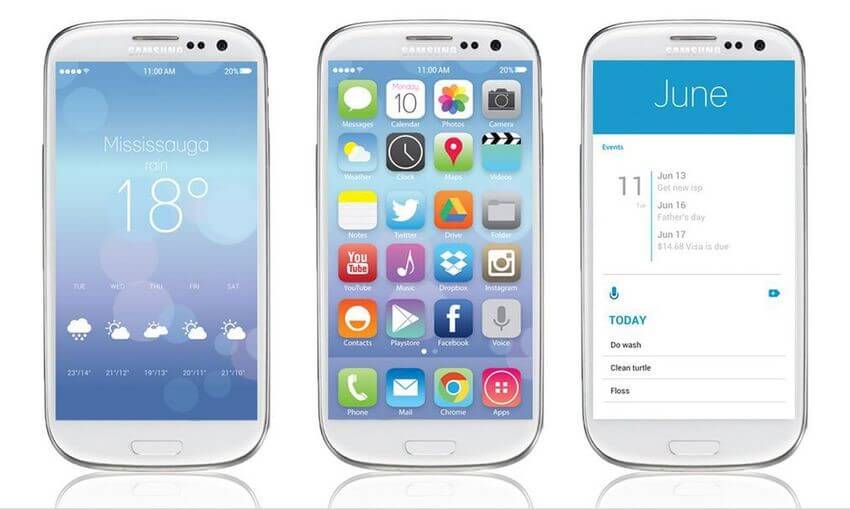
Lots of people who like Android are also interested in the neat, simple look and the smooth way iPhones work. But guess what? You can now get the iPhone look on your Android phone! This is possible because of special apps called launcher apps.
In this detailed guide, we’ll show you the best iPhone launcher apps for Android phones in 2026. An iOS launcher app for Android can change how your phone looks and works to be more like an iPhone. This means you can experience the iPhone style without actually changing your phone.
Whether you want a new look for your phone, want to surprise your friends who use iPhones, or just want to see what using an iPhone is like, we have chosen the best iOS launcher apps for Android just for you.
What is an iPhone Launcher?
Before we start talking about the top apps that make your Android phone look like an iPhone, let’s explain what an iPhone launcher is.
Basically, a launcher is a type of app that changes how your Android phone’s home screen, app drawer, and sometimes the whole interface look and work. An iPhone launcher is made to look and act like the iOS system on Apple’s iPhones.
These launchers usually have features that are similar to iOS, such as icons, widgets, and animations, and they try to copy some of the special iPhone ways of using the phone, like swiping and tapping.
Best iPhone Launchers For Android To Try Right Now
1. Action Launcher

Action Launcher is one of the best iPhone launcher app for Android. It has long been a favorite among Android users looking for a customizable and feature-rich launcher experience. While not strictly an iPhone launcher, it offers numerous options to create an iOS-like interface on your Android device.
Action Launcher brings together the top Android customization options and design features inspired by iOS. It lets users set up a simple, uncluttered home screen that looks like an iPhone’s, but still keeps the strong Android capabilities.
Features:
- Automatically picks colors from your wallpaper to create a cohesive look
- Swipe up on app icons to reveal widgets
- Offers an alphabetical list of apps, similar to iOS’s App Library
- Customizable search and shortcut bar at the top of the screen
Pros:
- Highly customizable, allowing for both Android and iOS-like setups
- Regular updates with new features and improvements
- Smooth performance and animations
Cons:
- Steeper learning curve due to numerous customization options
- Some features require in-app purchases
- Not a pure iOS clone, which may disappoint those seeking an exact iPhone replica
2. Microsoft Launcher

Microsoft Launcher, developed by tech giant Microsoft, offers a unique blend of productivity features and customization options that can be tailored to resemble an iPhone interface.
This iOS launcher app for Android transforms your Android device into a hub of productivity while offering extensive customization options. With a bit of tweaking, users can achieve an iOS-like appearance while benefiting from Microsoft’s ecosystem integration.
Features:
- Syncs your activities across Windows 10 PCs and your phone
- Customizable news, calendar events, and frequently used apps
- Microsoft’s virtual assistant for voice commands
- Seamless access to Office apps and OneDrive
Pros:
- Deep integration with Microsoft services and Windows PCs
- Clean, customizable interface that can mimic iOS aesthetics
- Robust productivity features for work and personal use
Cons:
- Requires a Microsoft account for full functionality
- May feel cluttered for users who prefer minimalism
- Some users report occasional performance issues on older devices
3. Nova Launcher

Nova Launcher is one of the most popular and versatile iOS launcher app for Android available. While not specifically designed as an iPhone launcher, its extensive customization options allow users to create a remarkably iOS-like experience.
Wondering what makes this one of the best iPhone launcher app for Android? Well, Nova Launcher offers unparalleled customization capabilities, allowing users to fine-tune every aspect of their home screen and app drawer. With the right settings and icon packs, it can closely mimic the look and feel of iOS.
Features:
- Customize swipes and taps for various actions
- Resize, add effects, and use custom icon packs
- Create iOS-style folders with custom backgrounds
- Night mode and dark theme options
Pros:
- Extremely customizable, catering to both Android and iOS aesthetics
- Smooth performance and frequent updates
- Large community for support and custom setups
Cons:
- Can be overwhelming for novice users due to numerous options
- Some advanced features require the paid Prime version
- Achieving a perfect iOS look may require additional icon packs and widgets
4. Launcher OS 18

Launcher OS 18 is specifically designed to replicate the iOS experience on Android devices, making it one of the best iPhone launcher apps for Android users seeking an authentic Apple feel.
Launcher OS 18 aims to provide an almost identical iOS interface on Android smartphones. It replicates many of the visual elements and functionalities found in recent versions of iOS.
Features:
- iOS-style Control Center with customizable toggles
- App Library similar to iOS 14 and later versions
- iOS-inspired widgets and icon designs
- iPhone-like dock and folder styles
Pros:
- Very close resemblance to actual iOS interface
- Easy to set up and use for those familiar with iPhones
- Regular updates to match newer iOS versions
Cons:
- Limited Android-specific customizations
- May not be as smooth on lower-end Android devices
- Some users report occasional ads in the free version
5. Niagara Launcher

Here comes the next pick on our list of best iPhone launcher app for Android. Niagara Launcher offers a unique, minimalist approach to the Android home screen that, while not strictly an iPhone clone, provides a clean and intuitive interface reminiscent of iOS simplicity.
Niagara Launcher reimagines the Android home screen with a focus on simplicity and ease of use. Its streamlined design and smart features offer an experience that many iPhone users would appreciate.
Features:
- Alphabetical app list with smart categorization
- Adaptive icons that change based on your wallpaper
- Minimalist widget integration
- Quick-access favorite apps and shortcuts
Pros:
- Clean, distraction-free interface
- Excellent one-handed usability
- Fast performance, even on older devices
Cons:
- Limited customization compared to some other launchers
- May feel too minimalist for users who prefer more on-screen information
6. Lynx Launcher

Lynx Launcher iOS launcher app for Android offers a fresh take on the iOS experience.
Lynx Launcher aims to bring the essence of iOS to Android devices with a focus on simplicity and user-friendly design. It offers a balance between faithfully replicating iOS elements and providing useful Android customizations.
Features:
- iOS-style app drawer with customizable categories
- Dynamic island feature for supported devices
- iOS 16-inspired lock screen customization
- Built-in theme engine with various iOS-inspired options
Pros:
- Modern design that closely resembles recent iOS versions
- Smooth animations and transitions
- Regular updates with new iOS-inspired features
Cons:
- Relatively new, so it may have fewer community resources
- Some advanced features require in-app purchases
- May not be as polished as more established launchers
7. Smart Launcher 6

Smart Launcher 6, while not specifically an iOS launcher app for Android, offers a unique and intelligent approach to organizing your Android device that can be customized to resemble iOS.
Smart Launcher 6 uses AI to categorize your apps and provide a clean, efficient interface. With some tweaking, users can achieve an iOS-like appearance while benefiting from Smart Launcher’s innovative features.
Features:
- Ultra-immersive mode for a cleaner look
- AI-driven app categorization and suggestions
- Ambient theme that adapts to your wallpaper
- Modular widget system for easy customization
Pros:
- Intelligent app organization saves time and reduces clutter
- Low resource usage, ideal for older or budget devices
- Unique features not found in other launchers
Cons:
- Default look isn’t very iOS-like, requiring more setup for an Apple feel
- Learning curve for users accustomed to traditional launchers
- Some users find the AI categorization not always accurate
8. HiPhone 15 Launcher

HiPhone 15 Launcher is designed specifically to mimic the latest iPhone interfaces, making it one of the most up-to-date iOS launcher apps for Android.
HiPhone 15 Launcher aims to bring the latest iPhone experience to Android users, replicating many of the visual elements and features found in recent iOS versions.
Features:
- Dynamic Island support for compatible Android devices
- iOS 16-style lock screen customization
- Control Center with customizable toggles and shortcuts
- App Library with automatic categorization
Pros:
- Very close visual match to recent iPhone interfaces
- Easy to set up for users familiar with iOS
- Includes many of the latest iOS features
Cons:
- May not run smoothly on older or lower-end Android devices
- Limited Android-specific customizations
- Some users report occasional ads in the free version
9. iLauncher

iLauncher is another popular choice for Android users looking to replicate the iPhone experience on their devices.
iLauncher focuses on providing a clean, iOS-like interface with minimal clutter. It aims to recreate the iPhone home screen experience while still allowing for some Android customizations.
Features:
- iOS-style app icons and layouts
- 3D touch simulation for supported devices
- iOS-inspired widgets and weather app
- Custom wallpaper blur effects
Pros:
- Faithful recreation of the iOS home screen layout
- Lightweight and generally smooth performance
- Regular updates to match newer iOS versions
Cons:
- Less customizable than some other Android launchers
- Some users report occasional stability issues
- Advanced features may require in-app purchases
10. DNA Launcher

DNA Launcher offers a unique approach to the iPhone launcher concept, blending iOS aesthetics with DNA-inspired design elements.
DNA Launcher provides an interesting twist on the iOS launcher idea, incorporating DNA-themed visuals while maintaining an overall iPhone-like interface. It offers a balance of iOS familiarity and unique design elements.
Features:
- DNA-inspired animations and transitions
- iOS-style app drawer with custom categorization
- Unique icon pack with DNA theme options
- Customizable gestures and shortcuts
Pros:
- Distinctive visual style sets it apart from other iOS launchers
- Smooth performance and animations
- Combines iOS familiarity with unique design elements
Cons:
- DNA theme may not appeal to all users seeking a pure iOS experience
- Less known than other launchers, potentially with fewer community resources
- Some users report occasional bugs or crashes
Conclusion
In this detailed guide, we’ve looked at the variety of iPhone launchers available for Android in 2026. There are many choices, so you can find one that fits your style and what you like. Whether you want a launcher that closely mimics the iPhone experience or one that mixes iPhone looks with Android features, there’s something for everyone.
There are many options, like Action Launcher and Nova Launcher, which let you change a lot of settings, and others like Launcher OS 18 and HiPhone 15 Launcher, which are made to look like iOS. Each of these apps has its own advantages.
The best iPhone launcher app for Android will depend on what you need and how well your phone can handle it. We suggest trying out different launchers to see which one works best for you and makes your daily use easier and more enjoyable.
FAQs:
Are iPhone launchers safe to use on Android devices?
Generally, iPhone launchers from reputable developers are safe to use on Android devices. However, as with any app, it’s important to download launchers only from trusted sources like the Google Play Store. Always check reviews, ratings, and the developer’s reputation before installing. Some launchers may require certain permissions to function properly, so be sure to review these before granting access.
Will using an iPhone launcher affect my Android phone’s performance?
The impact on performance can vary depending on the launcher and your device’s specifications. Most well-developed launchers are optimized for smooth performance, but some may use more system resources than others. If you notice any slowdowns or increased battery drain after installing a launcher, you might want to try a lighter alternative or revert to your device’s default launcher.
Can I still use Android-specific features with an iPhone launcher?
Yes, in most cases. While iPhone launchers change the look and feel of your interface, they don’t alter the underlying Android operating system. This means you can still access Android-specific features like the Google Play Store, Google Assistant, and system settings. However, some Android-specific widgets or shortcuts might not be compatible with certain iOS-style launchers.
How do I revert to my original Android launcher if I don’t like the iPhone launcher?
Reverting to your original launcher is usually a simple process. Go to your Android device’s Settings, then find the “Apps” or “Application Manager” section. Look for “Home” or “Launcher” settings, where you should see a list of installed launchers. Select your device’s default launcher from this list. Alternatively, you can uninstall the iPhone launcher app, which will automatically revert you to the default launcher.
Author Bio:
Dinesh Lakhwani 

Dinesh Lakhwani, the entrepreneurial brain behind “TechCommuters,” achieved big things in the tech world. He started the company to make smart and user-friendly tech solutions. Thanks to his sharp thinking, focus on quality and the motto of never giving up, TechCommuters became a top player in the industry. His commitment to excellence has propelled the company to a leading position in the industry.
Popular Post











Recent Post

Resolving Microphone Detection Problems: Latest Guide [2026]
Microphones are important tools in daily life. People use them for office meetings, online classes, interviews, gaming, customer support, and content creation. When a system fails to detect a microphone, communication stops at once. This situation can cause stress and confusion. Many users believe the microphone is damaged. In reality, most problems are simple and […]

How To Switch To A Dark Background Theme In Windows [2026]
Most people spend many hours each day in front of a computer screen. Office work, online classes, editing, browsing, and streaming all require long screen time. A bright white background may look clean at first. However, over time, it can feel sharp and tiring. The strong contrast between white backgrounds and black text may cause […]

How to Switch From Local To Microsoft Account On Windows
Many users begin with a local account when they set up a new Windows computer. A local account works only on that single device. It stores settings, files, and preferences locally. It does not connect to online Microsoft services. For basic offline use, it works well. However, as digital needs grow, many users want better […]

How to Switch Windows 10 to a Local Account: Complete Guide
Windows 10 allows users to sign in with either a Microsoft account or a local account. When you set up a new computer, the system often suggests using a Microsoft account. This account connects your device to Microsoft services such as Outlook, OneDrive, and the Microsoft Store. It also syncs settings, themes, and passwords across […]

How To Change Default Apps For File Types In Windows
Windows is designed to make using your computer easy. One way it does this is by assigning default apps to different file types. This means when you open a file, Windows automatically opens it with a specific program. For example, photos may open with Photos, music with Groove Music, and PDFs with Edge. These default […]

How To Adjust The Mouse Pointer Speed: Complete Guide
Using a computer every day means you use the mouse a lot. The mouse pointer moves on the screen and helps you click, scroll, and select items. Many people never think about the speed of the mouse pointer. They have used the default setting for years. This can cause small problems over time. A slow […]

How to Change Mouse Scrolling Settings In Windows
A mouse is one of the most used computer tools. People use it every day. They scroll through emails. They scroll through documents. They scroll through websites and images. The movement becomes automatic. Most users do not notice it. That is why problems often go unnoticed. Scrolling problems show up slowly. At first, it feels […]

Keyboard Light Settings: Keyboard Lighting Control [Complete Guide]
Keyboards are no longer simple typing tools. Well, yes! Over time, they have evolved to include features that improve comfort, visibility, and overall experience. One of the most useful features today is keyboard lighting. It helps users work comfortably in low-light conditions. It also reduces strain when typing for long hours. Many users first notice […]

Customizing Pointer Appearance: Complete Guide
The way your mouse pointer looks on your computer may seem like a small detail. But customizing pointer appearance can make using your PC more comfortable and visually appealing. Many users do not realize that they can change the pointer size, color, and style to fit their needs. Whether you want a bigger pointer for […]

How To Choose a Computer Monitor: Monitor Buying Guide
Buying a monitor looks easy. Many people think all screens are the same. That belief causes regret later. A monitor is not just a display. It is a daily tool. You read on it. You work on it. You relax with it. Small problems become big over time. Poor brightness hurts eyes. Bad size causes […]

