











Learn how to customize screen saver settings in Windows 11 with easy steps, safety tips, and simple tricks to personalize your PC screen.
The Most Common Types of Video Game Bugs
Introduction
Game developers, over time, have made advancements in the digital video game software types they release. Yet, despite the improvements, bugs or glitches are imminent in any software after upgrades or game patches. This is primarily in the case of video games that utilize high RAM and graphics.
For gaming experts, the glitches and bugs they notice have different results, some harming gameplay heavily or a few becoming funny experiences. There are several iconic video game glitches ranging from amusing ones, like playing with faceless characters, to frustrating ones, like being stuck in a permanent death loop. However, even if some bugs are not inherently harmful, they can get tiring to handle over time.
Knowing what they are and how to resolve the issues is necessary for protecting future gameplay experiences.
10 Video Game Bugs That People Experience
In many cases, the game bugs users notice while carrying ahead with their gameplay are not exceptionally harmful.
Players can still go ahead with the regular gameplay even with the bugs and glitches affecting the system. In some cases, the glitches were later turned into an extension of the game’s style, like The Sabin Train Suplex bug in Final Fantasy 6.
Some glitch types are standard for varying games irrespective of their types: the following are the most popular ones.
Bug 1: Flickering Textures
Gamers can notice flickering objects or textures in their video games. This is because the object keeps flashing between different things, creating a flickering effect. Typically, this occurs when the objects are placed near each other, with very little space between them.
This bug type is called Z-fighting in reference to the scene depth displayed in the Z-axis. Since the software cannot comprehend which of the objects on the screen is close to the main character due to incorrect depth analysis, the thing is rendered over it.
The bug problem intensifies when you move the object further away from the player. Then, in the game, the background object shows a flickering look when the character moves toward it, and the game scene expands.
Bug 2: Game Crashes, or Frozen Scenes
This bug occurs during gameplay or just after launch, blocking regular gameplay. The scene hangs or crashes completely when the player tries to start the game.
The glitch typically occurs due to hardware issues or incomplete program functions. The situation badly affects players’ gaming experience, causing interruptions or delays. It requires elaborate coding and processes to rectify this issue.
Bug 3: Text Problem
Sometimes, the text in the textbox can be misplaced, improperly aligned, or mistyped. For example, the Text-based bug shows the games the code within the textbox in place of the regular text.
Note that the text-based video game bug does not create many problems in regular gameplay. However, this bug can be confusing for the player in narrative games that require text-based content within the game to program the in-game storyline.
For example, a text problem occurred for the “Dissidia Final Fantasy: Opera Omnia” game, where the dialog boxes can sometimes have no text, wrong attack/skill names, etc.
Bug 4: Glitch in the Graphics
During the gameplay, if you see an incorrect image in place, that is usually due to issues in the graphics. In games, this glitch can appear on the user interface, like the castle or scenery the game showcases, the character the gamer is playing as, or an available object in the game.
In video games, graphics significantly influence the overall gameplay and environment building. Thus, any errors in the graphics can badly affect the game experience.
Common examples of graphics-related bugs are random alterations within the game scene or the character, the object shape, and such.
Bug 5: Save Function Bug
One of the most common video game bugs that many people experience during their digital gaming experience is problems with the saving function. This error can occur in different styles like the files getting lost, the inability to save the files, or the no saving button.
This can become a significant issue for gamers after they go through the whole gaming experience but cannot save their progress at all. These glitches are noticeable in different games, including certain Nintendo programs.
Bug 6: Character Distortions
One possible bug that occurs in some modern games is the unrealistic distortions in the appearance of the characters. One of the most famous examples of this issue is when the characters within “The Sims” game are distorted with stretched body parts, creating extremely unnatural character looks.
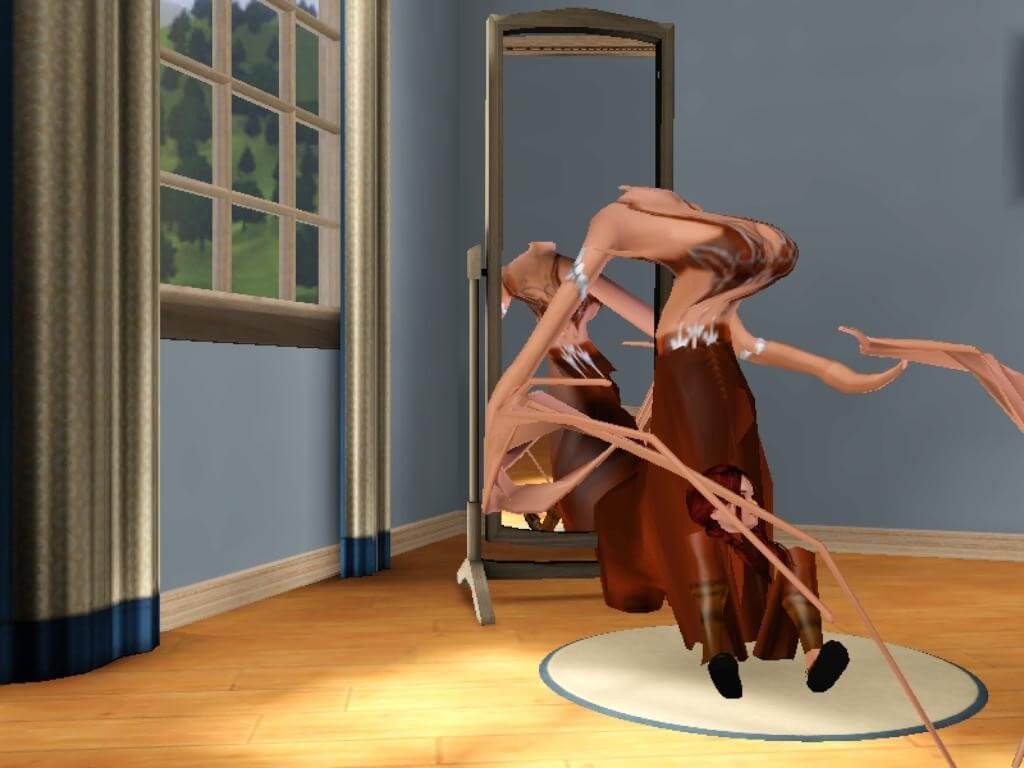
The bug occurs when the characters in the game mistake other rigs, i.e., the structure/skeleton around which developers build character looks, as their main one. Since the mistaken rig is not accurate for a specific character, it can stretch to fit the structure, creating a visually odd character appearance.
Bug 7: Audio-Related Bug
Audio can play a major role in improving or reducing the overall gaming experience for gamers. So, issues in the audio effects of the game can badly affect the background, like missing sound effects, delay in the song, or incorrect sound effects.
Some users also notice issues like lowered music volume or inconsistent game sound flow. For example, the music plays with sporadic volume increasing or declining.
In a few games, the audio effect changes as per the character’s movement. This type of effect may seem like a good bug during gameplay, but it can badly influence the overall game experience since it clashes with the intended ambiance. In some cases, it also affects gameplay, specifically when the sound effects are essential to determine your next move.
For example, the main character must hide from enemies while moving sneakily around. In this case, sound effects can alert you to their location, but glitched audio cannot.
Bug 8: Gameplay Choice Bugs
In some games, the most common bug that players deal with relates to the main functions they need to take to proceed with the gameplay. For example, the player needs to jump in a game to avoid falling or dodge projectiles.
However, the glitch will block their ability to take the action of jumping or dodging, causing the player to lose the game. This can seriously affect the game experience, and proper codework is necessary to fix the issue.
Bug 9: Characters Falling Through the Floor
In some cases, like a game that involves fighting other characters, the main character falls entirely through the floor graphics in the game, partially or fully. This is a type of graphical bug where the character looks stuck in a black void can affect the player’s overall game experience. The bug is not easily noticeable in the beginning and occurs randomly.
For this bug, understanding the concept of collision in the context of video games is essential. The environment and characters are made during development using polygons or tiny triangular elements. In newer game types, there are typically millions of polygons that make up the visuals. Unfortunately, some PC models, especially not recently released versions, cannot read all the polygons accurately and cannot understand which ones are colliding.
Thus, when the game software cannot tell which are objects or characters, the algorithms mistakenly assume that the player is below the floor, causing the bug to occur.
Bug 10: Objects Flying Aimlessly Into the Sky
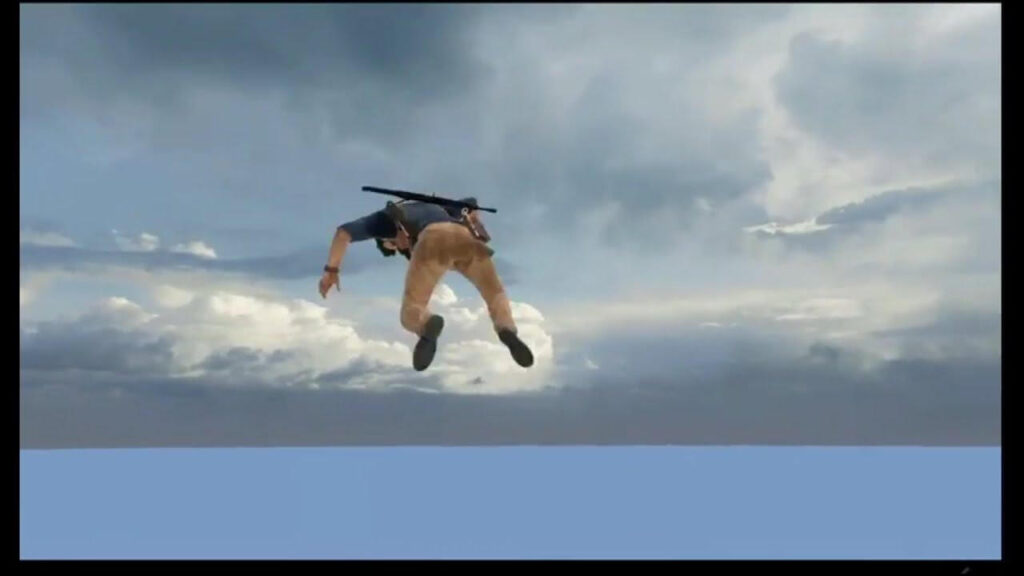
The collision-based bug does not only occur with the characters falling below the floor. In some cases, the objects or characters shoot into the sky and out of range. This bug occurs when a large force gets applied to specific objects and catapults them into the air.
It happens when the physics engine in the game software cannot correctly compute the realistic weight of objects or the force. This problem occurs when many items are available in some space, and the physics engine tries to move some away.
Final Words
Indeed, there are multiple bug types in video games that can affect the overall gameplay experience.
Some of the common ones are not harmful and are resolved in the next game update from developers. Because of that, you should always report any bugs you detect while playing a game, especially if they are not easily noticeable.
In case of significant bugs, it is better to take proper technical support to fix them, try verified hacks for quick solutions, or opt for other games to avoid harming your system potentially.
Author Bio:
Dinesh Lakhwani 

Dinesh Lakhwani, the entrepreneurial brain behind “TechCommuters,” achieved big things in the tech world. He started the company to make smart and user-friendly tech solutions. Thanks to his sharp thinking, focus on quality and the motto of never giving up, TechCommuters became a top player in the industry. His commitment to excellence has propelled the company to a leading position in the industry.
Popular Post
Recent Post

Driver Easy Windows Driver Updater Tool Review: Tried & Tested
In-depth information about Driver Easy’s functions and features can be found in our review. Learn how to update drivers more easily with this tool for a more seamless computer experience.

Is Avast Driver Updater Worth It? A Hands-On Analysis
A full review of Avast Driver Updater covering features, setup steps, pricing, pros and cons, and real PC results, to help you decide if it is worth buying.
IObit Driver Booster 13 (PRO) Review: [Tried & Tested]
IObit Driver Booster 13 is built for one purpose: keeping your PC drivers up to date. Well, yes! Outdated drivers can cause crashes, slowdowns, and hardware issues. This tool scans fast and updates with one click. The interface is simple. Even beginners can use it without confusion. Updates are pulled from a huge database, covering […]

Auslogics Driver Updater: A Detailed Walkthrough [2026]
This comprehensive review covers the key features, pros, and cons, pricing, and a final verdict on Auslogics’ driver update utility. Learn how it stacks up against manual driver maintenance.

5 Best Driver Updater Tools for Windows to Use (Free and Paid)
Introduction: Most people blame their PC for problems that a driver caused. A driver works like a bridge between your hardware and your operating system. When this bridge cracks, strange things start to happen. Screens flicker without reason. Printers go silent mid-task. Games freeze or crash out of nowhere. Manually finding the right driver is […]

Fixing Lock Screen Timeout – Screen Timeout Settings
Your Windows screen does not stay on forever. After a certain amount of idle time, it turns off or locks automatically. This is a normal feature found on both laptops and desktop PCs. It helps save battery power and reduces electricity use. It also keeps your files and personal information safe when you step away […]

How to Recover Unsaved Word Document? [Complete Guide]
It can be frustrating when a Word document suddenly disappears. You may have spent hours writing a report, assignment, or letter. Then your computer crashes, the power cuts out, or Word closes before you save the file. In that moment, it may seem like all your work is gone. This happens more often than most […]

What Is A Zero-Day Attack And How Can You Defend Against One?
Picture this. A hacker finds a secret crack in your favorite app. You don’t know it’s there. The company that built the app doesn’t know either. But the hacker does. And they use it right away, before anyone can stop them. This is the heart of a zero-day attack. It strikes when a flaw is […]

Iolo System Mechanic PC Cleanup Software: Hands-On Performance Review
PCs feel fast on the first day. Every click is quick. Apps open right away. With time, things slow down. Programs take longer to load. Files open slowly. Fans get loud even during light use. This happens to almost every computer, no matter how careful you are. The reason is clear. Junk files build up […]

