Top 10 Simulator Games for iOS/iPhone in 2026

Last updated on February 5th, 2026 at 3:09 am
The simulation gaming genre is hard to ignore in 2026. A game that can lift the barrier between real life and virtual life. These games can stimulate your senses and let you live your gaming fantasies. Simulator games are a perfect combination of fun and technology that you can’t afford to miss out on.
Q1 Which simulator game keeps feeling fresh after months of play?
Games that allow freedom last longer. Open-ended systems help. Minecraft is a strong example. Worlds never play the same way twice. Player creativity drives progress. Life simulators like BitLife also stay fresh due to random events. Predictable games fade faster.
Q2 Why do some simulator games feel tiring on mobile?
Time pressure is the main reason. Forced logins break the flow. Long tasks feel heavy on a phone. Complex menus add strain. Mobile simulators work best when play feels optional. Flexible pacing keeps interest alive.
Q3 What makes a simulator game feel right for daily phone use?
Respect for player time matters most. Quick progress helps. Clear goals help. The game should pause easily. Short sessions should feel complete. That balance makes a simulator enjoyable on iPhone.
Today, we come armed with the ten finest simulator games for iOS devices. The best iPhone simulation games that can escape you to a stress-free gaming world. So, let’s expand your gaming library!
What Is a Simulator Game?
A simulator game copies real life or imagined systems and lets players control them. The goal is not speed or combat. The focus is experience. Players manage choices, routines, and outcomes. Many simulators mirror jobs, vehicles, or life paths. Others simulate entire worlds. Progress feels gradual and personal.
On iOS and iPhone, simulator games favor touch controls and long play sessions. They reward planning and curiosity. Some feel calm and reflective. Others demand strategy and patience. In 2026, mobile simulators are deeper and more polished. They blend realism with creative freedom.
Top 5 Simulator Games for iOS in 2026
Simulator games on iPhone differ in theme and depth. Some focus on life choices. Others revolve around management or building. The table below compares five popular titles and explains what each one offers.
| Game | Simulation Type | Core Gameplay | Depth Level | Replay Value | Best For |
| BitLife | Life simulation | Make life decisions from birth to death | Medium | Very high | Story-driven players |
| Motorsport Manager | Sports management | Build and manage a racing team | High | High | Strategy fans |
| Godus | God simulation | Shape land and guide followers | Medium | Medium | Creative players |
| Bus Simulator: Ultimate | Vehicle simulation | Drive buses and run a transport company | High | High | Real-world driving fans |
| Minecraft | World simulation | Build, survive, and explore | Very high | Extremely high | All age groups |
How to Choose the Best Simulator Game on iOS
Picking the right simulator game depends on how you like to play. Some players enjoy slow progress. Others want freedom and creativity. A good simulator should match your pace and interest.
- Type of Simulation
Decide what you enjoy. Life, vehicles, management, or worlds matter. - Depth of Gameplay
Some games stay simple. Others add layers over time. - Session Length
Mobile play needs flexibility. Short sessions help busy users. - Controls and Interface
Touch controls should feel natural. Clutter hurts gameplay. - Replay Value
Random events and choices keep games fresh. - Progress System
Unlocks and upgrades add motivation to continue. - Performance on iPhone
Smooth performance matters. Lag breaks immersion. - Offline Play Support
Offline modes help during travel or in poor network areas.
10 Best Simulator Games for iOS in 2026 — Level Up your Game
Games are all about the experience! With simulator games, you can capture the raw experience and live in your game. To expand our iOS users’ gaming experience, we played many iPhone simulation games and rounded up the following ten best games.
1.BitLife
App Store Rating: 4.7/5
Parental Rating: 3/5
Compatible iOS: iOS 8.0 or higher
Language: English
Price: Free with in-app purchases.
BitLife is a life simulation game for iOS that starts with a sperm. Players have to choose between a series of right and wrong decisions to see their impact. So, yes, it’s practically your life in bits and pieces. While playing BitLife, you have to make numerous life-altering decisions.
Importantly, your wrong actions are punished with jail time, divorce, or death. If you want to teach your teenagers how to make the right decisions in life, you won’t get a better simulator game.

Stimulating Features
- Players have to make realistic decisions such as one-night stands, dropping out of school, killing a family member, etc.
- Often, your choices have consequences in life. Similarly, in the game, you have to face the consequences of your actions. For example, killing someone will only end you up in jail.
- BitLife stories are relatable and unique. You can learn to make better life choices with this game.
Pros
- A realistic experience.
- Attract interface and storyline.
- Help players to learn new things.
- Many events and choices.
Cons
- Too many ads.
- Often crashes.
- Developers add new complements rarely.
2. Motorsport Manager
App Store Rating: 4.4/5
Parental Rating: 3/5
Compatible iOS: iOS 12.0 or higher
Language: English, French, Spanish, Italian, Russian, Portuguese
Price: Free with in-app purchases. The full version for around $7.27.
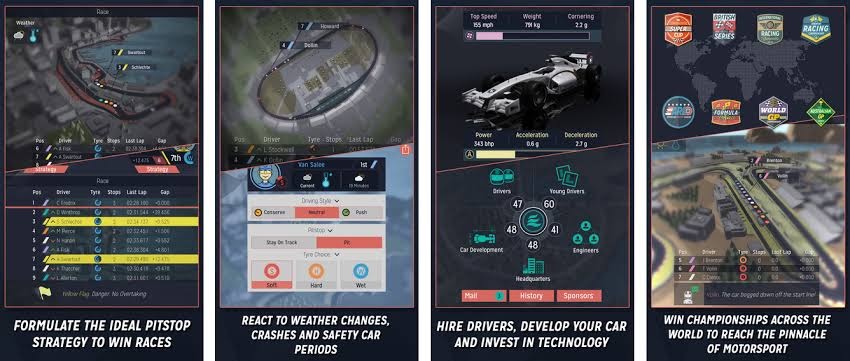
Motorsport Manager is the best-in-class management and iPhone simulation game by Playsport Games. The gameplay revolves around a motorsport racing team. You can customize your team name and color before entering into a racing series.
It is based on a hints tutorial system; a representative named Nigel provides advice throughout the game. The game includes many events, choices, racing tracks, and achievements that can keep you fully engaged. If you want to live a racer’s life, this is your game.
Stimulating Feature
- You can create your own motorsport team by hiring the world’s top drivers, such as Jean-Eric Vergne, Sebastian Buemi, etc.
- Players can also design their own cars or pick from the top brand like Porsche, Audi, Mercedes, and more.
- Motorsport Manager can be played by ten players together around the globe.
- 3D racing action enables you to experience intense wheel-to-wheel action.
- Competitions never stop — you can play with your friends worldwide, improve your ranking, and collect new rewards every week.
Pros
- Highly secure.
- Easy to play.
- Many customization options.
- Various drivers to select from.
Cons
- Consumes a lot of data.
- iOS users can’t do much other than racing.
- Often gameplay sis tuck after updating.
3. Godus
App Store Rating: 4.5/5
Parental Rating: 4/5
Compatible iOS: iOS 8.0 or higher
Language: English
Price: Free with in-app purchases. Full version for $19.88.
Godus is an award-winning iPhone simulation game that can let you play God. Yep, if you ever imagined being a God and controlling the entire universe, Godus can help you live your fantasy. It is a simple game where you have infinite power over the world. Using your fingers, you can create the world that you always wanted to live in. We don’t think there’s anything cooler than that!

Stimulating Features
- Using your fingertip, you can sculpt every landscape to create your unique world.
- You are an actual God in the game with tiny devotes who love you and worship the ground you walk on.
- You can uncover many mysteries and surprises below the landscapes.
- Like a God, you can guide your followers through uncharted situations that hold great rewards.
Pros
- Player has all the power.
- A lot of stuff to do.
- Soothing graphics.
Cons
- Too many advertisements.
- Annoying in-app purchases.
4. Bus Simulator: Ultimate
App Store Rating: 4.5/5
Parental Rating: 4.5/5
Compatible iOS: iOS 11.0 or higher
Language: English, Arabic, French, German, Hindi, Indonesia, Italian, and more.
Price: Free with in-app purchases. Ultimate League Membership for $2.99/month.
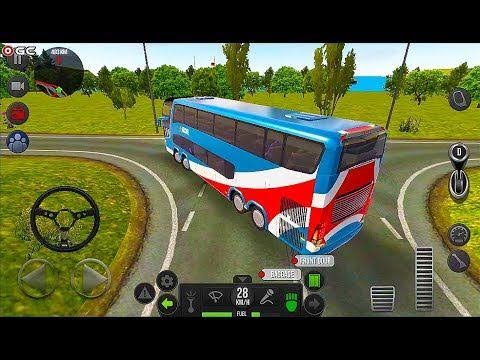
Bus Simulator: Ultimate is one of the most popular iPhone simulation games, with over 170 million users. You can establish your business company and grow it into the largest bus corporation in the world. With realistic routes and maps, you can get the whole bus driving feel. You will get real the USA, Germany, Russia, Spain, France, and other city maps for a better experience.
Stimulating Features
- Through the Passenger System, you will get social and realistic reactions.
- You can drive 150 amazing coach buses.
- The game is highly realistic with a real interior, traffic system, weather, and sound effects.
- You can experience how it feels to drive a bus on the highway while listening to 250+ radio stations.
Pros
- Easy controls.
- More than 25 language support.
Cons
- Very addictive.
- Multiplayer mode doesn’t work everywhere.
5. Minecraft
App Store Rating: 4.4/5
Parental Rating: 3.5/5
Compatible iOS: iOS 10.0 or higher
Language: English, Danish, Dutch, French, Russian, Chinese, Swedish, Spanish, and more.
Price: Two friends subscription for $3.99/month and ten friends for $7.99/month. Thirty days trial also available.
Minecraft is the simplest creation and survival simulator game for iOS. The basic gameplay revolves around creating, exploring, and surviving that you can play along with your friends. Creative mode offers unlimited mines in the world to build new things. In survival mode, you have to craft weapons and armor to fend off dangerous mobs. It is an extremely realistic and great game to have virtual fun with your friends.

Stimulating Features
- You can explore the Minecraft marketplace to get unique skins, maps, and texture packs from different creators.
- Using the Slash command, you can define your gameplay including, giving away items, changing the time of day, summoning mobs, and more.
- You can use various free addons to enhance your experience, such as you can modify driven behaviors to new resource packs.
Pros
- Minimal violence or drug use.
- Stimulate kids to learn.
- Fully customizable.
- Encourage kids to be creative and curious.
Cons
- Lacks parental control.
- Not free to play.
- Expose kids to bullies.
6. Thief Robbery
App Store Rating: 4.4/5
Parental Rating: 2/5
Compatible iOS: iOS 8.0 or higher
Language: English
Price: Free with in-app purchases.
Want to become a popular thief? Then, you can use Thief Robbery to rob the most secured houses in the town. You can collect different tools and use them to break into houses and steal expensive stuff. But, be aware of the burglar alarms and CCTV cameras. It is a full action-packed simulator game for iOS users.

Stimulating Features
- Opportunity to rob highly secure houses, shops, or supermarkets.
- Hack devices like a cool hacker.
- Use common tools to break into different houses.
- Avoid clashing with police by not killing homeowners.
Pros
- Interactive gameplay.
- Interesting storyline.
Cons
- Need more missions and weapons.
- Too many ads.
7. Stand O’Food City
App Store Rating: 4.2/5
Parental Rating: 4/5
Compatible iOS: iOS 8.0 or higher
Language: English, French, Russian, Korean, Spanish, and more.
Price: Free with in-app purchases.
Do you wish to start your own burger business one day? Then, let’s first practice with Stand O’Food City how to manage a bustling kitchen, decorate your restaurant, create new recipes, and more. It is a popular Food franchise game that enables you to strategize and time manage your business operations. With numerous updates, rewards, and components, you will never run out of things to do in the game.

Stimulating Features
- Over 741+ challenges to complete and grow your burger business.
- You can build 108 enliven to support your city.
- With 252 unique recipes, 43 suppliers, and infinite customers, you can derive a realistic hospitality industry experience from our iPhone.
Pros
- Numerous challenges.
- Fast and strategic gameplay.
Cons
- Heavy game.
- Consumes lots of power.
8. Farming Simulator 20
App Store Rating: 4.1/5
Parental Rating: 4/5
Compatible iOS: iOS 11.0 or higher
Language: English
Price: $5.99 with multiple in-app purchases.
Want to know how hard a farmer works? Simply install Farming Simulator 20 on your iPhone and harvest crops, tend to livestock, and ride a horse. It is the best farming simulator game for iOS, with endless opportunities. You have multiple options to produce, sell and expand your farm.
Additionally, you can take control of over 100 vehicles and tools to recreate your farm. The game is based on Northern American farmlands, so you can drive many famous farming brands like Valtra, Challenger, etc.

Stimulating Features
- Using 100+ vehicles and tools, you can build the biggest farming empire in the world.
- Players can harvest many different crops like barley, wheat, oats, corn, and more.
- You can derive real farming experience by feeding livestock, milking cows, producing wool, etc.
- Take care of your horses and ride them on to explore your farm.
- Powerful 3D graphics show more details on the Northern American environment.
- Cockpit view allows you to drive vehicles in realistic conditions.
Pros
- Awesome 3D features.
- Variety of vehicles.
- Attractive user interface.
Cons
- Doesn’t offer global play more.
- Need more updates.
- More workers are required.
9. AFPS Airplane Flight Pilot Sim
App Store Rating: 4/5
Parental Rating: 4/5
Compatible iOS: iOS 10.0 or higher
Language: English
Price: Free with in-app purchases.
For flight simulator fun, you can explore various sceneries with this pilot game. The game shows how it feels to fly over 150 km above sea level. With high-resolution graphics, you can explore different missions and dynamic weather conditions. To get the ultimate flying simulation, you gotta try this game.

Stimulating Features
- Realistic weather conditions including clear slides, snow, thunderstorms, turbulence, and true 3D volumetric clouds.
- Explore unique locations and take off from 7 airports.
- Open numerous missions like random flight problems, escort the president with an Air Force plane, emergency landing on the water, and many more.
Pros
- Fantastic missions.
- A big map.
- 20 free plans.
Cons
- Graphics are a little slow.
- Too many ads.
10. Pokemon Go
App Store Rating: 3.9/5
Parental Rating: 2.8/5
Compatible iOS: iOS 12.0 or higher
Language: English, Traditional Chinese, Spanish, French, Russian, and more.
Price: Free with the option to buy Pokecoins.
Pokemon Go has been one of the most talked-about simulation games worldwide. The location-based gameplay and AR technology made it so much popular. The game was designed with the attention to promote physical activity and help local businesses to grow with increased foot traffic.
However, various accidents and public reports have raised a security issue regarding the game. Despite all the negative controversies, the game’s revenue has crossed over $6 billion in 2020. If you play safely, there’s nothing more fun than going on a Pokemon hunt with your pals.

Stimulating Features
- Players can create and customize their own avatars.
- Once you are logged in with your geographical location, you can access ‘PokéStops’ and ‘Pokémon Gyms.
- Initially, the game was launched with 150 species of Pokemon, which had reached 600 by 2020.
- The catching Pokémon is very simple such as to catch water Pokemon, look near the water.
Pros
- Highly stimulating.
- Lots of things to do.
- Whimsical design.
Cons
- Security is a concern.
- Not appropriate for young kids.
- Often crashes.
- Consumer too much power and data.
Author’s Tip
Do not chase realism alone. Fun should come first. A very detailed simulator can feel tiring over time. A simpler game often feels more relaxing. It is easier to enjoy in short sessions. Pick a game that matches your mood. Stress-free games stay enjoyable longer on mobile.
Also, pay attention to time demands. Some games expect frequent check-ins. They push daily tasks and timers. Others let you play at your own pace. That matters on a phone. Choose games that fit your routine. It helps you enjoy them without pressure.
Conclusion
Simulator games on iOS in 2026 offer variety and depth. BitLife turns simple choices into long stories. Motorsport Manager rewards planning and patience. Godus focuses on calm creativity. Bus Simulator: Ultimate mixes driving with business. Minecraft remains unmatched for freedom and replay value.
The best simulator depends on you. Casual players may enjoy narrative-driven games. Strategy fans lean toward management titles. Creative minds prefer open worlds. A good simulator feels engaging without pressure. Pick one that fits how and when you play.
FAQs
Q1 Are simulator games good for casual players?
Yes. Many are slow-paced. They allow short sessions. No fast reactions are needed. Progress feels steady and relaxed.
Q2 Do simulator games need constant internet access?
Some do. Others work offline. It depends on updates and cloud saves. Always check store details before downloading.
Q3 Are simulator games suitable for kids?
Many are. Minecraft suits all ages. Some life simulators may include adult themes. Parental guidance matters.
Author Bio:
Dinesh Lakhwani 

Dinesh Lakhwani, the entrepreneurial brain behind “TechCommuters,” achieved big things in the tech world. He started the company to make smart and user-friendly tech solutions. Thanks to his sharp thinking, focus on quality and the motto of never giving up, TechCommuters became a top player in the industry. His commitment to excellence has propelled the company to a leading position in the industry.
Popular Post











Recent Post

How To Check If Your PC Is Infected? [Complete Guide]
Computers now sit at the center of almost everything we do. Well, yes! From sending emails to watching videos, we depend on them without much thought. Because of this, even a small issue can disrupt daily tasks. One common problem is hidden malware. It does not always show clear signs at first. It can enter […]

Repair Apps And Programs: Repair Apps That Aren’t Working
Computers have become an essential part of everyday life, supporting work, study, communication, and entertainment. Most of these activities rely on apps and programs, so when one stops functioning, even simple tasks can be disrupted. Common problems include error messages, frozen screens, or apps that fail to open. On Windows systems, such issues often arise […]

Troubleshooting Microphone Privacy Settings: Complete Guide
Sound is a basic part of how we use computers today. People attend meetings, record audio, speak to others, and use voice tools almost every day. A working microphone makes all these tasks easy. When the microphone fails, even simple work becomes difficult. Many users first think the device is broken. In reality, the issue […]

Windows Sound Settings – Sound Control Panel: Complete Guide
Sound plays an important role in how we use a computer every day. It supports both work and leisure. You need it for meetings, videos, music, and alerts. When audio fails, even simple tasks become difficult. Many users feel stuck when sound issues appear. This usually happens because they are not familiar with Windows Sound […]

Run a Troubleshooter For PC Issues Windows: Complete Guide
A computer plays an important role in everyday life. People use it for work, study, communication, and entertainment. When a problem appears, it can interrupt everything. Even a small issue can waste time and create frustration. Many users feel unsure about how to fix such problems. They often think they need expert help. In reality, […]
![Adjusting Audio Output Settings Complete Guide [2026]](https://www.techcommuters.com/wp-content/uploads/2026/03/Adjusting-Audio-Output-Settings-Complete-Guide.webp)
Adjusting Audio Output Settings: Complete Guide [2026]
Sound is part of almost everything we do on a computer. It lets you watch videos, join calls, play music, and hear alerts. When the audio stops working the right way, it can interrupt both work and daily use. That is why adjusting audio output settings matters for every user. Many people get unsure when […]

Artificial Intelligence Explained: Concepts, Terminology, Benefits, and Future Trends
Artificial Intelligence, or AI, is basically computers doing things that usually need a human brain. We’re talking about stuff like learning from experience, figuring out problems, understanding language, and making decisions. It’s not magic, just a lot of data, pattern-spotting, and math behind the scenes. Now, AI doesn’t actually think or feel like we do. […]

Resolving Microphone Detection Problems: Latest Guide [2026]
Microphones are important tools in daily life. People use them for office meetings, online classes, interviews, gaming, customer support, and content creation. When a system fails to detect a microphone, communication stops at once. This situation can cause stress and confusion. Many users believe the microphone is damaged. In reality, most problems are simple and […]

How To Switch To A Dark Background Theme In Windows [2026]
Most people spend many hours each day in front of a computer screen. Office work, online classes, editing, browsing, and streaming all require long screen time. A bright white background may look clean at first. However, over time, it can feel sharp and tiring. The strong contrast between white backgrounds and black text may cause […]

How to Switch From Local To Microsoft Account On Windows
Many users begin with a local account when they set up a new Windows computer. A local account works only on that single device. It stores settings, files, and preferences locally. It does not connect to online Microsoft services. For basic offline use, it works well. However, as digital needs grow, many users want better […]

