BeeGraphy Editor – Is It the Future of 2D and 3D modeling?
Last updated on May 11th, 2025 at 10:49 am
You can find a plethora of CAD (computer-aided design) software in the market. However, not all 3D tools are pretty helpful in your daily job. Therefore, the need for a tool that helps cover a variety of purposes, ranging from visualization to simulation to 3D printing, is required.
But the cost you have to pay for a 3D modeling software like this can be a lot, and you may not want to invest a fortune to use this technology. We are aware of the situation. Therefore, in this post, we review a tool named BeeGraphy that is the answer for all your problems.
What is the BeeGraphy Editor?
BeeGraphy is a software-as-a-service platform that allows users to construct parametric 2D and 3D models. It also offers collaboration tools for modeling, annotation, cloud storage, and sharing 3D views. Novice and non-professionals can use the online BeeGraphy Editor, which gives an extra edge for creating 2D and 3D parametric models.
Users can alter the parameters of the 3D model as many times as they need and download the finished model via the platform with the .obj and .stl for 3D.
They can sell the models directly on the platform, where consumers may select a model, adjust the parameters, and download it in the desired shape and size.

Also, users can create customized models with BeeGraphy.

What is Parametric Design?
Parametric Design is a procedure that uses parametric modeling to set up the shape and geometry of a design. To make it function, the user first needs to input the geometrical parameters into a design program, which is then processed to create relationships; after that, various design factors to investigate all design options are brought into effect.
BeeGraphy Editor Pricing Overview
BeeGraphy Editor is free forever for individual users. For additional pricing details, you can contact the vendor directly. Also, for the time being, all transactions will be processed through PayPal, with Mastercard, Visa, and American Express as a backup.
Benefits of BeeGraphy:

- The only online parametric modeling editor that supports the NURBS modeling.
- Helps collaborate between design and engineering teams in real-time.
- Model sharing via the platform’s online toolset is more efficient.
- API provides limitless possibilities for third-party apps, shops, and designers.
- Real-time access to all of BeeGraphy’s features and high-performance processing.
- The only cloud servers allow users to create, save and update large-scale 3D and 2D parametric models.
- Engineers and modelers can see how the design they’re working on appears in three dimensions and share their work with partners and clients.
Features of BeeGraphy Editor?
Divided into two sections: primary and supporter, the toolkit offers everything for everyone.
Toolkit for Beginners:
- Connection
- Node
Supporting Tools:
- Node finder
- Node groups
- Workspace scale manager (as well as the specified node(s) )
- 3D model display
- Tool position changer
- Node equalizer-sorter
- Copy-past for notes across editors
What are the features of the BeeGraphy Editor?
- Creating curves and points
- Working with Curves Toolkit
- Curve-based transformations
- Curve crossing, joining, & variance operations are all operations performed on curves.
- Constructing a surface (cap, revolve, extrude available)
- Display of a three-dimensional model

Tools for doing mathematical computations include:
Existing mathematical nodes help users execute various mathematical operations and use the results to build models. BeeGraphy includes tools for performing geometrical calculations & mathematical proofs are included in mathematical operations.

View in 3D:
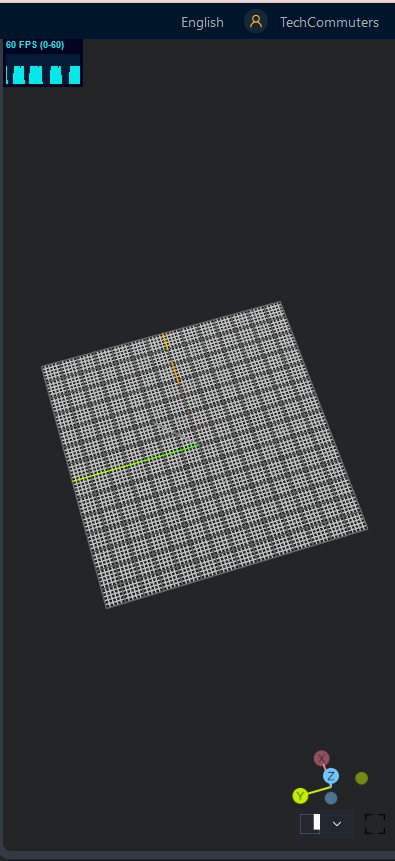
Once the workflow and different inputs have been set, the 3D model can be seen on the operational dashboard, allowing the builder to design a model while simultaneously seeing it in all of its intricacies and sizes.
Teamwork:
Designers can also collaborate on a project with different individuals and observe each other’s work. With the help of this feature, the customer can also monitor and oversee the work’s progress throughout the creation process.

The user’s workspace:
The benefit of BeeGraphy doesn’t end here. The tool even allows users to establish team projects, collaborate in real-time with their coworkers.

Functions BeeGraphy (BG) Editor offer?
- Nodes are used to carry out the design.
- Parametric modeling can be done online, either individually or in groups.
- Contribute to the work process, provide suggestions, or modify.
- The designs and comments of teammates are immediately visible.
- Online process tracking.
- Share the 3D view of the produced model with a third party.
- Create a design using NURBS mathematical models.
- Mathematical analysis to make it appear genuine, as well as a discussion of parameterization options
- Designing a product, allocating resources, and distributing it
- Development of project components with enough resources
- Examining the potential for current plugins to be used.
- Algorithmic processes can be detected with the “Node” tools, and applications can be created.
- Planning teamwork based on the product’s relevant professional direction
- Locations of team members are not included.
- During construction, keep an eye on the product’s look.
- Complete data management throughout the building process
- The Node-based toolset can be managed in a variety of ways.
- Using ” Node ” tools, construction of points, planes, curves, and objects using “Node” tools. See the BeeGraphy Editor’s technical documentation.
File Types supported by BeeGraphy.
- Formats for output and export
BeeGraphy Editor allows you to export your models in. dxf, .stl, and. obj file formats. You can export only a single static model file.
STL (“Standard Triangle Language” and “Standard Tessellation Language”) files are a three-dimensional object’s surface geometry, with no representation of color, texture, or other standard CAD model features. Many programs accept this file format, commonly used for fast prototyping, 3D printing, and computer-aided manufacturing.
At the same time, the OBJ file format is a basic data format that only contains 3D geometry, like the location of each vertex, the UV position of each texture coordinate vertex, vertex normals, and the faces that make up each polygon. However, OBJ coordinates lack units, and OBJ files can include scaling information in a human-readable remark line.
Use of products created using the BeeGraphy (BG) Editor
Models built using the BeeGraphy (BG) Editor can be used for:
- Automated manufacturing
- Jewelry making
- building furniture
- Architecture
- Design
- Multimedia, augmented reality/virtual reality, and gaming industry.
What is the typical application for this service?
BeeGraphy is a node editor-based online computer-aided design (CAD), computer-aided engineering (CAE), and computer-aided manufacturing (CAM) program that allows designers to generate parametric 2D and 3D models.
In times to come, BeeGraphy Editor will be indispensable for any 3D modeling industry (architecture, construction, education, entertainment, computer-aided manufacturing, etc.) The tool provides a convenient space and toolset for professional teams to collaborate and work on one design project together, see each other’s changes in real-time, comment or edit the needed parts of the design.
Also, the online facility and real-time sharing collaboration give a fantastic chance to share the project’s 3D perspective with the customer or manufacturer, allowing them to make parametric adjustments & choose the best alternative that fulfills the requirements.
This breakthrough will close a global gap in the CAD sector. We hope you will give this tool a try and give your 2D and 3D modeling a different outlook with BeeGraphy, which hosts on-site and online training for newcomers to the CAD business and experts in parametric design.
Author Bio:
Dinesh Lakhwani 

Dinesh Lakhwani, the entrepreneurial brain behind “TechCommuters,” achieved big things in the tech world. He started the company to make smart and user-friendly tech solutions. Thanks to his sharp thinking, focus on quality and the motto of never giving up, TechCommuters became a top player in the industry. His commitment to excellence has propelled the company to a leading position in the industry.
Popular Post











Recent Post

Troubleshooting Microphone Privacy Settings: Complete Guide
Sound is a basic part of how we use computers today. People attend meetings, record audio, speak to others, and use voice tools almost every day. A working microphone makes all these tasks easy. When the microphone fails, even simple work becomes difficult. Many users first think the device is broken. In reality, the issue […]
Windows Sound Settings – Sound Control Panel: Complete Guide
Sound plays an important role in how we use a computer every day. It supports both work and leisure. You need it for meetings, videos, music, and alerts. When audio fails, even simple tasks become difficult. Many users feel stuck when sound issues appear. This usually happens because they are not familiar with Windows Sound […]

Run a Troubleshooter For PC Issues Windows: Complete Guide
A computer plays an important role in everyday life. People use it for work, study, communication, and entertainment. When a problem appears, it can interrupt everything. Even a small issue can waste time and create frustration. Many users feel unsure about how to fix such problems. They often think they need expert help. In reality, […]
![Adjusting Audio Output Settings Complete Guide [2026]](https://www.techcommuters.com/wp-content/uploads/2026/03/Adjusting-Audio-Output-Settings-Complete-Guide.webp)
Adjusting Audio Output Settings: Complete Guide [2026]
Sound is part of almost everything we do on a computer. It lets you watch videos, join calls, play music, and hear alerts. When the audio stops working the right way, it can interrupt both work and daily use. That is why adjusting audio output settings matters for every user. Many people get unsure when […]

Artificial Intelligence Explained: Concepts, Terminology, Benefits, and Future Trends
Artificial Intelligence, or AI, is basically computers doing things that usually need a human brain. We’re talking about stuff like learning from experience, figuring out problems, understanding language, and making decisions. It’s not magic, just a lot of data, pattern-spotting, and math behind the scenes. Now, AI doesn’t actually think or feel like we do. […]

Resolving Microphone Detection Problems: Latest Guide [2026]
Microphones are important tools in daily life. People use them for office meetings, online classes, interviews, gaming, customer support, and content creation. When a system fails to detect a microphone, communication stops at once. This situation can cause stress and confusion. Many users believe the microphone is damaged. In reality, most problems are simple and […]

How To Switch To A Dark Background Theme In Windows [2026]
Most people spend many hours each day in front of a computer screen. Office work, online classes, editing, browsing, and streaming all require long screen time. A bright white background may look clean at first. However, over time, it can feel sharp and tiring. The strong contrast between white backgrounds and black text may cause […]

How to Switch From Local To Microsoft Account On Windows
Many users begin with a local account when they set up a new Windows computer. A local account works only on that single device. It stores settings, files, and preferences locally. It does not connect to online Microsoft services. For basic offline use, it works well. However, as digital needs grow, many users want better […]

How to Switch Windows 10 to a Local Account: Complete Guide
Windows 10 allows users to sign in with either a Microsoft account or a local account. When you set up a new computer, the system often suggests using a Microsoft account. This account connects your device to Microsoft services such as Outlook, OneDrive, and the Microsoft Store. It also syncs settings, themes, and passwords across […]

How To Change Default Apps For File Types In Windows
Windows is designed to make using your computer easy. One way it does this is by assigning default apps to different file types. This means when you open a file, Windows automatically opens it with a specific program. For example, photos may open with Photos, music with Groove Music, and PDFs with Edge. These default […]

